
Switching to iPhone for Tablet Command? Let's Polish Your Message and Explore Your Options!
A complete guide to refining your communication, understanding Tablet Command's requirements, and finding the best iPhone deals for your transition.
You're looking to switch from Android to an iPhone to use Tablet Command and want to ensure your message to Edward is grammatically perfect, while also getting information on current iPhone deals. Let's break this down for you comprehensively.
Key Highlights of Your Transition
- Grammar Check: Your message can be slightly refined for better clarity and formal structure, particularly in how the question about iPhone deals is phrased and the preposition used for replacement.
- Tablet Command & iPhones: Tablet Command, especially its TC Mobile application, is designed for iOS devices (iPhone and iPad), making a switch necessary if you need its full functionality on a smartphone.
- iPhone Deals Abound: As of May 2025, numerous attractive deals are available for various iPhone models, including the latest iPhone 16 series and more budget-friendly older generations, often involving trade-ins or new line activations.
Refining Your Message to Edward
Effective communication is key. Here's a look at your original message and a polished version with explanations for the changes.
Original Message:
"Good morning Edward, when you get a chance can you please let me know what are the current iPhone deals? I will need to replace my Android for an iPhone in order to use the Tablet Command."
Grammatical Review and Suggested Revisions
Your message is clear in its intent and polite. However, a few minor adjustments can enhance its grammatical correctness and flow, particularly for professional communication.
Detailed Breakdown of Revisions:
-
Greeting Punctuation:
- Original: "Good morning Edward,"
- Correction: "Good morning, Edward." or "Good morning Edward," (if the next part immediately follows as part of the same sentence, though separating the greeting is often cleaner). For formal address, a comma after the name ("Good morning, Edward,") is standard when the greeting is part of a longer introductory phrase. However, making it a standalone sentence ("Good morning, Edward.") is also common and clear.
-
Indirect Question Structure:
- Original: "...can you please let me know what are the current iPhone deals?"
- Correction: "...could you please let me know what the current iPhone deals are?"
- Explanation: When a question is embedded within a statement or another question (an indirect question), the word order typically reverts to that of a statement (subject-verb) rather than an interrogative (verb-subject). Using "could" instead of "can" can also sound slightly more polite or formal.
-
Preposition for Replacement:
- Original: "...replace my Android for an iPhone..."
- Correction: "...replace my Android with an iPhone..."
- Explanation: The standard preposition to use when substituting one item with another is "with." You replace X with Y.
-
Use of "the" with Proper Nouns (Software):
- Original: "...use the Tablet Command."
- Correction: "...use Tablet Command."
- Explanation: "Tablet Command" appears to be the proper name of an application or service. Generally, proper names of software or apps don't require a definite article ("the") unless "the" is part of the official name or used for specific emphasis in a particular context.
-
Specificity (Optional but good):
- Consideration: "...replace my Android..."
- More Specific: "...replace my Android phone..." or "...replace my Android device..."
- Explanation: While "Android" is often understood to mean an Android phone, adding "phone" or "device" can add a touch more clarity.
Polished Message Options:
Here are a couple of revised versions incorporating these points:
Option 1 (Slightly more formal):
"Good morning, Edward.
When you have a chance, could you please let me know what the current iPhone deals are? I will need to replace my Android phone with an iPhone to use Tablet Command."
Option 2 (Concise):
"Good morning Edward, when you get a chance, could you please inform me about the current iPhone deals? I need to replace my Android device with an iPhone in order to use Tablet Command."
Both revised versions maintain your polite tone while ensuring grammatical precision and enhancing clarity.
Understanding Tablet Command and iPhone Necessity
Tablet Command is a specialized mobile incident command and response software, widely used by emergency services like fire departments. Its ecosystem is primarily built for Apple's iOS platform.
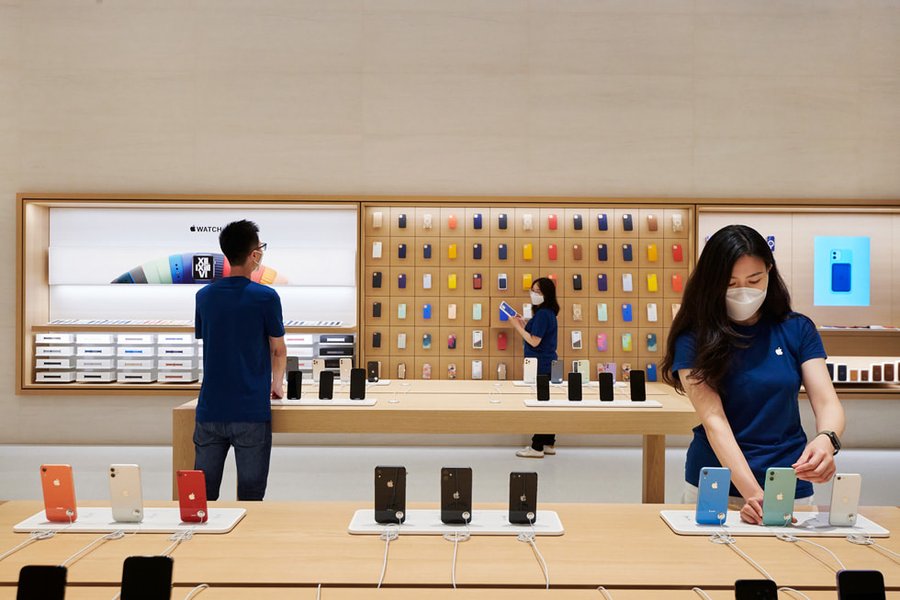
Modern Apple Stores showcase the latest iPhone models compatible with apps like Tablet Command.
Why an iPhone for Tablet Command?
- TC Mobile App: Tablet Command offers an iPhone app called TC Mobile. This application extends crucial incident response and management features to smartphones, including incident mapping, navigation, access to pre-plans, hydrant locations, and real-time CAD information.
- iOS Optimization: The Tablet Command suite, including the main iPad app and TC Mobile for iPhone, is developed and optimized for iOS. This ensures seamless integration with Apple's ecosystem, including features like Apple Push Notifications for alerts and integration with Apple Maps.
- Enterprise Service Requirement: Both the iPad and iPhone versions of Tablet Command require an enterprise incident command service subscription from Tablet Command.
- No Mention of Android Support: Current information and app store listings focus exclusively on iOS (iPadOS and iOS for iPhones). This means that to utilize TC Mobile effectively, an iPhone is indeed necessary.
Your need to switch from an Android device to an iPhone to use Tablet Command is well-founded, given the software's platform specificity.
Navigating Current iPhone Deals (May 2025)
As of May 2025, the market is ripe with various iPhone deals from Apple itself and major carriers like AT&T, Verizon, and T-Mobile. These promotions cover the latest iPhone 16 lineup as well as still-capable older models.
Overview of Potential iPhone Deals
The table below summarizes some typical iPhone deals you might encounter. Keep in mind that offers can change and often depend on factors like trade-ins, new line activations, and specific plan requirements.
| iPhone Model Category | Typical Deal Type | Example Carrier Offers (Illustrative) | Key Considerations |
|---|---|---|---|
| iPhone 16 Series (16, 16 Plus, 16 Pro, 16 Pro Max, 16e) | Trade-in credits (up to $800-$1000), monthly installment discounts, "free" phone with new premium unlimited line, bundle offers (e.g., with Apple Watch or iPad). |
|
Often requires 24-36 month financing. Trade-in value varies by device. Best deals usually tied to premium unlimited data plans. |
| iPhone 15 Series (15, 15 Plus, 15 Pro, 15 Pro Max) | Discounted prices, trade-in offers (e.g., up to $830 off), carrier switching bonuses. |
|
Good balance of modern features and cost savings. Fully compatible with current iOS and Tablet Command. |
| Older Models (iPhone 14, iPhone SE) | Lower outright purchase price, deals from MVNOs (e.g., Cricket, Metro by T-Mobile) often starting under $400, or even around $99 with activation. |
|
Most budget-friendly options. Ensure iOS compatibility for long-term Tablet Command use (check required iOS version). |
Note: Specific offers are subject to change and depend on carrier terms and conditions. Always check directly with the carrier or retailer.
Comparing iPhone Options for Tablet Command Use
The radar chart below offers a visual comparison of different iPhone categories based on factors relevant to your switch for Tablet Command. The scores (1-10, higher is better/more suitable) are illustrative and based on general characteristics.
This chart illustrates that while premium models offer top performance, budget or mid-range iPhones can provide excellent value and sufficient capability for running Tablet Command effectively.
The Android to iPhone Switching Process
Apple makes the transition from Android to iPhone relatively straightforward.
Using the "Move to iOS" App
The primary tool for this is Apple's "Move to iOS" app, which you download on your Android device from the Google Play Store.
- Preparation: Ensure Wi-Fi is on for both devices. Plug both your Android device and new iPhone into power. Make sure the content you're moving (including what's on your external Micro SD card) will fit on your new iPhone.
- Initiate Transfer: When setting up your new iPhone, look for the "Apps & Data" screen and tap "Move Data from Android."
- Use the App: On your Android device, open the Move to iOS app and follow the on-screen prompts. Wait for a ten-digit or six-digit code to appear on your iPhone. Enter this code on your Android device.
- Connect and Transfer: Your iPhone will create a temporary Wi-Fi network. When prompted, tap Connect to join that network on your Android device. Then, select the content you want to transfer (contacts, message history, photos, videos, web bookmarks, mail accounts, and calendars) and tap Continue.
- Wait: Leave both devices alone until the loading bar on your iPhone finishes, even if your Android device indicates the process is complete. The transfer can take a while, depending on how much content you're moving.
- Set Up iPhone: Once the transfer is done, you can continue setting up your iPhone. You'll need to download any free apps like Tablet Command from the App Store.
Guidance on Switching from Android to iPhone
For a visual guide and more details on the "Move to iOS" process, the following video from Apple Support is very helpful:
Apple's official guide on using the "Move to iOS" app to transfer your data from Android to iPhone.
Visualizing Your Path to Tablet Command on iPhone
To help visualize the steps and considerations in your transition, here's a mindmap outlining the process:
Use Tablet Command"] id1["Current Situation"] id1a["Using Android Device"] id1b["Tablet Command (TC) Needed"] id2["The Challenge"] id2a["TC Mobile is iOS Exclusive"] id2b["Android Incompatible with TC Mobile"] id3["The Solution: Switch to iPhone"] id3a["Research iPhone Models"] id3a1["Latest (iPhone 16 series)"] id3a2["Previous Gen (iPhone 15, 14)"] id3a3["Budget (iPhone SE, 16e)"] id3b["Explore iPhone Deals"] id3b1["Carrier Deals (AT&T, Verizon, T-Mobile)"] id3b2["Trade-in Offers"] id3b3["Retailer Promotions"] id3c["Execute the Switch"] id3c1["Purchase iPhone"] id3c2["Transfer Data (Move to iOS app)"] id3c3["Install Tablet Command (TC Mobile)"] id3c4["Configure TC Account"] id4["Key Considerations"] id4a["Budget for New Device/Plan"] id4b["Data Plan Requirements for TC"] id4c["Learning iOS Interface"]
This mindmap shows that your core need for Tablet Command necessitates an iPhone, leading to research, deal hunting, and the physical switch, along with considerations for budget and data.
Frequently Asked Questions (FAQ)
Why can't I use Tablet Command on my Android phone?
Tablet Command, particularly its smartphone application TC Mobile, is specifically designed and optimized for Apple's iOS operating system. This means it's developed to run on iPhones (and iPads for the main Tablet Command app). Currently, there is no official Android version of TC Mobile mentioned by the developers, making an iPhone necessary for its use.
Is it difficult to switch from Android to iPhone?
Apple has tried to make the process relatively easy with its "Move to iOS" app, available on the Google Play Store. This app helps transfer most of your important data like contacts, messages, photos, and calendars. While the data transfer is largely automated, getting used to a new operating system (iOS) will involve a learning curve, but many users adapt quickly.
Do I need the newest iPhone model to use Tablet Command?
Not necessarily. While the latest iPhone models (like the iPhone 16 series) will offer the best performance and longevity, older models that support a recent version of iOS should also be capable of running Tablet Command's TC Mobile app. Check the app's minimum iOS version requirement on the App Store. An iPhone 14, 15, or even an SE model could be sufficient and more budget-friendly.
What kind of iPhone deals should I look for in May 2025?
Look for trade-in offers (trading your Android phone can significantly reduce the cost), new line promotions from carriers like AT&T, Verizon, and T-Mobile, or discounts on slightly older models (e.g., iPhone 15 series). The new iPhone 16e is also marketed as a more budget-friendly option with current deals. Always compare the total cost over the contract period, including any required data plans.
Recommended Next Steps & Further Research
To make the best decision, consider exploring these related queries:
- What are the minimum iOS requirements for TC Mobile by Tablet Command?
- Compare current iPhone 16e deals from AT&T, Verizon, and T-Mobile May 2025.
- How much data does Tablet Command typically use on an iPhone?
- User reviews of switching from Android to iPhone for professional apps.
References
The information provided is based on insights from the following sources:
Last updated May 13, 2025