
Mastering the Leap: Expertly Navigating Your IQ Bot to Document Automation Migration
Unlock strategic advantages by showcasing profound expertise in Automation Anywhere's IDP evolution during your client interview.
Key Insights for Your Interview Success
- Strategic Upgrade Imperative: Understand that Document Automation is Automation Anywhere's advanced, AI-driven successor to IQ Bot, which is being decommissioned. Migrating is crucial for future-proofing document processing capabilities.
- Migration Mastery: A successful transition hinges on meticulous planning, a phased execution strategy, and proficient use of tools like the IQ Bot Migration Utility for learning instances and the Bot Scanner for A360 compatibility.
- Demonstrating Deep Expertise: Articulate a comprehensive understanding of both IQ Bot's functionalities and Document Automation's superior AI, scalability, and integration benefits. Be prepared to discuss migration steps, potential challenges, and best practices.
Understanding the Shift: From IQ Bot to Document Automation
The landscape of Intelligent Document Processing (IDP) within Automation Anywhere is evolving. As IQ Bot approaches its end-of-life, Document Automation emerges as the powerful, next-generation solution. Understanding the nuances of both platforms is fundamental to demonstrating expertise.
The Legacy: A Deep Dive into IQ Bot
IQ Bot has been a cornerstone for organizations looking to automate data extraction from semi-structured and unstructured documents. Its core strengths included:
- Learning Instances: IQ Bot utilized machine learning, requiring users to train "learning instances" with sample documents to identify and extract data fields.
- Human-in-the-Loop (HITL): A crucial component for validation, allowing human operators to review and correct extracted data, thereby further training the bot.
- Versatility: Capable of handling various document types like invoices, purchase orders, and emails, primarily by learning patterns from examples.
- Strengths: Effective for specific, well-defined document sets once trained, offering significant time savings over manual data entry.
- Limitations: The training process could be time-consuming and manual, especially for highly variable documents. Scaling across diverse document sets sometimes presented challenges, and its architecture was less natively integrated into the broader Automation 360 platform compared to Document Automation.
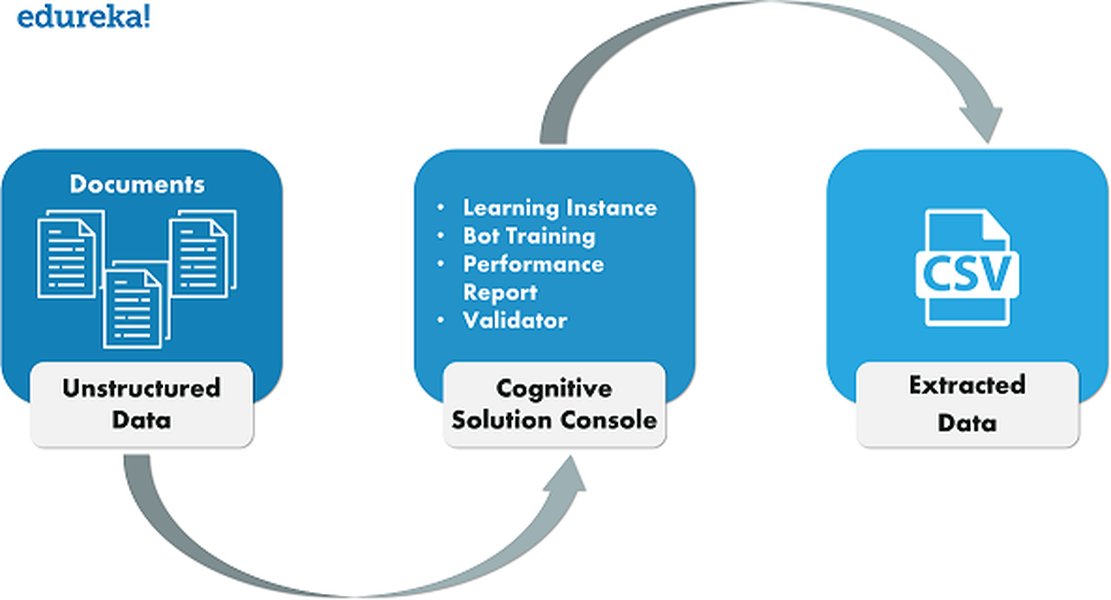
Illustrative workflow of document processing with IQ Bot.
The Future: Embracing Document Automation
Document Automation is Automation Anywhere's strategic response to the growing demand for more intelligent, scalable, and integrated IDP. It significantly enhances capabilities through:
- Advanced AI and ML: Leverages state-of-the-art AI, Natural Language Processing (NLP), and machine learning models for superior classification, extraction, and validation accuracy, often with less manual training.
- Pre-built Models: Offers pre-trained models for common document types (e.g., invoices, receipts), accelerating deployment and reducing initial setup time.
- Enhanced Scalability and Performance: Designed for high-volume processing and can handle more complex document layouts and variations with greater ease.
- Native Automation 360 Integration: Seamlessly integrates within the Automation 360 platform, allowing for centralized management via the Control Room and tighter coupling with RPA workflows.
- Streamlined User Experience: Often features a more intuitive, browser-based interface for designing, managing, and validating document processing.
- Focus on Finance and Accounting: Particularly strong in automating finance and accounting processes, offering tailored solutions for documents like invoices, expense receipts, and utility bills.
- Improved Security and Compliance: Benefits from Automation 360's robust security features, including credential vaults and detailed audit logging.
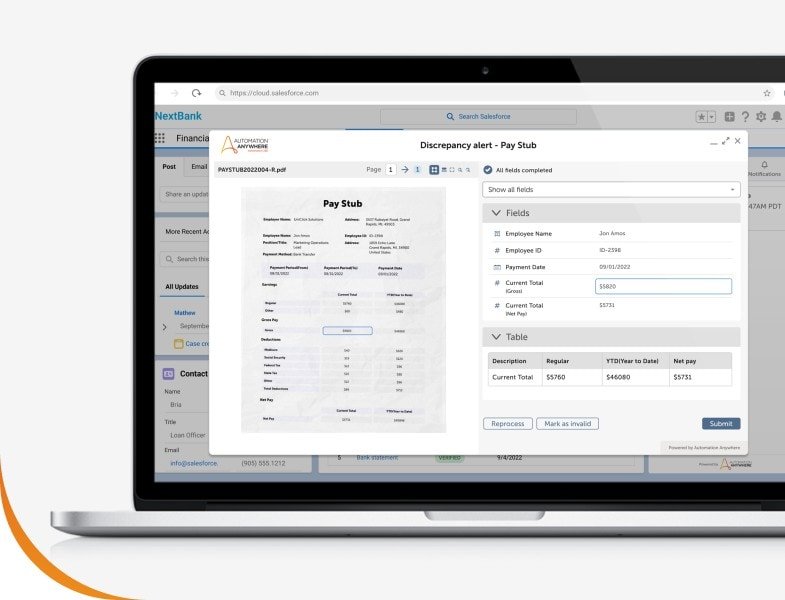
Document Automation enables processing diverse documents at scale with AI.
Charting the Course: IQ Bot vs. Document Automation
To effectively discuss the migration, it's vital to compare the capabilities of IQ Bot and Document Automation. The radar chart below provides a visual comparison across several key dimensions, highlighting why Document Automation represents a significant step forward. These are qualitative assessments based on general platform characteristics.
This chart illustrates Document Automation's general advancements in areas like AI sophistication, scalability, and native integration with the Automation 360 platform, while also considering factors like the effort involved in initial training and implementation speed. For instance, while IQ Bot was powerful, Document Automation typically offers more advanced AI out-of-the-box and is built for greater scale and complexity with potentially faster initial deployment due to pre-built models.
Mastering the Migration: A Strategic Blueprint
A successful migration from IQ Bot to Document Automation requires a structured approach. Highlighting your understanding of this process will be key in your client interview.
Phase 1: Assessment and Meticulous Planning
Auditing Your IQ Bot Ecosystem
Begin with a comprehensive audit of the existing IQ Bot setup. This involves identifying all active learning instances, the types and volumes of documents being processed, associated RPA bots, and current performance metrics. Understanding the complexity and business criticality of each process is vital.
Leveraging the Bot Scanner Utility
Utilize the Bot Scanner utility provided by Automation Anywhere. This tool is invaluable for assessing your Enterprise 10 or 11 bots for compatibility with Automation 360. It identifies unsupported commands or features that will need to be refactored, ensuring a smoother transition of the RPA components that interact with your IDP solution.
Critical Data Backup Strategy
Before initiating any migration activities, perform complete backups of all critical data. This includes IQ Bot databases, all learning instances (and their training documents), and any related RPA bots and Control Room configurations. This is a non-negotiable step to safeguard against data loss.
Phase 2: Executing the Transition
Migrating Learning Instances with the IQ Bot Migration Utility
The IQ Bot Migration Utility is a key tool for transferring your trained intelligence. Learning instances can be exported as .iqba files. Be mindful of file size limitations (e.g., up to 5 GB from Automation 360 v.29 onwards). These .iqba files are then imported into the Document Automation environment. While this utility helps preserve training, some adaptation or re-validation within Document Automation might be necessary due to architectural differences and enhanced AI models.
Addressing Role-Based Access Control (RBAC)
If your IQ Bot implementation utilizes custom roles, these must be migrated alongside the learning instances. RBAC functionality can differ between IQ Bot versions (e.g., 11.3.5.x) and Automation 360 IQ Bot/Document Automation. Ensure that user access and permissions are correctly mapped and replicated in the new environment to maintain security and operational continuity.
Database and Bot Migration Nuances
For on-premises IQ Bot installations, database migration might involve consolidating multiple databases into a unified one, especially when moving from older builds. Associated RPA bots may need to be updated to use Document Automation actions and to ensure compatibility with Automation 360. This often involves replacing IQ Bot specific commands with their Document Automation equivalents.
Phase 3: Validation, Go-Live, and Optimization
Phased Rollout: Starting Smart
Adopt a phased migration approach. Begin with less complex document types or less critical processes. This allows the team to gain familiarity with Document Automation, refine the migration process, and build confidence before tackling more complex or high-volume use cases.
Rigorous Testing and Validation
Thoroughly test and validate all migrated processes in Document Automation. This includes side-by-side comparisons of extraction accuracy and processing times against the legacy IQ Bot setup. Involve business users in User Acceptance Testing (UAT) to confirm that the new solution meets all requirements.
Change Management and Team Empowerment
Effective change management is crucial. Provide comprehensive training to users and developers on Document Automation's features, interface, and best practices. Update all process documentation to reflect the new workflows and system architecture. Continuous learning, potentially through resources like Automation Anywhere's Document Automation Training Camp or Masterclass, should be encouraged.
Monitoring and Continuous Optimization
Post-migration, continuously monitor the performance of Document Automation. Leverage its advanced AI capabilities for ongoing learning and optimization. Gather feedback from users to identify areas for further improvement and to ensure the solution continues to deliver maximum ROI.
Visualizing the Migration Journey
The migration from IQ Bot to Document Automation is a multi-stage process. The mindmap below outlines the key phases and activities involved, providing a clear visual overview of the journey from initial assessment to post-migration optimization. This structured approach helps ensure all critical aspects are considered for a smooth and successful transition.
(Processes, Documents, Learning Instances)"] id1_2["Utilize Bot Scanner Utility
(A360 Bot Compatibility Check)"] id1_3["Comprehensive Data Backup
(Databases, Instances, Bots)"] id1_4["Define Migration Scope & Detailed Timeline"] id1_5["Establish New Document Automation Environment"] id2["Phase 2: Execute Transition"] id2_1["Migrate Learning Instances
(IQ Bot Migration Utility - .iqba files)"] id2_2["Address RBAC Migration
(Map Custom Roles & Permissions)"] id2_3["Migrate & Refactor RPA Bots
(Update Commands for Document Automation)"] id2_4["Database Migration & Consolidation (if applicable)"] id2_5["Configure Document Automation
(Utilize Pre-built Models, Customize as Needed)"] id3["Phase 3: Validate & Deploy"] id3_1["Phased Rollout Strategy
(Pilot with Less Complex Use Cases)"] id3_2["Rigorous Testing & Validation
(Accuracy, Performance, Side-by-Side Comparison)"] id3_3["User Acceptance Testing (UAT)"] id3_4["Go-Live for Migrated Processes"] id4["Phase 4: Post-Migration & Optimization"] id4_1["Change Management & User Training
(Documentation Updates)"] id4_2["Monitor System Performance & Accuracy"] id4_3["Continuous Optimization & AI Model Tuning"] id4_4["Formal Decommissioning of IQ Bot"] id4_5["Gather User Feedback for Enhancements"]
This mindmap helps to conceptualize the entire lifecycle of the migration project, emphasizing that it's not just a technical task but a strategic initiative involving planning, execution, validation, and ongoing management.
Key Differences and Migration Considerations at a Glance
Understanding the core distinctions between IQ Bot and Document Automation, along with key considerations for migration, is crucial. The table below summarizes these aspects to provide a quick reference:
| Feature / Consideration | IQ Bot | Document Automation |
|---|---|---|
| Primary Technology Focus | AI/ML for semi-structured data, learning instance-based | Advanced AI/ML, NLP, Computer Vision, often with pre-built models |
| Training Approach | Manual training of learning instances, field-by-field selection | Faster training, leverages pre-built models, less manual intervention typically required for common documents |
| Integration with Automation 360 | Integration often required separate configuration; API calls | Native, seamless integration within Automation 360; centralized Control Room management |
| Learning Instance Migration | Export via IQ Bot Migration Utility as .iqba files |
Imports .iqba files; may require validation/adaptation of migrated instances |
| Scalability & Complexity | Good, but scaling complex/diverse documents could be training-intensive | Higher scalability, designed for large volumes and more complex document variations |
| Ideal Use Cases | Invoices, Purchase Orders, and other defined semi-structured documents | Broader, including complex Finance & Accounting documents, enhanced general OCR |
| Security & Auditability | Reliant on connected A360 security features | Enhanced native security via A360 credential vaults, granular audit logging |
| Human-in-the-Loop (HITL) | Core to its validation and continuous learning process | Supported and refined, with increased automation aiming to reduce manual HITL touchpoints |
| Platform Status | Being decommissioned / End-of-Life | Current-generation, strategic IDP solution |
This table highlights that while IQ Bot was a capable solution, Document Automation offers significant advancements in AI, integration, scalability, and user experience, making the migration a strategic move towards a more robust and future-proof IDP capability.
Gaining Deeper Insights: Practical Migration Guidance
Visual learning can often clarify complex processes. While the migration from IQ Bot to Document Automation is specific, understanding the broader principles of migrating to the Automation 360 platform is essential, as Document Automation is a key component of this ecosystem. The following video discusses migrating bots to Automation 360, which shares common principles and tools relevant to your overall migration strategy:
This video provides insights into using the Bot Migration Wizard for moving bots to Automation 360, a process that often accompanies or precedes specific IDP migration tasks. Understanding these platform-level migration tools and techniques is beneficial.
This video explains how to use the Bot Migration Wizard tool for migrating bots from Enterprise 10 or 11 to Automation 360. While your primary focus is IQ Bot to Document Automation, the RPA bots that interact with IQ Bot will also need to be migrated and potentially refactored to work with Document Automation within the Automation 360 environment. Therefore, familiarity with these broader migration tools and processes is highly relevant.
Demonstrating Unparalleled Expertise in Your Client Interview
To truly shine, go beyond just listing features. Convey a strategic understanding and practical experience.
Articulating Your IDP Philosophy
Explain that effective Intelligent Document Processing is more than just OCR. It's about understanding the end-to-end document lifecycle: acquisition, pre-processing, classification, extraction, validation (including efficient HITL), post-processing, data integration into downstream systems, and archival. Emphasize how Document Automation enhances each stage.
Showcasing Hands-On Experience
Provide concrete examples:
- Discuss your experience training IQ Bot learning instances, challenges faced with variability, and how you optimized them.
- Detail your familiarity with the IQ Bot Migration Utility, including handling of
.iqbafiles and potential issues like size limitations. - Talk about troubleshooting common migration issues, such as discrepancies in extracted data post-migration or resolving RBAC configuration differences.
Highlighting Document Automation's Strategic Value
Focus on the "why":
- AI Prowess: Explain how Document Automation's advanced AI/ML models lead to higher accuracy, especially with complex or varied documents, reducing the need for extensive manual training.
- Efficiency Gains: Quantify potential benefits where possible – reduced processing times, lower manual validation effort, faster deployment for new document types.
- Scalability and Future-Proofing: Position Document Automation as a solution that can scale with the client's business and adapt to future needs.
- ROI: Connect the migration to tangible business outcomes like cost savings, improved compliance, and faster decision-making.
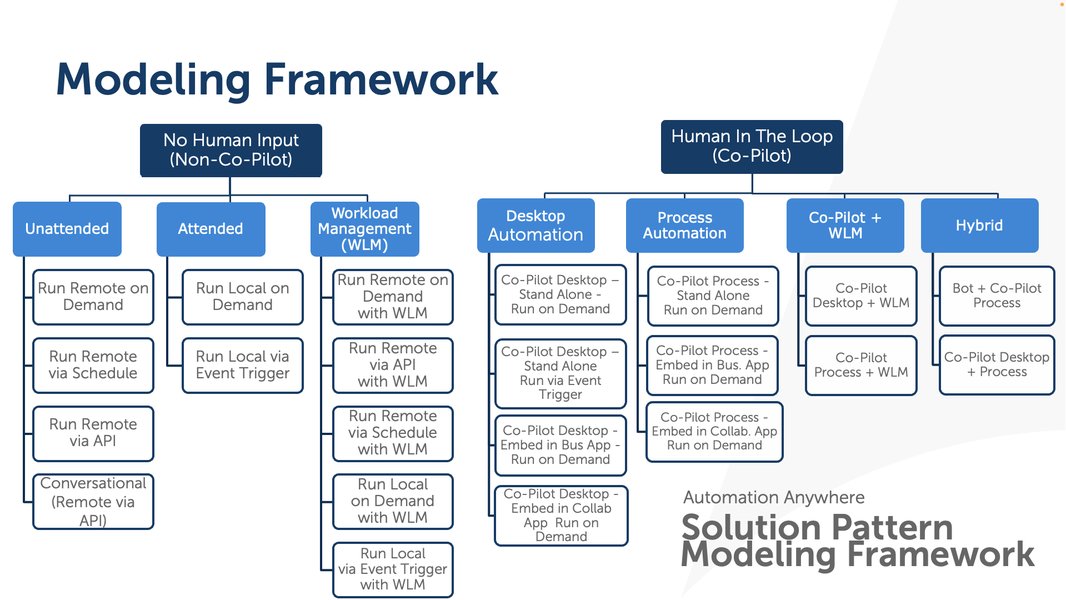
Demonstrating a structured approach to automation projects, including migration, showcases expertise.
Navigating Potential Challenges Proactively
Acknowledge that migrations aren't always seamless. Discuss potential challenges and how you'd address them:
- Data Quality: Emphasize the importance of clean source data for optimal AI performance.
- Learning Instance Adaptation: Explain that while instances are migrated, some level of re-validation or fine-tuning in Document Automation is often beneficial due to different underlying algorithms.
- Change Management: Reiterate the need for user training and clear communication.
Emphasizing Continuous Learning and Best Practices
Mention your commitment to staying updated with Automation Anywhere's latest developments. Referencing resources like the Document Automation Training Camp or Masterclass, or knowledge of best practices (e.g., creating reusable components, version control for automation assets) demonstrates professionalism and dedication.
Asking Insightful Questions
Engage the client by asking pertinent questions that show you're thinking strategically about their specific situation. For example:
- "What are the primary document types and volumes you anticipate migrating, and what are the key pain points with your current IQ Bot setup?"
- "How many of your current IQ Bot processes rely heavily on custom-trained models for very specific or unique document layouts versus more standard document types?"
- "What are your key success metrics for this migration to Document Automation (e.g., improved accuracy, reduced processing time, lower operational costs)?"
Frequently Asked Questions (FAQ)
What are the main reasons for migrating from IQ Bot to Document Automation? ▼
The primary reasons include IQ Bot's impending decommissioning, Document Automation's superior AI/ML capabilities leading to higher accuracy and efficiency, better scalability for complex and high-volume document processing, native integration with the Automation 360 platform for streamlined workflows, and access to ongoing enhancements and support as Automation Anywhere's strategic IDP solution.
Can IQ Bot learning instances be directly used in Document Automation? ▼
Yes, IQ Bot learning instances can be migrated to Document Automation using the IQ Bot Migration Utility, which exports them as .iqba files. However, due to differences in the underlying AI models and architecture, these migrated instances often require re-validation and potentially some fine-tuning or adaptation within Document Automation to ensure optimal performance and accuracy.
What are some of the biggest challenges during this migration? ▼
Challenges can include accurately assessing the scope and complexity of existing IQ Bot processes, ensuring seamless migration of associated RPA bots and their dependencies, managing differences in RBAC configurations, handling large volumes of learning instances (and their .iqba files), the potential need for retraining or significant adaptation of some learning instances for optimal performance in Document Automation, and effective change management to ensure user adoption.
How does Document Automation improve upon IQ Bot's capabilities? ▼
Document Automation offers several improvements, including more advanced AI, NLP, and ML models for higher extraction accuracy with less manual training, pre-built models for common document types to accelerate deployment, enhanced scalability for high-volume and complex scenarios, tighter native integration with Automation 360, a more streamlined user interface, and generally better performance in handling diverse document layouts and quality.
What is the role of the Bot Scanner Utility in this migration? ▼
The Bot Scanner utility is primarily used to analyze existing Enterprise 10 or 11 RPA bots (which may interact with IQ Bot) for compatibility with the Automation 360 platform. It helps identify any unsupported commands or deprecated features that need to be refactored before these bots can run correctly in Automation 360, where Document Automation resides. This ensures that the RPA workflows orchestrating document processing are also successfully migrated.
Recommended Further Exploration
- What are the specific AI model differences between IQ Bot and Document Automation and how do they impact extraction accuracy?
- How can I effectively migrate complex IQ Bot learning instances that handle highly variable document structures to Document Automation?
- What are the best practices for configuring and optimizing Document Automation specifically for high-volume financial document processing workflows?
- How can I build a compelling ROI calculation and business case for migrating from IQ Bot to Document Automation for stakeholders?
References
 aa2019packagesdkfordocumentation.s3-us-west-2.amazonaws.com
 docs.aws.amazon.com
Last updated May 6, 2025