
Ace Your Java Interview: Mastering Data Structures
A comprehensive guide to common Java data structure interview questions, with detailed answers and examples to help you prepare.
Key Insights
- Understand Core Concepts: A solid grasp of what data structures are, their types (linear vs. non-linear), and their importance in Java for efficient data management is fundamental.
- Know Your Collections: Familiarity with the Java Collections Framework, including
ArrayList,LinkedList,HashMap,HashSet,TreeSet, andPriorityQueue, and their trade-offs is crucial. - Practice Implementation: Beyond theory, be prepared to explain or even implement basic data structures (like a stack using an array) and understand their operational complexities (Big O notation).
Preparing for a Java interview, especially one focusing on technical proficiency, invariably involves a deep dive into data structures. Understanding how to organize, store, and manage data efficiently is paramount for writing performant and scalable Java applications. This guide covers a range of common interview questions, from fundamental definitions to complex implementations and comparisons, to help you confidently tackle this critical interview segment.
Fundamental Data Structure Concepts
A strong foundation in the basic principles of data structures is the first step towards acing your interview.
1. What is a Data Structure in Java?
A data structure is a specialized format for organizing, processing, retrieving, and storing data. It defines a way to manage information in memory so that it can be used efficiently. In Java, data structures can be primitive (like int, char) or non-primitive, which are further divided into built-in structures provided by the Java Collections Framework (e.g., ArrayList, HashMap) and user-defined structures (e.g., custom trees or graphs).
2. Why are Data Structures Important in Java?
Data structures are crucial in Java for several reasons:
- Efficiency: Choosing the right data structure can significantly improve the performance of an application, particularly for operations like searching, sorting, insertion, and deletion.
- Resource Management: Efficient data structures help in optimal memory utilization.
- Code Reusability and Abstraction: Java's Collections Framework provides well-tested, reusable data structure implementations, allowing developers to focus on business logic.
- Problem Solving: Many complex problems can be modeled and solved more effectively using appropriate data structures.
3. What are the main types of Data Structures?
Data structures are primarily categorized into two types:
- Linear Data Structures: Elements are arranged in a sequential or linear manner. Each element is connected to its previous and next adjacent elements (except for the first and last).
- Examples: Arrays, Linked Lists, Stacks, Queues.
- Non-linear Data Structures: Elements are not arranged sequentially. Data is organized in a hierarchical or network fashion.
- Examples: Trees, Graphs, Hash Tables, Heaps.
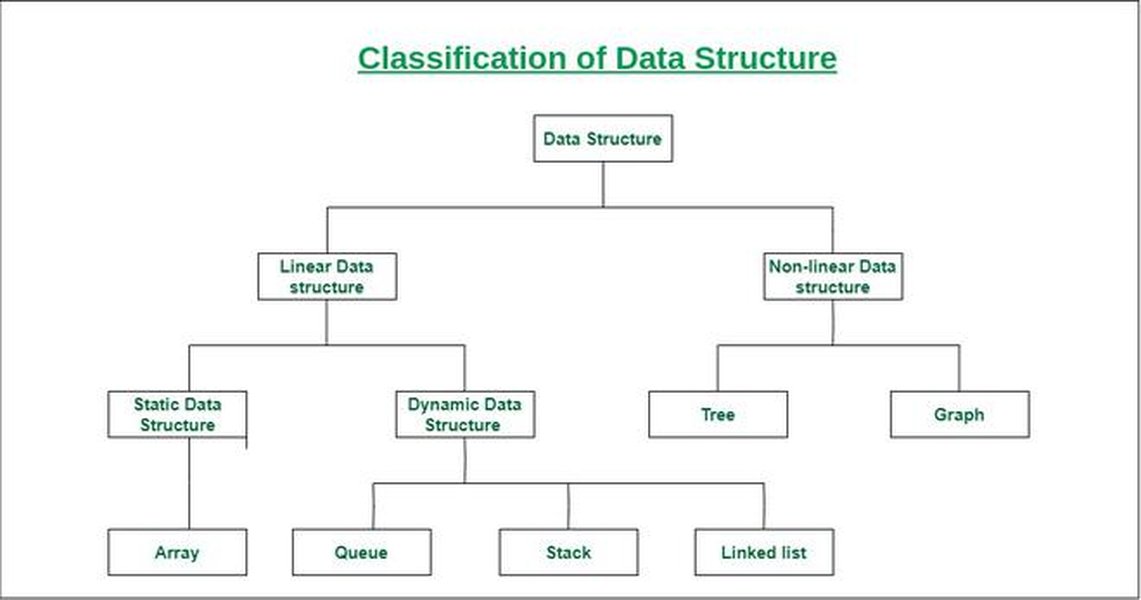
A visual representation of data structure classification.
Linear Data Structures in Java
4. Arrays in Java
What is an Array?
An array in Java is a fundamental linear data structure that stores a fixed-size sequential collection of elements of the same data type. Elements are stored in contiguous memory locations and can be accessed directly using an index (0-based).
Array Initialization and Size
Arrays can be initialized in several ways:
// Declaration and instantiation
int[] numbers = new int[5]; // Creates an array of 5 integers, initialized to 0

// Declaration, instantiation, and initialization
String[] names = {"Alice", "Bob", "Charlie"};

// Accessing elements
System.out.println(names[0]); // Outputs "Alice"

// Getting array size
System.out.println(names.length); // Outputs 3
What is ArrayIndexOutOfBoundsException?
This runtime exception occurs when an attempt is made to access an array element using an index that is outside the valid range (i.e., less than 0 or greater than or equal to `array.length`).
What are Jagged Arrays?
A jagged array is an array of arrays where each sub-array can have a different length. It's essentially a 2D array where rows can have varying numbers of columns.
int[][] jaggedArray = new int[3][];
jaggedArray[0] = new int[]{1, 2};
jaggedArray[1] = new int[]{3, 4, 5};
jaggedArray[2] = new int[]{6};
5. Linked Lists in Java
What is a Linked List?
A linked list is a linear data structure where elements (nodes) are not stored in contiguous memory locations. Each node contains data and a reference (or pointer) to the next node in the sequence. Java's `java.util.LinkedList` is a doubly-linked list implementation.
Types of Linked Lists:
- Singly Linked List: Each node points only to the next node.
- Doubly Linked List: Each node points to both the next and the previous node.
- Circular Linked List: The last node points back to the first node, forming a circle.
How is a LinkedList different from an Array?
This is a classic comparison question. The key differences are summarized in the table below.
6. Stacks in Java
What is a Stack?
A stack is a linear data structure that follows the Last-In, First-Out (LIFO) principle. This means the last element added to the stack is the first one to be removed. Think of it like a stack of plates.
Main Stack Operations:
- push(element): Adds an element to the top of the stack.
- pop(): Removes and returns the element from the top of the stack.
- peek(): Returns the element at the top of thestack without removing it.
- isEmpty(): Checks if the stack is empty.
In Java, `java.util.Stack` class can be used, or more preferably, an implementation of the `Deque` interface like `ArrayDeque`.
How to implement a Stack using an Array in Java?
public class ArrayStack {
    private int[] data;
    private int top;
    private int capacity;

    public ArrayStack(int size) {
        capacity = size;
        data = new int[capacity];
        top = -1; // Stack is initially empty
    }

    public void push(int value) {
        if (isFull()) {
            System.out.println("Stack Overflow");
            return;
        }
        data[++top] = value;
    }

    public int pop() {
        if (isEmpty()) {
            System.out.println("Stack Underflow");
            return -1; // Or throw an exception
        }
        return data[top--];
    }

    public int peek() {
        if (isEmpty()) {
            System.out.println("Stack is empty");
            return -1; // Or throw an exception
        }
        return data[top];
    }

    public boolean isEmpty() {
        return top == -1;
    }

    public boolean isFull() {
        return top == capacity - 1;
    }
}
7. Queues in Java
What is a Queue?
A queue is a linear data structure that follows the First-In, First-Out (FIFO) principle. This means the first element added to the queue is the first one to be removed, similar to a checkout line.
Main Queue Operations:
- enqueue(element) / add(element) / offer(element): Adds an element to the rear of the queue.
- dequeue() / remove() / poll(): Removes and returns the element from the front of the queue.
- peek() / element(): Returns the element at the front of the queue without removing it.
- isEmpty(): Checks if the queue is empty.
Java provides the `Queue` interface and implementations like `LinkedList` (which implements `Queue`), `ArrayDeque`, and `PriorityQueue`.
Difference between Stack and Queue:
The primary difference is their access principle: Stacks are LIFO (Last-In, First-Out), while Queues are FIFO (First-In, First-Out).
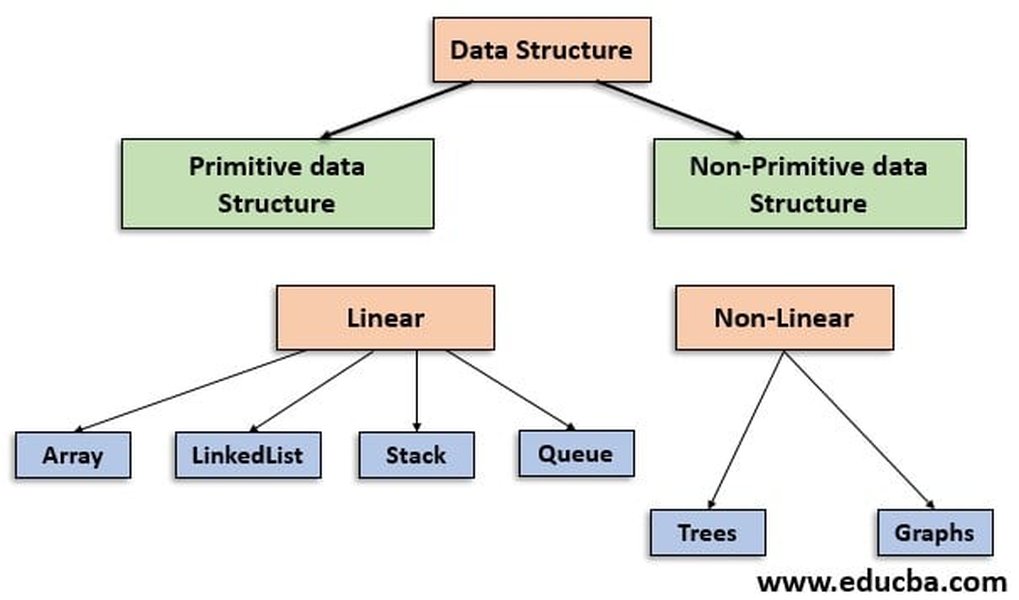
Visualizing various data structures available in Java.
Non-Linear Data Structures in Java
8. Trees in Java
What is a Tree Data Structure?
A tree is a non-linear, hierarchical data structure consisting of nodes connected by edges. Each tree has a root node, and every node (except the root) has exactly one parent. Nodes can have zero or more child nodes. Trees are used to represent hierarchical data like file systems or organizational structures.
Binary Tree
A binary tree is a tree data structure in which each node has at most two children, referred to as the left child and the right child. A basic node structure in Java could be:
class TreeNode {
    int data;
    TreeNode left;
    TreeNode right;

    TreeNode(int data) {
        this.data = data;
        this.left = null;
        this.right = null;
    }
}
Binary Search Tree (BST)
A Binary Search Tree (BST) is a special type of binary tree that adheres to the following properties:
- The value of all nodes in the left subtree of a node is less than or equal to the value of the node.
- The value of all nodes in the right subtree of a node is greater than the value of the node.
- Both the left and right subtrees must also be binary search trees.
BSTs allow for efficient searching, insertion, and deletion operations, typically with an average time complexity of O(log n) for balanced trees.
Self-Balancing Trees (e.g., Red-Black Tree)
Self-balancing binary search trees, like Red-Black trees or AVL trees, automatically adjust their structure during insertions and deletions to maintain a balanced height. This ensures that operations remain efficient (O(log n) in the worst case). Java's `TreeSet` and `TreeMap` internally use Red-Black trees.
9. Graphs in Java
What is a Graph Data Structure?
A graph is a non-linear data structure consisting of a set of vertices (or nodes) and a set of edges that connect pairs of vertices. Graphs can be directed (edges have a direction) or undirected (edges do not have a direction). They are used to model networks, social connections, and various real-world relationships.
Graph Implementation
Graphs can be implemented in Java using:
- Adjacency Matrix: A 2D array where `matrix[i][j] = 1` if there is an edge from vertex `i` to vertex `j`, and 0 otherwise. Suited for dense graphs.
- Adjacency List: An array of lists, where `adjList[i]` contains a list of all vertices adjacent to vertex `i`. Suited for sparse graphs.
// Example of Adjacency List implementation
import java.util.*;

class Graph {
    private int numVertices;
    private List<List<Integer>> adjList;

    Graph(int vertices) {
        numVertices = vertices;
        adjList = new ArrayList<>(numVertices);
        for (int i = 0; i < numVertices; i++) {
            adjList.add(new LinkedList<>());
        }
    }

    void addEdge(int src, int dest) {
        adjList.get(src).add(dest);
        // For an undirected graph, add an edge from dest to src as well
        // adjList.get(dest).add(src);
    }
}
Common graph algorithms include Breadth-First Search (BFS) and Depth-First Search (DFS) for traversal, and Dijkstra's or Floyd-Warshall for finding shortest paths.
10. Hash Tables (HashMap in Java)
What is a HashMap and how does it work?
A `HashMap` in Java is a data structure that stores key-value pairs. It is part of the Java Collections Framework and implements the `Map` interface. It uses a technique called hashing to compute an index (or bucket location) where an element should be stored or retrieved.
Key aspects of `HashMap` working:
- Hashing: When a key-value pair is inserted, the `hashCode()` method of the key is used to calculate an integer hash code. This hash code is then transformed into an index for an internal array (often called buckets or bins).
- Buckets: Each bucket can store one or more entries. If multiple keys hash to the same bucket (a "collision"), they are typically stored in a linked list or, in modern Java versions (Java 8+), a balanced tree (like a Red-Black tree) if the list becomes too long.
- Performance: On average, `put`, `get`, and `remove` operations take O(1) constant time, assuming a good hash function and minimal collisions. In the worst case (many collisions hashing to the same bucket), it can degrade to O(n).
- Null Keys/Values: `HashMap` allows one null key and multiple null values.
11. Heaps (PriorityQueue in Java)
What is a Heap?
A heap is a specialized tree-based data structure that satisfies the heap property. There are two main types:
- Min-Heap: The value of each node is less than or equal to the values of its children. The root node contains the smallest value.
- Max-Heap: The value of each node is greater than or equal to the values of its children. The root node contains the largest value.
Heaps are commonly implemented as complete binary trees and are often stored in arrays for efficiency.
How does Java’s PriorityQueue work?
`java.util.PriorityQueue` is an unbounded queue based on a priority heap. Elements are ordered according to their natural ordering (if they implement `Comparable`) or by a `Comparator` provided at queue construction time. By default, `PriorityQueue` uses a min-heap, meaning the element with the "smallest" priority (according to the ordering) is at the head of the queue and will be dequeued first. Insertion (`add`/`offer`) and removal (`remove`/`poll`) operations have a time complexity of O(log n).
Java Collections Framework Comparisons
Understanding the nuances between different collection classes is vital for interviews.
This video provides an overview of common data structure interview questions in the context of Java.
12. Data Structure Comparison Table
The following table compares key features of commonly used Java Collection classes, which are implementations of fundamental data structures:
| Feature | ArrayList | LinkedList | HashSet | TreeSet | HashMap |
|---|---|---|---|---|---|
| Underlying Data Structure | Dynamic Array | Doubly Linked List | Hash Table (uses HashMap internally) | Red-Black Tree (Self-balancing BST) | Hash Table |
| Ordering | Maintains insertion order | Maintains insertion order | No specific order (unordered) | Sorted (natural or by Comparator) | No specific order (unordered) |
| Duplicates | Allows duplicates | Allows duplicates | Does not allow duplicates | Does not allow duplicates | Keys must be unique; values can be duplicates |
| Null Values | Allows multiple nulls | Allows multiple nulls | Allows one null element | Does not allow nulls (by default, unless Comparator handles them) | Allows one null key and multiple null values |
| Performance (Get/Access) | O(1) for indexed access | O(n) for indexed access (O(1) if iterating) | O(1) on average (for `contains`) | O(log n) (for `contains`) | O(1) on average (for `get`) |
| Performance (Add/Insert) | O(1) amortized (add to end), O(n) (insert in middle) | O(1) (add to ends), O(n) (insert in middle if searching for position) | O(1) on average | O(log n) | O(1) on average (for `put`) |
| Performance (Remove) | O(n) | O(1) (if iterator is at node or removing from ends), O(n) (if searching) | O(1) on average | O(log n) | O(1) on average (for `remove`) |
| Use Case | Frequent random access, list that doesn't change size often. | Frequent insertions/deletions, especially at ends or with an iterator. | Storing unique elements where order is not important; fast lookups. | Storing unique elements in sorted order. | Storing key-value pairs; fast lookups by key. |
13. What is the difference between `Comparable` and `Comparator` interfaces in Java?
Both interfaces are used for ordering objects in Java, but they differ in their application:
- `Comparable` Interface:
- Used to define the natural ordering of a class.
- The class itself must implement this interface and its single method `compareTo(T obj)`.
- Example: A `Student` class might implement `Comparable` to sort students by their ID by default.
- `compareTo` method returns a negative integer, zero, or a positive integer if this object is less than, equal to, or greater than the specified object.
- `Comparator` Interface:
- Used to define custom or multiple orderings for objects, or to sort objects of classes that you cannot modify (e.g., third-party library classes).
- Implemented as a separate class.
- Its primary method is `compare(T o1, T o2)`.
- Example: You might create one `Comparator` to sort `Student` objects by name and another to sort them by GPA.
- `compare` method returns a negative integer, zero, or a positive integer if the first argument is less than, equal to, or greater than the second.
In essence, `Comparable` is for intrinsic, default sorting, while `Comparator` provides extrinsic, flexible sorting logic.
Data Structure Performance Characteristics (Radar Chart)
Choosing the right data structure often involves trade-offs. The radar chart below provides a visual comparison of some common Java data structures based on opinionated, generalized performance characteristics and features. Scores are on a scale where higher values generally indicate better performance or stronger presence of a feature for that specific characteristic.
Note: 'Ordering Guarantee' for ArrayList/LinkedList refers to insertion order; for TreeSet/PriorityQueue, it refers to sorted/priority order. HashMap has no inherent ordering. 'Ease of Basic Use' is subjective. Memory efficiency can vary greatly based on usage patterns and stored data types.
Mindmap of Java Data Structures
This mindmap illustrates the classification of common data structures available and relevant in Java programming. It helps visualize the relationships between different types of data structures.
Frequently Asked Questions (FAQ)
How does garbage collection work with linked data structures such as LinkedLists in Java?
In Java, memory management is largely automatic thanks to the Garbage Collector (GC). For linked data structures like `LinkedList`, each node is an object stored on the heap. When a node becomes unreachable – meaning no active part of the program holds a reference to it (e.g., it's removed from the list and no other variables point to it) – it becomes eligible for garbage collection. The GC periodically scans the heap for such unreachable objects and reclaims the memory they occupy. This prevents common memory leak issues associated with manual memory management in languages like C++.
What is the significance of `ArrayIndexOutOfBoundsException` and how can it be avoided?
`ArrayIndexOutOfBoundsException` is a runtime exception in Java that occurs when an attempt is made to access an array element using an illegal index. An index is illegal if it's negative or greater than or equal to the size of the array. This signifies a logical error in the code, often due to incorrect loop bounds, off-by-one errors, or using an uninitialized or incorrectly sized array. To avoid it:
- Always ensure indices are within the valid range `[0, array.length - 1]`.
- Be careful with loop conditions, especially when iterating through arrays.
- Validate user input or external data that might be used as an array index.
- Initialize arrays with the correct size needed for the application.
When should I use an `ArrayList` versus a `LinkedList` in Java?
The choice between `ArrayList` and `LinkedList` depends on the specific operations you intend to perform most frequently:
- Choose `ArrayList` if:
- You need frequent random access to elements using an index (e.g., `get(index)`). `ArrayList` provides O(1) time complexity for this.
- The primary operations involve iterating through the list.
- Insertions and deletions are infrequent or mostly occur at the end of the list. Adding to the end is O(1) amortized, but insertions/deletions in the middle are O(n).
- Choose `LinkedList` if:
- You need frequent insertions and deletions, especially in the middle of the list, and you have an iterator pointing to the location. These operations can be O(1) if the position is known (e.g., via an iterator). Adding/removing at the beginning or end is O(1).
- Random access by index is infrequent, as it takes O(n) time.
- You need a data structure that can also efficiently act as a Queue or Deque (`LinkedList` implements these interfaces).
Conclusion
Mastering Java data structures is indispensable for any Java developer, particularly when preparing for technical interviews. A thorough understanding of their characteristics, implementations within the Java Collections Framework, and performance trade-offs will not only help you answer interview questions confidently but also enable you to write more efficient and robust Java code. Continuous practice, including coding implementations and analyzing complexities, is key to solidifying this knowledge.
Recommended Further Exploration
- In-depth analysis of time and space complexity for Java Collection classes.
- How to implement a custom Binary Search Tree in Java with traversal methods.
- Advanced graph algorithms (like Dijkstra's and A*) in Java for interview preparation.
- Real-world use cases and performance tuning for Java HashMaps and TreeMaps.
Referenced Search Results
 javarevisited.blogspot.com
javarevisited.blogspot.com
javarevisited.blogspot.com