
Java Delete
A Comprehensive Guide to Deleting Files and Managing Objects in Java
Highlights
- File Deletion Methods: Learn how to delete files using both java.io.File and java.nio.file.Files methods.
- Error Handling & Permissions: Understand best practices, including proper exception handling and permission management.
- Garbage Collection: Explore how Java manages object deletion with its automatic garbage collection mechanism.
Overview of Java Deletion Techniques
In Java, the notion of "delete" typically refers to two primary operations: deleting files (or directories) from the file system and removing objects via garbage collection. This guide comprehensively covers the techniques used to delete files and directories using Java’s standard libraries as well as explaining how memory management through garbage collection operates behind the scenes.
Deleting Files Using Java
When it comes to deleting files, Java provides programmers with two major approaches. The first approach uses the java.io.File class, while the second employs the java.nio.file.Files class, which was introduced in Java 7. Each approach has its unique characteristics and best use cases.
Using the java.io.File.delete() Method
The delete() method of the java.io.File class deletes a file or an empty directory represented by the File object. It returns a boolean value, indicating the success or failure of the deletion operation.
// Example using java.io.File.delete()
File file = new File("path/to/file.txt");
if (file.delete()) {
    System.out.println("Deleted the file: " + file.getName());
} else {
    System.out.println("Failed to delete the file.");
}
It is important to note that when deleting directories using the File.delete() method, the directory must be empty. Otherwise, the deletion will fail.
Using the java.nio.file.Files.delete() and deleteIfExists() Methods
The java.nio.file.Files class provides more advanced file operations. Two important methods are delete() and deleteIfExists(). The delete() method throws an IOException if the deletion fails, while deleteIfExists() returns a boolean value indicating whether the deletion was successful or not.
// Example using java.nio.file.Files.deleteIfExists()
import java.nio.file.Files;
import java.nio.file.Path;
import java.nio.file.Paths;
import java.io.IOException;

Path path = Paths.get("path/to/file.txt");
try {
    Files.deleteIfExists(path);
    System.out.println("File deleted successfully");
} catch (IOException e) {
    System.out.println("An error occurred: " + e.getMessage());
}
These methods provide better error handling and are part of the more modern Java I/O approaches introduced in Java 7.
Error Handling and Permissions
When performing file deletion, ensure that your application has the necessary filesystem permissions. In many operating systems, attempting to delete a file that the user does not have permission to remove will result in an error. Additionally, using delete() from the Files class, you must be prepared to catch IOException to handle situations such as the file being in use or inadequate privileges.
Best Practices for Error Handling
Effective error handling is crucial when performing file deletions. It is recommended to always check the existence of a file before attempting deletion and to wrap deletion operations in try-catch blocks. Here is a summary table explaining the different methods and their key characteristics:
| Method | Description | Key Characteristics |
|---|---|---|
File.delete() |
Deletes a file or an empty directory. | Returns boolean; does not throw an exception. |
Files.delete() |
Deletes a file at a given path. | Throws IOException on failure. |
Files.deleteIfExists() |
Deletes a file if it exists. | Returns boolean; avoids exception if file is missing. |
Deleting Directories
Deleting directories in Java follows similar rules to file deletion, but with an additional constraint: the directory must be empty. Attempting to delete a non-empty directory using the File.delete() method will fail silently (or return false), and using the Files method will trigger an error.
Handling Non-Empty Directories
To delete a non-empty directory, you will need to recursively delete all files and subdirectories it contains before removing the directory itself. Developers can implement a recursive deletion method to address this requirement.
// Recursive deletion example for non-empty directories
public static void deleteDirectory(File directory) {
    if(directory.exists()){
        File[] files = directory.listFiles();
        if(files != null){
            for(File file : files) {
                if(file.isDirectory()){
                    deleteDirectory(file);
                } else {
                    file.delete();
                }
            }
        }
    }
    directory.delete();
}
Memory Management and Garbage Collection
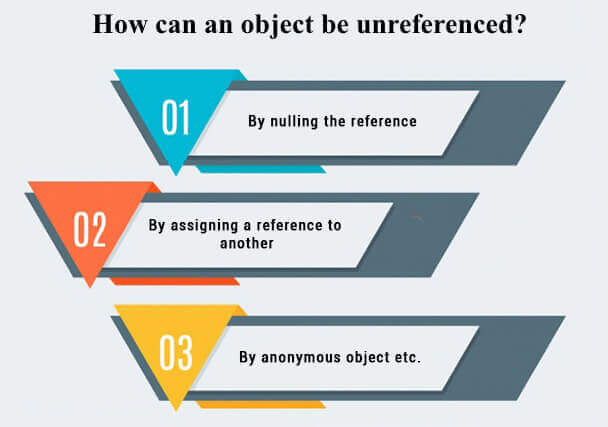
Unlike file deletion, Java does not provide a method to explicitly delete objects from memory. Instead, Java relies on an automated process known as garbage collection. When an object is no longer referenced by any part of the program, it becomes eligible for garbage collection, and the Java Virtual Machine (JVM) will reclaim the memory at a later time.
How Garbage Collection Works
Garbage collection in Java is handled automatically, which simplifies memory management for developers. There is no direct way to force a garbage collection, although calling System.gc() is sometimes used as a suggestion to the JVM. However, this is not guaranteed to have an immediate effect. To make an object eligible for garbage collection, simply remove all references to it (for instance, by setting references to null or letting them go out of scope).
// Example demonstrating making an object eligible for GC
MyObject obj = new MyObject();
// The object is in use...
// Make it eligible for garbage collection
obj = null;
// The garbage collector will eventually reclaim the memory
It is important to design applications with proper reference management, ensuring that objects are not unnecessarily held in memory, which can lead to memory leaks.
Comparative Summary
Below is a comparative table summarizing the two main contexts where "delete" operations occur in Java:
| Context | Method/Class | Description | Sample Code |
|---|---|---|---|
| File Deletion | java.io.File.delete() |
Deletes a file or empty directory; returns boolean. | File file = new File("file.txt"); file.delete(); |
java.nio.file.Files.deleteIfExists() |
Deletes a file if it exists; handles exceptions. | Path path = Paths.get("file.txt"); Files.deleteIfExists(path); |
|
| Object Deletion | Garbage Collection | Automatic memory management; objects are deleted when no longer referenced. | obj = null; // then GC runs |
Additional Considerations
In addition to the examples and explanations above, here are some additional points to consider when working with deletion in Java:
Error Handling and Logging
Proper error handling and logging are crucial for diagnosing issues in production applications. When deleting files, ensure that you log both successes and failures, and consider fallback mechanisms if a critical file or directory cannot be deleted.
Security and Access Control
File deletion operations require appropriate permissions. Always validate user input and consider security implications when performing file deletion. This is especially important in multi-user environments where deleting a file could impact several users.
Platform Specific Differences
Remember that the behavior of file deletion operations might slightly differ across operating systems. For instance, locks on files or restrictions imposed by antivirus software can interfere with deletion operations on Windows or macOS.
References
- Delete a File Using Java - GeeksforGeeks
- Deleting a File or Directory - The Java™ Tutorials
- Java Delete Files - W3Schools
- Java - Delete a File | Baeldung
- Java Delete Objects - DelftStack
Recommended Queries for Further Insights
Last updated March 16, 2025