

Key Insights into JavaScript Fundamentals
- Strings are sequences of characters, essential for handling all textual data in JavaScript. They are immutable, meaning operations on strings create new ones.
- Arrays are ordered collections of data, capable of holding various data types, and are accessed via zero-based indexing. They are fundamental for managing lists of items.
- For loops are powerful control structures that enable repetitive execution of code, making them indispensable for iterating over strings (character by character) and arrays (element by element).
For aspiring JavaScript developers, mastering strings, arrays, and for loops is not merely about understanding syntax; it's about grasping the core mechanisms that drive dynamic and interactive web experiences. These three concepts form the bedrock upon which more complex programming constructs are built. Let's embark on a journey to demystify each one, illustrating their individual strengths and how they synergize to create powerful applications.
Deciphering Strings: The Essence of Textual Data
In JavaScript, a string is a primitive data type used to represent textual data. Whether it's a user's name, a product description, or a simple "Hello, World!", strings are omnipresent. They are sequences of characters enclosed within single quotes ('...'), double quotes ("..."), or backticks (...
Creating and Manipulating Strings
Creating a string is straightforward:
let greeting = "Hello, JavaScript!";
let user = 'Beginner';
let message = <code>Welcome, ${user}!; // Template literal with interpolation
One crucial characteristic of JavaScript strings is their immutability. This means that once a string is created, its value cannot be changed. Any operation that appears to modify a string, such as converting it to uppercase or extracting a substring, actually returns a *new* string, leaving the original untouched. This is a vital concept for beginners to grasp, as it impacts how string manipulations are performed.
Essential String Properties and Methods
Strings come with a variety of built-in properties and methods that facilitate their manipulation:
lengthproperty: Returns the number of characters in a string. For example,"hello".lengthwould return 5.slice(): Extracts a section of a string and returns it as a new string. You specify the start and end (optional) indices.indexOf(): Searches for the first occurrence of a specified value within a string and returns its position.replace(): Replaces a specified value with another value in a string.toUpperCase()andtoLowerCase(): Convert the string to uppercase or lowercase, respectively.includes(): Checks if a string contains another string and returnstrueorfalse.split(): Divides a string into an ordered list of substrings, puts these substrings into an array, and returns the array.
These methods empower developers to perform tasks ranging from simple formatting to complex data parsing. Understanding their application is key to efficient string handling.
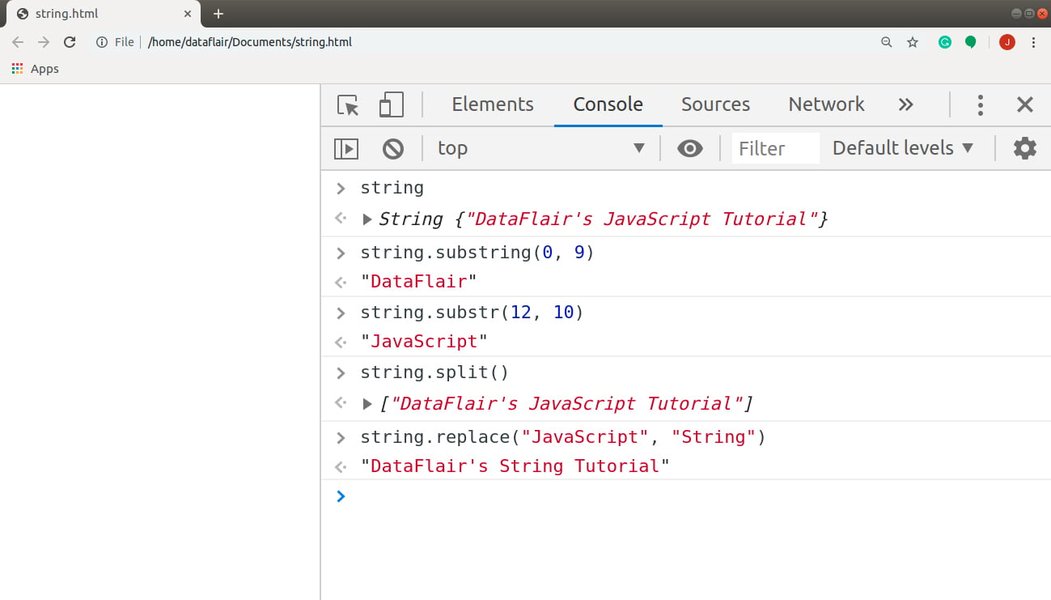
An illustration showing substring extraction from a JavaScript string.
Exploring Arrays: Structured Collections of Data
While strings handle single pieces of text, arrays are designed to manage collections of data. Think of an array as an ordered list where each item, regardless of its data type (numbers, strings, objects, or even other arrays), has a specific position. This ordered nature allows for precise access and manipulation of individual elements.
Defining and Accessing Array Elements
Arrays are created using square brackets [], with elements separated by commas:
let fruits = ["apple", "banana", "cherry"];
let mixedData = [1, "hello", true, {name: "John"}];
Accessing elements within an array is done using zero-based numerical indices. The first element is at index 0, the second at 1, and so on. For example, to get "banana" from the fruits array, you would use fruits[1].
Common Array Operations and Methods
Arrays in JavaScript are highly flexible, offering numerous methods to add, remove, and reorganize elements:
lengthproperty: Similar to strings, it indicates the number of elements in the array.push(): Adds one or more elements to the end of an array and returns the new length.pop(): Removes the last element from an array and returns that element.shift(): Removes the first element from an array and returns that element.unshift(): Adds one or more elements to the beginning of an array and returns the new length.forEach(): Executes a provided function once for each array element. This is a common method for iterating.map(),filter(),reduce(): More advanced methods for transforming, filtering, and aggregating array data, respectively.
These methods allow arrays to function effectively as lists, stacks, or queues, making them incredibly versatile for various programming tasks, from managing user inputs to storing complex data structures.

A visual representation of various useful JavaScript array methods.
Mastering For Loops: Repetition and Iteration
The true power of strings and arrays often comes to life when combined with loops. A for loop is a control flow statement that allows a block of code to be executed repeatedly, a specific number of times. This makes it indispensable for processing collections of data, such as elements in an array or characters in a string.
The Anatomy of a Traditional For Loop
A traditional for loop in JavaScript typically consists of three expressions, separated by semicolons, within its parentheses, followed by the code block to be executed:
for (initialization; condition; iteration) {
    // Code to be executed in each iteration
}- Initialization: Executed once before the loop begins. It's often used to declare and set a counter variable (e.g.,
let i = 0). - Condition: Evaluated before each iteration. If it evaluates to
true, the code block inside the loop is executed. If it evaluates tofalse, the loop terminates. - Iteration: Executed after each iteration of the loop. Typically used to update the counter variable (e.g.,
i++).
Iterating Over Arrays and Strings with For Loops
The traditional for loop is excellent for iterating over arrays when you need direct access to the index:
let colors = ["red", "green", "blue"];
for (let i = 0; i < colors.length; i++) {
    console.log(colors[i]); // Outputs: red, green, blue (each on a new line)
}
For iterating over strings character by character, the same principle applies, treating the string as an array of characters:
let word = "JavaScript";
for (let i = 0; i < word.length; i++) {
    console.log(word[i]); // Outputs each character: J, a, v, a, S, c, r, i, p, t
}
Modern Iteration: The For...of Loop
JavaScript offers more modern and often more readable ways to iterate, particularly the for...of loop, which is designed for iterating over iterable objects like arrays and strings directly, without needing to manage indices:
let fruits = ["apple", "banana", "orange"];
for (const fruit of fruits) {
    console.log(fruit); // Outputs: apple, banana, orange
}

let language = "Python";
for (const char of language) {
    console.log(char); // Outputs: P, y, t, h, o, n
}
The for...of loop simplifies the syntax for common iteration tasks, making code cleaner and less prone to off-by-one errors that can occur with index-based loops.
A YouTube video explaining JavaScript For Loops in 5 minutes, ideal for beginners.
This video provides a quick and concise introduction to JavaScript for loops, breaking down the core concepts into easily digestible chunks. It covers the fundamental structure of the for loop and offers practical examples, which is perfect for visually reinforcing the theoretical knowledge. Its brevity makes it an excellent resource for a beginner seeking to quickly grasp the mechanics of repetition in JavaScript programming.
The Synergy: How They Work Together
The true power in JavaScript development lies in understanding how strings, arrays, and loops complement each other. For instance, you might use a for loop to iterate through an array of strings, performing some operation on each string, such as checking its length or converting its case. Or, you might parse a string (e.g., a comma-separated list of items) into an array using the split() method, and then process each item in the array using a loop.
Practical Applications
Consider a scenario where you have a list of user comments (strings) stored in an array. You could use a loop to:
- Count the total number of comments.
- Filter out comments that contain certain keywords.
- Format each comment to ensure consistency.
- Display each comment dynamically on a webpage.
A Conceptual Mindmap of Core JavaScript Elements
To provide a holistic view of how these concepts interconnect, here's a mindmap illustrating the relationships between strings, arrays, and for loops, along with their key characteristics and methods.
Comparing JavaScript Data Types and Iteration Methods
This table summarizes the key characteristics and common iteration methods for strings and arrays in JavaScript, highlighting their distinct features and how loops are applied to them.
| Feature | Strings | Arrays |
|---|---|---|
| Definition | Sequence of characters, textual data | Ordered collection of various data types |
| Mutability | Immutable (operations create new strings) | Mutable (elements can be changed in place) |
| Creation Syntax | "...", '...', |
[...] |
| Access Method | Index-based (e.g., myString[0]) |
Index-based (e.g., myArray[0]) |
| Common Properties | .length |
.length |
| Key Methods | .slice(), .indexOf(), .replace(), .toUpperCase(), .split() |
.push(), .pop(), .shift(), .unshift(), .forEach(), .map(), .filter() |
| Primary Loop Type for Iteration | for (let i = 0; i < str.length; i++), for (const char of str) |
for (let i = 0; i < arr.length; i++), for (const item of arr), arr.forEach(...) |
| Use Cases | Text manipulation, user input, displaying messages | Storing lists of items, managing collections of data, creating queues/stacks |
Frequently Asked Questions about JavaScript Fundamentals
What is the main difference between strings and arrays in JavaScript?
When should I use a traditional for loop versus a for...of loop?
for loop when you need to access the index of the elements during iteration, or when you need more control over the iteration process (e.g., iterating backwards, skipping elements). The for...of loop is preferred when you simply want to iterate over the values of an iterable object (like an array or string) without needing to know their indices, as it provides a more readable and concise syntax.Are strings and arrays considered objects in JavaScript?
Object.prototype and having their own specific prototype methods.Can I mix data types within a single JavaScript array?
Conclusion: Building Your JavaScript Foundation
Understanding strings, arrays, and for loops is foundational for anyone embarking on their JavaScript journey. Strings empower you to handle text, arrays enable you to manage collections of data efficiently, and for loops provide the essential mechanism for automating repetitive tasks and iterating through these data structures. Mastering these core concepts will not only allow you to write functional code but also provide a solid platform for exploring more advanced topics in JavaScript, ultimately enabling you to build sophisticated and interactive web applications. Continuous practice and experimentation with these building blocks will solidify your understanding and boost your confidence as a developer.
Recommended Further Exploration
- Explore advanced JavaScript array methods like map, filter, and reduce for powerful data transformations.
- Discover more about template literals and their benefits for string interpolation and multi-line strings.
- Investigate other JavaScript loop types such as
whileanddo-whilefor varying iteration needs. - Deepen your knowledge of JavaScript's data types, distinguishing between primitives and objects.