
Unlocking the Secrets of JavaScript's `setTimeout(..., 0)`: More Than Just a Delay!
Discover the hidden power of zero-delay timeouts and how they impact JavaScript's event loop and asynchronous execution.
Key Highlights of `setTimeout(..., 0)`
- Deferring Execution: It allows you to defer the execution of a function until the current call stack is cleared, enabling non-blocking behavior.
- Event Loop Management: It leverages the JavaScript event loop to prioritize UI updates and handle user interactions more efficiently.
- Browser Compatibility: Be aware of the minimum delay enforced by browsers (typically 4ms) for nested timers due to historical reasons.
Understanding `setTimeout(..., 0)` in JavaScript
The `setTimeout()` function in JavaScript is a powerful tool for managing asynchronous operations. It allows you to execute a specific block of code or a function after a designated time delay, measured in milliseconds. While it's commonly used to introduce delays, the seemingly peculiar usage of `setTimeout(..., 0)` (a timeout with a delay of 0 milliseconds) serves a more nuanced purpose than simply pausing execution. This technique leverages the event loop to manage the execution order of JavaScript code, and understanding it is crucial for writing efficient and responsive applications.
The Role of the Event Loop
JavaScript operates on a single-threaded event loop. This means that JavaScript can only execute one operation at a time. The event loop continuously monitors the call stack and the task queue. The call stack represents the currently executing code, while the task queue holds tasks waiting to be executed. When the call stack is empty, the event loop takes the first task from the task queue and pushes it onto the call stack for execution.
How `setTimeout(..., 0)` Works
When you call `setTimeout(callback, 0)`, you're not actually telling the JavaScript engine to execute the `callback` function immediately. Instead, you're instructing the engine to add the `callback` function to the task queue. The event loop will then execute this `callback` function when the call stack is empty, which means after the current thread of execution has completed.
This behavior is crucial because it allows you to defer the execution of a function until after the browser has had a chance to update the user interface and handle any pending events. This can prevent blocking the UI thread and improve the responsiveness of your application.
Use Cases for `setTimeout(..., 0)`
`setTimeout(..., 0)` is useful in several scenarios:
- Deferring computationally intensive tasks: If you have a function that performs a lot of calculations or manipulates the DOM, you can use `setTimeout(..., 0)` to defer its execution until after the browser has updated the UI. This can prevent the browser from becoming unresponsive.
- Breaking up long-running tasks: If you have a task that takes a long time to complete, you can use `setTimeout(..., 0)` to break it up into smaller chunks. This allows the browser to update the UI and respond to user interactions in between the chunks, improving the user experience.
- Ensuring execution order: Sometimes, you need to ensure that a function is executed after a certain event has occurred or after certain DOM elements have been loaded and rendered. Using `setTimeout(..., 0)` can help you achieve this by placing the function in the task queue.
Diving Deeper: Practical Examples and Implications
Example Scenario: Rendering and DOM Manipulation
Consider a situation where you need to calculate the height of an element immediately after it's added to the DOM. If you try to calculate the height synchronously, the element might not be fully rendered yet, leading to an incorrect height value. By wrapping the height calculation in a `setTimeout(..., 0)`, you ensure that the calculation happens after the browser has rendered the element.
Minimum Delay and Browser Throttling
It's important to note that `setTimeout(..., 0)` doesn't guarantee immediate execution. Browsers enforce a minimum delay for `setTimeout`, typically around 4 milliseconds, especially for nested timers. This is due to historical reasons and the need to prevent scripts from monopolizing the CPU. Therefore, while you're requesting a zero-delay, the actual delay will be at least the browser's minimum.
Alternatives to `setTimeout(..., 0)`
In some cases, other techniques might be more appropriate than `setTimeout(..., 0)`:
-
`requestAnimationFrame()`: If you're dealing with animations or visual updates, `requestAnimationFrame()` is often a better choice. It tells the browser to call a function before the next repaint, ensuring smooth animations.
-
Promises and Async/Await: For managing asynchronous operations in a more structured way, Promises and the `async/await` syntax provide a cleaner and more readable alternative to callbacks.
-
`setImmediate()` (Node.js): In Node.js environments, `setImmediate()` is similar to `setTimeout(..., 0)` but is designed to execute the callback in the next event loop iteration.
Illustrative Table: Comparing `setTimeout(..., 0)` with Alternatives
Here's a table summarizing the key differences between `setTimeout(..., 0)` and some alternative approaches:
| Feature | `setTimeout(..., 0)` | `requestAnimationFrame()` | Promises/Async-Await | `setImmediate()` (Node.js) |
|---|---|---|---|---|
| Purpose | Defer execution to the next event loop iteration | Schedule animation-related tasks before the next repaint | Manage asynchronous operations with a cleaner syntax | Execute callback in the next event loop iteration (Node.js) |
| Use Cases | Deferring tasks, breaking up long-running operations, ensuring execution order | Animations, visual updates | Handling asynchronous operations, managing complex workflows | Similar to `setTimeout(..., 0)` in Node.js |
| Minimum Delay | ~4ms (browser), 0ms (Node.js) | Optimized for browser's refresh rate | N/A (manages asynchronous flow) | 0ms (Node.js) |
| Context | Browsers and Node.js | Browsers | Browsers and Node.js | Node.js |
Visualizing the Event Loop with `setTimeout(..., 0)`
The JavaScript event loop is a fundamental concept for understanding how asynchronous operations are handled. It continuously monitors the call stack and the task queue, executing tasks from the queue when the stack is empty. The diagram below illustrates how `setTimeout(..., 0)` interacts with the event loop.
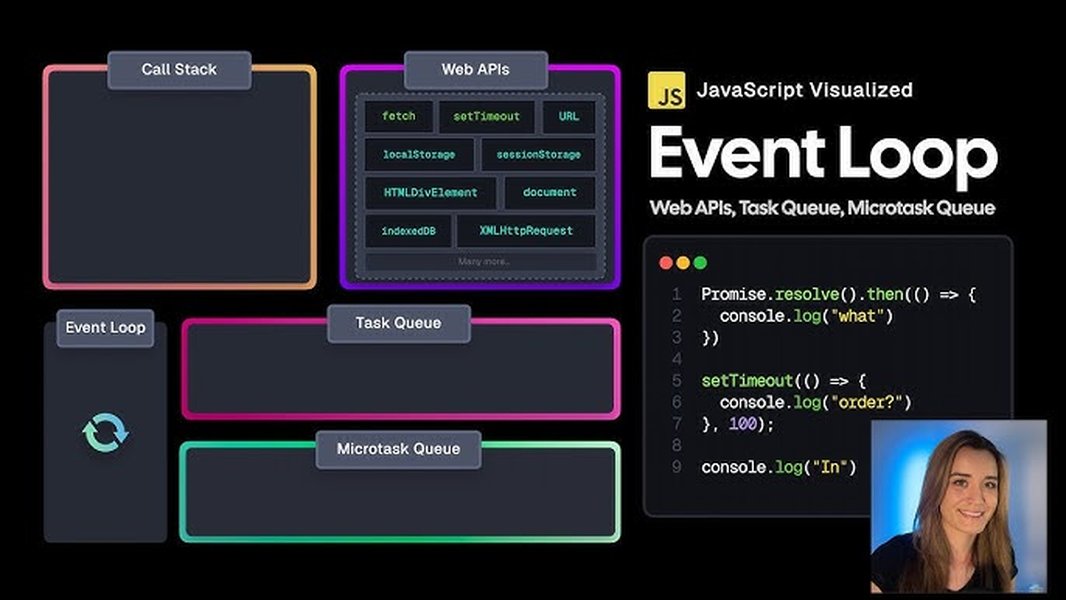
This image represents the JavaScript event loop, a crucial mechanism for handling asynchronous tasks. When `setTimeout(..., 0)` is used, the provided callback function is placed in the task queue. The event loop continuously checks if the call stack is empty. Once it is, the event loop takes the first callback from the task queue (in this case, the one scheduled by `setTimeout`) and pushes it onto the call stack for execution. This ensures that the callback is executed as soon as possible, but not immediately, allowing the browser to perform other tasks like rendering updates and handling user interactions in between.
Practical Demonstration: Seeing `setTimeout(..., 0)` in Action
To further illustrate the behavior of `setTimeout(..., 0)`, let's look at a simple code example and a video explanation:
This video, "setTimeout of 0? #javascript," explains the JavaScript event loop, task queue, and Web APIs. It provides a clear understanding of what `setTimeout(0)` does by showing how it interacts with the event loop to defer the execution of a function until the current call stack is empty. The video reinforces the concept that even with a zero-millisecond delay, the callback function is placed in the task queue and executed asynchronously, not immediately.
FAQ: Frequently Asked Questions About `setTimeout(..., 0)`
References
Last updated April 10, 2025