

Key Insights into JPEG Markers
- Fundamental Structure: JPEG markers are critical two-byte codes that define the organizational backbone of a JPEG file, enabling proper interpretation and display.
- Ubiquitous Presence: From marking the image's beginning and end to detailing metadata and compression parameters, various markers serve distinct, essential roles within the file.
- Interoperability and Metadata: Markers like APP0 (JFIF) and APP1 (Exif) are vital for embedding application-specific metadata, ensuring compatibility and enriching image information.
JPEG markers identify the start of the image, tables the decoder needs, scan boundaries and the end of the image. The marker guide below explains how to read common hexadecimal codes and what each one signals.
JPEG markers are the unseen architects behind every digital image stored in the ubiquitous JPEG format. These fundamental, two-byte codes act as "signposts" within a JPEG file, directing software on how to parse, interpret, and display the image data correctly. Without these markers, a JPEG file would be an unintelligible stream of bytes, making image rendering and manipulation impossible. Understanding them is crucial for anyone working deeply with image processing, digital forensics, or file format development.
The Core Mechanics of JPEG Markers
At their heart, all JPEG markers adhere to a simple, yet highly effective, structure. Each marker begins with the hexadecimal value 0xFF, followed by a second byte that uniquely identifies the marker's type. This design ensures that markers are easily distinguishable from the actual image data, preventing misinterpretation.
An illustration showing the high-level structure of a JPEG file, highlighting the role of markers.
The Universal Signature: 0xFF
The consistent use of 0xFF as the first byte of every marker is a cornerstone of the JPEG standard. This byte serves as a universal signal, alerting any parsing software that a marker is about to follow. The second byte then specifies the marker's function, ranging from indicating the start or end of the image to defining crucial compression parameters or metadata sections.
Some markers, like the Start of Image (SOI) and End of Image (EOI), are self-contained, consisting only of these two bytes. Others are followed by additional data, which can include a two-byte length indicator specifying the size of the subsequent data payload, followed by the actual segment data.
Preventing Ambiguity: Byte Stuffing
A clever mechanism known as "byte stuffing" is employed to prevent the accidental misinterpretation of image data as a marker. If the value 0xFF naturally occurs within the entropy-coded image data, an additional 0x00 byte is inserted immediately after it. Decoders are programmed to recognize and skip this 0x00 byte when encountered after an 0xFF within the image data stream, ensuring that only true markers (0xFF followed by a non-0x00, non-0xFF byte) are processed as such.
Essential JPEG Marker Types and Their Roles
JPEG files rely on a diverse set of markers, each with a specific purpose, contributing to the file's overall integrity and functionality. Here's a breakdown of the most critical ones:
Start and End Markers
- Start of Image (SOI -
0xFFD8): This is always the very first marker in a JPEG file, signaling the beginning of the image data. - End of Image (EOI -
0xFFD9): Conversely, this marker signifies the absolute end of the image data within the file.
Metadata and Application-Specific Markers
These markers are vital for embedding non-image data, enhancing the JPEG's utility beyond just visual information.
- Application Markers (APPn -
0xFFE0to0xFFEF): These markers are reserved for application-specific data.- APP0 (
0xFFE0): Commonly used for JFIF (JPEG File Interchange Format) information, which specifies details necessary for robust exchange of JPEG files across different platforms. - APP1 (
0xFFE1): Primarily used for Exif (Exchangeable Image File Format) data, containing valuable camera settings, date/time, and other photographic metadata captured by digital cameras. - Other APPn markers can be used for various purposes, such as storing XMP or IPTC metadata.
- APP0 (
- Comment Marker (COM -
0xFFFE): Allows for the inclusion of free-form text comments within the JPEG file, which can be useful for embedding arbitrary textual information.
A visual representation of the JFIF header structure, often found after the SOI marker.
Image Data Structure Markers
These markers directly influence how the image itself is compressed and rendered.
- Start of Frame (SOF - e.g.,
0xFFC0for SOF0): These markers define the fundamental characteristics of the image frame, including its dimensions (width and height), precision, and number of components. Different SOF markers exist for various JPEG compression modes (e.g., baseline DCT, progressive DCT). - Define Quantization Table (DQT -
0xFFDB): Specifies the quantization tables, which are crucial for the lossy compression process in JPEG. These tables determine how much detail is discarded during compression. - Define Huffman Table (DHT -
0xFFC4): Defines the Huffman tables used for entropy coding, which is a lossless compression step that further reduces file size after quantization. - Start of Scan (SOS -
0xFFDA): Indicates the beginning of the actual compressed image data (the entropy-coded scan data). This is where the bulk of the image information resides.
Restart Markers
- Restart Markers (RST0 to RST7 -
0xFFD0to0xFFD7): These optional markers are inserted within the entropy-coded data to allow for restarting the decoding process. They are particularly useful for error recovery in corrupt files or for enabling parallel decoding of different image segments.
The Critical Role of Marker Sequence and Parsing
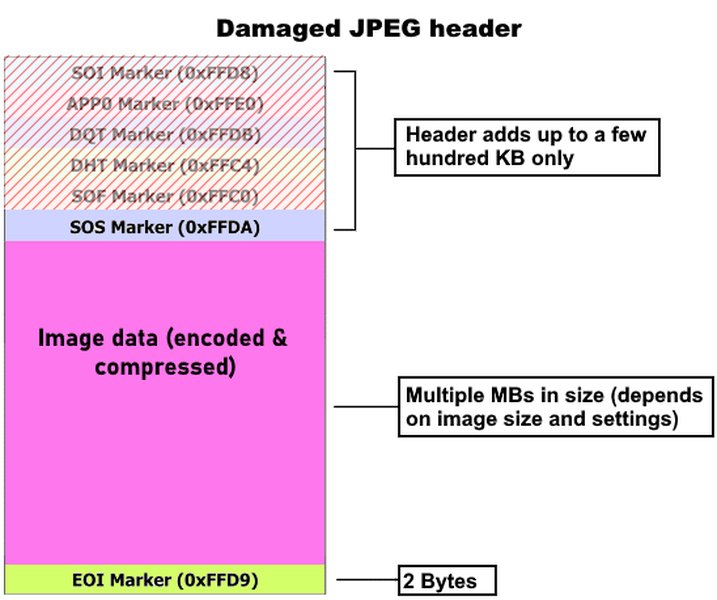
The sequence in which these markers appear within a JPEG file is not arbitrary; it's meticulously defined by the JPEG standard. Image viewers and editors rely heavily on this prescribed order to correctly parse and display JPEG images. For instance, the SOI marker must always come first, followed by configuration markers like SOF, DQT, and DHT, before the SOS marker introduces the actual image data.
A mindmap illustrating the hierarchical structure of a JPEG file and the placement of various markers.
When an application opens a JPEG file, it essentially reads through this sequence of markers, interpreting each segment according to its type. This methodical approach ensures that even complex JPEG files, with embedded metadata and multiple image components, are handled uniformly across different software implementations. The standardization of markers also facilitates features like progressive loading, where an image can gradually appear on screen as more data is received and decoded.
Understanding JPEG Markers: A Practical Perspective
From a practical standpoint, a deep understanding of JPEG markers is invaluable for several areas:
Software Development
Developers building image processing libraries, viewers, or editors must meticulously follow the JPEG standard for marker interpretation. Incorrectly parsing markers can lead to corrupted images, display errors, or failure to extract important metadata.
Digital Forensics and Recovery
In cases of corrupted JPEG files, knowledge of markers is critical for data recovery. Forensic analysts can often reconstruct partially damaged images by identifying valid marker sequences and isolating salvageable data segments. The absence of a key marker, like SOS, can indicate severe corruption in the image data itself, as demonstrated in media discussions about repair.
This video delves into JPEG repair, specifically addressing issues like a missing SOS marker, which is crucial for defining the start of the image scan data. It highlights the practical implications of marker integrity for image recovery.
Metadata Management
Photographers and archivists benefit from understanding how Exif, JFIF, and other metadata are embedded via APP markers. This knowledge helps in preserving crucial information associated with their images and in troubleshooting issues related to metadata display or modification.
Summary of Key JPEG Markers
The following table provides a concise overview of the most frequently encountered JPEG markers, their hexadecimal codes, and their primary functions:
| Marker Type | Hex Code | Description | Additional Data (Length + Payload) |
|---|---|---|---|
| Start of Image (SOI) | 0xFFD8 |
Marks the beginning of the JPEG image. | No |
| End of Image (EOI) | 0xFFD9 |
Marks the end of the JPEG image data. | No |
| APP0 (JFIF) | 0xFFE0 |
Contains JFIF metadata, defining parameters for interchanging JPEG files. | Yes |
| APP1 (Exif) | 0xFFE1 |
Holds Exif metadata, including camera settings, date, and time. | Yes |
| Comment (COM) | 0xFFFE |
Allows for the inclusion of arbitrary text comments. | Yes |
| Start of Frame (SOF0) | 0xFFC0 |
Defines baseline DCT sequential frame parameters (dimensions, components). | Yes |
| Define Quantization Table (DQT) | 0xFFDB |
Specifies the quantization tables used in compression. | Yes |
| Define Huffman Table (DHT) | 0xFFC4 |
Defines the Huffman tables for entropy coding. | Yes |
| Start of Scan (SOS) | 0xFFDA |
Indicates the start of the compressed image data (scan data). | Yes |
| Restart Markers (RST0-RST7) | 0xFFD0-0xFFD7 |
Used for restarting the decoder in specific intervals for error resilience. | No |
Frequently Asked Questions (FAQ)
What is the primary function of JPEG markers?
Why does every JPEG marker start with 0xFF?
0xFF byte serves as a universal indicator, signaling to a decoder that the following byte will specify a marker type. This helps distinguish markers from the actual image data, which can contain any byte value.What is the difference between APP0 and APP1 markers?
0xFFE0) is primarily used for JFIF (JPEG File Interchange Format) metadata, which standardizes basic image parameters for compatibility. APP1 (0xFFE1) is commonly used for Exif (Exchangeable Image File Format) metadata, containing detailed photographic information captured by cameras, such as exposure settings, date, and time.Can a JPEG file be missing markers and still be valid?
What is byte stuffing in JPEG, and why is it necessary?
0x00 byte is inserted after any 0xFF byte that occurs naturally within the entropy-coded image data. This is necessary to prevent the decoder from misinterpreting a sequence of 0xFF followed by another byte as a marker, ensuring that only actual markers are recognized.Conclusion
JPEG markers are foundational elements that dictate the structure and intelligibility of every JPEG image. These humble two-byte codes orchestrate the complex interplay of image data, compression parameters, and metadata, transforming a raw stream of bytes into the rich visual and informational experience we expect from digital photography. From the initial 0xFFD8 signaling the image's birth to the final 0xFFD9 marking its conclusion, each marker plays a vital role in ensuring that JPEG files are universally readable, efficiently compressed, and robustly maintain their embedded information. Understanding their purpose and interaction is key to appreciating the sophistication of the JPEG standard and for advanced applications like image processing and data recovery.
Recommended Further Exploration
- How to repair corrupted JPEG files using markers?
- Detailed explanation of Exif metadata within JPEG files?
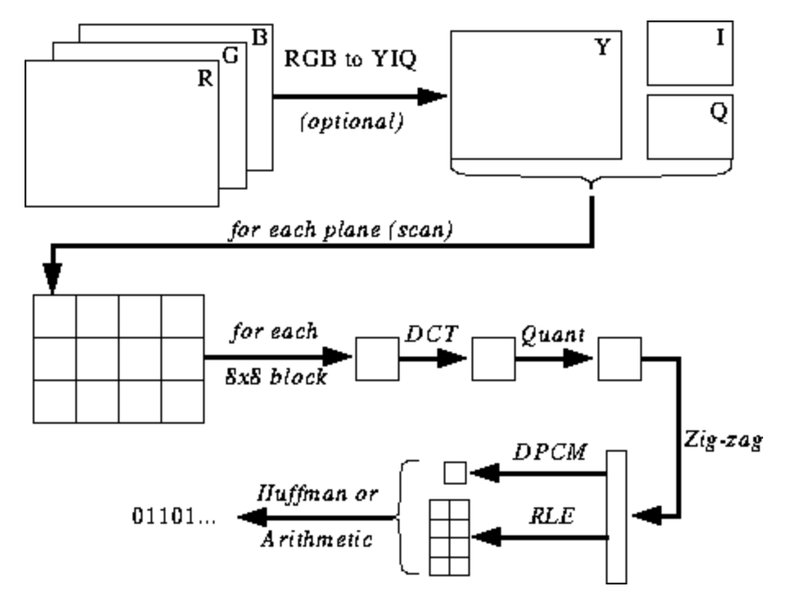
- The process of JPEG compression and its relation to DQT and DHT markers?
- Advanced techniques for hiding data in JPEG files using marker segments?
Referenced Search Results
 www.media.mit.edu