
Unlocking Granular Control: Advanced Keycloak Role-Based Authorization in .NET
Mastering sophisticated access control with Keycloak's powerful features seamlessly integrated into your .NET applications.
Implementing robust security is paramount in modern application development. Keycloak, an open-source Identity and Access Management (IAM) solution, offers powerful capabilities for managing user identities and controlling access to resources. When combined with .NET, particularly ASP.NET Core, developers can implement advanced Role-Based Access Control (RBAC) strategies that go beyond simple role checks. This guide explores how to leverage Keycloak's sophisticated authorization services to build secure and flexible .NET applications.
Key Highlights of Advanced Keycloak RBAC in .NET
- Centralized Management: Keycloak provides a central platform for defining and managing roles, permissions, and policies, simplifying authorization logic across multiple .NET applications and services.
- Fine-Grained Control: Beyond basic roles, Keycloak enables the creation of detailed authorization policies based on attributes, scopes, and even custom logic, allowing for highly specific access rules.
- Seamless .NET Integration: Dedicated .NET libraries, such as
Keycloak.AuthServices.Authorization, facilitate the integration process, enabling .NET applications to consume Keycloak roles and enforce policies effectively.
Understanding Keycloak's Authorization Architecture
Keycloak's strength lies in its comprehensive authorization services, which allow for defining precise access control mechanisms. To effectively use it with .NET, understanding its core components is crucial.
Core Components in Keycloak
Realms
A realm in Keycloak acts as an isolated administrative domain. It manages a set of users, credentials, roles, and clients. Each realm is self-contained, meaning users, roles, and clients defined in one realm are not accessible in another, providing a strong foundation for multi-tenancy or separating different application environments.
Clients
Clients are entities that can request Keycloak to authenticate a user. In the context of .NET, your ASP.NET Core application or API would be registered as a client in a Keycloak realm. Clients can have their own specific roles and authorization settings.
Roles: The Cornerstone of RBAC
Keycloak supports two primary types of roles:
- Realm Roles: These are global roles within a realm, applicable to any client within that realm. For example, a
global_adminrole could grant administrative privileges across multiple applications. - Client Roles: These roles are specific to a particular client. For instance, an
order_managerrole might only exist and apply within an e-commerce client application. This allows for more granular, application-specific permissions.
Roles can be assigned directly to users or mapped to groups. Users inherit roles assigned to their groups.
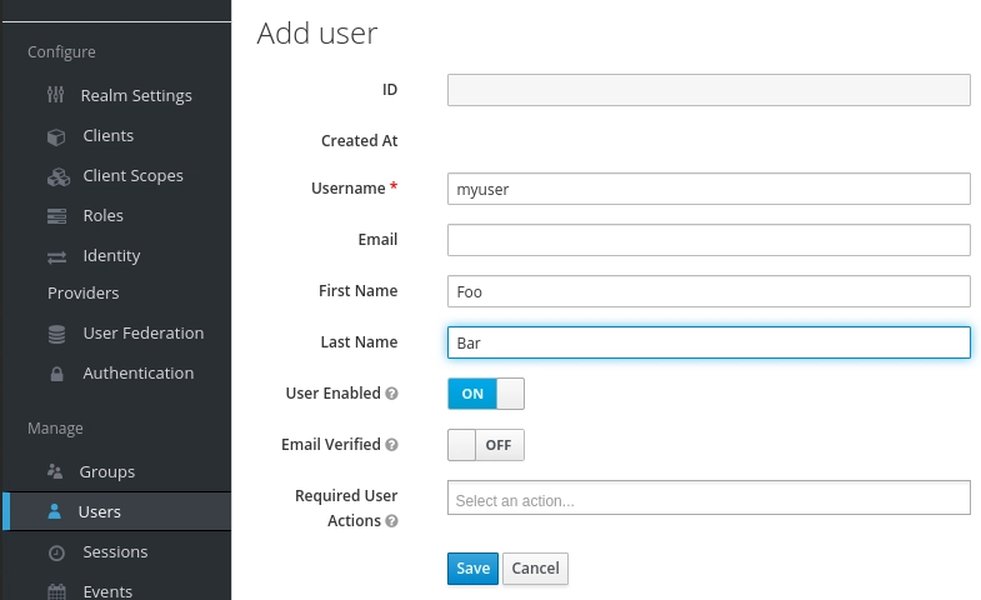
Assigning roles to a user within the Keycloak Admin Console.
Policies and Permissions
Keycloak's Authorization Services enable defining sophisticated authorization policies:
- Policies: These are the conditions under which access is granted or denied. Keycloak supports various policy types, including role-based, user-based, time-based, and even JavaScript-based policies for custom logic. For example, a policy might state "Allow access if the user has the 'editor' role AND the current time is within business hours."
- Permissions: Permissions associate protected resources (e.g., API endpoints, UI components) with authorization policies. A permission might link a specific API endpoint like
/api/articles/{id}(resource) with a policy requiring thearticle_viewerrole.
When a user attempts to access a protected resource, Keycloak evaluates the associated permissions and policies to make an authorization decision.
Setting Up Keycloak for .NET Integration
Proper configuration in Keycloak is the first step towards implementing advanced RBAC in your .NET application.
Initial Keycloak Configuration
- Install and Run Keycloak: Ensure you have a running Keycloak instance. This can be achieved using Docker, standalone distributions, or cloud-based deployments.
- Create a Realm: In the Keycloak Admin Console, create a new realm for your application (e.g.,
my-dotnet-app-realm). - Create a Client: Within your realm, register your .NET application as a client.
- Set the
Client ID(e.g.,my-dotnet-api). - Choose an appropriate
Client Protocol(typicallyopenid-connect). - Set the
Access Typetoconfidentialfor server-side applications that can securely store a client secret. For public clients like SPAs,publicis used. - Configure
Valid Redirect URIsandWeb Originsas needed for your .NET application.
- Set the
- Define Roles:
- Navigate to
Realm RolesorClient Roles(under your client's settings) to create roles such asadmin,user,editor, etc.
- Navigate to
- Assign Roles to Users: Go to the
Userssection, select a user, and use theRole Mappingstab to assign the defined realm or client roles. - Configure Role Mappers for Tokens: To ensure .NET can easily consume roles, you might need to configure mappers for your client or client scopes. By default, Keycloak includes roles in the
realm_accessandresource_accessclaims in the JWT. Ensure these are in a format (often an array of strings) that .NET's authorization middleware can interpret. Keycloak's built-in claims transformers can help map roles to standard claim types likerole.
Integrating Keycloak Authorization with .NET
Once Keycloak is configured, the next step is to integrate it with your ASP.NET Core application.
Essential NuGet Packages
To streamline the integration, you'll typically use libraries designed for Keycloak and .NET:
Keycloak.AuthServices.Authentication: For handling authentication against Keycloak.Keycloak.AuthServices.Authorization: For leveraging Keycloak's authorization services and defining policies based on Keycloak roles and permissions.
Configuring Authentication and Authorization in Program.cs
In your ASP.NET Core application's Program.cs (or Startup.cs for older versions), you need to configure the authentication and authorization services.
// Program.cs (ASP.NET Core 6+)
var builder = WebApplication.CreateBuilder(args);
var services = builder.Services;
var configuration = builder.Configuration;

// 1. Add Keycloak Authentication
services.AddKeycloakWebApiAuthentication(configuration, options =>
{
    // Optional: Configure token validation parameters if needed
    // options.TokenValidationParameters.ValidIssuer = "your-keycloak-realm-url";
});

// 2. Add Authorization services and Keycloak-specific authorization
services.AddAuthorization(options =>
{
    // Example: Policy requiring a realm role
    options.AddPolicy("RequireUserRealmRole", policy =>
        policy.RequireRealmRoles("user")); // Assumes 'user' is a realm role

    // Example: Policy requiring a client role from a specific client
    options.AddPolicy("RequireAdminClientRole", policy =>
        policy.RequireResourceRoles("admin", "my-dotnet-api")); // Assumes 'admin' is a role in client 'my-dotnet-api'

    // Example: Policy combining multiple role requirements
    options.AddPolicy("AdminAndEditor", policy =>
    {
        policy.RequireRealmRoles("editor");
        policy.RequireResourceRoles("admin", "my-dotnet-api"); // Client role from 'my-dotnet-api'
    });
})
.AddKeycloakAuthorization(configuration); // Integrates Keycloak's policy enforcement

// Add other services (Controllers, etc.)
services.AddControllers();

var app = builder.Build();

// Configure the HTTP request pipeline.
if (app.Environment.IsDevelopment())
{
    app.UseSwagger();
    app.UseSwaggerUI();
}

app.UseHttpsRedirection();

// 3. Enable Authentication and Authorization middleware
app.UseAuthentication();
app.UseAuthorization();

app.MapControllers();

app.Run();
Role Claims Transformation
The Keycloak.AuthServices.Authentication library often includes a KeycloakRolesClaimsTransformation. This component is crucial as it maps roles from Keycloak's JWT (typically found in realm_access.roles or resource_access.{client_id}.roles) into claims that ASP.NET Core's authorization system understands (usually by creating claims of type ClaimTypes.Role or a custom role claim type). You can configure whether realm roles, client roles, or both are used as the source for these .NET role claims, often via appsettings.json:
{
  "Keycloak": {
    "realm": "my-dotnet-app-realm",
    "auth-server-url": "http://localhost:8080/auth/",
    "ssl-required": "none",
    "resource": "my-dotnet-api", // Client ID
    "credentials": {
      "secret": "your-client-secret"
    },
    "RolesSource": "ResourceAccess" // Or "Realm" or "Both"
  }
}
Securing Endpoints with Policies
Once policies are defined, you can apply them to your controllers or action methods using the [Authorize] attribute.
using Microsoft.AspNetCore.Authorization;
using Microsoft.AspNetCore.Mvc;

[ApiController]
[Route("api/[controller]")]
public class DataController : ControllerBase
{
    [HttpGet("public")]
    public IActionResult GetPublicData()
    {
        return Ok(new { Message = "This is public data." });
    }

    [HttpGet("user-only")]
    [Authorize(Policy = "RequireUserRealmRole")] // Protected by realm role policy
    public IActionResult GetUserData()
    {
        return Ok(new { Message = "This data is for users with the 'user' realm role." });
    }

    [HttpGet("admin-only")]
    [Authorize(Policy = "RequireAdminClientRole")] // Protected by client role policy
    public IActionResult GetAdminData()
    {
        return Ok(new { Message = "This data is for admins with the 'admin' client role for this application." });
    }

    [HttpPost("sensitive-action")]
    [Authorize(Policy = "AdminAndEditor")] // Protected by combined policy
    public IActionResult PerformSensitiveAction([FromBody] string data)
    {
        // Logic for sensitive action
        return Ok(new { Message = $"Sensitive action performed with data: {data}" });
    }
}
Visualizing Keycloak RBAC Components
A mindmap can help illustrate the relationships between the core components involved in Keycloak RBAC and its integration with a .NET application.
This mindmap outlines the journey from setting up Keycloak, defining roles and policies, to integrating with the .NET application, and finally, the flow of an authenticated and authorized request.
Comparing Keycloak RBAC Features
The following radar chart provides a qualitative comparison of different aspects and capabilities within Keycloak's RBAC and related authorization features when applied in a .NET context. The scores (1-5, where 5 is highest/best) reflect general characteristics and ease of use for developers.
This chart highlights Keycloak's strengths in basic RBAC setup and role management, along with solid .NET library support. While fine-grained policies and ABAC are powerful, they can introduce more complexity in setup and integration.
Advanced Considerations and Best Practices
To truly harness Keycloak's power for advanced authorization, consider the following:
Fine-Grained Permissions with Resources and Scopes
Keycloak's Authorization Services allow you to define permissions not just based on roles, but also on specific resources (e.g., an API endpoint /products/123, a specific file) and scopes (e.g., read, write, delete operations on a resource). This enables a much more granular access control model than simple role assignments.
- Define resources in your Keycloak client's "Authorization" tab.
- Define scopes associated with these resources.
- Create policies (role-based, attribute-based, etc.) and then create permissions that link resources, scopes, and policies.
Your .NET application can then request specific permissions (resource and scope) and Keycloak will issue a RPT (Requesting Party Token) if the user is authorized, which can be validated by the resource server (.NET API).
Combining RBAC with Attribute-Based Access Control (ABAC)
While RBAC is about "what a user *is* (their role)," ABAC is about "what a user *has* (attributes)." Keycloak allows you to create policies based on user attributes, client attributes, or even attributes from the HTTP request. For example, a policy could grant access if user.department == 'Finance' and request.ip_address is within a certain range. This can be combined with RBAC for highly contextual authorization decisions.
Realm Roles vs. Client Roles: A Practical Comparison
Understanding when to use Realm Roles versus Client Roles is key for a well-structured authorization setup.
| Feature | Realm Roles | Client Roles |
|---|---|---|
| Scope | Global within the realm, visible to all clients. | Specific to a single client. Not visible to other clients unless explicitly mapped. |
| Use Case | General roles applicable across multiple applications (e.g., super_admin, auditor). |
Application-specific roles (e.g., document_editor for a specific document management app, order_processor for an e-commerce app). |
| Namespace | Globally unique within the realm. | Namespaced by the client. Different clients can have roles with the same name (e.g., admin role for Client A, admin role for Client B). |
| Token Claim | Typically appear in realm_access.roles in the JWT. |
Typically appear in resource_access.{client_id}.roles in the JWT. |
| Management Complexity | Simpler for roles that are truly global. | Allows for more fine-grained control and avoids polluting the global role namespace. Can be more complex if many clients have similar but distinct roles. |
Choosing between them depends on the granularity and scope of the permissions you need to define.
Multi-Tenancy
For multi-tenant .NET applications, Keycloak offers several approaches:
- Separate Realms per Tenant: Provides strong isolation but can be complex to manage if there are many tenants or cross-tenant access is needed.
- Single Realm with Scoped Roles/Attributes: Use client roles, groups, or user attributes to distinguish tenants and apply policies accordingly. This is often more manageable for a large number of tenants.
.NET Aspire Integration
.NET Aspire, a cloud-native stack for .NET, simplifies the development and deployment of distributed applications. It includes support for integrating Keycloak, allowing developers to easily spin up Keycloak instances during development and configure services to use Keycloak for authentication and authorization, streamlining the setup for RBAC in microservice architectures.
Best Practices
- Minimize Hardcoded Roles in .NET: Rely on Keycloak for role and policy definitions. Your .NET code should consume these dynamically.
- Use Client Scopes for Token Customization: Manage which claims (including roles) are included in tokens through client scopes in Keycloak.
- Inspect JWTs: Use tools like jwt.io to understand the structure of tokens issued by Keycloak and ensure your .NET application is correctly interpreting role claims.
- Thorough Testing: Test all authorization policies rigorously with various user roles and scenarios.
- Enable Consent: For applications handling sensitive data, configure Keycloak to require user consent before assigning certain roles or granting access to scopes.
Video Guide: RBAC with Keycloak and ASP.NET Core
For a visual walkthrough and practical demonstration of setting up role-based authorization with Keycloak in an ASP.NET Core application, the following video provides valuable insights. It covers aspects like configuring Keycloak, setting up roles, and integrating with an ASP.NET Core Web API and Blazor WASM application.
This video demonstrates how to configure Keycloak, define roles, and then use those roles within an ASP.NET Core application to protect API endpoints. It also touches upon how a client application (Blazor WASM) can interact with the secured API based on the user's roles.
Frequently Asked Questions (FAQ)
What is the main difference between realm roles and client roles in Keycloak?
How can I ensure Keycloak roles are correctly interpreted by my .NET application?
roles or specific claims like realm_access.roles and resource_access.CLIENT_ID.roles. The Keycloak.AuthServices.Authentication library for .NET typically handles the transformation of these claims into .NET Identity roles. Check the RolesSource configuration in your appsettings.json.Can I combine role-based access with other conditions in Keycloak?
How do I handle dynamic roles or permissions that change frequently?
Is it possible to implement fine-grained permissions beyond just roles with Keycloak and .NET?
Conclusion
Integrating Keycloak for advanced role-based authorization in .NET applications provides a powerful, flexible, and centralized approach to security. By leveraging Keycloak's concepts of realms, clients, realm/client roles, and its sophisticated Authorization Services, developers can implement fine-grained access control that goes far beyond simple role checks. With dedicated .NET libraries simplifying the integration, securing .NET applications with Keycloak becomes a manageable task, enabling the development of robust and secure systems that can adapt to complex authorization requirements.
Recommended Further Exploration
- Learn how to implement Attribute-Based Access Control (ABAC) strategies using Keycloak in conjunction with your .NET Core applications.
- Explore best practices for securing a microservices architecture built with .NET using Keycloak's comprehensive Authorization Services.
- Discover different patterns and strategies for implementing multi-tenancy in .NET applications using Keycloak.
- Find out how to customize JWT claims issued by Keycloak to support advanced and specific authorization needs within your .NET applications.