
Unlocking Seamless Document Processing: Essential Prerequisites for KODAK Info Input Solution on Azure
A complete guide to deploying intelligent document capture in Microsoft's cloud environment
What You Need To Know
- Azure foundations: An active subscription, resource provisioning knowledge, and basic cloud architecture understanding are essential starting points
- Integration capabilities: KODAK Info Input Solution leverages Azure AI services for intelligent document processing and data extraction
- Security configuration: Proper network setup, authentication mechanisms, and compliance considerations ensure secure document processing
Azure Cloud Fundamentals for KODAK Info Input
KODAK Info Input Solution, a powerful document capture and processing platform, can be effectively deployed and utilized within the Microsoft Azure cloud environment. This integration combines KODAK's intelligent document processing capabilities with Azure's robust cloud infrastructure, creating a scalable and efficient solution for organizations of all sizes.
Core Azure Infrastructure Requirements
Before deploying KODAK Info Input Solution on Azure, you need to establish the following foundational elements:
- Azure Subscription: An active Azure subscription is the foundation of your cloud infrastructure. This provides access to all the necessary Azure services and resources.
- Resource Groups: Create dedicated resource groups to organize and manage all the Azure resources associated with your KODAK Info Input deployment.
- Virtual Network (VNet): Configure a Virtual Network to ensure secure communication between your KODAK Info Input components and other Azure resources. This VNet must be referenced in the NetworkConfiguration section of your configuration files.
- Storage Accounts: Set up appropriate Azure Storage accounts for storing documents and data processed by KODAK Info Input Solution.
Compute and Hosting Options
KODAK Info Input Solution can be deployed using various Azure compute services:
Virtual Machines
For traditional deployment models, Azure Virtual Machines provide a flexible infrastructure with complete control over the operating system and environment. When choosing VMs, consider:
- Appropriate VM sizes based on expected document processing volumes
- Operating system compatibility with KODAK Info Input Solution
- High availability configurations for production environments
Container Services
For more modern, scalable deployments, KODAK Info Input Solution can be containerized and deployed using:
- Azure Kubernetes Service (AKS) for orchestrating containerized applications
- Azure Container Instances for simpler deployments
- Azure App Service for PaaS-based web application hosting
Identity and Access Management
Proper identity management is crucial for secure access to your KODAK Info Input Solution in Azure.
Microsoft Entra ID Integration
Microsoft Entra ID (formerly Azure Active Directory) serves as the identity backbone for your Azure deployment:
- Configure Microsoft Entra ID for user authentication and authorization
- Implement role-based access control (RBAC) to govern user permissions
- For hybrid environments, deploy Microsoft Entra Connect to synchronize with on-premises Active Directory
Application Authentication
Secure service-to-service communication requires proper application authentication:
- Register KODAK Info Input Solution as an application in Microsoft Entra ID
- Configure application permissions and consent workflows
- Implement secure credential management using Azure Key Vault
| Authentication Method | Use Case | Configuration Complexity | Security Level |
|---|---|---|---|
| Client Secret | Service-to-service authentication | Low | Moderate |
| Certificate Authentication | Enhanced service-to-service security | Medium | High |
| Managed Identity | Azure-hosted applications | Low | Very High |
| Interactive User Authentication | End-user access | Low | Varies based on policies |
Networking and Security Configuration
A secure network configuration is essential for protecting your document processing workflows in Azure.
Network Security
Implement comprehensive network security measures:
- Network Security Groups (NSGs): Configure NSGs to control inbound and outbound traffic to your KODAK Info Input components
- Private Endpoints: Use Azure Private Link to access Azure PaaS services privately
- Azure Firewall: Consider implementing Azure Firewall for enhanced network protection
- Web Application Firewall (WAF): Protect web-facing components with Azure WAF
Data Security
Protect sensitive documents and data throughout the processing lifecycle:
- Encryption at Rest: Enable storage encryption for all data at rest
- Encryption in Transit: Configure TLS/SSL for all network communications
- Key Management: Use Azure Key Vault for secure key management
This radar chart illustrates the relative resource requirements for different scales of KODAK Info Input Solution deployments on Azure, helping organizations plan their infrastructure needs accordingly.
Azure AI Integration for KODAK Info Input Solution
One of the key advantages of deploying KODAK Info Input Solution on Azure is the ability to leverage Azure's powerful AI services for enhanced document processing capabilities.
Azure Document Intelligence Integration
KODAK Info Input Solution can integrate with Azure Document Intelligence (formerly Form Recognizer) to enhance document processing:
- Automated data extraction from documents using prebuilt and custom models
- Intelligent document classification to streamline workflows
- OCR capabilities for text extraction from images and scanned documents
This video demonstrates how to connect and consume Microsoft Azure AI Document Intelligence with Kodak solutions, showcasing the integration capabilities that enhance document processing workflows.
Azure OpenAI Service
For advanced document analysis and understanding, KODAK Info Input Solution can leverage Azure OpenAI Service:
- Natural language understanding for document context comprehension
- Information extraction from unstructured documents
- Automated summarization of document content
Mindmap: KODAK Info Input Solution Azure Deployment Components
The following mindmap illustrates the key components and their relationships when deploying KODAK Info Input Solution on Azure:
This mindmap provides a visual representation of the key components needed for a successful KODAK Info Input Solution deployment on Azure, illustrating how these elements interconnect within the cloud ecosystem.
Relevant Images
The following images provide visual context for KODAK Info Input Solution deployment in Azure:
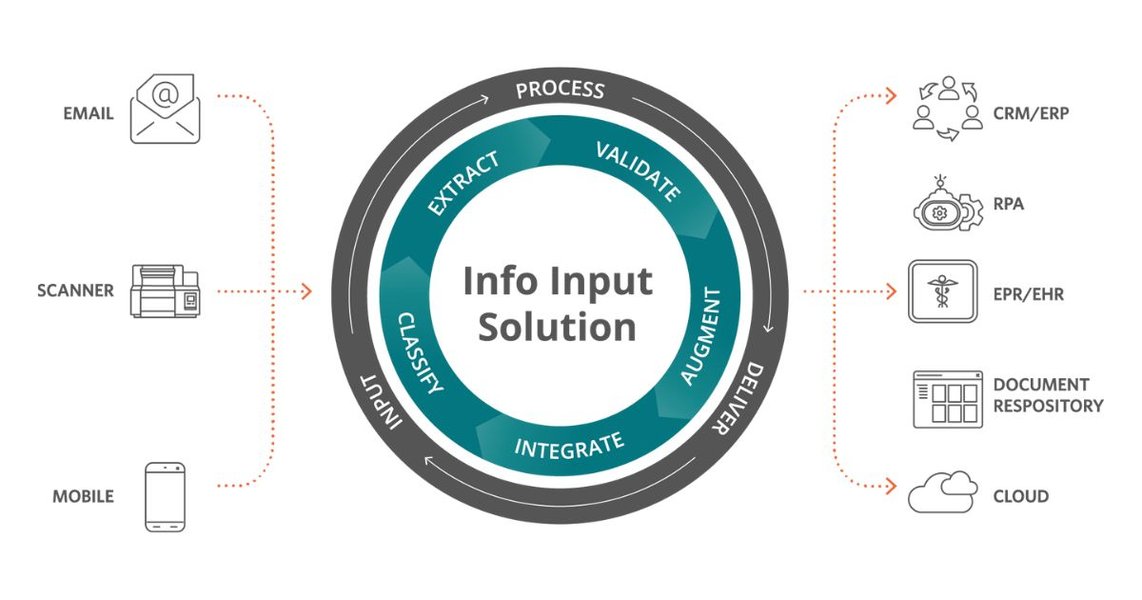
The KODAK Info Input Solution interface showcasing document processing capabilities. This web-based interface can be accessed through Azure-hosted deployment.
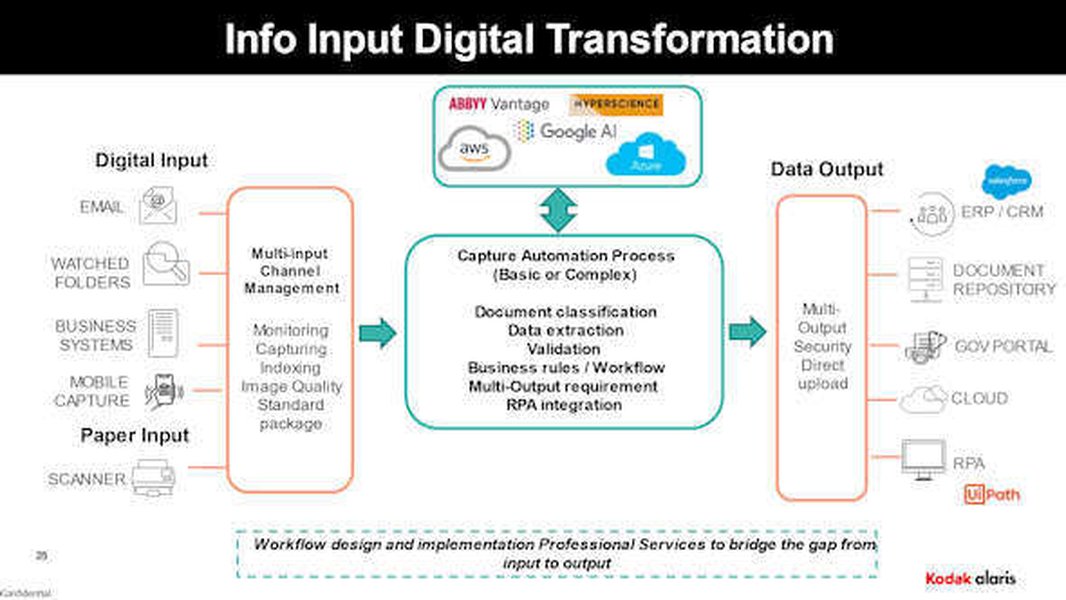
KODAK Info Input Solution architecture diagram showing how the solution components interact in a cloud environment like Azure.
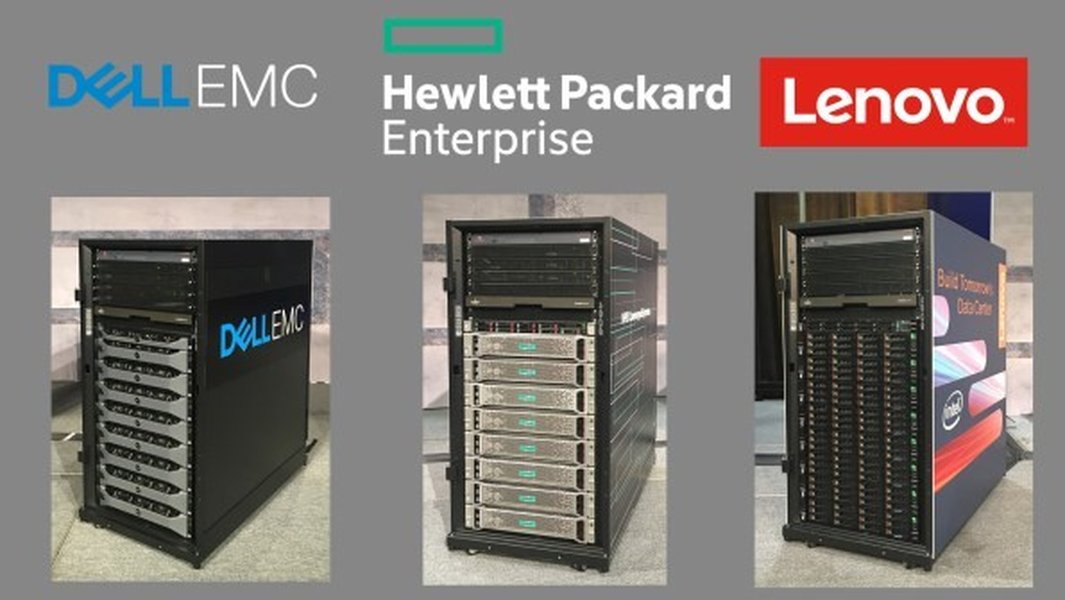
Azure integrated systems that can host solutions like KODAK Info Input, showing the physical infrastructure that powers cloud services.
Recommended Implementation Process
When deploying KODAK Info Input Solution on Azure, follow this proven implementation process:
Planning Phase
- Assess document processing needs and volumes
- Define security and compliance requirements
- Design Azure infrastructure architecture
- Plan for integration with existing systems
Deployment Phase
- Provision Azure resources according to the architectural design
- Configure networking and security components
- Deploy KODAK Info Input Solution on the selected compute platform
- Integrate with Azure AI services for enhanced processing capabilities
Testing and Validation
- Verify end-to-end document processing workflows
- Test security controls and access permissions
- Validate performance under expected load conditions
- Confirm integration points with other systems are functioning correctly
Operational Considerations
- Implement monitoring and alerting with Azure Monitor
- Set up backup and disaster recovery procedures
- Document operational processes and runbooks
- Train administrators and end-users
Frequently Asked Questions
References
- Azure Virtual Desktop Prerequisites - Microsoft Learn
- Cloud Services Extended Support Prerequisites - Microsoft Learn
- KODAK Info Input Solution - Kodak Alaris
-
KODAK Info Input Solution Support, Drivers and Manuals - Kodak Alaris
- Microsoft Azure Fundamentals: Describe Cloud Concepts - Microsoft Learn
- Microsoft Entra Connect Prerequisites - Microsoft Learn
Recommended Searches
Last updated April 8, 2025