
Unveiling the Automatic Fallback: Why Your Jetson Reverted to Stock Kernel Without extlinux.conf Directives
Exploring the sophisticated boot resilience mechanisms inherent in NVIDIA's Linux4Tegra (L4T) that prioritize system stability.
When your custom Linux4Tegra (L4T) 32.7.6 kernel failed to boot on an NVIDIA Jetson device, it's understandable to be perplexed when the system automatically reverted to the stock kernel, especially if you hadn't configured such a fallback in the extlinux.conf file. This behavior, while seemingly uncommanded, is a deliberate and crucial feature of the Jetson platform's boot architecture, designed to ensure system recoverability and robustness. Let's delve into the reasons behind this intelligent fallback.
Key Insights: The Pillars of L4T's Boot Resilience
- Automatic A/B Slot Fallback: NVIDIA Jetson platforms commonly implement a dual-slot (A/B) boot partition system. If the kernel or other critical boot components on the currently active slot (e.g., "Slot A" with your custom kernel) encounter a critical failure, the bootloader firmware can automatically switch to the alternate slot (e.g., "Slot B"), which typically houses a known-good, factory-shipped stock kernel.
- Bootloader-Level Failure Detection and Recovery: The fallback is orchestrated at a low level by the platform's bootloader (such as CBoot or the L4TLauncher EFI application). This bootloader actively monitors the boot process. If it detects a severe issue like a kernel panic, unrecoverable error, or repeated boot failures (often after a set number of retries, e.g., three), it initiates a recovery sequence that includes attempting to boot from the alternate slot. This process operates independently of, and at a lower level than, the
extlinux.conffile. - The Limited Scope of
extlinux.conf: Theextlinux.conffile is a configuration file used by the bootloader (when booting from the *current* slot) to define specific boot entries, including the kernel image path, initial RAM disk (initrd), device tree blob (DTB) location, and kernel command-line arguments. However, it does not govern the A/B slot management or the fundamental fallback strategies embedded within the bootloader's firmware logic. Thus, its lack of an explicit fallback entry doesn't prevent the system-level mechanism from activating.
The Anatomy of an Automatic Kernel Fallback
The journey from a failed custom kernel boot to a successful stock kernel boot involves several sophisticated layers within the L4T environment. Understanding these layers reveals why the fallback occurred seamlessly, even without explicit directives in extlinux.conf.
The A/B Redundancy System: Your Jetson's Safety Net
At the heart of L4T's resilience is the A/B redundancy system for boot components. This architecture is standard in many modern embedded systems, including NVIDIA Jetson devices, to safeguard against failed updates or corruptions rendering the device unbootable.

Over-The-Air (OTA) update systems for NVIDIA BSPs often rely on robust boot mechanisms like A/B redundancy.
How A/B Slots Work
The system maintains two parallel sets of partitions for critical boot software, often referred to as Slot A and Slot B. These slots can contain distinct versions of the bootloader, kernel, device tree, and other essential root filesystem components.
- One slot is designated as "active" (e.g., Slot A, where your custom kernel was likely installed). The system attempts to boot from this slot by default.
- The other slot ("inactive," e.g., Slot B) typically holds a stable, known-good version of the software, often the stock kernel and components that came with the original JetPack/L4T flashing.
The management of these slots, including which slot is active and the conditions for switching, is handled by low-level firmware and tools like nvbootctrl. If the boot process from the active slot fails repeatedly, the firmware automatically marks the active slot as unbootable and switches the active designation to the other slot, then reboots. This is precisely what allows the system to fall back to the stock kernel.
Boot Failure Detection: The Watchful Eye of the Bootloader
The L4T bootloader (which could be CBoot or the UEFI-based L4TLauncher, depending on the Jetson platform and L4T version) is more than just a program loader; it's an intelligent gatekeeper.
Mechanisms for Detecting Failure
- Kernel Panics: If your custom L4T 32.7.6 kernel encountered a fatal error early in its initialization sequence (a "kernel panic"), it would signal an abnormal termination. The bootloader can detect this state.
- Boot Timeouts: A watchdog timer or a similar mechanism monitors the boot process. If the kernel fails to reach a certain stage of initialization within a predefined timeframe, it's considered a failed boot.
- Repeated Failures: The system often keeps a boot attempt counter for the current slot. By default, if a slot fails to boot successfully (e.g., 3 consecutive times), it's deemed unreliable, triggering the switch to the alternate slot.
Once a critical failure is detected and the retry limit for the current slot is exhausted, the bootloader's internal logic initiates the fallback procedure. This is a built-in safety feature designed to prevent the device from becoming "bricked."
The Role (and Limitations) of extlinux.conf
The extlinux.conf file, typically located in /boot/extlinux/ on the root filesystem of the active slot, plays a specific role in defining boot configurations for *that particular slot*. It allows you to specify which kernel image to load, the associated initrd and device tree, and kernel command-line parameters.
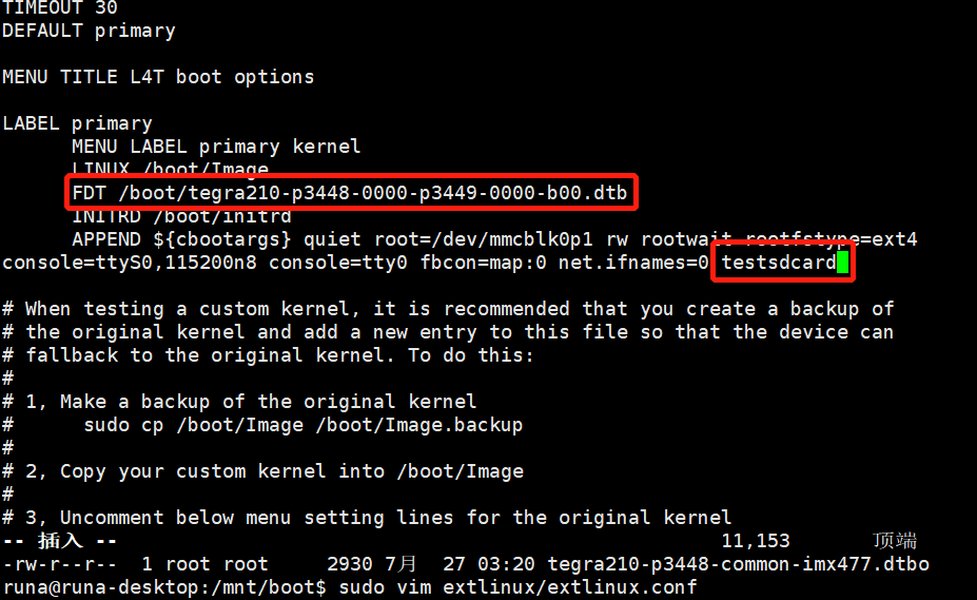
An example extlinux.conf file, showing boot entries for different kernel configurations.
Why extlinux.conf Doesn't Control A/B Fallback
- Scope of Control:
extlinux.confoperates *within* the context of a boot attempt from the currently selected slot. It tells the bootloader what to do if it successfully reads that file from that slot. - Lower-Level Mechanisms: The A/B slot switching and the decision to mark a slot as unbootable occur at a lower level in the boot chain, managed by the boot ROM, firmware, and bootloader components like
nvbootctrl, even beforeextlinux.confis fully parsed or its directives are acted upon if the kernel it points to is faulty. - Error Handling Precedence: If the kernel specified in
extlinux.confleads to a panic or boot loop, the bootloader's error detection and A/B fallback logic take precedence over the contents ofextlinux.conf. The file itself doesn't instruct the system on how to handle a catastrophic failure of its own specified kernel.
Essentially, extlinux.conf is for configuring a *successful* boot path on a given slot, not for managing inter-slot recovery from critical failures.
L4TLauncher and Other Bootloader Components
On more recent Jetson platforms, the L4TLauncher EFI application plays a significant role in the boot process. It's responsible for locating and interpreting extlinux.conf. However, it also possesses its own internal logic.
L4TLauncher's Behavior
If L4TLauncher cannot find or process extlinux.conf correctly (e.g., due to filesystem issues, corruption, or syntax errors), or if the kernel specified within it fails catastrophically, L4TLauncher might attempt alternative boot strategies. This can include a "Direct Boot" or "Kernel Boot" attempt, where it tries to load a kernel from a predefined, known-good location. This, combined with the A/B slot mechanism, ensures multiple layers of fallback.
The overall boot process on a Jetson device is a multi-stage affair, starting from the Boot ROM, proceeding through various bootloader stages (like CBoot), and eventually involving L4TLauncher or U-Boot to load the Linux kernel. The A/B failover mechanisms are integrated throughout these early stages to ensure maximum resilience.
Visualizing Boot Resilience Factors
The resilience of the Jetson boot process depends on several interconnected factors. The radar chart below illustrates a conceptual comparison of these factors under different boot scenarios. A higher score indicates a stronger positive contribution to successful booting or recovery.
This chart highlights how, during a custom kernel failure, the A/B redundancy and firmware resilience shine, compensating for the failed kernel's integrity. The extlinux.conf compliance becomes less relevant as the system prioritizes recovery.
Mapping the Fallback Process
To better visualize the sequence of events leading to the stock kernel boot, consider the following mindmap. It outlines the decision points and mechanisms involved when a custom kernel fails on an L4T system.
(e.g., Kernel Panic, Timeout, Corruption)"] id1b1["Bootloader Detects Critical Failure"] id1b1a["A/B Redundancy System Activated"] id1b1a1["Boot Attempt Counter Exceeded for Active Slot"] id1b1a2["System Switches to Alternate Boot Slot (e.g., Slot B)"] id1b1a3["Alternate Slot Contains Stock Kernel"] id1b1b["Bootloader's Intrinsic Fallback Logic"] id1b1b1["Attempts to Load Known-Good Kernel from Default Location"] id2["Role of extlinux.conf"] id2a["Defines Boot Parameters for Active Slot's Custom Kernel"] id2b["No Explicit Fallback Kernel Configured by User"] id2c["Bypassed by Lower-Level Firmware/Bootloader Recovery"] id3["Outcome"] id3a["System Successfully Boots Stock Kernel"] id3b["Device Remains Operational for Recovery/Troubleshooting"]
This mindmap illustrates that the failure of the custom kernel triggers a distinct recovery path managed by the bootloader and A/B system, a path that operates largely independently of the extlinux.conf file's specific entries for the failed kernel.
Understanding Bootloader Responses
The bootloader's behavior adapts based on the state of the kernel and system configuration. The table below summarizes how different scenarios influence the boot process and the role of various components, particularly in your L4T 32.7.6 environment.
| Scenario | Primary Kernel Source | Bootloader Action Upon Boot | A/B System Role | extlinux.conf Influence |
Outcome |
|---|---|---|---|---|---|
| Nominal Custom Kernel Boot | Custom Kernel (specified in extlinux.conf) |
Reads extlinux.conf from the active slot, loads specified kernel, initrd, and DTB. Applies kernel arguments. |
Boots from the currently active slot (e.g., Slot A). | Crucial: Defines the kernel image, parameters, initrd, and DTB for the primary boot attempt. | Successful boot into the custom kernel environment. |
| Custom Kernel Fails (e.g., Panic, Corruption) | Custom Kernel (intended via extlinux.conf on active slot) |
Detects boot failure (e.g., kernel panic, boot loop, timeout) typically after a set number of retries (e.g., 3 times). | Automatically marks the current (e.g., Slot A) as unbootable and switches to the alternate slot (e.g., Slot B). Initiates boot from Slot B. | The extlinux.conf on Slot A (for the failed kernel) is effectively bypassed. Slot B may have its own extlinux.conf for the stock kernel or use default boot parameters. |
Successful fallback to the stock kernel on the alternate slot. |
extlinux.conf Not Found or Corrupt on Active Slot |
N/A (configuration unreadable) | L4TLauncher (or equivalent) may be unable to parse extlinux.conf. It might then attempt a "Direct Kernel Boot" or default to a known kernel image on the current slot if available. |
If direct boot on the current slot also fails, A/B fallback to the alternate slot might still occur. | Cannot be processed; bootloader relies on internal defaults or predefined paths for the current slot. | Potential fallback to a default kernel on the current slot, or eventually to the stock kernel on the alternate slot if all else fails. |
| Post-Fallback Stock Kernel Boot | Stock Kernel (from the now-active backup slot, e.g., Slot B) | Loads the stock kernel and associated components from Slot B, potentially using Slot B's own extlinux.conf or default parameters. |
The system is now operating from the backup slot (Slot B), which has become the active slot. | The extlinux.conf from the original failed slot (Slot A) is not used. |
Successful boot into the stock kernel environment, allowing for system access and troubleshooting. |
This table clarifies that the fallback mechanism is a robust, multi-layered defense against boot failures, with the A/B system and bootloader intelligence playing pivotal roles that supersede extlinux.conf when critical errors occur.
Frequently Asked Questions (FAQ)
Can I disable this automatic A/B fallback behavior?
nvbootctrl or similar tools) to manage boot slots or retry counts, completely disabling the fallback could increase the risk of bricking the device if a boot-critical update fails. It's a core part of the Jetson platform's resilience strategy.How does the system determine that the stock kernel is "good" or "stable"?
How many failed boot attempts usually trigger the A/B fallback?
nvbootctrl (e.g., checking num_slots and retry counts for each slot), though modification should be approached with caution.Where can I find logs related to the custom kernel failure and the subsequent fallback?
If extlinux.conf isn't involved in the fallback, what is its primary purpose then?
extlinux.conf is to provide a human-readable and configurable way to define boot entries for the *currently active boot slot*. For a given slot, it tells the bootloader (like L4TLauncher) which kernel image file to load, which device tree blob (DTB) to use, the path to the initial RAM disk (initrd, if used), and any specific kernel command-line arguments needed for that particular boot configuration. It allows users to, for example, switch between different custom kernel versions or test different DTBs on the *same* boot slot, assuming that slot itself is bootable.Conclusion
In summary, the automatic fallback from your failed custom L4T 32.7.6 kernel to the stock kernel, despite no explicit fallback configuration in extlinux.conf, is a testament to the robust, multi-layered recovery mechanisms built into the NVIDIA Jetson platform. This behavior is primarily driven by the A/B boot redundancy system and the intelligent failure detection capabilities of the L4T bootloader. These features operate at a foundational level to ensure that your device can recover from critical boot issues, prioritizing system availability and preventing a "bricked" state. While extlinux.conf is important for defining boot parameters for a specific slot, the ultimate safety net is provided by these deeper, firmware-level protections.
Recommended Further Exploration
-
Learn how to use the
nvbootctrlutility to inspect the current A/B boot slot status and retry counts on your Jetson device. - Discover the best practices for safely updating custom kernels on NVIDIA Jetson platforms that utilize A/B partitioning.
- Find out how to access and interpret UART serial console logs to diagnose Jetson boot failures in detail.
-
Gain a deeper understanding of the L4TLauncher boot process and its interaction with
extlinux.confon newer NVIDIA Jetson platforms.