
Mastering Concurrency, Parallelism, and Asynchrony in Go with Go Fiber
Key Takeaways
- Understand the fundamental differences between concurrency, parallelism, and asynchrony in Go.
- Leverage Go's goroutines and channels to implement concurrent and parallel operations.
- Build a basic CRUD API using the Go Fiber framework, utilizing Go's concurrency features.
- Integrate a Support Vector Machine (SVM) using a Go-based SVM library within a Go Fiber application.
- Ensure thread safety and efficient request handling in concurrent environments.
Understanding Concurrency, Parallelism, and Asynchrony
In the realm of programming, especially in Go, understanding the nuances of concurrency, parallelism, and asynchrony is crucial for building efficient and scalable applications.
Concurrency
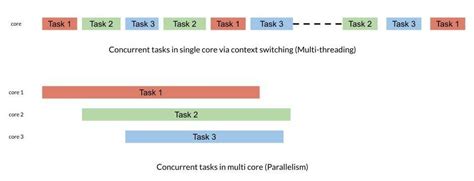
Concurrency refers to the composition of independently executing processes. It allows a program to handle multiple tasks by managing their execution over time, even if not simultaneously. In Go, concurrency is primarily achieved through goroutines and channels.
Parallelism
Parallelism involves the simultaneous execution of multiple tasks across multiple CPU cores. It is about performing computations truly at the same time, leveraging the hardware capabilities. Go's runtime scheduler facilitates parallelism by distributing goroutines across available CPU cores.
Asynchrony
Asynchrony is about performing tasks without blocking the main execution flow. It allows a program to initiate tasks and continue executing without waiting for those tasks to complete. In Go, asynchrony is naturally handled using goroutines, enabling non-blocking operations such as I/O processing.
Concurrency in Go
Goroutines
Goroutines are lightweight threads managed by Go's runtime. They allow functions to run concurrently with other functions, enabling efficient multitasking without the overhead of traditional threads.
Example: Basic Goroutine
package main

import (
    "fmt"
    "time"
)

func sayHello() {
    for i := 0; i < 5; i++ {
        fmt.Println("Hello")
        time.Sleep(500 * time.Millisecond)
    }
}

func main() {
    go sayHello()
    time.Sleep(3 * time.Second)
}
In this example, the sayHello function runs concurrently with the main program, printing "Hello" every half a second.
Channels
Channels are conduits through which goroutines communicate. They allow for the safe exchange of data between concurrent routines, facilitating synchronization and coordination.
Example: Using Channels
package main

import (
    "fmt"
    "time"
)

func sendMessages(ch chan string) {
    for i := 0; i < 5; i++ {
        ch <- "Message " + fmt.Sprint(i)
        time.Sleep(500 * time.Millisecond)
    }
    close(ch)
}

func receiveMessages(ch chan string) {
    for msg := range ch {
        fmt.Println(msg)
    }
}

func main() {
    ch := make(chan string)
    go sendMessages(ch)
    receiveMessages(ch)
}
Here, one goroutine sends messages to the channel, while another receives and prints them, demonstrating inter-goroutine communication.
Synchronization
When multiple goroutines access shared resources, synchronization mechanisms like mutexes and WaitGroups ensure data integrity and coordination.
Example: Using Mutex and WaitGroup
package main

import (
    "fmt"
    "sync"
    "time"
)

var (
    counter int
    mutex   sync.Mutex
    wg      sync.WaitGroup
)

func worker() {
    defer wg.Done()
    mutex.Lock()
    counter++
    fmt.Println("Counter:", counter)
    mutex.Unlock()
    time.Sleep(1 * time.Second)
}

func main() {
    for i := 0; i < 5; i++ {
        wg.Add(1)
        go worker()
    }
    wg.Wait()
    fmt.Println("Final Counter:", counter)
}
In this example, multiple goroutines increment a shared counter safely using a mutex, and the main goroutine waits for all workers to finish using a WaitGroup.
Parallelism in Go
Go’s Scheduler
Go's runtime scheduler manages the distribution of goroutines across available CPU cores, facilitating parallel execution. By default, Go sets GOMAXPROCS to the number of available CPU cores.
Example: Controlling Parallelism
package main

import (
    "fmt"
    "runtime"
    "sync"
)

func count(id int, wg *sync.WaitGroup) {
    defer wg.Done()
    for i := 0; i < 5; i++ {
        fmt.Printf("Goroutine %d: %d\n", id, i)
    }
}

func main() {
    runtime.GOMAXPROCS(2) // Limit to 2 OS threads
    var wg sync.WaitGroup
    for i := 1; i <= 4; i++ {
        wg.Add(1)
        go count(i, &wg)
    }
    wg.Wait()
    fmt.Println("Done")
}
This setup allows multiple goroutines to execute in parallel across two OS threads, demonstrating controlled parallelism.
Controlling Parallelism
Developers can adjust the level of parallelism by setting GOMAXPROCS or designing the program to limit concurrent operations, ensuring optimal resource usage.
| Setting | Description |
|---|---|
GOMAXPROCS |
Determines the maximum number of OS threads that can execute user-level Go code simultaneously. |
| Worker Pools | Limits the number of concurrent goroutines processing tasks, preventing resource exhaustion. |
Asynchrony in Go
Asynchronous Programming Patterns
Asynchrony in Go is achieved through goroutines and non-blocking operations. This allows tasks to be initiated and executed independently of the main program flow.
Example: Asynchronous HTTP Requests
package main

import (
    "fmt"
    "net/http"
    "io/ioutil"
    "time"
)

func fetch(url string, ch chan string) {
    resp, err := http.Get(url)
    if err != nil {
        ch <- fmt.Sprintf("Error fetching %s: %v", url, err)
        return
    }
    body, _ := ioutil.ReadAll(resp.Body)
    resp.Body.Close()
    ch <- fmt.Sprintf("Fetched %s: %d bytes", url, len(body))
}

func main() {
    urls := []string{
        "https://www.google.com",
        "https://www.github.com",
        "https://www.stackoverflow.com",
    }
    ch := make(chan string)
    for _, url := range urls {
        go fetch(url, ch)
    }
    for range urls {
        fmt.Println(<-ch)
    }
    fmt.Println("All fetches completed")
}
In this example, HTTP requests are performed asynchronously using goroutines, allowing multiple fetch operations to run concurrently without blocking the main routine.
Building a Basic CRUD API with Go Fiber
Setting Up the Project
-
Install Go: Ensure Go is installed on your machine. Download it from Go Downloads.
-
Initialize the Project:
mkdir fiber-crud cd fiber-crud go mod init fiber-crud -
Install Fiber:
go get github.com/gofiber/fiber/v2
Defining the Data Model
For simplicity, we'll manage a list of users.
// models/user.go
package models

type User struct {
    ID     uint   `json:"id" gorm:"primaryKey"`
    Name   string `json:"name" gorm:"not null"`
    Email  string `json:"email" gorm:"unique;not null"`
    Phone  string `json:"phone" gorm:"not null"`
}
Implementing CRUD Endpoints
Below is the implementation of the CRUD API using Go Fiber and GORM for database interactions.
package main

import (
    "github.com/gofiber/fiber/v2"
    "gorm.io/driver/postgres"
    "gorm.io/gorm"
    "strconv"
    "fiber-crud/models"
    "sync"
)

type App struct {
    DB    *gorm.DB
    Mutex *sync.Mutex
}

func main() {
    // Initialize the Fiber app
    app := fiber.New()

    // Connect to the PostgreSQL database
    dsn := "host=localhost user=postgres password=postgres dbname=crud_api port=5432 sslmode=disable"
    db, err := gorm.Open(postgres.Open(dsn), &gorm.Config{})
    if err != nil {
        panic("failed to connect database")
    }

    // Migrate the schema
    db.AutoMigrate(&models.User{})

    application := &App{
        DB:    db,
        Mutex: &sync.Mutex{},
    }

    // Define the CRUD endpoints
    app.Get("/users", application.getAllUsers)
    app.Get("/users/:id", application.getUser)
    app.Post("/users", application.createUser)
    app.Put("/users/:id", application.updateUser)
    app.Delete("/users/:id", application.deleteUser)

    // Start the server
    app.Listen(":3000")
}

// Handler to get all users
func (app *App) getAllUsers(c *fiber.Ctx) error {
    var users []models.User
    app.DB.Find(&users)
    return c.JSON(users)
}

// Handler to get a single user by ID
func (app *App) getUser(c *fiber.Ctx) error {
    id, err := strconv.Atoi(c.Params("id"))
    if err != nil {
        return c.Status(400).SendString("Invalid ID")
    }
    var user models.User
    app.DB.First(&user, id)
    if user.ID == 0 {
        return c.Status(404).SendString("User not found")
    }
    return c.JSON(user)
}

// Handler to create a new user
func (app *App) createUser(c *fiber.Ctx) error {
    var user models.User
    if err := c.BodyParser(&user); err != nil {
        return c.Status(400).SendString("Invalid request body")
    }
    app.DB.Create(&user)
    return c.Status(201).JSON(user)
}

// Handler to update an existing user
func (app *App) updateUser(c *fiber.Ctx) error {
    id, err := strconv.Atoi(c.Params("id"))
    if err != nil {
        return c.Status(400).SendString("Invalid ID")
    }
    var user models.User
    app.DB.First(&user, id)
    if user.ID == 0 {
        return c.Status(404).SendString("User not found")
    }
    if err := c.BodyParser(&user); err != nil {
        return c.Status(400).SendString("Invalid request body")
    }
    app.DB.Save(&user)
    return c.JSON(user)
}

// Handler to delete an existing user
func (app *App) deleteUser(c *fiber.Ctx) error {
    id, err := strconv.Atoi(c.Params("id"))
    if err != nil {
        return c.Status(400).SendString("Invalid ID")
    }
    var user models.User
    app.DB.First(&user, id)
    if user.ID == 0 {
        return c.Status(404).SendString("User not found")
    }
    app.DB.Delete(&user)
    return c.SendStatus(204)
}
Running the Server
-
Ensure PostgreSQL is running and accessible with the credentials provided in the DSN.
-
Run the application:
go run main.goThis will start the server at http://localhost:3000 with CRUD endpoints for managing users.
Training a Support Vector Machine (SVM) using Go Fiber
Choosing an SVM Library
While Go Fiber is a web framework, integrating machine learning tasks like SVM requires a compatible library. One such library is go-svm, which provides Go bindings for the widely-used LibSVM library.
Implementing SVM Training
Below is an example of integrating SVM training within a Go Fiber application.
package main
import (
"github.com/gofiber/fiber/v2"
"github.com/cj9/go-svm"
"sync"
"strconv"
"fmt"
)
type App struct {
SVMModel *svm.Model
SVMModelLock sync.RWMutex
}
func main() {
app := fiber.New()
application := &App{
SVMModel: nil,
SVMModelLock: sync.RWMutex{},
}
// CRUD endpoints (as defined earlier)
// ... [CRUD handlers]
// SVM endpoints
app.Post("/svm/train", application.trainSVM)
app.Post("/svm/predict", application.predictSVM)
app.Listen(":3000")
}
// Handler to train the SVM
func (app *App) trainSVM(c *fiber.Ctx) error {
type TrainingData struct {
Labels []float64 `json:"labels"`
Features [][]float64 `json:"features"`
}
var data TrainingData
if err := c.BodyParser(&data); err != nil {
return c.Status(400).JSON(fiber.Map{"error": "Cannot parse JSON"})
}
if len(data.Labels) != len(data.Features) {
return c.Status(400).JSON(fiber.Map{"error": "Labels and Features length mismatch"})
}
// Prepare SVM problem
svmData := svm.NewProblem()
svmData.SetMaxIndex(len(data.Features[0]))
for i, features := range data.Features {
svmData.SetY(i, data.Labels[i])
for j, value := range features {
svmData.SetX(i, j+1, value)
}
}
// Define SVM parameters
parameter := svm.NewParameter()
parameter.SetType(svm.C_SVC)
parameter.SetKernel(svm.RBF)
parameter.SetGamma(0.5)
parameter.SetC(1)
// Train the model
model := svm.NewModel()
err := model.Train(&svmData, ¶meter)
if err != nil {
return c.Status(500).JSON(fiber.Map{"error": "Error training SVM"})
}
// Acquire write lock and update the model
app.SVMModelLock.Lock()
app.SVMModel = model
app.SVMModelLock.Unlock()
return c.JSON(fiber.Map{"status": "SVM trained successfully"})
}
// Handler to predict using the trained SVM
func (app *App) predictSVM(c *fiber.Ctx) error {
type PredictionRequest struct {
Features []float64 `json:"features"`
}
var req PredictionRequest
if err := c.BodyParser(&req); err != nil {
return c.Status(400).JSON(fiber.Map{"error": "Cannot parse JSON"})
}
app.SVMModelLock.RLock()
defer app.SVMModelLock.RUnlock()
if app.SVMModel == nil {
return c.Status(400).JSON(fiber.Map{"error": "SVM model not trained yet"})
}
prediction := app.SVMModel.Predict(req.Features)
return c.JSON(fiber.Map{"prediction": prediction})
}
Explanation:
-
Endpoints Added:
POST /svm/train: Accepts training data and trains the SVM model.
-
POST /svm/predict: Accepts feature data and returns the SVM's prediction.
sync.RWMutex to ensure safe access to the SVM model during concurrent operations.labels and features arrays.Running and Testing the SVM
-
Train the SVM:
curl -X POST http://localhost:3000/svm/train \
-H "Content-Type: application/json" \
-d '{
      "labels": [0, 1, 1, 0],
      "features": [
          [0, 0],
          [0, 1],
          [1, 0],
          [1, 1]
      ]
}'
Expected Response:
{ "status": "SVM trained successfully" } -
Predict Using the SVM:
curl -X POST http://localhost:3000/svm/predict \
-H "Content-Type: application/json" \
-d '{
      "features": [1, 0]
}'
Expected Response:
{
    "prediction": 1
}
Putting It All Together
The integration of concurrency, parallelism, and asynchrony within the Go Fiber framework enables the development of robust and efficient web applications. The CRUD API handles multiple client requests concurrently, while the SVM training and prediction tasks are managed asynchronously to prevent blocking operations.
| Feature | Description | Implementation |
|---|---|---|
| Concurrency | Handling multiple tasks seemingly at the same time. | Goroutines manage concurrent requests in the CRUD API. |
| Parallelism | True simultaneous execution of tasks on multiple CPU cores. | Go's scheduler distributes goroutines across CPU cores, enabling parallel processing. |
| Asynchrony | Performing non-blocking operations. | SVM training runs in its own goroutine, allowing the server to handle other requests. |
Conclusion
Mastering concurrency, parallelism, and asynchrony is essential for any Go programmer aiming to build high-performance and scalable applications. Through goroutines and channels, Go provides powerful abstractions for managing concurrent tasks. When combined with the Go Fiber framework, developers can create efficient web APIs that handle numerous simultaneous requests while performing complex tasks like training machine learning models asynchronously.
By understanding and implementing these concepts, you can ensure that your applications not only perform optimally but also maintain responsiveness and reliability under various workloads. Embrace these patterns and continue exploring advanced Go concurrency features to further enhance your programming prowess. Happy coding!
Last updated January 9, 2025