
Comprehensive Analysis of sendSetLicenseConsumptionRequest Method
Understanding Reactive Request Handling with WebTestClient in Spring WebFlux
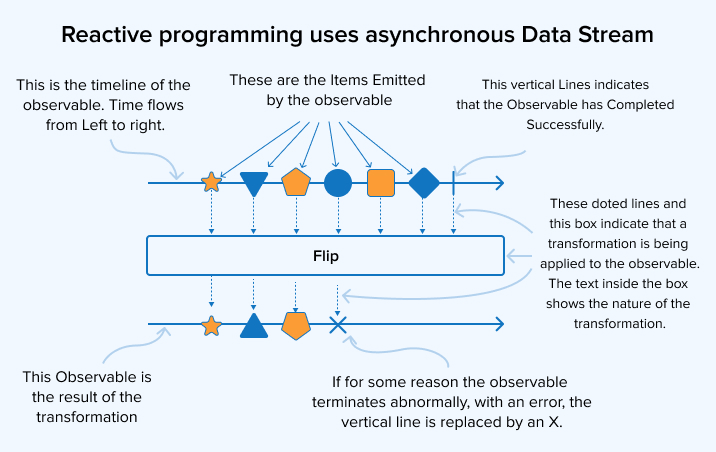
Key Highlights
- Reactive Request Execution: The method leverages WebTestClient to send a PUT request and process responses reactively as a Flux stream.
- Error Logging and Handling: Detailed logging with subscription, next item logging, and error capturing using reactive operators ensures robust diagnostics.
- Flexible Method Signature: Utilizes generics to allow flexible response deserialization and validations against expected HTTP statuses.
Detailed Overview of the Method Implementation
The provided code snippet defines a generic method named sendSetLicenseConsumptionRequest, which is designed to execute a PUT request in a Spring WebFlux application. Its primary role is to send a request with a given payload and validate the response against an expected HTTP status. This method is crucial in developing and testing reactive REST APIs where responses are streamed as Flux instances.
Method Signature and Parameters
Generic Definition
The method is defined with a generic type <T>, making it highly flexible. This means that the response streamed from the server can be of any class type specified when calling the method. By returning Flux<T>, the method encapsulates zero to many elements of the provided type.
Parameters Explained
- String requestPayload: This parameter represents the JSON request body that is sent to the server. It is expected to be a well-formed JSON string that can be deserialized by the server.
-
HttpStatus expectedStatus: This parameter defines the HTTP status code that the client expects in response. For instance, when the code anticipates a
BAD_REQUEST(400) status, this parameter is set accordingly. -
Class<T> responseClass: This parameter specifies the class type to which the response should be converted. When an error is expected, for example, it may be
ApiClientError.classto map the JSON error into a corresponding Java object.
Step-by-Step Walkthrough of the Code
1. Setting Up the Request
Initialization with WebTestClient
The method begins by creating a PUT request via the webTestClient.put() method call. Here, the PUT HTTP verb is used, which indicates that the client intends to update or set a particular resource on the server.
The target endpoint is then specified using .uri(endPoint). The endpoint value, stored in a previously defined variable (endPoint), determines the URL path to which the PUT request is sent.
Configuring Headers
The request is enhanced with several critical HTTP headers:
-
Accept: Set to
MediaType.APPLICATION_NDJSON_VALUE, indicating that the client will process the response as a stream of newline-delimited JSON (NDJSON). This format is practical for receiving data in chunks. -
Content-Type: Set to
MediaType.APPLICATION_JSON_VALUE, indicating that the request payload is formatted as JSON. -
Authorization: The header includes an authorization token (
authorizationToken) necessary for authenticating the client request against restricted endpoints.
2. Sending the Request and Handling Request Body
Adding the Request Payload
The line .bodyValue(requestPayload) embeds the JSON payload into the body of the PUT request. This payload is what the server uses to set or update license consumption details.
Exchanging the Request
The .exchange() operator triggers the actual HTTP request using the WebTestClient. Unlike traditional blocking client calls, .exchange() initiates the reactive pipeline allowing stream-based processing of the response.
Immediately after the exchange, the method verifies that the HTTP response status matches the expected status provided in the parameter using:
.expectStatus().isEqualTo(expectedStatus)
This check is crucial in testing scenarios where verifying the correctness of response statuses, such as ensuring that a BAD_REQUEST status is returned for invalid input, is part of the test assertions.
3. Deserializing and Logging the Response
Returning the Result
Once the response status is confirmed, the .returnResult(responseClass) converts the JSON response body into an object of the specified type T. This deserialization is managed automatically by Spring WebFlux using the underlying conversion mechanisms.
The .getResponseBody() call then extracts the response body as a Flux<T> stream. This approach fits well with reactive programming as it allows the client to handle data as it arrives.
Logging: Monitoring the Flow
The method incorporates three essential reactive logging operations:
- doOnSubscribe: The lambda logs the request payload at the time of subscription. This is the point where the reactive stream begins, ensuring that every initiation of the request is recorded.
- doOnNext: Logs each element of the response received. As the Flux stream emits items one by one, this operator logs each element, often converting complex objects to a JSON string representation for clarity.
- doOnError: Captures any errors occurring during the execution of the reactive stream. Should an error occur, the logging mechanism reports it, which is crucial for debugging and monitoring purposes.
Collectively, these logging operations allow developers to trace the request-response flow meticulously and diagnose issues when API calls do not proceed as expected.
Error Handling in Reactive Streams
Although the code snippet primarily logs errors without altering the stream's propagation, several additional reactive operators can enhance error handling:
Advanced Error Operators
onErrorResume
Using onErrorResume allows you to capture an error, log it, and then return an alternative Flux or Mono to maintain the reactive stream flow. The snippet could be extended like this:
// Example code snippet extension
return webTestClient.put()
        // ... (other configurations)
        .doOnError(error -> log.error("Error occurred during API call: ", error))
        .onErrorResume(error -> Flux.error(new CustomException("Error during API call", error)));
Other Error Handling Options
Other operators include:
- onErrorReturn: Provides a predefined fallback value if an error occurs.
- onErrorContinue: Skips over the erroneous element and continues processing subsequent elements. Note that this should be used carefully as ignoring errors might lead to loss of significant data or state inconsistencies.
- onErrorMap: Transforms the original error into a custom exception, offering an opportunity to standardize error handling strategies across the application.
These operators enhance the resiliency of reactive streams, ensuring that the application can gracefully handle unexpected issues, such as network failures or invalid request payloads.
Integrating with Testing Frameworks
The use of WebTestClient in this method is particularly significant in the context of testing Spring WebFlux applications. Unlike traditional blocking tests, WebTestClient allows simulation of real-world scenarios that involve non-blocking reactive streams.
Live Server vs. Mock Testing
WebTestClient can be used in two primary configurations:
- Binding directly to a live server: This configuration tests the actual running application, making HTTP calls to real endpoints.
- Binding to a mocked server: This allows you to simulate server responses without launching the entire server, which is particularly useful for unit tests where isolation of the functionality is required.
These configurations ensure that the method not only validates the API behavior in production-like environments but also supports rapid test execution during development.
Practical Use Case: Testing API Error Scenarios
In the use case illustrated by the snippet, the method is invoked as follows:
Flux<ApiClientError> apiClientErrorFlux = sendSetLicenseConsumptionRequest(
    requestPayload,
    HttpStatus.BAD_REQUEST,
    ApiClientError.class
);
Here, when an invalid or incorrectly structured payload is sent, the expected behavior is to receive a BAD_REQUEST (400) status from the API. The response is then converted into a stream of ApiClientError objects, allowing for detailed inspection of the error details. Such a setup is ideal for testing failure handling and ensuring that the API returns informative error messages corresponding to client-side mistakes.
Practical Table Summary
| Aspect | Description |
|---|---|
| HTTP Method | PUT - Used to update or set resource state. |
| Headers |
Accept: application/ndjsonContent-Type: application/jsonAuthorization: Token-based authentication. |
| Response Handling |
Status verification using expectStatus().Conversion of response body to a Flux stream of type T.
|
| Logging | Logs on subscription, each element received, and errors. |
| Error Handling |
Primary error logging with potential operators like onErrorResume, onErrorReturn, etc.
|
| Use Cases | Useful for API testing, especially for error scenarios and reactive stream handling. |
Extending the Approach for Enhanced Use
The presented implementation is very effective in capturing and logging the lifecycle of a reactive HTTP request. However, there are several optional enhancements you can consider when integrating this approach into a larger project:
Custom Exception Handling
In production systems, it may be beneficial to wrap lower-level exceptions within custom application-specific exceptions. This approach encapsulates detailed error information that could then be processed by global exception handlers or propagated to the client in a controlled manner.
For example, replacing the default logging in doOnError with a transformation into a custom exception, as shown in the extended sample code earlier, could be an elegant way to integrate with your overall error management framework.
Stream Processing Enhancements
Reactive streams provide a robust foundation for handling large or continuously produced data sets. Consider leveraging additional operators like filter, map, or even buffer if you need to aggregate or transform the data before processing it further. These operations can be inserted seamlessly into the reactive chain, providing powerful and efficient data processing capabilities.
Real-time Logging and Monitoring
Integrating a real-time logging system or dashboard that subscribes to the Flux stream can give you insights into operational metrics such as request latency, error frequency, and data throughput. This can be invaluable in production environments where understanding real-time system performance is key to maintaining high availability and reliability.
References
- WebTestClient :: Spring Framework - Spring Docs
- Spring WebClient - Reflectoring
- Error Handling in Spring WebFlux - Baeldung
- Spring WebTestClient for Efficient REST API Testing - Rieckpil
- Spring 5 WebTestClient and WebClient Tutorial with Examples - Callicoder
Recommended Related Queries
Last updated March 14, 2025