
Unlocking LLM Potential: Best Platforms for Comparing AI Models with Document Processing
Discover the most effective tools to evaluate and compare language models' performance when processing your documents
Key Insights for LLM Comparison
- LangChain's Document Comparison Toolkit offers the most comprehensive framework for comparing how different LLMs process uploaded documents
- Specialized platforms like Kern AI and H2O.ai provide dedicated document comparison interfaces with advanced analytics capabilities
- Local options like LM Studio and GPT4All allow for private document processing with various open-source models on your own hardware
Top Platforms for LLM Document Processing Comparison
As large language models become increasingly important for document analysis, several platforms have emerged that allow users to compare how different LLMs perform when processing uploaded documents. These platforms vary in their capabilities, user interface, and the range of models they support.
Commercial Solutions with Advanced Features
H2O.ai Document Comparison
H2O.ai offers a sophisticated platform for LLM-powered document comparison that enables users to connect various LLMs and embedding models. The platform includes features for comparing documents and identifying similarities, changes, and moved content with high precision. It's particularly useful for enterprises requiring detailed document analysis across multiple AI models.
Kern AI Document Processing
Kern AI provides a straightforward yet powerful approach to document processing and comparison using advanced LLMs. Users can upload their documents and compare how different models analyze them, with all data preserved throughout the process. Their platform is especially useful for comparing how various LLMs extract information and identify relationships within complex documents.
TextCortex Multi-language Comparison
TextCortex stands out for its support of over 25 languages, making it an excellent choice for global teams. It allows document uploads for analysis across various AI models, including GPT models, and provides an intuitive interface for comparing performance across different languages and document types.
Developer-Focused Frameworks
LangChain Document Comparison Toolkit
LangChain offers one of the most powerful frameworks for document comparison using LLMs. It provides developers with the tools to create question-answering chains for each uploaded document and effectively compare multiple documents side by side. This enables detailed performance analysis of different LLMs on the same document set. The toolkit is particularly valuable for developers building custom document comparison solutions.
Streamlit PDF Comparison App
This specialized application allows users to upload multiple PDF documents and conduct detailed comparisons using various LLMs. Users can ask specific questions about the documents' content, and the app presents structured outputs in table format, making it easy to analyze how different models interpret the same information.
Local Processing Options
LM Studio
LM Studio allows users to upload documents within chats for LLM processing. While it doesn't have a central document management system, it effectively processes documents and images with various open-source models. This makes it an excellent tool for comparing model performance on your local machine without sending sensitive documents to external services.
GPT4All
GPT4All provides a robust system for uploading and managing documents within a knowledge base. While it only supports XLSX files currently, it offers a straightforward way to compare how different open-source models process structured data on your local hardware.
OpenWebUI
This platform provides comprehensive settings for document processing, including web search functionality. Users can upload documents and engage different LLMs with the content, making it easy to compare how models interpret and respond to the same documents with additional web context.
AnythingLLM
AnythingLLM can process various document types for comparison across different models. While it may face challenges with error handling, it provides a useful platform for comparing how different LLMs process and understand complex documents.
Commercial LLM Platforms with Document Upload
Several commercial platforms offer document upload capabilities that allow for comparing LLM performance in processing and analyzing documents.
ChatGPT (OpenAI)
With a ChatGPT Plus subscription ($20/month), users can upload documents and interact with them using the GPT-4 language model. The platform allows for document analysis and comparison, making it a versatile tool for evaluating how GPT-4 performs on specific document types compared to other models you might test elsewhere.
Claude AI
Claude AI offers a large context window and seamless integration with tools like the Microsoft Suite. Its document processing capabilities make it excellent for comparing how different versions of Claude handle complex documents compared to other LLMs in the market.
| Platform | Document Types | Model Variety | Local Processing | Key Features |
|---|---|---|---|---|
| LangChain | Multiple formats | High | Yes (can be configured) | Question-answering chains, parallel processing |
| H2O.ai | Multiple formats | High | Optional | Identifying similarities, changes tracking |
| LM Studio | Text, images | Medium | Yes | Chat-based document processing |
| ChatGPT | PDFs, docs, images | Low (GPT models only) | No | Web access, real-time Bing data |
| Claude AI | Multiple formats | Low (Claude models only) | No | Large context window, MS Suite integration |
| Kern AI | Multiple formats | Medium | Optional | Document processing, analytics |
| TextCortex | Multiple formats | Medium | No | Multi-language support (25+ languages) |
Comparing LLM Performance on Document Tasks
This radar chart compares the performance of different LLMs across key document processing metrics. GPT-4 excels in question answering and information extraction, while Claude 3 leads in summarization and context window size. Local LLMs like Llama 3 offer superior data privacy but lag in multilingual support and overall comprehension capabilities.
Understanding LLM Document Processing Capabilities
This mindmap illustrates the key aspects to consider when comparing LLM document processing capabilities. From upload capabilities and supported file types to analysis features and performance metrics, understanding these elements helps in selecting the right platform for your document comparison needs.
Practical Applications of Document Comparison
This video from Kern AI demonstrates practical applications of using LLMs to compare large documents. The video shows how leveraging AI models can simplify the process of tracking changes, identifying similarities, and extracting valuable insights across multiple documents. This approach is particularly useful for legal professionals, researchers, and content analysts who regularly need to compare complex documents.
Visual Examples of LLM Document Processing
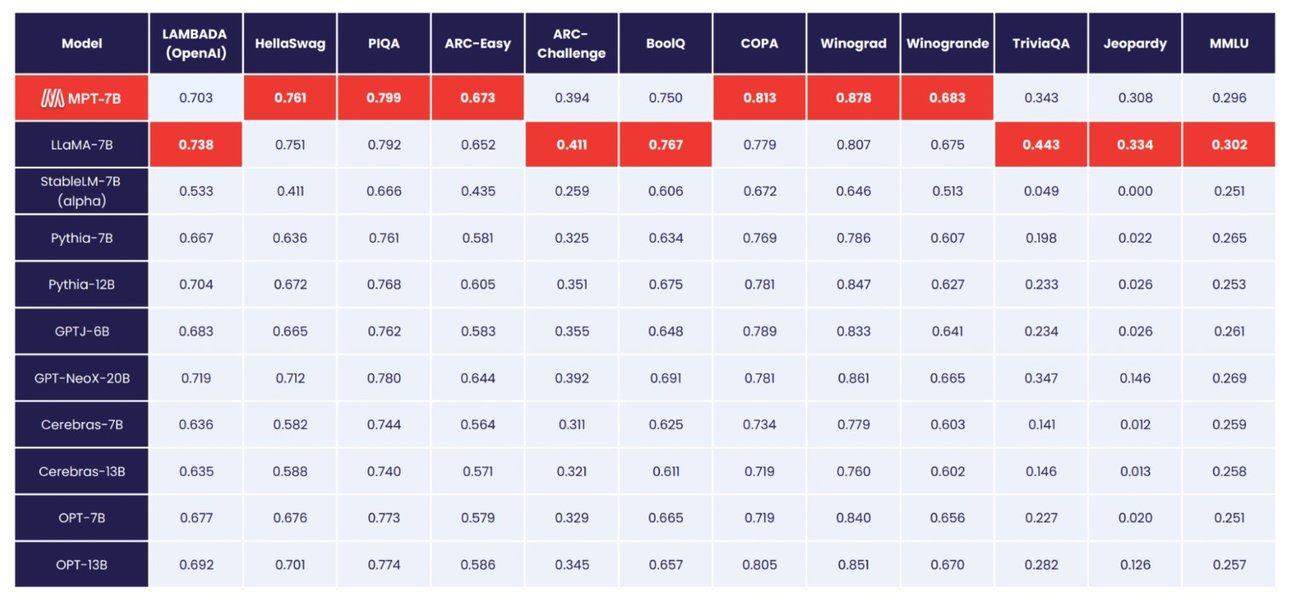
Comprehensive Comparison of LLM Capabilities: This visualization shows how different open-source LLMs perform across various metrics, helping users select the right model for their document processing needs.
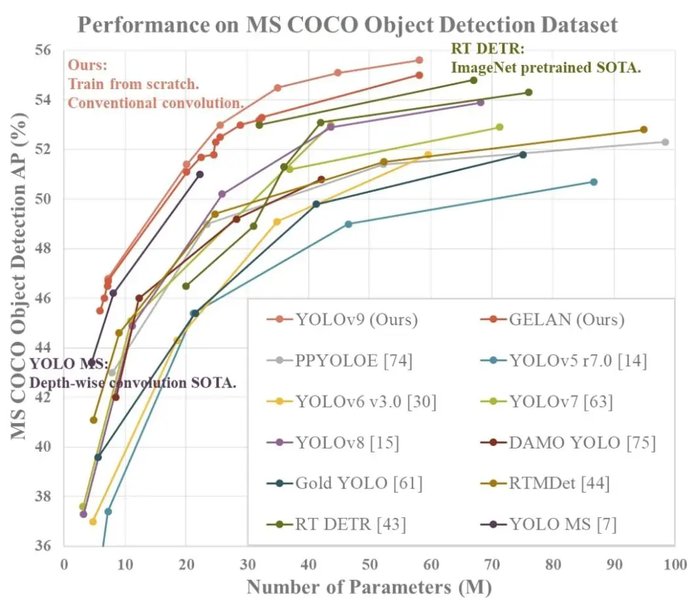
Performance Benchmarking: While this chart specifically shows YOLO models, it illustrates the type of performance comparisons that are essential when evaluating LLMs for document processing tasks. Similar comparisons can help users understand the trade-offs between different models.
These visual examples highlight the importance of structured comparison when evaluating LLM performance on document processing tasks. When choosing a platform for document comparison, look for those that provide similar visual analytics to help you understand the strengths and weaknesses of different models.
Frequently Asked Questions
References
- H2O.ai: LLM-Powered Document Comparison - H2O.ai
- Document Comparison Toolkit - LangChain Documentation
- Using AI for Document Comparison - Kern AI Blog
- Intelligent Document Processing with LLMs - Deepset Blog
- How to Use ChatGPT to Compare Documents - Evolution.ai
- PDF Comparison LLM - Streamlit Community
- Comparing 5 LLMs to Review Long Documents - Klariti
- Can I use LLM to compare 2 PDF documents - Reddit r/LocalLLaMA
Recommended Searches
Last updated April 4, 2025