
Running a Local LLM AI Model: DeepSeek R1 Distilled 70B
A comprehensive guide to hardware, software, and deployment considerations
Key Highlights
- Hardware Essentials: Adequate GPU VRAM, sufficient system RAM, and fast storage are critical for performance.
- Software and Deployment: Linux (or compatible systems), Docker, and specialized deployment tools streamline setup and execution.
- Performance and Optimization: Advanced techniques (like quantization and distributed computing) are useful for balancing resource constraints and speed.
Detailed Considerations for Running DeepSeek R1 Distilled 70B
1. Hardware Requirements
The backbone of running any local large language model (LLM), such as DeepSeek R1 Distilled 70B, lies in meeting its hardware demands. These requirements are non-trivial and involve several important components:
a. GPU Specifications
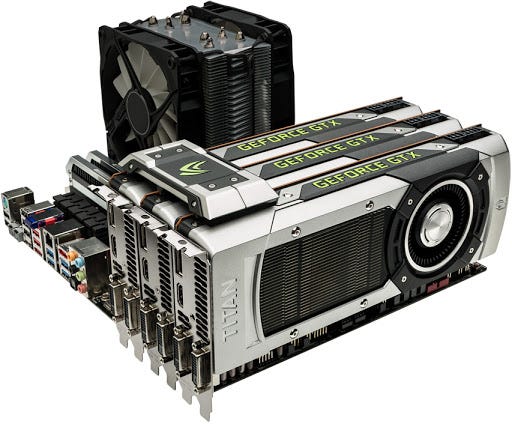
One of the most significant components is the Graphics Processing Unit (GPU). The model in question is resource-intensive, meaning you will need a high-end GPU or ideally, a multi-GPU setup. Even though some variants or distilled versions might have slightly reduced requirements, the following points are crucial:
- VRAM: High-end GPUs with at least 24 GB of VRAM are recommended. However, for an optimal experience, especially in a multi-GPU setup, having at least 48 GB of combined VRAM is advisable. This ensures that large model weights and dynamic calculations can be handled without offloading excessively to slower system components.
- Multi-GPU Setup: Utilizing two or more high-end GPUs (e.g., two RTX 4090 cards or comparable models) can significantly boost performance. This is particularly important for handling extensive computations and larger model variants.
- VRAM Offloading: If your GPU does not have sufficient VRAM, the system will offload parts of the computation to the CPU and system RAM, drastically reducing performance. Hence, it is crucial to ensure that your GPU memory can accommodate the model's requirements.
b. System RAM
System memory is closely tied to the efficient management of large datasets and the KV cache utilized in LLMs:
- Minimum Requirements: At least 48 GB of RAM is generally recommended. However, for smoother operations, particularly when dealing with a KV cache with large token contexts (which can require up to 220 GB of RAM), having much more memory may be necessary.
- Optimal Performance: While the VRAM handles most of the heavy lifting, ample system RAM prevents bottlenecks during preprocessing and caching operations. Increasing the available RAM can yield notable performance improvements.
c. Storage
Fast storage is another critical factor when managing large language models:
- SSD Usage: A high-speed Solid State Drive (SSD) is essential for quickly loading the model and saving intermediate data. SSDs ensure that data reads/writes occur at rapid speeds, reducing overall latency.
- Capacity Requirements: Allocate sufficient disk space to store the model files. It is common to require in excess of 250 GB, especially given the large size of advanced models.
d. Power and Cooling
High-end hardware demands not just raw computational power but also efficient support in terms of power supply and cooling:
- Power Supply: Ensure your system has a robust power supply unit (PSU) that can handle the high current demands of multiple GPUs. Inadequate power can lead to system instability and reduced performance.
- Cooling Solutions: Effective cooling is vital to prevent thermal throttling, which can slow down the GPUs and overall performance. Investing in quality cooling systems (both for the GPU and the CPU) can help maintain performance.
2. Software Environment and Tools
In addition to robust hardware, the software environment plays a pivotal role in deploying and managing local LLMs like DeepSeek R1 Distilled 70B. A well-prepared software environment ensures seamless interactions between hardware components and the AI model.
a. Operating System
When it comes to operating systems, compatibility and efficiency go hand in hand:
- Preferred OS: Linux is often the preferred choice for deploying large-scale AI models, due to its stability and robust support for multi-GPU configurations. However, advanced users have also successfully run the model on Windows using specialized tools.
- System Configuration: Ensure that your operating system is fully updated and that it supports the required drivers and dependencies for high-performance GPU computing.
b. Deployment and Containerization Tools
Managing all the components required for running LLMs can be complex; therefore, containerization and specialized deployment tools are recommended:
- Container Platforms: Use Docker for containerizing the environment. Containerization simplifies dependency management and isolates the model’s runtime environment from the underlying system.
- Deployment Interfaces: Tools such as Ollama provide an accessible command-line interface and often integrate with web-based user interfaces (like Open WebUI) for easier interaction with the model.
- Software Dependencies: Besides the containerization platform, you may need to install several libraries and frameworks that are essential for running the model efficiently. Ensure compatibility with drivers, CUDA, and other relevant dependencies.
c. Execution and Command-Line Considerations
Running the model involves specific command-line instructions and configurations:
-
Command Syntax: For instance, you might run a command such as
ollama run deepseek-r1:70b, which instructs the deployment tool to load and start the model locally. - Network Requirements: While the core operations run locally, initial downloads, updates, and potential troubleshooting often require a stable network connection.
3. Model Selection and Optimization
DeepSeek R1 Distilled 70B is one variant within a family of models that can vary considerably in terms of required resources. Deciding on the right model involves balancing performance, resource availability, and intended use.
a. Variant Considerations
Depending on your hardware constraints and the complexity of your tasks, you might consider:
- Full-Scale vs. Distilled Models: The distilled version of the model tends to be more resource-efficient, making it a suitable option for those without access to cutting-edge hardware. However, it may trade off some performance aspects compared to the full model.
- Smaller Variants: If hardware constraints are a significant concern, starting with smaller variants (such as 1.5B or 8B) can be a way to test compatibility and functionality before committing to the larger, more demanding 70B model.
b. Quantization and Compression Techniques
Advanced techniques like quantization can help reduce the memory footprint of the model:
- Purpose of Quantization: By converting the model’s weights from floating-point precision to lower bit representations, quantization reduces the VRAM and system memory demands. This can be especially helpful for running the model on systems that do not meet the highest-end specs.
- Performance Trade-offs: There might be some impact on the inference quality or speed, so it is important to test this approach based on your specific needs.
c. Distributed Computing Strategies
When a single GPU setup struggles with performance demands, distributed computing can be explored:
- Workload Distribution: Splitting the model computations across multiple GPUs can reduce the per-device load and improve tokens per second performance.
- Complexity Consideration: Setting up a distributed pipeline requires both hardware that supports multi-GPU communication and configuration changes to the deployment software.
4. Performance Expectations and Troubleshooting
Knowing what performance to expect from your local LLM setup can help you better plan and troubleshoot potential bottlenecks:
a. Tokens per Second and Model Speed
Performance largely depends on the hardware and model complexity:
- Estimates: Performance measures like tokens per second (TPS) can vary. For instance, some users report significantly slower performance with single GPU configurations versus setups with multiple high-end GPUs.
- Optimization Impact: Optimizations such as quantization, efficient scheduling, and proper load balancing across GPUs can improve inference speed.
b. Common Pitfalls and Solutions
It is important to be aware of potential issues that might arise during deployment:
- Insufficient VRAM: Running into VRAM limitations ensures that your system might offload to the CPU, drastically slowing down performance. This can often be resolved by either upgrading GPUs or using quantization methods.
- Software Dependencies: Mismatches in software versions, misconfigured Docker containers, or outdated GPU drivers can lead to unexpected errors. Regular updates and thorough dependency checks are essential.
- Thermal Throttling: If your hardware’s cooling system is inadequate, performance might drop due to thermal throttling. Ensuring proper ventilation and possibly investing in enhanced cooling solutions can prevent this.
c. Benchmarks and Testing
Before fully deploying the model in a production scenario, extensive benchmarking and testing are advised:
| Component | Recommended Specification | Potential Bottleneck |
|---|---|---|
| GPU | High-end multi-GPU setup (minimum 48GB VRAM total) | Offloading computations to CPU if VRAM is inadequate |
| System RAM | ≥ 48 GB (preferably 128 GB for intensive tasks) | Insufficient memory for large KV caches |
| Storage | Fast SSD, ≥ 250 GB | Slow loading times if using HDD or insufficient disk space |
| Cooling | Robust cooling systems for multi-GPU setups | Thermal throttling reducing performance |
5. Budget and Cost Considerations
Setting up a system capable of running resource-intensive models involves significant initial and operational expenses:
- Initial Hardware Investment: High-end GPUs (such as RTX 4090 or equivalent) and large amounts of RAM are expensive. Depending on your configuration, the cost could range from a few thousand dollars to significantly higher amounts for multi-GPU systems.
- Operational Costs: Continuous operation, especially in demanding setups, will lead to increased electricity and cooling costs. It is advisable to calculate these ongoing expenses when planning your deployment.
- Scalability Trade-Offs: Consider starting with smaller, less expensive variants if you are exploring the use case or prototyping a solution. Scaling up to the full 70B model can be planned as your requirements become more concrete and funding allows.
6. Additional Tips for Successful Deployment
Beyond the core criteria, several additional factors can further enhance your experience:
a. Starting with Smaller Models
For newcomers, experimenting with smaller models (like 1.5B or 8B variants) may reduce the initial complexity and resource demands. This allows you to gain familiarity with the deployment process, software tooling, and troubleshooting techniques, before moving on to larger, more demanding models.
b. Keeping Software Updated
Regularly updating both your deployment tools and hardware drivers ensures that you have the latest features and optimizations. The AI and deep learning space evolves rapidly, and staying current with software updates can help avoid compatibility issues.
c. Monitoring and Logging
Implementing robust monitoring and logging systems helps you track performance metrics and troubleshoot issues quickly. Tools that monitor GPU usage, memory consumption, and system temperatures can provide alerting mechanisms to prevent hardware failure or suboptimal performance.
d. Community and Support Resources
Finally, leverage community guides, forums, and online resources. Many deployments of large models have been shared by other practitioners, and such communities often provide troubleshooting tips, resource optimization techniques, and deployment scripts that can streamline your process.
Conclusion and Final Thoughts
Running a local LLM AI model such as DeepSeek R1 Distilled 70B is a multifaceted endeavor that requires careful planning across hardware, software, and performance optimization. Ensuring that you have the right high-end GPU(s) with ample VRAM, sufficient system RAM, and fast storage are paramount to handling the model’s massive computational load. Beyond the physical requirements, crafting a compatible software environment—leveraging containerization tools, deployment interfaces, and robust operating systems—is critical for seamless execution.
Furthermore, maintaining realistic performance expectations through thorough benchmarking, understanding potential bottlenecks, and planning for necessary optimizations (including quantization or distributed computing setups) will equip you to maximize the model’s potential. Lastly, factoring in costs—from hardware investments to ongoing operational expenses—will help in balancing budget constraints with performance goals. With these considerations detailed above, you are well-equipped to set up, test, and eventually deploy a high-performance local LLM system that meets both your research and practical needs.
References
- GPU Requirements for LLM Models - APXML
- DeepSeek R1: Architecture, Training, Local Deployment and Hardware Requirements - Dev.to
- DeepSeek-R1 671B Complete Hardware Requirements - AIBypy
- DeepSeek-R1 70B Hardware Requirements - Dev.to
Recommended Queries for Further Exploration
Last updated February 21, 2025