
Unlock Your Documents: Building a Local RAG Q&A System on Your Laptop
Harness Ollama, Llama 3.2, Python, and Streamlit for private, intelligent document interaction.
Building an intelligent Question-Answering (Q&A) system that runs entirely on your local machine offers significant advantages in terms of data privacy, speed, and customization. By leveraging Retrieval-Augmented Generation (RAG), you can enable Large Language Models (LLMs) like Llama 3.2 to answer questions based on the content of your specific documents, rather than just their pre-trained knowledge. This guide outlines the key components and practices for implementing such a system locally using Ollama, Llama 3.2, Python, and Streamlit.
Highlights
- Privacy First: Implement a fully local RAG pipeline using Ollama and Llama 3.2, ensuring your documents and queries never leave your laptop.
- Contextual Accuracy: Utilize RAG to ground LLM responses in specific document content, retrieved via semantic search from a local vector database like ChromaDB.
- Interactive Interface: Build a user-friendly web application with Streamlit for easy document upload, querying, and result visualization.
Setting Up Your Local Powerhouse
The foundation of your local RAG system is a well-configured development environment. This ensures all components work together seamlessly on your laptop.
Installing Core Tools
Python Environment
Ensure you have Python installed (version 3.10 or later is recommended for compatibility with modern libraries). Use a virtual environment manager like `venv` or `conda` to isolate project dependencies:
# Using venv
python -m venv rag-env
source rag-env/bin/activate  # On Windows use `rag-env\Scripts\activate`
Ollama and Llama 3.2
Ollama simplifies running LLMs locally. Download and install Ollama from its official website. Once installed, pull the Llama 3.2 model using the command line:
ollama pull llama3.2Ollama will run as a background service, providing an API endpoint (usually `http://localhost:11434`) that your Python application can use to interact with Llama 3.2 locally.
Essential Python Libraries
Install the necessary Python libraries using pip within your activated virtual environment. Key libraries include:
- streamlit: For building the interactive web application interface.
- langchain: A framework to orchestrate the RAG pipeline, handling document loading, chunking, embedding, retrieval, and LLM interaction.
- ollama: Python client library to interact with the Ollama API.
- chromadb: A popular open-source vector database for storing and querying document embeddings locally.
- langchain_community / langchain-text-splitters / langchain-document-loaders: Provide specific components for loading different document types (PDFs, text files) and splitting them effectively.
- sentence-transformers: Often used (via LangChain integrations) for generating high-quality text embeddings locally.
pip install streamlit langchain ollama chromadb-client sentence-transformers langchain-community langchain-text-splitters pypdf # Add other loaders as needed, e.g., python-docxHardware Considerations
Running LLMs locally can be resource-intensive. While Llama 3.2 has efficient variants (like the 8B parameter model often used in these setups), consider the following:
- RAM: A minimum of 8GB is often cited, but 16GB or more is recommended for smoother operation, especially when handling larger documents or models.
- CPU/GPU: While Ollama can run on CPU, performance (especially inference speed) is significantly better with a compatible GPU (NVIDIA recommended for CUDA support, though workarounds for AMD/Apple Silicon exist). Ollama automatically utilizes available GPU resources if configured correctly.
- Storage: Ensure sufficient disk space for Ollama, the downloaded LLM models (which can be several gigabytes), vector stores, and your documents.
Using quantized versions of models (smaller, slightly less precise versions) through Ollama can help reduce resource requirements if needed.
The Document Processing Pipeline
Before you can ask questions, your documents need to be processed and stored in a way the RAG system can understand. This involves ingestion, chunking, embedding, and indexing.
Ingesting Documents
Loading and Parsing
Your application needs a way to accept documents (e.g., PDFs, TXT, DOCX). LangChain provides various `DocumentLoader` classes (like `PyPDFLoader`, `TextLoader`) to read content from different file formats.
Smart Chunking Strategies
LLMs have context limits, and embedding models work best on smaller text segments. Therefore, loaded documents must be split into smaller, meaningful chunks. LangChain's `TextSplitter` classes (e.g., `RecursiveCharacterTextSplitter`) help achieve this. Aim for chunks of a few hundred to around 1000 tokens, often with some overlap between chunks to preserve context across boundaries.
from langchain_text_splitters import RecursiveCharacterTextSplitter
from langchain_community.document_loaders import PyPDFLoader

loader = PyPDFLoader("path/to/your/document.pdf")
documents = loader.load()

text_splitter = RecursiveCharacterTextSplitter(chunk_size=1000, chunk_overlap=150)
chunks = text_splitter.split_documents(documents)
Generating Semantic Embeddings
Each text chunk needs to be converted into a numerical vector (embedding) that captures its semantic meaning. This allows for finding relevant chunks based on the meaning of the user's query, not just keywords. You can use embedding models available through LangChain, often leveraging libraries like `sentence-transformers` running locally.
from langchain_community.embeddings import OllamaEmbeddings # Or another local model like SentenceTransformerEmbeddings

# Configure embedding model to run locally via Ollama or directly
# Ensure the model used here is suitable for embedding tasks
embeddings_model = OllamaEmbeddings(model="llama3.2") # Or use a dedicated embedding model via Ollama/SentenceTransformers
# embedding_vectors = embeddings_model.embed_documents([chunk.page_content for chunk in chunks])
Note: While base LLMs like Llama 3.2 can generate embeddings via Ollama, specialized embedding models often yield better retrieval performance. Ollama allows pulling dedicated embedding models too (e.g., `nomic-embed-text`).
Storing Embeddings Locally (Vector Database)
The generated embeddings, along with their corresponding text chunks, are stored in a vector database. ChromaDB is a good choice for local setups as it's easy to install and run. LangChain integrates smoothly with ChromaDB.
from langchain_community.vectorstores import Chroma

# Assuming 'chunks' and 'embeddings_model' are defined
vector_store = Chroma.from_documents(
    documents=chunks,
    embedding=embeddings_model,
    persist_directory="./chroma_db_local" # Directory to save the database locally
)
vector_store.persist() # Save the database
# Later, load it: vector_store = Chroma(persist_directory="./chroma_db_local", embedding_function=embeddings_model)
Visualizing the Document Processing Flow
The following mindmap illustrates the sequence of steps involved in preparing your documents for the RAG system.
Implementing the RAG Core: Retrieval and Generation
With the documents processed and indexed, the core RAG logic handles user queries by retrieving relevant information and generating answers.
The Retrieval Step: Finding Relevant Information
When a user asks a question, the system first converts the query into an embedding using the same model used for the documents. It then queries the vector database (ChromaDB) to find the document chunks whose embeddings are most similar (e.g., using cosine similarity) to the query embedding. These top-k relevant chunks form the context for the LLM.
# Assuming 'vector_store' is loaded and 'query' is the user's question
retriever = vector_store.as_retriever(search_kwargs={"k": 5}) # Retrieve top 5 chunks
relevant_docs = retriever.invoke(query)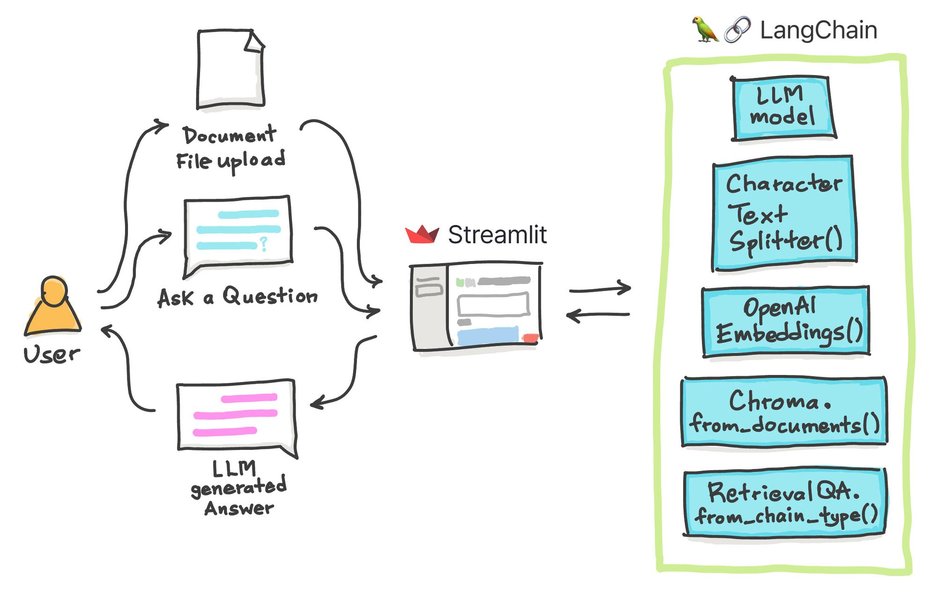
Conceptual diagram illustrating how a query interacts with a vector store and LLM in a RAG system (Source: Streamlit Blog).
The Generation Step: Answering with Llama 3.2
The retrieved document chunks are combined with the original user query into a structured prompt. This augmented prompt is then sent to the Llama 3.2 model (via the Ollama API) to generate a final answer. LangChain's `Runnable` chains simplify this process, ensuring the LLM bases its response on the provided context.
from langchain_core.prompts import ChatPromptTemplate
from langchain_core.runnables import RunnablePassthrough
from langchain_core.output_parsers import StrOutputParser
from langchain_community.llms import Ollama # Use the LLM wrapper

# Define the LLM interface via Ollama
llm = Ollama(model="llama3.2")

# Define the prompt template
template = """Answer the question based only on the following context:
{context}

Question: {question}
"""
prompt = ChatPromptTemplate.from_template(template)

# Define the RAG chain
rag_chain = (
    {"context": retriever, "question": RunnablePassthrough()}
    | prompt
    | llm
    | StrOutputParser()
)

# Invoke the chain with the user query
answer = rag_chain.invoke(query)
print(answer)
Key Tools and Their Roles
This table summarizes the core technologies used in this local RAG setup and their specific functions:
| Tool | Role in the System |
|---|---|
| Python | Primary programming language for scripting the entire pipeline. |
| Ollama | Manages and serves the Llama 3.2 model locally via an API. |
| Llama 3.2 | The Large Language Model used for understanding queries and generating answers based on retrieved context. |
| Streamlit | Creates the interactive web-based user interface for document upload, query input, and answer display. |
| LangChain | Framework for orchestrating the RAG workflow: document loading, chunking, embedding management, vector store interaction, prompt templating, and LLM calls. |
| ChromaDB | Local vector database used to store document embeddings and perform efficient similarity searches for retrieval. |
| Embedding Model (e.g., SentenceTransformers or Ollama-served) | Generates numerical vector representations (embeddings) of text chunks and user queries for semantic comparison. |
Building the User Interface with Streamlit
Streamlit makes it remarkably easy to create an interactive web application for your local RAG system, allowing users to upload documents and ask questions without needing complex front-end development.
Designing an Interactive Experience
Structure your Streamlit app logically:
- Document Upload: Use `st.file_uploader` to allow users to upload PDFs, text files, etc. Process and index these documents when uploaded (potentially caching results with `@st.cache_data` or `@st.cache_resource` to avoid re-processing).
- Query Input: Use `st.text_input` for users to type their questions.
- Answer Display: Use `st.write` or `st.markdown` to show the generated answer. You might also display the retrieved source chunks (`relevant_docs`) to provide transparency.
- Status Updates: Use `st.spinner` or progress bars to indicate when processing (indexing or querying) is happening.
Handling User Input and Displaying Results
Streamlit's reactive nature means the app can automatically rerun parts of the script when inputs change. You'll typically wrap your RAG chain invocation within a conditional block triggered by a button click (`st.button`) or when the query input changes.
import streamlit as st
# ... (Import other necessary libraries and define functions for processing, RAG chain, etc.)

st.title("Local Document Q&A with RAG")

uploaded_file = st.file_uploader("Upload your document (PDF, TXT)", type=["pdf", "txt"])

if uploaded_file is not None:
    # Process and index the document (implement this logic)
    # You might store the retriever in st.session_state
    st.success("Document processed and indexed!")
    # retriever = setup_retriever(uploaded_file) # Your function
    # st.session_state.retriever = retriever

query = st.text_input("Ask a question about your document:")

if query and 'retriever' in st.session_state:
    if st.button("Get Answer"):
        with st.spinner("Generating answer..."):
            # Assuming rag_chain is defined and uses st.session_state.retriever
            # answer = rag_chain.invoke(query)
            # Mock answer for example structure:
            answer = "This is a generated answer based on the document context."
            st.markdown("### Answer:")
            st.write(answer)
            # Optionally display source chunks
            # relevant_docs = st.session_state.retriever.invoke(query)
            # st.markdown("### Relevant Context:")
            # for doc in relevant_docs:
            #    st.write(doc.page_content)
            #    st.write("---")
elif query:
    st.warning("Please upload and process a document first.")

# To run: streamlit run your_script_name.py
Building an Ask-the-Doc App
The following video provides a tutorial relevant to building document-based Q&A systems, potentially using similar concepts or tools like LangChain, which are central to this local RAG setup. It can offer practical insights into structuring such an application.
This video demonstrates building a document Q&A system, showcasing how tools can be integrated to allow users to interact with their documents intelligently. While specifics might differ (e.g., hosted vs. local models), the principles of loading documents, creating a retriever, and generating answers are highly relevant to your goal of building a local system with Ollama, Llama 3.2, and Streamlit.
Key Practices for a Robust Implementation
Beyond the core components, several practices ensure your local RAG system is efficient, reliable, and secure.
Code Modularity and Maintainability
Structure your Python code into logical modules or functions (e.g., one for document processing, one for RAG chain setup, one for the Streamlit UI). This makes the code easier to understand, debug, and update.
Performance Optimization on Your Laptop
- Choose Efficient Models: Use appropriate sizes for the LLM (e.g., Llama 3.2 8B) and embedding models. Consider quantized versions if resources are tight.
- Optimize Retrieval: Fine-tune the number of chunks retrieved (`k` value). Too few may miss context; too many can overwhelm the LLM. Experiment with advanced retrieval strategies if needed (e.g., reranking).
- Caching: Use Streamlit's caching (`@st.cache_data`, `@st.cache_resource`) to avoid re-running expensive operations like document loading, embedding, or model loading unnecessarily. Persist the ChromaDB index so it doesn't need rebuilding every time.
Ensuring Data Privacy and Security
The primary advantage of a local system is privacy. Ensure this by:
- Confirming Local Execution: Double-check that Ollama, the LLM, the vector database, and all processing happen entirely on your machine with no calls to external cloud APIs (unless explicitly intended for a hybrid approach, which is not the goal here).
- Secure Storage: If dealing with highly sensitive documents, consider file system permissions or encryption for the stored documents and the vector database directory.
- Avoiding Logging Sensitive Data: Be mindful of what information your application logs.
Testing and Error Handling
- Test Thoroughly: Test with various document types and diverse queries to evaluate retrieval accuracy and answer quality.
- Implement Error Handling: Add `try-except` blocks to handle potential issues gracefully, such as failures in document parsing, embedding generation, or LLM responses. Provide informative feedback to the user in the Streamlit interface.
Relative Importance and Effort of Implementation Aspects
The radar chart below provides a conceptual overview of the relative importance and estimated implementation effort for key aspects of building this local RAG system. 'Importance' relates to the core functionality, while 'Effort' reflects the time/complexity involved.
As shown, core RAG components like Retrieval and LLM Integration are highly important, while aspects like UI development might be less complex but still crucial for usability. Security remains paramount for a local system.
Frequently Asked Questions (FAQ)
Can I use a different LLM with Ollama?
Yes, Ollama supports a wide range of open-source LLMs. You can pull different models (e.g., Mistral, Phi-3) using `ollama pull ` and specify the desired model name when initializing the LLM interface in LangChain or your Python code (`Ollama(model="")`). Ensure your hardware meets the requirements of the chosen model.
What if my documents are very large or numerous?
For very large documents, ensure your chunking strategy is effective. For a large number of documents, the main constraint might be the size of the vector database and the time taken for indexing. ChromaDB is generally efficient for local use, but performance might degrade with millions of vectors on typical laptop hardware. Ensure you have sufficient disk space and RAM. Consider optimizing indexing parameters or exploring more scalable vector database options if needed, though this might move away from a purely simple local setup.
How can I improve the quality of the answers?
Answer quality depends on several factors:
- Embedding Quality: Use a high-quality embedding model specifically designed for retrieval tasks.
- Chunking Strategy: Experiment with chunk size and overlap to find what works best for your documents.
- Retrieval Relevance: Adjust the number of retrieved chunks (`k`). Consider adding a reranking step after initial retrieval for better relevance.
- Prompt Engineering: Refine the prompt template provided to the LLM to guide it better in synthesizing the answer from the context.
- LLM Choice: A more capable LLM (if your hardware allows) might provide better synthesis, though Llama 3.2 is generally very strong.
Can this system handle images or tables within documents?
The basic setup described primarily focuses on text extraction. Handling images and complex tables requires more advanced techniques, often called "Multimodal RAG". This involves specialized document loaders (like those from `unstructured.io`) capable of extracting text from images (OCR) and parsing tables, and potentially using multimodal embedding models that can understand both text and image content. Integrating these adds complexity beyond the scope of this initial guide but is an area of active development.
References
- Build Your Own RAG App: A Step-by-Step Guide to Setup LLM locally using Ollama, Python, and ChromaDB - DEV Community
- Local RAG - LangChain Documentation
- Building a local LLMs app with Streamlit and Ollama - Medium
- Intelligent-Document-Query-System-with-LLM-Powered-RAG - GitHub
- Enhancing Your LLM with RAG: A Python Implementation Guide - Medium
- Building a Llama 3.1 8b Streamlit Chat App with Local LLMs - Medium
Recommended Further Exploration

Last updated April 15, 2025