
Unlocking the Hidden World of Loricifera
Explore Intricate Infographics and 3D Models of a Fascinating Marine Phylum
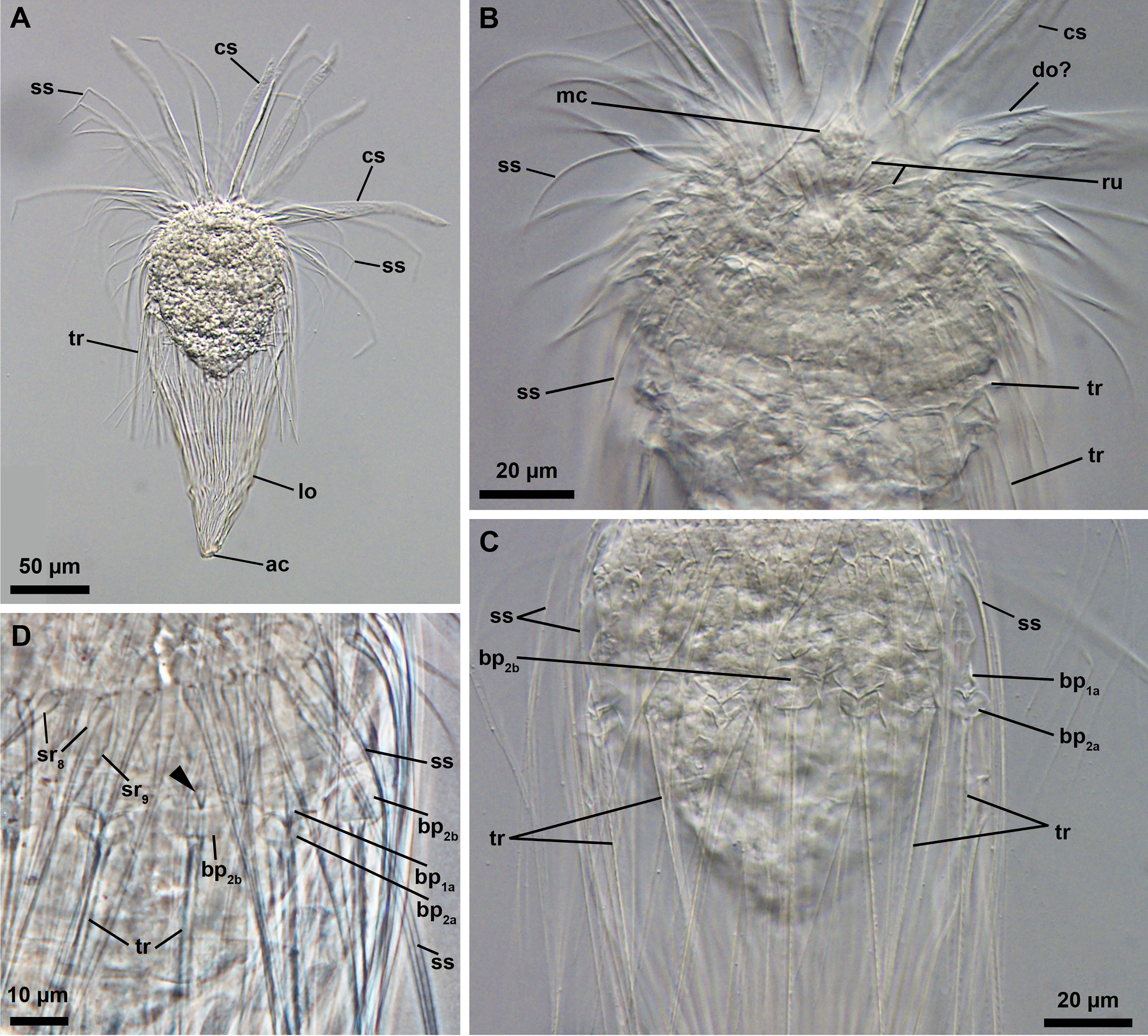
Key Highlights
- Unique Morphology: Discover the intriguing anatomical features of Loricifera including their protective lorica and complex internal structures.
- Visual Storytelling: Utilize infographics to depict the biology, habitat, and life cycle of these microscopic marine creatures.
- Interactive Modeling: Leverage 3D models for educational and research purposes using tools and resources that allow dynamic exploration of Loricifera anatomy.
Understanding Phylum Loricifera
Loricifera is a phylum consisting of tiny, marine invertebrates that primarily inhabit the sediment of various oceanic regions. Typically ranging in size from approximately 100 μm to 1 mm, these creatures have captivated the scientific community since their discovery in the 1980s due to their unique morphology and adaptation strategies. Their distinctive features, such as the protective lorica (an external shell) and a complex, folded digestive tract, position them as subjects of interest for both educational and research-based visualizations.
Infographics: Visualizing Complexity
Purpose and Utility
Infographics serve as a powerful medium to transform intricate scientific details into intuitive visual narratives. When designing an infographic for Loricifera, several key aspects should be highlighted:
- Anatomical Details: A section dedicated to the morphology of Loricifera could include illustrations emphasizing the lorica’s construction, the multi-layered cuticle, and internal organ systems like the folded intestine. Clear labels and annotated diagrams deliver a concise yet comprehensive view of their anatomy.
- Habitat Illustration: Depict the marine sediment environments and the niche habitats that Loriciferans occupy. Including information on their preferred environments—from shallow coastal sediments to deep-sea ecosystems—can illustrate their ecological roles.
- Life Cycle Depiction: A visual timeline that captures the developmental stages from juvenile to adult can engage audiences and aid in understanding the species' biology.
- Ecological Impact: An infographic can show how Loricifera contribute to the marine ecosystem, such as their role in sediment dynamics and as a food source for predators.
Tools for Creating Infographics
Recommended Platforms and Resources
Several online tools empower users to create professional and engaging infographics:
- Canva: A user-friendly design platform offering a variety of templates, icons, and illustrations that can be customized to include specific details about Loricifera.
- Piktochart: Known for its data visualization capabilities, Piktochart provides the necessary tools to transform scientific data into compelling graphics.
- Infogram: With features ideal for embedding interactive elements, Infogram is particularly helpful if you wish to provide clickable, informative segments within your infographic.
By integrating detailed scientific illustrations with these platforms, you can craft infographics that not only simplify the information for general audiences but also serve as reliable scientific communication tools.
3D Models: Bringing Loricifera to Life
3D modeling offers an immersive medium to explore the anatomical intricacies of Loricifera. These digital models are invaluable in both academic research and interactive educational scenarios. By allowing users to interact with the model—rotating and zooming in on specific features—the hidden complexities and adaptive mechanisms of Loricifera can be explored in remarkable detail.
Key Features of a 3D Model
Anatomical Accuracy and Interactivity
A high-quality 3D model of a loriciferan should incorporate the following elements:
- Detailed External Shell (Loricula): Render the protective and multi-layered shell with transparency options to allow viewers to appreciate the internal structures.
- Internal Organ Visualization: Use cross-sectional views or interactive cutaways to exhibit the complex, folded intestine and other internal components.
- Textural Realism: Implement textures that mimic the natural appearance of the loriciferan’s exoskeleton, including fine details like setae (bristles) and surface consistency.
- Animated Features: Incorporate animations to demonstrate body movements, organ functions, or developmental stages, thereby enhancing the educational potential of the model.
3D Modeling Tools and Resources
Software and Online Libraries
To build or customize 3D models of Loricifera, several resources can be employed:
- Sketchfab: An extensive platform featuring royalty-free 3D models, including biological specimens. You can browse existing models or use them as references.
- Thingiverse: A repository for 3D digital designs; while primarily focused on physical objects, it contains resources that can be adapted to biological modeling.
- Blender: A powerful, open-source 3D modeling and animation software suitable for creating detailed and interactive models.
- Tinkercad: A more accessible tool for beginners interested in constructing simple 3D models or prototypes.
- Poly Haven: A library of free 3D models and textures that can provide a solid foundation for constructing realistic models.
Integrating Infographics and 3D Models
Combining infographics with interactive 3D models can create a multifaceted educational display that caters both to visual learners and interactive users. Consider the following strategies:
Layered Information Approach
Step-by-Step Information Delivery
Develop an integrated presentation where an infographic serves as the introduction and overview of Loricifera, outlining key facts and biological traits. Embedded within or adjacent to the infographic, a 3D model can allow users to delve deeper into each element. For example:
- Anatomical Hotspots: Highlight regions of the visual infographic that reference specific parts of the anatomy. These hotspots can be made interactive by linking to the corresponding segment in the 3D model.
- Progressive Exploration: Organize the content so that a basic overview leads to more detailed sections. Initially, the infographic could chart out an overview of the phylum, followed by detailed, labeled sections that the user can explore interactively through a 3D visualization.
- Dynamic Annotations: Use pop-up annotations within the 3D model to provide deeper context about the organism’s physiology, ecological role, and the significance of its unique structures.
Educational and Research Benefits
Enhancing Learning Through Visual Tools
The integration of infographics and 3D models of Loricifera can transform traditional educational content into interactive research tools. Educators can use such integrated visuals to:
- Facilitate Active Learning: Students can interact with the model to gain a hands-on understanding of the species’ morphology and ecological niche.
- Stimulate Inquiry: The detailed visuals invite questions, prompting students to explore how the unique anatomical features of Loricifera contribute to their survival.
- Bridge Theory and Observation: By correlating textbook diagrams with 3D interactive models, learners can better grasp how theoretical descriptions translate into actual biological structures.
Comparative Resource Table
| Resource | Description | URL |
|---|---|---|
| Infogram | Infographic designs including Loricifera visualizations | Infogram - Infogram |
| Sketchfab | Library of free 3D models for reference and customization | Sketchfab - Sketchfab |
| Thingiverse | Digital designs and 3D models repository for creative projects | Thingiverse - Thingiverse |
| Poly Haven | Free library of high-quality 3D models and textures | Poly Haven - Poly Haven |
| ResearchGate | Academic diagrams and detailed research on Loricifera anatomy | ResearchGate - ResearchGate |
Practical Implementation and Creation Tips
Below are actionable tips and steps you can follow to create your own infographics or 3D models centered on Phylum Loricifera:
Planning Your Project
Gathering Data and Resources
Begin with thorough research on Loricifera by reviewing academic articles and existing infographics. Collect high-resolution images, diagrams, and research data. This will establish a solid foundation for your visualization project.
- Define the scope: Are you focusing on anatomy, taxonomy, ecological role, or all combined?
- Select a target audience: Tailoring content for students, researchers, or the general public will determine the style and level of detail.
- Identify key visual elements and annotations that must be included.
Designing the Infographic
Step-by-Step Guide
Consider the following design workflow:
- Outline Structure: Start by sketching a layout that organizes the information logically—an introductory section, detailed anatomical diagrams, habitat details, and a concluding segment on ecological importance.
- Select a Visual Theme: Choose color schemes and fonts that are engaging and scientifically appropriate. Use icons and imagery that reflect the marine environment and microscopic life.
- Integrate Data: Utilize statistical data, taxonomic information, and annotated images to create a compelling narrative.
- Review and Iterate: Seek feedback from peers or subject matter experts to refine the visual accuracy and clarity of the infographic.
Creating the 3D Model
Workflow and Techniques
For 3D modeling, follow this streamlined process:
- Conceptualization: Draft a detailed blueprint of the loriciferan anatomy. Identify which aspects will be modeled in high detail, such as the lorica or internal organs.
- Modeling Software: Use platforms such as Blender for complex modeling or Tinkercad for simpler versions. Customize existing models from Sketchfab or Thingiverse if they fit the requirements.
- Texturing and Lighting: Apply realistic textures to mimic the natural appearance—transparency for cuticular layers and realistic shading for depth perception.
- Interactivity: Incorporate features like rotation, zoom, and clickable annotations to transform a static model into an educational tool.
Collaborative and Extended Resources
Whether you are working in a research group or as a solo creator, collaboration plays a key role in refining and proving visual representations. Online communities dedicated to marine biology, digital visualization, and scientific illustration often provide critical feedback and new ideas. Consider joining forums and online groups related to 3D modeling or biological illustration to further enhance your project.
Additional Considerations
Maintaining Scientific Integrity
It is vital to ensure that both infographics and 3D models are not only visually appealing but scientifically accurate. Always verify information through trusted academic sources and peer-reviewed research articles. Cite relevant studies and acknowledge any adaptations from existing models or diagrams to maintain transparency and reliability in your visual representations.
Cross-disciplinary Integration
Engaging a Wider Audience
The visual tools you create for Loricifera can be extended to interdisciplinary projects including environmental education, interactive museum exhibits, and digital science outreach. By integrating art with science, you are not only educating but also inspiring curiosity about lesser-known marine organisms.
References
- Infogram - Infogram
- Loriciferans - Cronodon
- Research on Loricifera - ResearchGate
- Sketchfab Free 3D Models - Sketchfab
- Thingiverse Designs - Thingiverse
Recommended Exploration Queries
Last updated March 23, 2025