
Mastering Even Lighting in Macro Eye Photography
Achieve stunningly detailed and balanced eye portraits with your Sony A7R5 and 90mm Macro Lens
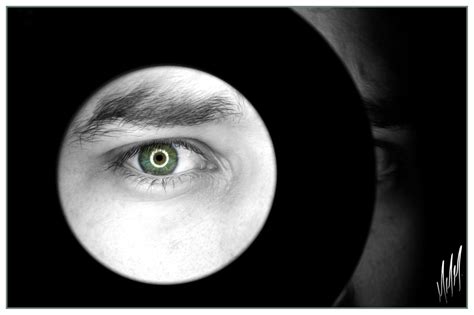
Key Takeaways
- Utilize diffused and balanced lighting setups to minimize harsh shadows and reflections in the eye.
- Optimize camera settings including aperture, ISO, and shutter speed to enhance depth of field and image clarity.
- Stabilize your equipment with tripods and focus rails to achieve precise focus and reduce motion blur.
Introduction to Macro Eye Photography
Capturing the intricate details of the human eye through macro photography is both an art and a science. Utilizing the Sony A7R5 paired with a Sony 90mm macro lens offers unparalleled resolution and sharpness, making it an excellent choice for this type of photography. However, achieving evenly lit eye photographs requires meticulous attention to lighting techniques, camera settings, and overall setup. This guide provides an in-depth look into the strategies and best practices to help you master even lighting in macro eye photography.
Essential Equipment Setup
1. Camera and Lens Configuration
Your Sony A7R5 paired with the Sony 90mm f/2.8 Macro G lens is a powerful combination for eye macro photography. To maximize the potential of this setup:
Aperture Settings
Use a narrow aperture (f/8 to f/11) to ensure a sufficient depth of field. This range keeps both the iris and eyelashes in sharp focus, which is critical given the three-dimensional nature of the eye.
Focus Mode
Switch to manual focus for precise control. Utilize focus peaking or magnification features available on the A7R5 to ensure the focus is accurately placed on the iris.
ISO and Shutter Speed
Maintain a low ISO setting (100-400) to minimize noise and preserve image clarity. A fast shutter speed (1/125s or faster) is essential to prevent motion blur, especially if there is any slight movement from the subject or camera.
Stabilization Tools
Use a sturdy tripod to eliminate camera shake. A focus rail can also be beneficial for making precise positional adjustments without disturbing the overall setup.
2. Creating Even Lighting
Even lighting is paramount in macro eye photography to highlight the details without introducing distracting shadows or reflections. Here’s how to achieve it:
Diffused Light Sources
Harsh lighting can create unwanted reflections and shadows that detract from the eye's details. Utilize diffused light sources such as softboxes, umbrella diffusers, or ring lights with built-in diffusers to soften and spread the light evenly across the eye.
Optimal Light Positioning
Position your light source slightly above and to the side of the subject’s eye. This angle mimics natural lighting and helps avoid direct reflections in the cornea. Maintaining equal power on lights positioned at 45-degree angles ensures balanced illumination.
Avoiding Direct Flash
Direct flash can lead to harsh reflections and washed-out details. If flash is necessary, use a diffuser or bounce the flash off a reflector to soften the light. Alternatively, continuous light sources with diffusers provide more control over lighting intensity and spread.
Use of Reflectors
Incorporate white or silver reflectors to fill in any shadows and balance the overall lighting. Reflectors help in bouncing light back onto the eye, ensuring that every part is evenly lit and enhancing the natural colors of the iris.
Natural Light Techniques
Natural light can be effectively used by positioning the subject near a large window with sheer curtains. This setup offers soft, diffused lighting. However, controlled artificial lighting often provides more consistency and vibrancy in eye colors and details.
| Lighting Technique | Advantages | Considerations |
|---|---|---|
| Softbox Lighting | Provides soft, even lighting; reduces harsh shadows | Requires additional space and setup |
| Ring Light | Uniform illumination; minimal shadows | Can produce reflections around the lens |
| Natural Light | Soft and flattering; no additional equipment needed | Dependent on weather and time of day |
| Continuous LED Panels | Adjustable intensity and color temperature; versatile | May require diffusion materials for softness |
3. Stabilizing Your Setup
Stability is crucial in macro photography to achieve sharp, detailed images. Here's how to ensure your setup remains steady:
Using a Tripod
A sturdy tripod is essential to keep your camera steady, especially when using high magnification settings. Ensure that the tripod is placed on a stable surface and that all legs are securely locked.
Focus Rail Utilization
A focus rail allows for precise adjustments to the camera's position without moving the entire setup. This is particularly useful when stacking multiple images for focus stacking, enhancing the overall depth of field.
Mirror Lock-Up and Remote Shutter
Enable mirror lock-up to reduce vibrations caused by the camera's mirror movement. Use a remote shutter release or the camera's timer function to prevent any movement when taking the shot.
4. Positioning the Subject
Proper positioning of the subject’s eye is fundamental to capturing sharp and evenly lit images:
Maintaining Optimal Distance
Keep the camera approximately 6-12 inches away from the subject's eye. This distance ensures that the eye fills the frame without causing distortion of features, facilitating better detail capture.
Ensuring Subject Comfort
A comfortable and relaxed subject is less likely to move, resulting in sharper images. Encourage the subject to focus on a fixed point and provide scheduled blinking breaks to minimize eye movement during the shoot.
Head Stabilization
Have the subject's head rest against a stable surface to reduce movement. This stabilization, coupled with the camera's tripod, minimizes the risk of blurred images.
5. Capturing the Perfect Shot
Once your setup is ready, follow these steps to capture high-quality macro eye photographs:
Taking Multiple Shots
Capture several images with slight variations in focus and exposure settings. This practice increases the likelihood of obtaining at least one perfectly sharp and well-lit photo.
Focus Stacking
To achieve maximum sharpness across the entire eye, consider focus stacking. Take multiple shots at different focus points and combine them during post-processing to enhance the overall depth of field.
Utilizing Camera Features
Leverage the A7R5’s focus magnification and peaking features to fine-tune the focus on the iris. These tools aid in ensuring that the most critical parts of the eye are captured with precision.
6. Post-Processing Techniques
Post-processing plays a vital role in refining macro eye photographs. Here’s how to enhance your images:
Enhancing Details
Use software like Adobe Lightroom or Photoshop to adjust contrast, sharpness, and color balance. Enhancing these aspects brings out the intricate details of the iris and adds depth to the image.
Removing Unwanted Reflections
Employ cloning or healing tools to eliminate any distracting reflections or glare that may have appeared in the eye during the shoot.
Selective Saturation Adjustment
Adjust the saturation selectively to emphasize the natural colors of the eye. Be cautious not to oversaturate, as this can make the image appear unnatural.
Final Touches
Perform final reviews and tweaks to ensure that the photograph meets your desired aesthetic and technical standards. This may include cropping, adjusting exposure, or applying filters to enhance the overall look.
Comprehensive Lighting Setup Guide
To achieve even lighting, a well-thought-out lighting setup is indispensable. Below is a detailed guide to setting up your lighting for macro eye photography:
Choosing the Right Light Sources
Select light sources that provide consistent and controllable illumination. Continuous LED panels are a popular choice as they allow real-time adjustments to lighting settings.
Types of Diffusers
Use softboxes or diffusion fabrics to spread the light evenly. These diffusers soften the light, reducing harsh shadows and minimizing reflections on the eye's surface.
Positioning Lights at 45-Degree Angles
Place two small, continuous LED lights at 45-degree angles on either side of the subject's eye. This positioning ensures that light is evenly distributed, highlighting the eye's natural features without creating unwanted hotspots.
Balancing Light Intensity
Ensure that both lights are set to equal power levels. This balance is crucial for uniform illumination, preventing one side of the eye from appearing brighter than the other.
Implementing Reflectors
Reflectors play a significant role in filling in shadows and enhancing the overall balance of light in your photograph.
Types of Reflectors
Utilize white or silver reflectors depending on the desired intensity. White reflectors provide a soft fill, while silver reflectors offer a more pronounced reflection, ideal for adding depth to the eye's details.
Placement of Reflectors
Place reflectors opposite the primary light sources to bounce light back onto the eye. This technique helps in reducing shadows and highlighting intricate details of the eye.
Avoiding Common Lighting Pitfalls
Even with the best equipment, certain pitfalls can undermine your efforts to achieve even lighting. Awareness and proactive measures can help you avoid these common issues.
Managing Reflections
Be mindful of the angles at which light sources hit the eye. Adjusting the position of lights or the subject can prevent light sources from appearing as bright spots in the eye.
Controlling Light Spill
Prevent unwanted light spill by using gobos or flags to block light from reaching areas it shouldn't. This control ensures that the eye remains the focal point without external distractions.
Consistency in Lighting
Maintain consistent lighting conditions throughout the shoot to ensure uniformity across all captures. Sudden changes in lighting can result in inconsistent image quality and color balance.
Advanced Techniques for Enhanced Lighting
Focus Stacking for Maximum Detail
Focus stacking is an advanced technique used to increase the depth of field in macro photography, ensuring that all parts of the eye are in sharp focus.
Step-by-Step Focus Stacking
Capture a series of images with varying focus points across the iris and surrounding areas.
Ensure consistent lighting and camera settings throughout the sequence.
Use post-processing software to merge the images, combining the sharpest parts from each photo to create a single, fully focused image.
Benefits of Focus Stacking
This technique enhances the overall sharpness and detail of the eye, capturing features that may be challenging to achieve with a single shot.
Using Polarizing Filters
Polarizing filters can be utilized to reduce reflections and glare on the eye's surface, leading to clearer and more detailed images.
Types of Polarizing Filters
Either linear or circular polarizing filters can be used. Circular polarizers are generally preferred for DSLR and mirrorless cameras as they do not interfere with autofocus systems.
Application of Polarizing Filters
Rotate the polarizing filter until unwanted reflections are minimized. This adjustment helps in enhancing the eye's natural color and detail by eliminating distracting light spots.
Incorporating Backlighting
Backlighting can add depth and dimension to the eye, highlighting the contours and textures of the surrounding area.
Setting Up Backlighting
Position a soft light source behind the subject's head, directing the light to create a subtle rim of light around the eye. This technique accentuates the eye's edges, making it stand out against the background.
Balancing Backlight with Front Lighting
Ensure that the backlight does not overpower the front lighting. The goal is to create a balanced illumination that enhances the eye without introducing excessive shadows or highlights.
Troubleshooting Common Lighting Issues
Dealing with Red-Eye Effect
The red-eye effect occurs when the camera flash reflects off the retina, causing the eye to appear red in photographs.
Preventive Measures
Utilize off-camera lighting sources to illuminate the eye instead of relying on the camera's built-in flash. By positioning lights at angles, you reduce the likelihood of light directly reflecting back into the lens.
Post-Processing Solutions
If red-eye occurs, it can be corrected during post-processing using tools in software like Photoshop or Lightroom. Selectively desaturate the red areas to restore a natural eye color.
Minimizing Eye Reflections
Reflections can distract from the eye's natural beauty and detail. Proper lighting setup is essential to minimize these reflections.
Adjusting Light Angles
Experiment with the angles of your light sources to find positions that reduce reflections in the cornea. Slight adjustments can significantly impact the presence of unwanted light spots.
Using Polarizers
A polarizing filter can help control and reduce reflections, enhancing the clarity and detail of the eye's features.
Managing Shadow Areas
Shadows, especially under eyelashes or around the eyelid, can detract from the overall quality of the photograph.
Implementing Fill Lighting
Use reflectors or additional light sources to fill in shadows. Adjusting the intensity and position of these lights helps in creating a more balanced and evenly lit image.
Subject Positioning
Encourage the subject to position their eye in a way that naturally minimizes shadows. Slight adjustments in head tilt or gaze direction can have a significant effect.
Advanced Post-Processing for Enhanced Images
Sharpening and Clarity
Post-processing tools allow for enhancing the sharpness and clarity of the eye, bringing out fine details that may not be fully captured in the initial shot.
Selective Sharpening
Apply sharpening selectively to the iris and surrounding areas to emphasize details without affecting the overall softness of the image.
Clarity Adjustments
Adjusting the clarity setting can add depth and texture to the eye, making the colors and patterns more pronounced.
Color Correction and Enhancement
Proper color correction ensures that the eye's natural hues are accurately represented, while selective enhancement can make the colors more vibrant.
White Balance Calibration
Ensure that the white balance is correctly set to avoid color casts that can distort the eye's true color. Use white balance tools or presets based on your lighting setup.
Saturation and Vibrance
Adjust saturation and vibrance carefully to enhance the natural colors of the eye without making them appear unnatural.
Removing Imperfections
Post-processing also allows for the removal of minor imperfections such as stray eyelashes or blemishes on the surrounding skin.
Healing and Cloning Tools
Use healing brushes or cloning tools in your editing software to seamlessly remove distractions and smooth out the skin around the eye.
Spot Reduction Techniques
Identify and correct any spots or imperfections that detract from the overall appearance of the eye, ensuring that the focus remains on the eye itself.
Conclusion
Taking great macro photos of the human eye with your Sony A7R5 and Sony 90mm macro lens is a rewarding endeavor that, when approached with the right techniques, can yield stunning results. Achieving even lighting is a critical component of this process, requiring a combination of thoughtful lighting setups, precise camera settings, and meticulous stabilization. By following the comprehensive strategies outlined in this guide, you can capture the intricate beauty of the eye with clarity and balance, elevating your macro photography skills to new heights.
References
By implementing these techniques and utilizing the provided references, you will be well-equipped to capture stunning, evenly-lit macro photos of the human eye, showcasing its natural beauty and intricate details.
Last updated January 18, 2025