
Managing Child Records Upon Parent Deletion in Relational Databases
Comprehensive Strategies and Best Practices for Data Integrity
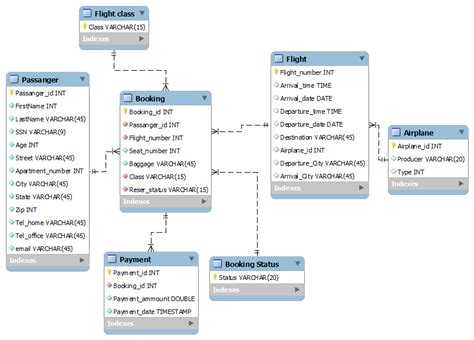
Key Takeaways
- Ensure Referential Integrity: Utilize database constraints like
ON DELETE CASCADEorON DELETE SET NULLto maintain consistent relationships. - Choose Appropriate Deletion Strategies: Select a method that aligns with your application's business logic and data dependency requirements.
- Implement Best Practices: Incorporate logging, testing, and regular maintenance to safeguard against data loss and ensure smooth operations.
Understanding Referential Integrity
Referential integrity is a cornerstone of relational database design, ensuring that relationships between tables remain consistent. When a parent record is deleted, it's imperative to handle the associated child records appropriately to prevent orphaned records, which can lead to data inconsistencies and application errors.
Strategies for Maintaining Child Records
1. ON DELETE CASCADE
ON DELETE CASCADE is a declarative method within foreign key constraints that automatically deletes all related child records when a parent record is removed. This approach is ideal for scenarios where child records are entirely dependent on the parent and have no standalone significance.
Implementation Example:
CREATE TABLE Orders (
    order_id INT PRIMARY KEY,
    customer_id INT,
    FOREIGN KEY (customer_id) REFERENCES Customers(customer_id) ON DELETE CASCADE
);
Advantages:
- Automates the cleanup process, reducing the need for manual intervention.
- Maintains data integrity by ensuring that no orphaned child records remain.
Disadvantages:
- Risk of unintended mass deletions if a parent record is removed accidentally.
- May complicate auditing processes if deletions need to be tracked meticulously.
2. ON DELETE SET NULL
The ON DELETE SET NULL strategy modifies the child records' foreign key fields to NULL when the parent record is deleted. This method is suitable when child records can logically exist without their parent records.
Implementation Example:
CREATE TABLE Reviews (
    review_id INT PRIMARY KEY,
    product_id INT,
    FOREIGN KEY (product_id) REFERENCES Products(product_id) ON DELETE SET NULL
);
Advantages:
- Preserves child records, allowing them to maintain their own lifecycle.
- Facilitates scenarios where child records should remain accessible even if the parent is removed.
Disadvantages:
- Introduces
NULLvalues, which may require additional handling in queries and application logic. - Potential for orphaned records if
NULLdoes not semantically represent the intended state.
3. Manual Deletion or Archiving
Manual deletion involves explicitly removing child records through application logic or stored procedures before deleting the parent record. Alternatively, archiving can be employed to move child records to a separate archive table, preserving historical data.
Implementation Example:
BEGIN TRANSACTION;

DELETE FROM OrderDetails WHERE order_id = :order_id;
DELETE FROM Orders WHERE order_id = :order_id;

COMMIT;
Advantages:
- Provides granular control over the deletion process, allowing for conditional logic and additional operations like logging.
- Prevents accidental data loss by requiring explicit actions to remove or archive records.
Disadvantages:
- Increases complexity within the application or database scripts.
- Requires meticulous management to ensure all dependent records are appropriately handled.
4. Restrict Deletion
The ON DELETE RESTRICT or ON DELETE NO ACTION options prevent the deletion of a parent record if any related child records exist. This strategy ensures that parent records cannot be removed without first addressing the dependent child records.
Implementation Example:
CREATE TABLE Departments (
    department_id INT PRIMARY KEY,
    name VARCHAR(100)
);

CREATE TABLE Employees (
    employee_id INT PRIMARY KEY,
    department_id INT,
    FOREIGN KEY (department_id) REFERENCES Departments(department_id) ON DELETE RESTRICT
);
Advantages:
- Ensures that critical parent records are not deleted inadvertently, preserving data integrity.
- Requires intentional handling of child records before parent deletion, promoting data consistency.
Disadvantages:
- May complicate data management by necessitating additional steps to remove or reassign child records.
- Can lead to operational bottlenecks in applications with high data interdependencies.
5. Soft Delete
Soft deletion involves marking records as deleted using a flag (e.g., is_deleted) rather than physically removing them from the database. This approach can be applied to both parent and child records, allowing for historical data retention and recovery if needed.
Implementation Example:
ALTER TABLE Customers ADD is_deleted BOOLEAN DEFAULT FALSE;

UPDATE Customers SET is_deleted = TRUE WHERE customer_id = :customer_id;
Advantages:
- Retains historical data for auditing, reporting, and recovery purposes.
- Facilitates reversible deletion, allowing records to be restored if deletions were accidental.
Disadvantages:
- Increases the complexity of queries, as conditions must be added to exclude soft-deleted records.
- Can lead to database bloat over time if not managed with regular maintenance routines.
Augmenting Deletion Strategies
Combining the aforementioned methods can yield a robust approach tailored to specific application needs. For instance, implementing ON DELETE SET NULL alongside soft deletes allows child records to maintain their existence while signaling the absence of their parent.
Implementing Combined Strategies
Consider an e-commerce application where orders are linked to customers. Using ON DELETE SET NULL allows orders to remain in the system for historical analysis even if a customer is removed. Additionally, soft deletion of customer records ensures that sensitive information can be marked as inactive without losing transactional data.
Example:
CREATE TABLE Customers (
    customer_id INT PRIMARY KEY,
    name VARCHAR(100),
    is_deleted BOOLEAN DEFAULT FALSE
);

CREATE TABLE Orders (
    order_id INT PRIMARY KEY,
    customer_id INT,
    FOREIGN KEY (customer_id) REFERENCES Customers(customer_id) ON DELETE SET NULL
);

-- Soft delete a customer
UPDATE Customers SET is_deleted = TRUE WHERE customer_id = 123;
Benefits:
- Maintains historical order data irrespective of customer status.
- Allows for comprehensive reporting and analytics without data loss.
Considerations:
- Requires careful handling in application logic to account for
NULLforeign keys. - Ensures that soft-deleted records are appropriately excluded from active queries.
Best Practices for Managing Deletions
1. Align with Business Requirements
Before choosing a deletion strategy, thoroughly assess your application's business logic and data dependencies. Understanding whether child records should depend on parent records or can exist independently is crucial in selecting the most appropriate method.
2. Implement Comprehensive Logging
Maintain detailed logs of all deletion operations, especially when using cascaded or manual deletions. This practice aids in tracking changes, auditing data modifications, and diagnosing issues related to unintended data loss.
3. Utilize Database Transactions
When performing complex deletions involving multiple tables, encapsulate operations within database transactions. This ensures atomicity, meaning that all related deletions either complete successfully together or are entirely rolled back in case of errors.
Transaction Example:
BEGIN TRANSACTION;

DELETE FROM OrderDetails WHERE order_id = :order_id;
DELETE FROM Orders WHERE order_id = :order_id;

COMMIT;
4. Regularly Test Deletion Scenarios
Establish a testing regimen that includes various deletion scenarios to ensure that your strategies behave as expected. Testing helps identify potential issues like unintended mass deletions or orphaned records before they impact the production environment.
5. Plan for Scalability and Maintenance
Design your deletion strategies with future scalability in mind. As your database grows, ensure that the chosen methods remain efficient and manageable. Implement regular maintenance routines, such as database cleanup jobs, to handle residual data from deletion operations.
Implementing Effective Deletion Policies
Developing a coherent deletion policy involves not only selecting the right technical strategies but also documenting procedures and ensuring that team members are aware of best practices. An effective policy should outline the circumstances under which different deletion methods should be applied, ensuring consistency and reliability across the database management processes.
Documentation and Training
Create detailed documentation that explains the chosen deletion strategies, their implementations, and the rationale behind each decision. Provide training to database administrators and developers to ensure that they understand how to manage deletions appropriately and are aware of the potential implications of each method.
Monitoring and Auditing
Implement monitoring tools to track deletion operations in real-time. Auditing mechanisms can help detect and alert on abnormal deletion patterns, such as unusually large cascaded deletions, which may indicate underlying issues or potential data breaches.
Case Study: E-Commerce Application
Consider an e-commerce platform that manages customers, orders, and order details. Here's how different deletion strategies can be applied:
Scenario: Customer Deletion
Requirement:
When a customer is deleted, it's essential to maintain historical order data for auditing and analytics while ensuring that inactive customer accounts do not clutter active listings.
Proposed Solution:
- Implement soft deletes by adding an
is_deletedflag to the Customers table. - Use
ON DELETE SET NULLfor the foreign key constraint in the Orders table to preserve order records even if the customer is deleted.
Implementation Steps:
- Add the
is_deletedcolumn to the Customers table. - Modify the Orders table to set
customer_idtoNULLupon customer deletion. - Update application queries to exclude customers where
is_deleted = TRUEunless historical data is required.
Benefits:
- Retains order history for analysis without tying it to active customer accounts.
- Prevents accidental loss of critical order data by avoiding cascading deletions.
Considerations:
-
Ensure that orphaned orders with
NULLcustomer IDs are handled appropriately in the application logic. -
Regularly review and clean up records if necessary to maintain database performance.
Conclusion
Maintaining child records when deleting parent records in a relational database is pivotal for preserving data integrity and ensuring the seamless operation of applications. By carefully selecting and implementing appropriate deletion strategies such as ON DELETE CASCADE, ON DELETE SET NULL, manual deletions, or soft deletes, developers can align their database behavior with business requirements while safeguarding against data loss and inconsistencies.
Adhering to best practices, including thorough documentation, comprehensive logging, and regular testing, further fortifies the database against potential issues arising from deletion operations. Ultimately, a well-thought-out approach to managing deletions not only enhances data integrity but also contributes to the overall robustness and reliability of the application.
References
Last updated January 18, 2025