
Unlock the Power of APIs: Your Guide to Building Web Services with Django
Leverage the Django REST Framework to create robust, scalable APIs efficiently.
Building an Application Programming Interface (API) allows different software applications to communicate with each other. Django, a high-level Python web framework, provides a solid foundation for web development, and when combined with the Django REST Framework (DRF), it becomes exceptionally powerful for creating web APIs.
Highlights
- Django REST Framework (DRF) is Essential: While Django can handle basic HTTP responses, DRF provides a specialized toolkit that drastically simplifies API development, handling serialization, authentication, permissions, and more.
- Structured Workflow: Building a Django API follows a clear pattern: define data models, create serializers to translate data, implement views to handle logic, and map URLs to connect everything.
- Rapid Development & Flexibility: DRF offers features like the Browsable API for easy testing and various view types (from simple function-based views to powerful ViewSets) to suit different complexity levels.
Why Use Django REST Framework (DRF)?
While you *can* build basic APIs using only Django by returning JsonResponse objects, this approach quickly becomes cumbersome for anything beyond simple endpoints. Django REST Framework (DRF) is the de facto standard for building APIs with Django because it offers:
- Serialization: Easily convert complex data types like Django model instances into formats like JSON or XML that can be transmitted over the web, and validate incoming data.
- Authentication & Permissions: Built-in support for various authentication schemes (e.g., Token, Session, OAuth, JWT) and flexible permission policies to control API access.
- Generic Views & ViewSets: Reusable components that significantly reduce boilerplate code for common tasks like creating, retrieving, updating, and deleting (CRUD) data.
- Browsable API: An automatically generated, user-friendly HTML interface for your API, making it easy to visualize and interact with endpoints directly in your browser during development and testing.
- Extensibility: Highly customizable, allowing you to tailor almost every aspect to your specific needs.
- Community & Documentation: Extensive documentation and a large, active community provide excellent support.
In essence, DRF handles the repetitive, complex parts of API development, letting you focus on your application's unique logic.
Step-by-Step Guide to Building Your Django API
Let's walk through the fundamental steps to create a REST API using Django and DRF.
Step 1: Setting Up Your Development Environment
Prerequisites
Ensure you have Python (version 3.8 or higher recommended) and pip (Python's package installer) installed on your system.
Virtual Environment
It's best practice to create a virtual environment for each project to manage dependencies independently.
# Create a virtual environment (e.g., named 'venv')
python -m venv venv

# Activate the virtual environment
# On macOS/Linux:
source venv/bin/activate
# On Windows:
.\venv\Scripts\activate
Install Packages
Install Django and Django REST Framework using pip:
pip install django djangorestframeworkStep 2: Project and App Initialization
Create Django Project
If you don't have an existing project, create one:
django-admin startproject myproject
cd myproject
(Replace myproject with your desired project name).
Create Django App
Within your project, create a Django app to house your API logic:
python manage.py startapp api(Replace api with your preferred app name).
Step 3: Configuring Your Project
You need to tell Django about your new app and the DRF package. Edit the settings.py file located in your project directory (e.g., myproject/settings.py):
INSTALLED_APPS = [
    'django.contrib.admin',
    'django.contrib.auth',
    'django.contrib.contenttypes',
    'django.contrib.sessions',
    'django.contrib.messages',
    'django.contrib.staticfiles',
    # Third-party apps
    'rest_framework',
    # Your apps
    'api', # Add your app here
]
Optionally, you can add a global REST_FRAMEWORK dictionary in settings.py to configure default settings like authentication, permissions, and pagination later.
Step 4: Defining Data Models
Models define the structure of your data, usually mapping to database tables. Define your models in the models.py file within your app directory (e.g., api/models.py).
Example: A simple Item model.
# api/models.py
from django.db import models

class Item(models.Model):
    name = models.CharField(max_length=100)
    description = models.TextField(blank=True, null=True)
    created_at = models.DateTimeField(auto_now_add=True)

    def __str__(self):
        return self.name
Database Migrations
After defining or modifying models, create and apply database migrations:
python manage.py makemigrations
python manage.py migrate
This creates/updates the corresponding tables in your database.
Step 5: Crafting Serializers
Serializers convert complex data types (like model instances) into Python data types that can be easily rendered into JSON, XML, or other content types. They also handle deserialization (converting incoming data back into complex types) and data validation.
Create a serializers.py file in your app directory (e.g., api/serializers.py).
# api/serializers.py
from rest_framework import serializers
from .models import Item

class ItemSerializer(serializers.ModelSerializer):
    class Meta:
        model = Item
        fields = ['id', 'name', 'description', 'created_at'] # Or use '__all__' to include all fields
The ModelSerializer works similarly to Django's ModelForm and automatically generates fields based on the specified model.
Step 6: Implementing Views
Views handle the request/response logic for your API endpoints. DRF provides several ways to write views:
- Function-Based Views (FBVs): Using decorators like
@api_view. Simple for basic cases. - Class-Based Views (CBVs):
APIView: The base class, offering more structure than FBVs.- Generic Views: Classes like
ListAPIView,CreateAPIView,RetrieveUpdateDestroyAPIView,ListCreateAPIViewhandle common patterns with minimal code. - ViewSets: Combine logic for multiple related views (e.g., list, create, retrieve, update, destroy) into a single class, often used with Routers for automatic URL generation.
ModelViewSetprovides a full CRUD implementation automatically.
Using Generic Views or ViewSets is often the most efficient approach. Let's use a ModelViewSet in api/views.py:
# api/views.py
from rest_framework import viewsets
from .models import Item
from .serializers import ItemSerializer

class ItemViewSet(viewsets.ModelViewSet):
    """
    API endpoint that allows items to be viewed or edited.
    """
    queryset = Item.objects.all().order_by('-created_at')
    serializer_class = ItemSerializer
    # Permissions can be added here, e.g.,
    # permission_classes = [permissions.IsAuthenticatedOrReadOnly]
This single ModelViewSet provides endpoints for listing, creating, retrieving, updating (full and partial), and deleting Item objects.
Step 7: Mapping URLs to Views
Finally, connect URLs to your views so that requests can be routed correctly. When using ViewSets, DRF's Routers simplify this significantly.
App URLs (api/urls.py)
Create a urls.py file inside your app directory (e.g., api/urls.py).
# api/urls.py
from django.urls import path, include
from rest_framework.routers import DefaultRouter
from .views import ItemViewSet

# Create a router and register our viewsets with it.
router = DefaultRouter()
router.register(r'items', ItemViewSet, basename='item') # 'items' is the URL prefix

# The API URLs are now determined automatically by the router.
urlpatterns = [
    path('', include(router.urls)),
]
Project URLs (myproject/urls.py)
Include your app's URLs in the main project urls.py (e.g., myproject/urls.py).
# myproject/urls.py
from django.contrib import admin
from django.urls import path, include

urlpatterns = [
    path('admin/', admin.site.urls),
    path('api/', include('api.urls')), # Include your app's URLs under the 'api/' prefix
    # You might want API authentication URLs
    # path('api-auth/', include('rest_framework.urls', namespace='rest_framework'))
]
With this setup, the router will automatically generate URLs like /api/items/ (for list and create) and /api/items/{pk}/ (for retrieve, update, destroy).
Step 8: Testing Your API
Run the Django development server:
python manage.py runserverNow you can access your API:
- Browsable API: Open your web browser and navigate to
http://127.0.0.1:8000/api/items/. DRF provides an interactive interface to view data and make requests. - Tools: Use tools like
curlon the command line or graphical clients like Postman or Insomnia to send various HTTP requests (GET, POST, PUT, PATCH, DELETE) to your endpoints and inspect the responses.
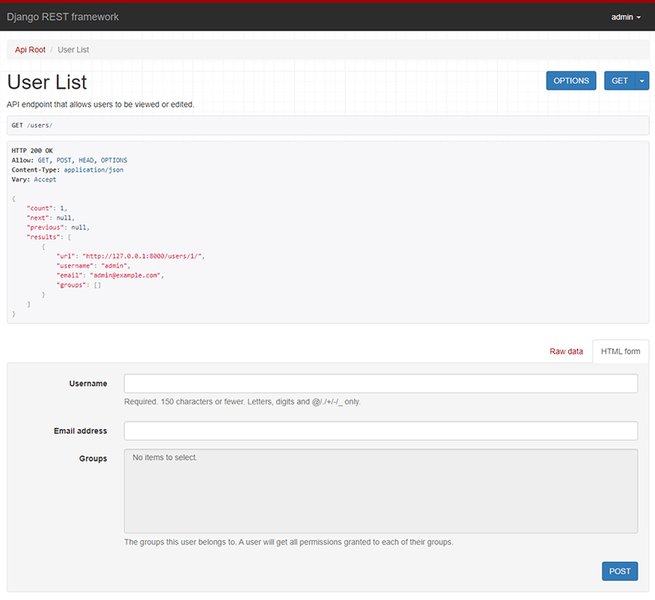
Example of the DRF Browsable API interface for testing endpoints.
Visualizing the DRF Architecture
Understanding the flow of a request through Django and DRF can be helpful. A typical request hitting a DRF endpoint goes through several layers:
- Incoming request hits Django's URL dispatcher.
- URL dispatcher routes the request to the appropriate DRF View (e.g.,
ItemViewSet). - Middleware and DRF's request processing (including authentication and permissions checks) occur.
- The View interacts with the Serializer (
ItemSerializer) and the Model (Item). - The Serializer converts model data to/from primitive types (like dictionaries).
- DRF's Renderer converts the primitive data into the final response format (e.g., JSON).
- The response is sent back through Django's middleware to the client.
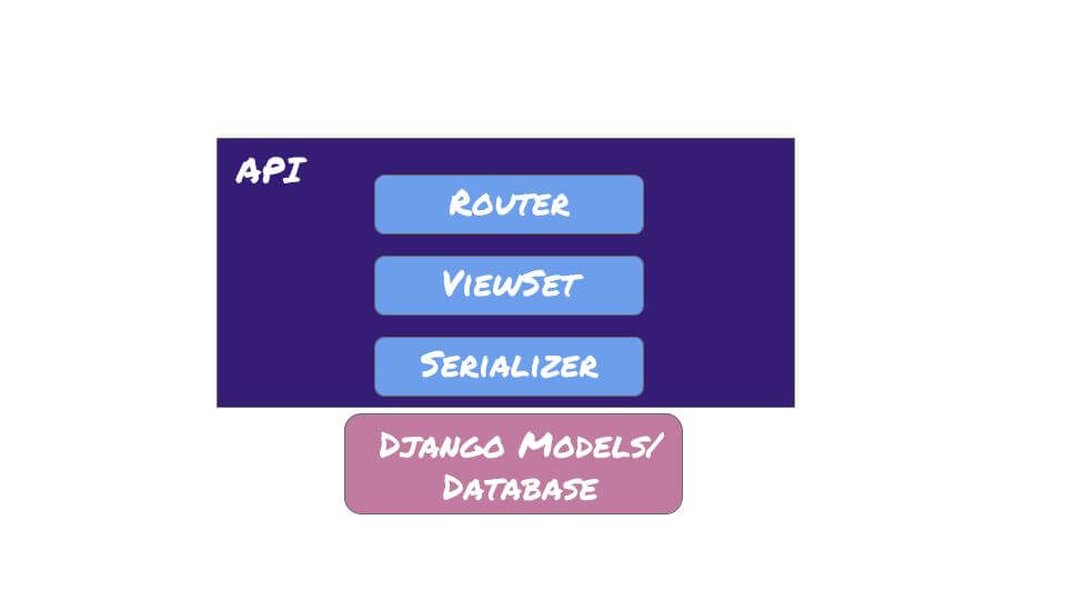
Simplified architecture of Django REST Framework request handling.
Comparing DRF View Approaches
Choosing the right type of view depends on your needs. ViewSets offer the most automation, while APIView provides the most control. Generic views strike a balance. This radar chart illustrates a subjective comparison of different view types based on common development considerations:
As shown, `ViewSets` excel in reducing boilerplate and providing automatic features, making them great for standard CRUD operations and rapid development. `APIView` offers the most granular control, suitable for complex or unconventional endpoints. `Generic Views` provide a good middle ground, offering common patterns with less code than `APIView` but more flexibility than `ViewSets`.
Enhancing Your API
Beyond the basics, DRF provides features to build more robust and user-friendly APIs:
Authentication and Permissions
Secure your API by controlling who can access it and what actions they can perform. DRF integrates with Django's authentication system and provides handlers for Token Authentication, Session Authentication, JWT (via third-party packages like `djangorestframework-simplejwt`), and more. Define default policies in `settings.py`:
# myproject/settings.py
REST_FRAMEWORK = {
    'DEFAULT_AUTHENTICATION_CLASSES': [
        'rest_framework.authentication.TokenAuthentication', # Example: Token Auth
        'rest_framework.authentication.SessionAuthentication',
    ],
    'DEFAULT_PERMISSION_CLASSES': [
        'rest_framework.permissions.IsAuthenticatedOrReadOnly', # Example: Allow read-only for anonymous, require auth for write
        # 'rest_framework.permissions.IsAuthenticated', # Or require auth for all access
    ]
}
You can also set authentication and permission classes on a per-view or per-viewset basis.
Pagination
For endpoints that return lists of objects, pagination is crucial to avoid sending massive amounts of data at once. DRF offers several pagination styles (e.g., PageNumberPagination, LimitOffsetPagination) configurable globally or per-view.
Filtering and Searching
Allow clients to filter, search, and order results. DRF integrates with libraries like `django-filter` for powerful filtering backends.
Documentation
Good documentation is vital for API consumers. The Browsable API provides basic self-documentation. For more formal specifications like OpenAPI (Swagger), use packages like `drf-spectacular` or `drf-yasg` to automatically generate interactive API documentation.
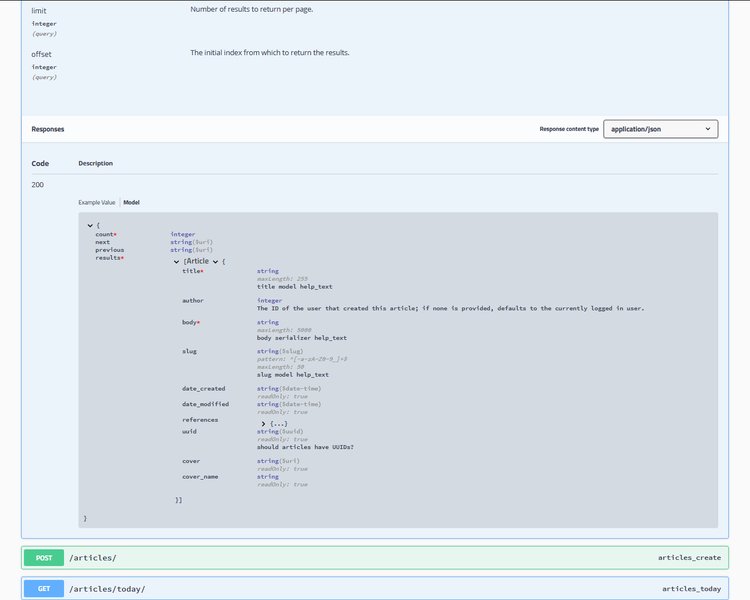
Example of auto-generated Swagger UI documentation.
Core Concepts Mindmap
This mindmap summarizes the key components involved in building an API with Django and DRF:
The mindmap illustrates how the project setup leads to defining data models, which are then processed by serializers and managed by views. URLs route requests to the appropriate views, and additional DRF features enhance the API's functionality and usability.
Practical Example: Key Code Snippets
Here's a table summarizing the essential code files and their content for the simple `Item` API example discussed previously:
| File Path | Description | Code Snippet |
|---|---|---|
api/models.py |
Defines the database model. | |
api/serializers.py |
Defines how model data is converted. | |
api/views.py |
Defines the API logic using a ViewSet. | |
api/urls.py |
Sets up URL routing for the app using a Router. | |
myproject/urls.py |
Includes the app's URLs into the main project URLs. | |
myproject/settings.py |
Registers the app and DRF. | |
Learn Visually: Building a Django REST API
Watching someone build an API can often clarify the process. This video provides a concise, step-by-step tutorial on creating a REST API using Python, Django, and the Django REST Framework, covering many of the concepts discussed here.
Python Django REST API In 30 Minutes - Django Tutorial by PedroTech.
The tutorial walks through setting up the environment, creating models, serializers, views (often using ViewSets for efficiency), and configuring URLs, culminating in a testable API endpoint using the browsable API.
Frequently Asked Questions (FAQ)
What is the difference between Django and Django REST Framework (DRF)?
Django is a full-stack web framework for building web applications, including handling databases, URL routing, templating (for HTML pages), forms, and authentication. Django REST Framework (DRF) is a separate package built *on top* of Django specifically designed to make building Web APIs easier. It adds tools for data serialization, API-specific views, authentication/permission classes suited for APIs, and features like the browsable API.
Do I *have* to use DRF to build an API with Django?
No, you don't *have* to use DRF. You can build simple APIs using Django's built-in `JsonResponse` to return JSON data directly from your views. However, for anything beyond very basic endpoints, DRF significantly simplifies development by handling common API tasks like serialization, content negotiation, authentication, and providing helpful tools like generic views and the browsable API.
What are serializers used for?
Serializers in DRF are primarily used for two things:
- Serialization: Converting complex Python objects (like Django model instances or querysets) into simple data types (like dictionaries) that can then be easily rendered into formats like JSON for API responses.
- Deserialization & Validation: Converting incoming data (e.g., JSON from a POST request) back into Python objects after validating the data structure and types. This is crucial for creating or updating database records based on client input.
How do I handle user authentication in my API?
DRF provides several built-in authentication classes (like `TokenAuthentication`, `SessionAuthentication`, `BasicAuthentication`) and supports third-party packages for others (like JWT with `djangorestframework-simplejwt`). You typically configure the desired authentication methods in your `settings.py` under the `REST_FRAMEWORK` dictionary or specify them directly in your views/viewsets. Once configured, DRF handles the process of checking credentials provided in the request headers (e.g., an `Authorization: Token ` header) and attaching the authenticated user to the `request.user` object.
What is the Browsable API?
The Browsable API is a feature of DRF that automatically generates an HTML representation of your API endpoints when accessed through a web browser. It displays the data for GET requests, provides forms for making POST, PUT, and PATCH requests, and allows DELETE requests. It's incredibly useful during development and testing as it lets you interact with your API without needing a separate client tool like Postman.
Recommended Next Steps
- How can I add user authentication (like tokens or JWT) to my Django REST Framework API?
- Can you explain how to effectively use ViewSets and Routers in Django REST Framework?
- What are the best practices for handling permissions and object-level permissions in DRF?
- What are some common strategies and tools for testing Django REST Framework APIs?
References
Last updated May 4, 2025