
Matte Painting: Crafting Cinematic Worlds Beyond Reality
Explore the art and evolution of matte painting, the visual effects technique that builds breathtaking environments in film, TV, and games.
Matte painting is a powerful visual effects (VFX) technique used across entertainment industries to create detailed and often fantastical environments. Whether extending a physical set, depicting a distant landscape, or conjuring an entirely imaginary world, matte paintings blend seamlessly with live-action footage or computer-generated imagery (CGI) to produce illusions that captivate audiences. It's an art form that combines traditional painting principles with cutting-edge digital technology.
Key Insights into Matte Painting
- Historical Roots: Matte painting originated over a century ago, first used by Norman Dawn in 1907, employing painted glass panels to alter or enhance filmed scenes.
- Digital Transformation: The technique evolved significantly with the advent of digital tools in the 1980s, allowing for greater realism, flexibility, and integration with complex camera movements and CGI.
- Enduring Relevance: Despite advancements in CGI, matte painting remains a vital and cost-effective method for creating expansive and detailed environments in modern film, television, and video game production.
The Genesis and Evolution of Matte Painting
From Glass Panels to Digital Canvases
The history of matte painting stretches back to the nascent days of cinema. Norman Dawn, a pioneering filmmaker and special effects artist, is credited with the first documented use of a matte painting in his 1907 documentary Missions of California. Dawn utilized the "glass shot" technique, where parts of a scene were painted onto a large pane of glass positioned strategically between the camera and the live-action set. Clear areas were left on the glass, allowing the live-action elements to be filmed through them, effectively compositing the painted environment with the real scene directly in-camera.
Early Techniques and Milestones
This early method provided a cost-effective solution for creating settings that were otherwise impossible or prohibitively expensive to build or access. Throughout the early 20th century, the technique was refined. Artists began painting elaborate backgrounds not just on glass, but also on large canvases used as backdrops. During the 1930s and 1940s, matte paintings were often combined with miniature sets to depict vast locations.
Iconic examples from this era showcase the artistry involved:
- The Wizard of Oz (1939): The memorable approach to the gleaming Emerald City was realized through matte painting.
- Citizen Kane (1941): Charles Foster Kane's imposing estate, Xanadu, was largely brought to life using sophisticated matte techniques.
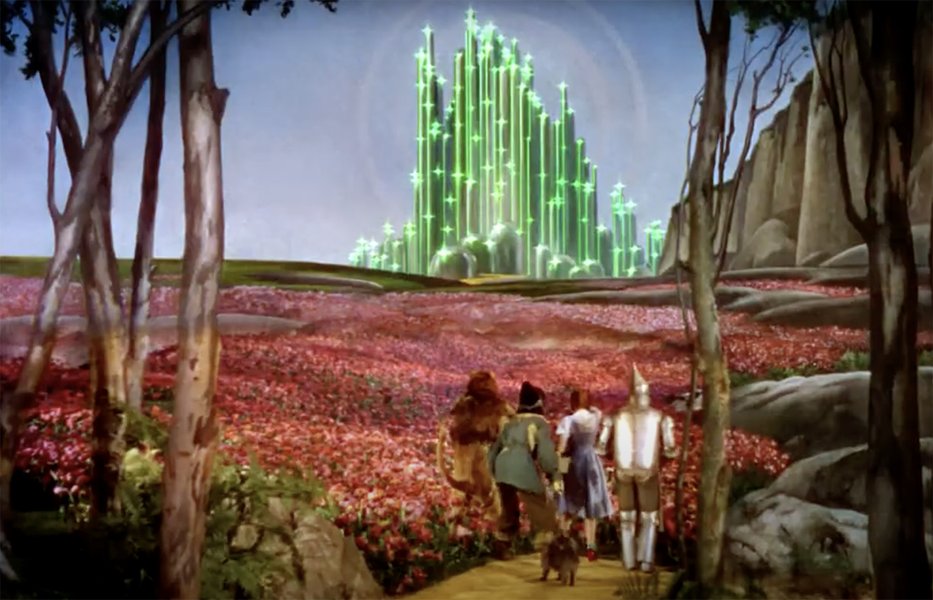
The approach to the Emerald City in "The Wizard of Oz" (1939), a classic example of traditional matte painting.
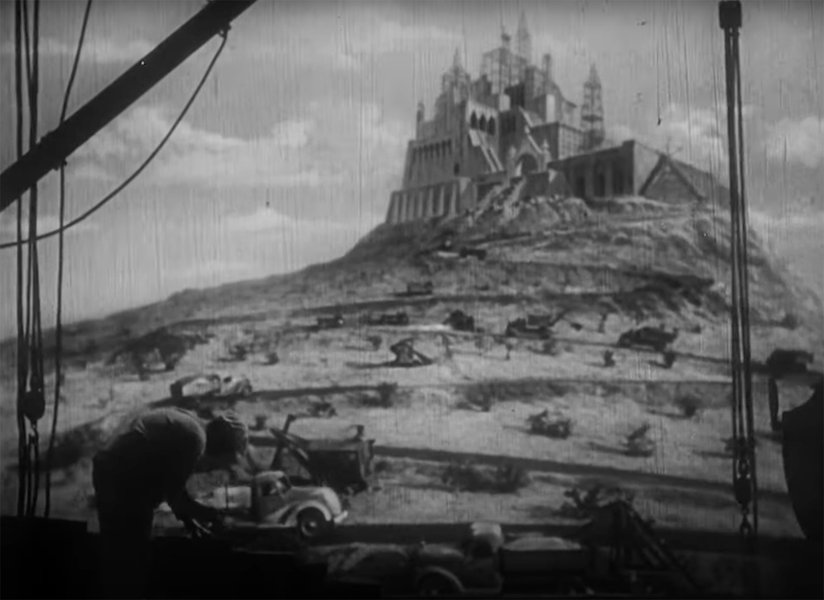
The vast estate of Xanadu in "Citizen Kane" (1941), achieved through masterful matte work.
These traditional methods required immense skill in painting, perspective, and understanding how light interacted with both the painted elements and the live-action footage. Compositing often involved complex optical printing processes.
The Digital Revolution
The landscape of matte painting began to change dramatically with the rise of computer technology. A pivotal moment occurred in 1985 when artist Chris Evans created the first known digital matte painting for the film Young Sherlock Holmes. Evans blended a scanned photograph with digital painting techniques, signaling the dawn of a new era.
As digital tools like Adobe Photoshop became more powerful and accessible in the 1990s, artists increasingly transitioned from physical paints and glass to digital tablets and software. This shift, often referred to as Digital Matte Painting (DMP), offered unprecedented flexibility and control.
Modern Matte Painting Techniques
Blending Artistry with Technology
Today, digital matte painting is a sophisticated discipline integrating 2D painting, 3D modeling, and image manipulation. Digital Matte Painters (DMPs) leverage powerful software to create photorealistic or highly stylized environments that seamlessly integrate with live-action or CGI elements. Key techniques include:
- Photobashing: Combining and manipulating elements from multiple photographs to create textures, details, or entire sections of the environment. This allows for rapid creation of realistic surfaces and objects.
- Digital Painting: Using digital brushes and tools (often in software like Photoshop or Clip Studio Paint) to paint elements from scratch, refine photobashed components, or create atmospheric effects like fog, haze, or specific lighting conditions.
- 3D Integration: Incorporating 3D models created in software like Maya or 3ds Max. These models can form the base geometry for complex structures or landscapes, providing accurate perspective and parallax, especially for shots involving camera movement.
- Projection Mapping (2.5D): Projecting a 2D matte painting onto simple 3D geometry. This allows for limited camera movement (like pans or tilts) without revealing the flatness of the painting, creating a sense of depth often referred to as 2.5D.
- Photorealistic Texturing: Applying realistic textures, often derived from photographs, to 2D paintings or 3D models to enhance realism.
- Atmospheric Effects: Simulating weather conditions, time of day changes (e.g., converting day to night), and atmospheric perspective (where distant objects appear less distinct and bluer) to ground the painting in reality.
- Clean-up and Sky Replacement: Removing unwanted elements from live-action plates (like rigging or modern structures in a period piece) and replacing skies to set a specific mood or time.
- Compositing: The final step, where the matte painting is combined with the live-action footage or CGI elements using compositing software like Nuke or After Effects, ensuring seamless integration of lighting, color, and perspective.
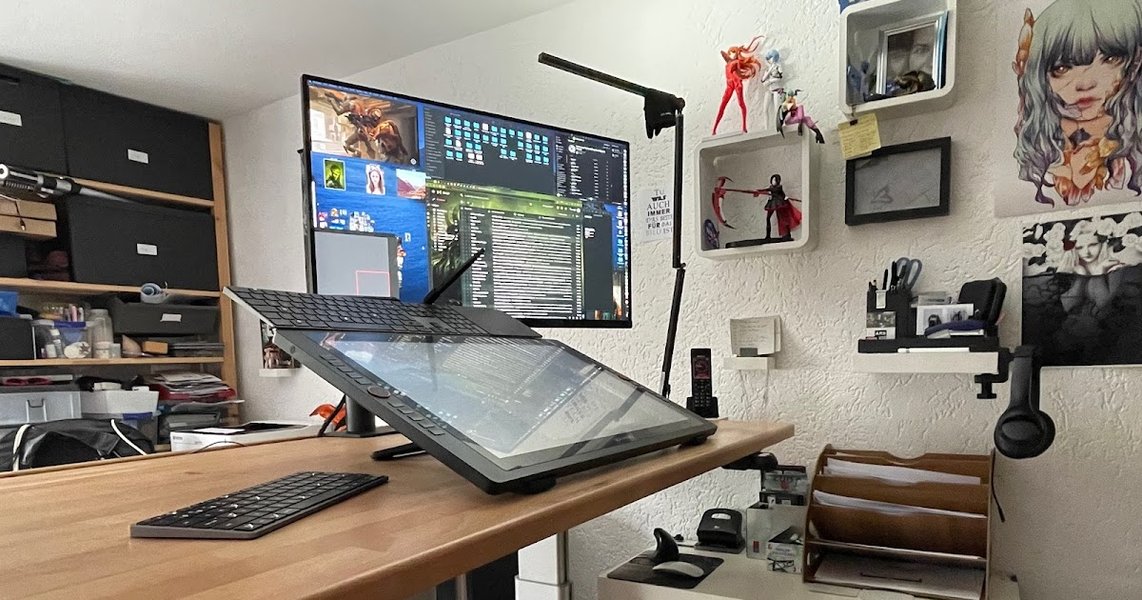
Modern digital matte painters utilize advanced software and hardware setups.
Visualizing Matte Painting Techniques: Traditional vs. Digital
A Comparative Analysis
Matte painting has undergone a significant transformation from its traditional roots to its current digital form. While the goal remains the same—creating believable background environments—the methods, flexibility, and potential outcomes differ considerably. This radar chart compares key aspects of traditional and digital matte painting based on common industry perceptions.
As the chart illustrates, digital techniques generally offer superior flexibility, better integration with dynamic camera movements and CGI, and greater capacity for handling complex scenes and achieving photorealism. Traditional methods could sometimes be faster for very simple, static shots and had a different kind of initial cost structure (physical materials vs. software/hardware), but lacked the iterative power and integration capabilities of modern digital workflows.
Mapping the World of Matte Painting
Key Concepts at a Glance
To understand the multifaceted nature of matte painting, this mindmap outlines its core components, from its definition and history to its techniques and applications.
VFX technique for creating
background environments"] id2["History"] id2a["Traditional Era (Early 1900s+)"] id2a1["Norman Dawn (1907)"] id2a2["Glass Painting"] id2a3["Canvas Backdrops"] id2a4["Optical Compositing"] id2b["Digital Era (1985+)"] id2b1["Chris Evans (Young Sherlock Holmes)"] id2b2["Software Tools (Photoshop, etc.)"] id2b3["Integration with CGI"] id3["Techniques"] id3a["Digital Painting"] id3b["Photobashing"] id3c["3D Integration"] id3d["Projection Mapping (2.5D)"] id3e["Atmospheric Effects"] id3f["Sky Replacement"] id3g["Compositing"] id4["Applications"] id4a["Film Production (Set Extension, Worlds)"] id4b["Television"] id4c["Video Games (Environments, Concept Art)"] id4d["Animation"] id4e["Architectural Visualization (ArchViz)"] id5["Key Elements"] id5a["Realism & Believability"] id5b["Seamless Integration"] id5c["Cost-Effectiveness"] id5d["Artistic Skill (Light, Comp.)"] id6["Notable Examples/Artists"] id6a["Wizard of Oz, Citizen Kane"] id6b["Star Wars (McQuarrie)"] id6c["Blade Runner"] id6d["Modern Artists (Cole, Lacoste)"]
This mindmap provides a visual summary of matte painting, highlighting its journey from physical craft to digital art form and its diverse uses in creating immersive visual experiences.
Applications Across Industries
Where Matte Painting Makes an Impact
Matte painting is not confined to feature films; its versatility makes it valuable across various media:
- Filmmaking: Its primary application. Used for establishing shots, extending physical sets, creating historical or futuristic settings, adding crowds, altering landscapes (e.g., adding mountains or removing modern buildings), and realizing fantastical worlds that are impossible to film.
- Television: Employed for similar purposes as film, often crucial for achieving high production values on tighter budgets and schedules. Set extensions and environment creation are common uses.
- Video Games: Used extensively for creating background environments, skyboxes, loading screens, and concept art to visualize the game's world during development.
- Animation: Provides detailed backgrounds for animated characters and scenes, adding depth and realism.
- Advertising: Helps create compelling visuals and environments for commercials quickly and cost-effectively.
- Architectural Visualization (ArchViz): Artists use matte painting techniques to enhance 3D architectural renders, adding realistic surroundings, landscaping, skies, and people to showcase proposed projects.
The enduring appeal of matte painting lies in its efficiency and the artistic touch it brings. Even with advanced 3D rendering, matte painting often provides a faster route to achieving complex, photorealistic backgrounds, especially for static or subtly moving shots.
Exploring Matte Painting Techniques Visually
An Introductory Guide
Understanding the practical application of matte painting techniques can be greatly enhanced by seeing them in action. This video provides an introduction to the basics of digital matte painting, covering fundamental concepts and approaches used by artists in the field. It demonstrates how digital tools are employed to craft environments, offering insights valuable for both beginners and those curious about the process.
An introduction to the fundamental techniques of digital matte painting and concept art.
The video touches upon digital painting basics and concept art principles often employed in matte painting workflows. Observing these techniques helps illustrate how artists build layers, manipulate light and shadow, integrate photographic elements, and ultimately create convincing illusions that blend seamlessly with other visual elements in a production.
Comparing Matte Painting Approaches
Traditional vs. Digital Methods
The evolution from traditional to digital matte painting brought significant changes in tools, techniques, and capabilities. This table summarizes the key differences:
| Feature | Traditional Matte Painting | Digital Matte Painting |
|---|---|---|
| Medium | Paint (oils, acrylics, pastels) on glass or canvas | Digital paint, manipulated photographs, 3D models |
| Tools | Brushes, physical paints, large glass panels, optical printers | Computers, graphics tablets, software (Photoshop, Nuke, Maya, etc.) |
| Flexibility | Low; changes were difficult and time-consuming | High; easy iteration, non-destructive workflows, layers |
| Integration | Complex; required precise camera alignment, optical compositing | Simpler; digital compositing allows seamless integration with live-action and CGI |
| Camera Movement | Very limited; mostly static shots | Supports complex camera moves (using 3D/2.5D techniques) |
| Realism Potential | High (dependent on artist skill), but could look 'painted' | Very high; photorealistic results achievable through photo manipulation and advanced rendering |
| Cost-Effectiveness | Costly materials and specialized artist time; saved on set building | Initial software/hardware cost, but efficient workflow can save time and budget overall |
| Workflow | Physical painting, filming through glass or optical printing | Digital creation, layering, compositing in post-production |
While traditional techniques demanded exceptional painting skill and meticulous planning, digital methods offer greater versatility, efficiency, and seamless integration with modern filmmaking pipelines.
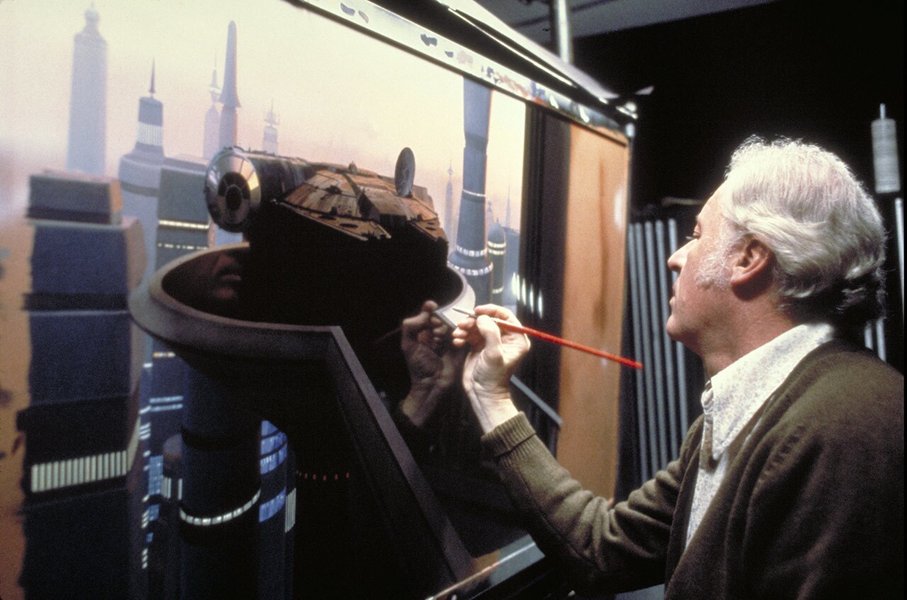
Iconic matte painting work from "Star Wars: The Empire Strikes Back," showcasing the blend of practical sets and painted extensions.
Learning Matte Painting
Developing the Necessary Skills
Aspiring matte painters need a strong foundation in art fundamentals, including composition, perspective, color theory, and lighting. Understanding photography and possessing proficiency in digital tools like Photoshop are essential. Many resources, from online tutorials to dedicated courses, focus on specific techniques like photobashing, 3D integration, and compositing. Building a portfolio showcasing diverse environmental work is key for entering the industry.
Frequently Asked Questions about Matte Painting
What exactly is matte painting?
Matte painting is a visual effects technique used to create representations of landscapes, sets, or locations that aren't physically present during filming. It involves combining painted or digitally created elements with live-action footage or CGI to produce a seamless, believable environment. It's used to extend sets, create fantastical worlds, or alter existing locations cost-effectively.
How does digital matte painting work?
Digital matte painting typically involves using software like Adobe Photoshop, Clip Studio Paint, or specialized 3D programs. Artists often start with photographic elements (photobashing), digital painting, or 3D models. They layer these elements, match lighting and perspective to the live-action plate, add atmospheric effects, and then composite the final matte painting with the footage using software like Nuke or After Effects.
Is matte painting still used today with advanced CGI?
Yes, absolutely. While full CGI environments are common, matte painting remains a crucial and often more efficient technique, especially for backgrounds that don't require complex interaction or full 3D geometry. It's frequently used for set extensions, sky replacements, and establishing shots. Often, digital matte paintings incorporate 3D elements (2.5D or full 3D integration), blending the lines between techniques.
What's the difference between matte painting and concept art?
While they use similar techniques, their purpose differs. Concept art is created early in production to visualize ideas, characters, and environments, guiding the overall look and feel. Matte painting is a final visual effect used in the actual film, TV show, or game, appearing on screen as part of the finished product. A concept artist might design a world, and a matte painter would then create the final, photorealistic version of that world for specific shots.
Recommended
- What are some beginner techniques for digital matte painting?
- Can you show famous examples of matte paintings used in classic and modern films?
- What software do professional matte painters typically use?
- How does matte painting differ from fully 3D environment creation in VFX?
References
 nzpetesmatteshot.blogspot.com
nzpetesmatteshot.blogspot.com
nzpetesmatteshot.blogspot.com
nzpetesmatteshot.blogspot.com
nzpetesmatteshot.blogspot.com
Last updated May 5, 2025