
Decoding Mechanical Controls: From Simple Levers to Complex Selectors
Understanding the parts you interact with to operate mechanical devices.
Highlights
- Selector / Selector Switch: The specific term for a user-manipulated mechanical part with distinct positions (like your 2-position slider example) that alters device operation.
- Control Devices / Mechanical Controls: General terms encompassing all user-manipulable parts like knobs, levers, buttons, and sliders used to operate mechanical systems.
- Related Concepts: Understanding terms like linkages, detents, mechanisms, and actuators provides a deeper insight into how these controls function within a mechanical device.
Unveiling the "Selector": Your Mechanical Position Controller
Pinpointing the Right Term
When you have a part on a mechanical device that you can move into distinct, separate positions, and each position changes how the machine works, the most accurate term is typically a selector or selector switch. Think of it like its electrical counterpart, the slider or rotary switch, but operating purely through mechanical means.
This component allows a user to choose between different operational modes, settings, or pathways within the device. Examples include gear selectors in vehicles, mode selectors on machinery, or even older elevator floor selectors which were mechanical devices indicating and controlling the car's position.
Key Characteristics of a Mechanical Selector:
- User-Manipulable: Designed for direct interaction by the user (e.g., sliding, rotating, flipping).
- Discrete Positions: It has two or more specific settings it can rest in, not usually allowing for intermediate states.
- Mechanical Operation: Its action directly causes a physical change within the device through linkages, cams, or other mechanisms, without necessarily involving electrical circuits (though electromechanical versions exist).
- Positional Feedback (Detents): Often, selectors incorporate detents – mechanical stops or spring-loaded mechanisms – that provide tactile feedback (a 'click' or resistance) and hold the selector firmly in the chosen position.
If the selector takes the form of a lever, it might specifically be called a selector lever. While "mechanical switch" is a broader term, "selector" emphasizes the function of choosing between predefined states.
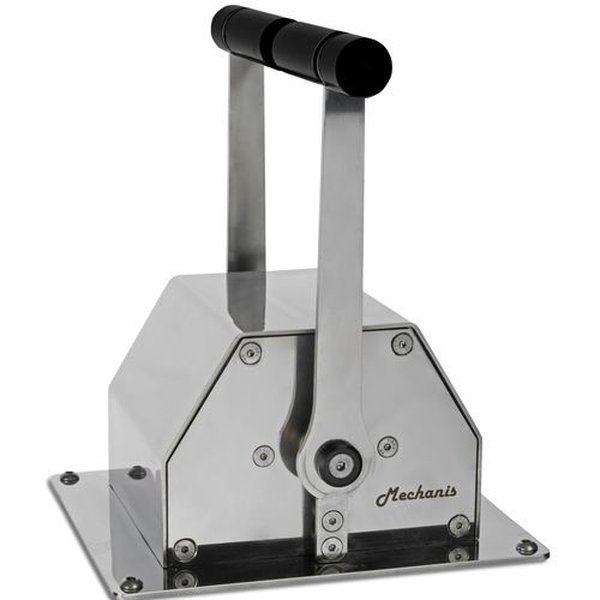
Example of a mechanical selector lever used for engine control.
The Orchestra of Control: General Terms for Mechanical Interfaces
The Broader Family of Controls
While "selector" is specific, the umbrella terms for all user-manipulable parts on a mechanical device are generally referred to as control devices, mechanical controls, control elements, or parts of the control interface or mechanical user interface (UI). These are the physical points where a human operator inputs commands or makes adjustments to a mechanical system.
Common Types of Mechanical Controls:
- Knobs: Typically rotated to adjust settings like flow, tension, position, or speed. They offer fine control, often over a continuous range or discrete steps.
- Levers: Bars that pivot on a fulcrum to transmit force or motion. Used for tasks requiring leverage or distinct positional changes, like engaging gears or operating valves.
- Switches: Devices designed to change the state of a system between discrete options (like on/off or different modes). This category includes toggle switches (flipped), slide switches (linear motion), rocker switches (pivot back and forth), and the selector switches discussed earlier.
- Buttons: Pressed to initiate a specific action or state change. Often spring-loaded to return to their original position.
- Sliders: Moved linearly along a track to adjust a setting or select a position. Similar in action to a slide switch but can sometimes allow for more continuous adjustment depending on the design.
- Pedals: Foot-operated levers, common in vehicles and some industrial machinery.
- Joysticks: Levers that can pivot in multiple directions, often used for controlling movement or position in two dimensions.
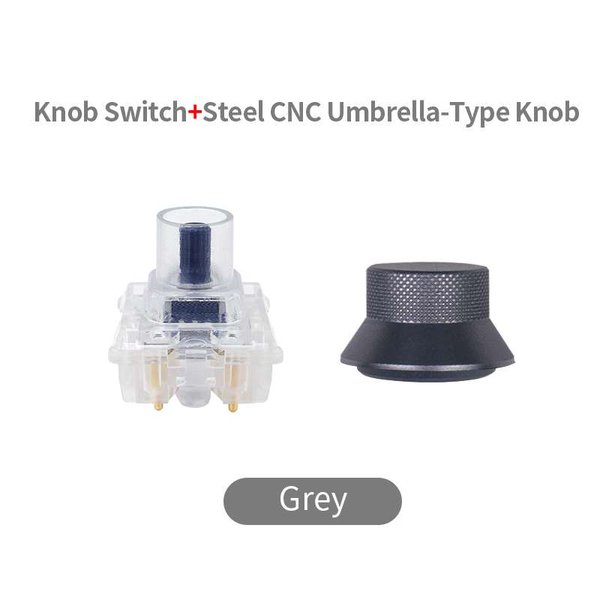
A rotary knob, often used for precise adjustments.
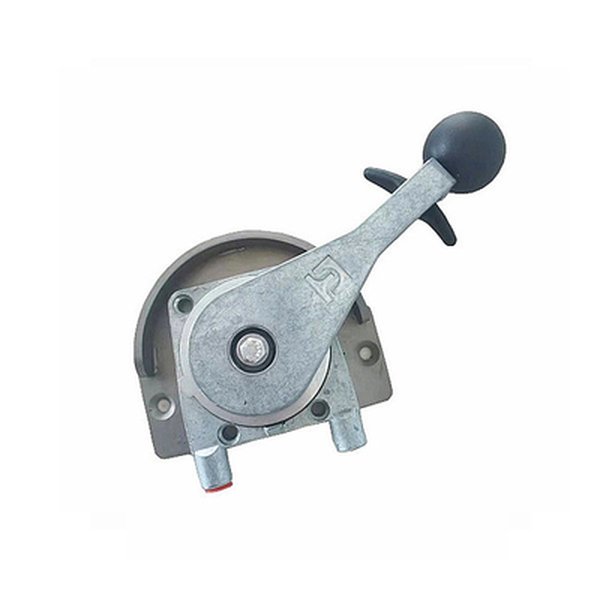
A mechanical gear shift lever, a common type of control lever.
Overview of Common Mechanical Control Types
The following table summarizes the typical characteristics and uses of these common mechanical control elements:
| Control Type | Typical Action | Primary Function | Common Examples |
|---|---|---|---|
| Knob | Rotation | Adjustment (continuous or stepped), Tuning | Volume control (older radios), Valve adjustment, Instrument dials |
| Lever | Pivoting / Angular Motion | Engage/Disengage, Directional control, Apply force | Gear shift, Handbrake, Valve handle, Machine operation |
| Selector Switch | Rotary or Linear Motion | Select discrete modes or settings | Appliance mode selection, Machine function control, Gear selector |
| Slide Switch / Slider | Linear Motion | Select discrete positions, On/Off, Adjustment | Mode switches on tools, Simple position selectors, Dimmer (mechanical) |
| Toggle Switch | Flipping Motion (Angular) | On/Off, Select between two states | Power switches, Simple function activation |
| Button | Pushing / Pressing | Initiate action, Momentary contact, Latching On/Off | Start/Stop controls, Activation triggers |
| Pedal | Foot Pressing / Pivoting | Apply force, Control speed or braking | Vehicle accelerator/brake, Sewing machine control |
| Joystick | Multi-directional Pivoting | Directional control, Positioning | Heavy machinery control, Crane operation |
Connecting the Dots: Related Concepts in Mechanical Design
How Controls Interact with the Machine
Understanding user-manipulable controls involves looking at how they integrate into the larger mechanical system. Several key concepts from mechanical engineering and design are relevant:
Mechanisms and Linkages
The user control is just the starting point. Its movement is transferred to the operating part of the device via mechanisms and linkages. These are assemblies of rigid bodies (like rods, levers, gears, cams) connected by joints. They transmit force and motion, converting the user's input (e.g., turning a knob) into the desired action (e.g., closing a valve or shifting a gear). A cam and cam follower system, for example, can translate the rotary motion of a selector knob into specific linear movements within the machine.
Ensuring Precision: Detents and Feedback
As mentioned earlier, detents are crucial for selectors and other controls needing distinct positions. They provide positive locking into specific states, preventing accidental movement and giving the user clear tactile feedback that the desired position has been reached. This improves the reliability and usability of the control.
The Bigger Picture: Control Systems and Interfaces
Mechanical controls are part of a device's overall control system. They form the physical or mechanical user interface (UI), which is a subset of the broader concept of the Human-Machine Interface (HMI). While HMI often includes digital screens and electronic inputs today, in purely mechanical or electromechanical systems, the HMI consists of these tangible controls. Good mechanical UI design considers ergonomics (ease and comfort of use), durability, and intuitive operation.
Powered Counterparts: Actuators
While user controls are manipulated manually, an actuator is a component that converts energy (electrical, hydraulic, pneumatic) into physical motion to control a mechanism. Actuators often perform similar functions to manual controls (like opening valves or moving components) but are driven by signals from an automated control system rather than direct user manipulation. Sometimes, a manual control might override or work in conjunction with an actuator.
Mindmap of Mechanical Control Concepts
This mindmap illustrates the relationship between user input, control devices, internal mechanisms, and related concepts in a mechanical system:
(Discrete Positions)"] id1a1b["Knob
(Rotary Adjustment)"] id1a1c["Lever
(Pivoting Action)"] id1a1d["Slider
(Linear Movement)"] id1a1e["Button
(Push Activation)"] id1a2["Related Interface Concepts"] id1a2a["Detents
(Ensure Positions,
Provide Feedback)"] id1a2b["HMI
(Human-Machine Interaction)"] id1a2c["Ergonomics
(User Comfort & Efficiency)"] id2["Mechanical Linkage / Mechanism"] id2a["Transmits User Input"] id2a1["Cams & Followers"] id2a2["Gears"] id2a3["Rods & Cables"] id2a4["Levers"] id3["Device Operation / Output"] id3a["Change in State"] id3b["Adjustment of Parameter"] id4["Actuator
(Powered Counterpart,
Not Directly User-Manipulated)"]
Visualizing Control Dynamics: A Comparative Radar Chart
Comparing Different Control Types
Different mechanical controls offer distinct advantages depending on the application. This radar chart provides a qualitative comparison across several functional characteristics. The scores (ranging from 2 to 10) reflect typical attributes; specific designs can vary.
- Precision: How accurately a desired setting can be selected.
- Speed: How quickly the control can be operated.
- Force Required: The typical effort needed to manipulate the control.
- Tactile Feedback: The degree of physical sensation (clicks, resistance) provided.
- Linkage Complexity: The typical complexity of the mechanism connecting the control to the operating part.
- Discrete States Suitability: How well suited the control is for selecting distinct, separate settings.
- Continuous Adjustment Suitability: How well suited the control is for making smooth, gradual changes.
This visualization highlights, for example, that knobs excel at continuous adjustment but may be slower to operate than buttons, while selector switches are highly suited for discrete states and offer good precision and feedback, often requiring more complex linkages than simple buttons.
Exploring Mechanical Control Systems Further
Visualizing Mechanisms in Action
To better understand how user controls like levers and sliders translate input into action within a mechanical device, it helps to see the underlying mechanisms. The video below discusses various mechanical linkages, such as crank sliders, which are fundamental components often connected to user-manipulable controls. Watching how these linkages convert one type of motion into another provides insight into the 'behind-the-scenes' workings of the controls you interact with daily.
This video explores fundamental mechanical linkages relevant to control systems.
Frequently Asked Questions (FAQ)
What's the difference between a mechanical selector and an electrical selector switch?
A mechanical selector directly manipulates physical parts (levers, gears, valves) through mechanical linkages based on its position. An electrical selector switch uses its position to open or close electrical contacts, redirecting current flow to control electrical or electronic circuits, which then might control mechanical parts via actuators like motors or solenoids.
Why are purely mechanical controls still used in modern devices?
Mechanical controls offer several advantages in certain situations:
- Reliability: They can be very robust and less susceptible to electrical interference or power failure.
- Simplicity: For some tasks, a direct mechanical linkage is simpler and more cost-effective than an electronic solution.
- Tactile Feedback: They provide direct physical feedback (resistance, clicks) that can be important for user control and confirmation.
- Safety: In some safety-critical systems, a direct mechanical override or control might be preferred.
- Harsh Environments: They can sometimes withstand harsh conditions (temperature, vibration, moisture) better than sensitive electronics.
What exactly is a detent?
A detent is a mechanical feature designed to hold a moving part, like a selector switch or lever, in a specific position. It typically consists of a spring-loaded component (like a ball or pin) that engages with notches or indentations on the moving part. When the part reaches one of these positions, the spring pushes the component into the notch, creating resistance against further movement and providing a tactile 'click' or 'snap' sensation. This confirms the position and prevents the control from resting between settings.
Are joysticks considered mechanical controls?
Yes, joysticks are a type of mechanical control, specifically a lever capable of multi-directional movement. While modern joysticks often incorporate electronic sensors (potentiometers, Hall effect sensors) to translate their physical position into electrical signals for controlling software or electronic systems, the user manipulates a physical, mechanical lever.
What is an HMI in a purely mechanical context?
In a purely mechanical context, the Human-Machine Interface (HMI) refers to the collection of all the physical, user-manipulable controls on the device – the levers, knobs, selectors, buttons, pedals, etc. It's the sum of all points where the user physically interacts with the machine to control its operation, without involving screens or electronic inputs.
Recommended Further Exploration
- How do mechanical linkages transfer motion from a control lever?
- What are the different types of detent mechanisms used in selectors?
- Compare the advantages of mechanical vs electromechanical control systems.
- Explain the role of ergonomics in designing mechanical control interfaces.
References
Last updated April 30, 2025