
Unlocking the Power of Templates in MediaWiki and Semantic MediaWiki
Streamlining Content and Enhancing Data Management in Your Wiki
MediaWiki, the software behind Wikipedia, offers a robust templating system that dramatically enhances content consistency, management, and update efficiency. When combined with Semantic MediaWiki (SMW), these templates transform a standard wiki into a powerful knowledge management system, allowing for structured data storage and complex querying capabilities. This guide will walk you through the process of creating and leveraging templates in both MediaWiki and Semantic MediaWiki, from basic usage to advanced semantic applications.
Key Insights into MediaWiki and Semantic MediaWiki Templates
- Templates ensure consistency and reduce redundancy: By allowing repetitive content or formatting to be defined once and reused across multiple pages, templates maintain a uniform look and feel. Any changes made to a template are immediately reflected on all pages that use it.
- Semantic templates enable structured data: With Semantic MediaWiki, templates become the primary mechanism for embedding machine-readable data into wiki pages. This allows for powerful querying, aggregation, and dynamic display of information.
- Page Forms simplify data entry: Extensions like Page Forms (formerly Semantic Forms) provide user-friendly input forms that allow non-technical users to populate template parameters, including semantic data, without needing to directly edit wiki markup.
Understanding MediaWiki Templates: The Foundation
What are MediaWiki Templates?
At its core, a MediaWiki template is a page designed to be embedded, or "transcluded," into other wiki pages. Think of it as a reusable content block or a subroutine. Instead of manually typing the same information or applying the same formatting repeatedly, you define it once in a template page. When you want to use it, you simply refer to the template's name within double curly brackets, like {{Template Name}}.
Templates reside in their own dedicated "Template:" namespace. For example, to create a template named "header," you would edit the page "Template:header." The content you place on this page is what will be inserted into other pages when the template is called.
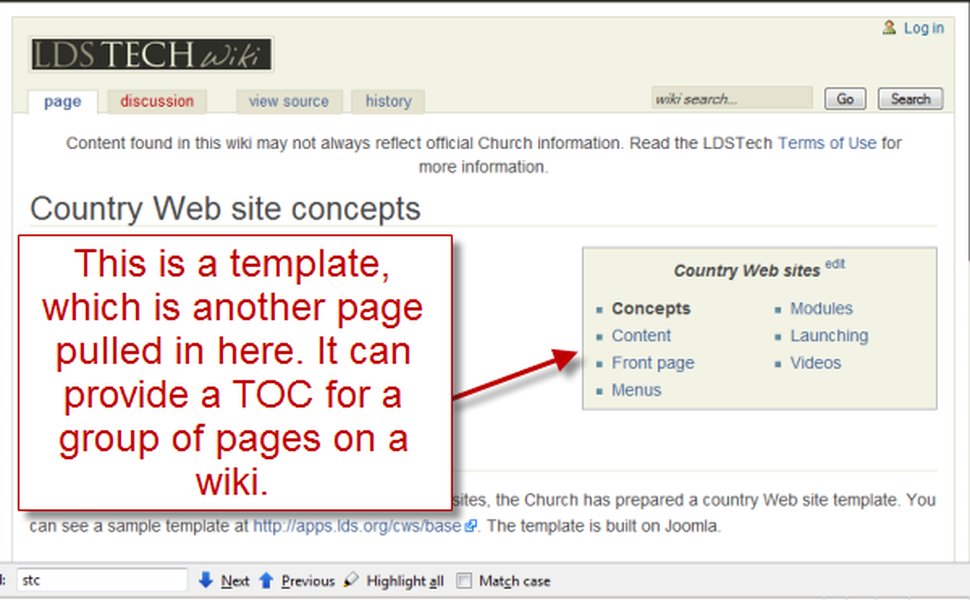
An example of how a simple MediaWiki template might appear within the editor, showcasing basic syntax.
Why Use MediaWiki Templates?
- Consistency: Templates ensure a consistent appearance and user experience across your wiki by enforcing uniform formatting and content.
- Efficiency: They minimize redundant effort. Any modifications to a template are instantly propagated to every page utilizing that template, saving significant time, especially in large wikis.
- Standardization: Templates can standardize the way information is presented, making it easier for users to navigate and understand content.
- Reusability: They allow for the creation of reusable and customizable content, from navigation menus to boilerplate messages.
Creating a Basic MediaWiki Template
Step-by-Step Template Creation
- Choose a name: Decide on a descriptive name for your template, e.g., "WelcomeMessage."
- Navigate to the template page: Go to
Template:WelcomeMessagein your wiki. If it doesn't exist, MediaWiki will prompt you to create it. - Add content: Enter the text, wiki markup, or HTML you want to reuse. For example:
<div style="border: 1px solid #ccc; padding: 10px; background-color: #f9f9f9;"> <b>Welcome!</b> This page is part of our wiki knowledge base. </div> - Save the page: Click "Save page" to create your template.
Using Parameters in Templates
Templates become much more powerful with parameters, allowing for customizable input. Parameters are placeholders that you fill in when you use the template. They are defined within triple curly brackets, e.g., {{{parameter_name}}}.
Consider a "Greeting" template that takes a name:
Content of Template:Greeting:
Hello, {{{name}}}! Welcome to our wiki.
How to use it on a page:
{{Greeting|name=Alice}}
This will render as: "Hello, Alice! Welcome to our wiki."
Parameters can be passed anonymously ({{Template|value1|value2}}), numbered ({{Template|1=value1|2=value2}}), or named ({{Template|param=value}}).
This tutorial video provides a deeper dive into using variables (parameters) within MediaWiki templates, illustrating how they enable dynamic and customizable content.
Integrating Semantic MediaWiki (SMW) with Templates
The Semantic Revolution: Templates as Data Carriers
Semantic MediaWiki (SMW) is an extension that transforms MediaWiki into a semantic wiki, enabling the storage and querying of structured data. The most common and effective way to store semantic data in SMW is through templates. In fact, an estimated 99% of all SMW data is stored via templates.
By embedding semantic annotations directly within templates, you ensure that when a template is used, the associated data is automatically captured and made queryable. This provides a powerful framework for knowledge management, allowing you to define properties and values that describe the content of your pages in a machine-readable format.
Creating Semantic Templates
Defining Properties within Templates
To make a template semantic, you embed SMW markup that assigns properties and values to the page where the template is transcluded. This typically involves using the [[Property::Value]] syntax within your template.
Consider a "Book" template that defines properties like "Author" and "Publication Date":
Content of Template:Book:
        This book is titled {{{title}}}.
        It was written by [[Author::{{{author}}}]] and published on [[Publication date::{{{date}}}]].
How to use it on a page (e.g., "The Hitchhiker's Guide to the Galaxy"):
{{Book|title=The Hitchhiker's Guide to the Galaxy|author=Douglas Adams|date=1979-10-12}}
When this template is used, the page "The Hitchhiker's Guide to the Galaxy" will automatically acquire the semantic data:
[[Author::Douglas Adams]][[Publication date::1979-10-12]]
This data can then be queried, aggregated, and displayed in various formats across your wiki.
Advanced Semantic Template Features
Using Parser Functions and Conditionals
Semantic templates can become quite sophisticated with the use of MediaWiki's parser functions (like #if). This allows you to include content or semantic annotations conditionally.
For instance, you might want to annotate a property only if a value is provided:
{{#if:{{{ISBN|}}}|[[Has ISBN::{{{ISBN}}}]]}}
This code snippet means: "If the parameter 'ISBN' is not empty, then add the semantic property 'Has ISBN' with its value." This is crucial for creating robust templates that handle missing data gracefully and avoid cluttering your semantic data with empty properties.
Semantic Queries and Result Formats
Once data is stored semantically via templates, you can use SMW's query capabilities to retrieve and display information dynamically. Templates can be used in conjunction with SMW's result formats to custom-format query outputs, especially for complex tables or lists.
For example, to display a sortable table of all books and their authors:
        {{#ask: [[Category:Book]]
        |?Author
        |?Publication date
        |format=wikitable
        |class=sortable
        }}
You can also use a specific template to format each row of a query result, giving you fine-grained control over the output's appearance.
The Role of Page Forms in Semantic Template Management
The Page Forms extension (formerly Semantic Forms) is highly recommended when working with semantic templates. It provides a user-friendly interface for creating and editing pages that utilize complex templates and semantic data, eliminating the need for users to manually interact with wiki markup.
Page Forms allows you to:
- Generate forms: Create custom forms that guide users through the process of entering data, ensuring it conforms to the template's structure and semantic properties.
- Populate templates: Users can fill out form fields, and Page Forms automatically populates the corresponding template parameters and semantic annotations on the wiki page.
- Query data: Page Forms integrates with SMW to enable querying and display of data entered via forms.
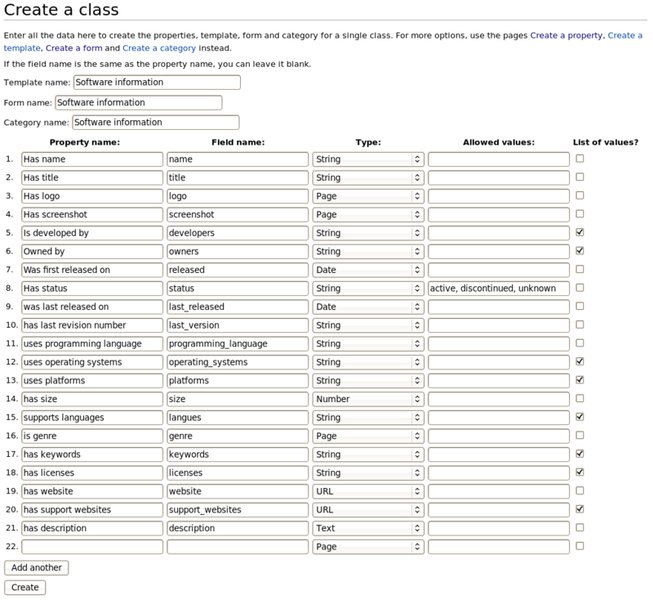
An example of the Page Forms interface, demonstrating its role in simplifying the creation of semantic data structures.
Comparative Analysis of Template Capabilities
Evaluating the Strengths of MediaWiki and Semantic MediaWiki Templates
To better understand the benefits of integrating SMW with MediaWiki templates, consider the comparative strengths of each approach. This radar chart visualizes key aspects of templating, highlighting how SMW enhances MediaWiki's core capabilities.
The radar chart illustrates that while basic MediaWiki templates excel at content reusability and formatting consistency, Semantic MediaWiki significantly elevates capabilities in data structuring, automated information retrieval, and scalability for complex data. The integration with Page Forms further boosts user-friendly data entry, making SMW templates a powerful tool for structured knowledge management.
Practical Applications and Best Practices
Common Uses of MediaWiki and Semantic MediaWiki Templates
Templates are versatile and can be applied in numerous scenarios to improve wiki content and functionality:
- Infoboxes: Standardized boxes at the top of pages (like those on Wikipedia) to display key facts about a topic. These are ideal for semantic annotation.
- Navigation boxes/menus: Consistent navigation links across related pages.
- Boilerplate messages: Standard warnings, disclaimers, or information boxes.
- Citation formatting: Ensuring consistent citation styles.
- Automated lists and tables: Dynamically generated content based on semantic queries (e.g., a list of all articles about "animals" sorted by "habitat").
Key Best Practices for Template Development
Developing effective templates requires adherence to certain best practices:
- Start simple: Don't try to import overly complex templates from large wikis like Wikipedia immediately. Begin with basic templates and gradually add complexity.
- Document your templates: Always create a documentation page for your templates (e.g.,
Template:TemplateName/doc). Use TemplateData to describe parameters, which helps users via the visual editor. - Use parser functions judiciously: While powerful, overuse of complex parser functions can make templates difficult to understand and debug.
- Separate concerns: Keep template logic as simple as possible. HTML templates, for example, should contain minimal programming logic for readability and proper separation of concerns.
- Plan your semantic properties: Before creating semantic templates, clearly define the properties you intend to use in SMW. This ensures consistent data structuring.
- Utilize Page Forms: For wikis where non-technical users will contribute structured data, Page Forms is invaluable for simplifying the data entry process.
Comparison of Templating Capabilities
Here's a table summarizing the distinctions and synergies between basic MediaWiki templates and those enhanced by Semantic MediaWiki:
| Feature/Aspect | Basic MediaWiki Templates | Semantic MediaWiki Templates |
|---|---|---|
| Primary Purpose | Content reusability, formatting consistency. | Structured data storage, querying, dynamic content generation. |
| Content Type | Plain text, wiki markup, basic HTML. | Semantic annotations (properties and values) embedded within wiki markup. |
| Data Management | Manual updates for embedded content. | Automated data extraction and aggregation; data becomes queryable. |
| Complexity (Creation) | Relatively straightforward; no programming knowledge for basics. | Requires understanding of SMW properties, types, and query syntax. |
| User Input Method | Direct editing of wiki source or basic parameters. | Often augmented by extensions like Page Forms for user-friendly input forms. |
| Dynamic Content | Limited to basic parser functions (e.g., #if). |
Extensive dynamic content generation through semantic queries (tables, maps, timelines, etc.). |
| Interoperability | Content is primarily for human consumption. | Machine-readable data allows for integration with other semantic web tools. |
Frequently Asked Questions
What is "transclusion" in MediaWiki?
{{Template Name}}, the template's content is automatically displayed on the page where it's called.Can I import templates from Wikipedia?
Do I need programming knowledge to create templates?
How do Semantic MediaWiki templates differ from regular ones?
[[Property::Value]]). This turns the content into structured data that can be queried and analyzed, whereas regular templates primarily focus on content reuse and formatting.What is TemplateData?
Conclusion
Templates are a cornerstone of efficient content management in MediaWiki, providing unparalleled consistency and reusability. By mastering basic template creation and usage, you can significantly streamline your wiki's development and maintenance. Furthermore, by integrating Semantic MediaWiki, templates evolve into powerful vehicles for structured data, transforming your wiki into a dynamic, queryable knowledge base. Whether standardizing infoboxes or enabling complex data queries, templates, especially when empowered by SMW and tools like Page Forms, are indispensable for building a robust and intelligent wiki environment.
Recommended Further Exploration
- Explore advanced MediaWiki parser functions for complex template logic.
- Dive into more examples of semantic MediaWiki queries and result formats.
- Understand how to effectively use MediaWiki's Page Forms extension for data entry.
- Learn about performance considerations when using many templates on MediaWiki.
References
Last updated May 21, 2025