
Unlock Subscriber Growth: Architecting Your Meta Ads Account for Subscription App Success in 2025
A comprehensive blueprint for structuring your Meta Ads to maximize conversions and cultivate a loyal subscriber base for your app.
Successfully navigating the Meta Ads landscape in 2025 to grow your subscription app requires a well-thought-out account structure. This structure is not just about organization; it's about enabling Meta's powerful algorithms to work efficiently for you, driving high-quality subscribers at an optimal cost. This guide will walk you through building a robust Meta Ads account tailored for the unique dynamics of subscription-based applications.
Key Highlights for Your Meta Ads Strategy
- Strategic Consolidation: Prioritize fewer, stronger campaigns and ad sets to feed Meta's algorithm sufficient data, avoiding over-segmentation for optimal learning and performance. This is crucial for allowing the system to exit the learning phase efficiently.
- Subscription-Focused Optimization: Align campaign objectives and conversion events directly with key subscription milestones like "Trial Start" or "Subscription Purchase." Utilize advanced tracking mechanisms such as Aggregated Event Measurement (AEM) and the Conversions API (CAPI) for accurate data collection.
- Iterative Creative & Audience Strategy: Begin with broader targeting and a diverse range of ad creatives. Systematically test, analyze performance data, and refine your audience segments and creative approaches to scale your campaigns effectively and improve return on ad spend (ROAS).
Foundational Account Setup: Building a Solid Base
The bedrock of any successful Meta Ads strategy for a subscription app is a meticulously configured account. This initial setup ensures smooth operations, accurate data tracking, and efficient management.
Establishing Your Meta Business Portfolio and Ad Account
Meta Business Manager is Key
Your first step is to operate within Meta Business Manager (now often referred to as Meta Business Portfolio). Create a dedicated Ad Account specifically for your subscription app. This separation is vital for several reasons:
- Clarity and Organization: It keeps your app's advertising activities distinct from other business ventures or personal profiles.
- Role Management: Allows for precise assignment of roles and permissions to team members or agencies.
- Focused Tracking: Simplifies performance analysis and financial reporting for your app.
If you manage multiple apps or distinct brands, each should ideally have its own ad account to maintain data integrity and reporting clarity.
Linking Your App and Essential Assets
Once your ad account is ready, connect your app. This is typically done through the App Dashboard by registering your app and linking it to your Ads Manager. This integration is fundamental for tracking app-specific events such as installs, trial initiations, and actual subscription conversions. Ensure your Facebook Page and Instagram account are also linked within your Business Portfolio to enable advertising across these platforms.
Critical Technical Integrations for Subscription Apps
For subscription apps, precise event tracking is non-negotiable. This is how Meta's algorithm learns who your ideal subscribers are.
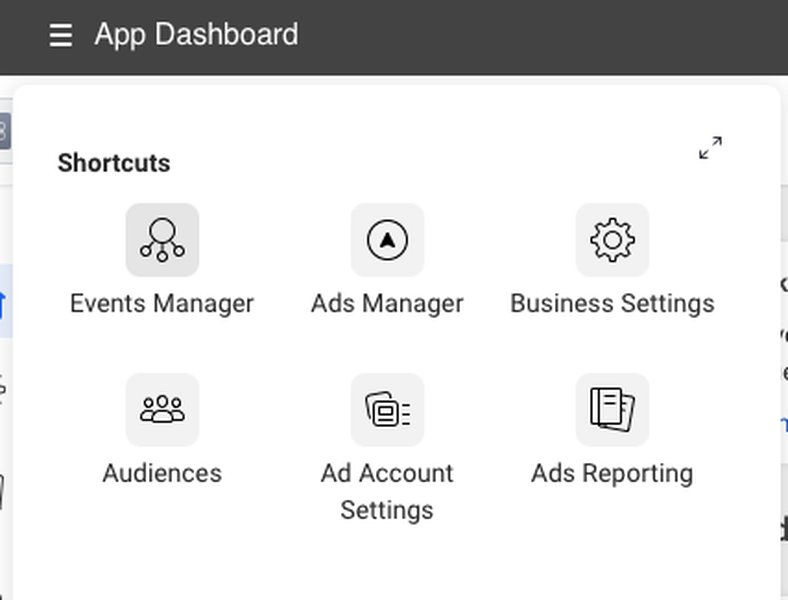
Visual showing event configuration for Meta Ads, crucial for tracking subscription app events.
Meta SDK and Conversions API (CAPI)
Implement the Meta SDK in your app. This allows you to send standard and custom app events directly from your application to Meta. For enhanced data reliability, especially in light of privacy changes, supplement SDK tracking with the Conversions API (CAPI). CAPI allows you to send web and app events from your server directly to Meta, offering a more stable and comprehensive data stream.
Aggregated Event Measurement (AEM)
Configure AEM to measure app events from iOS 14.5+ users. This protocol is essential for processing conversion events while respecting user privacy choices. Prioritize the conversion events that are most critical to your subscription business, such as "Trial Started" or "Subscribe."
Third-Party Tracking Tools
Integrate with mobile measurement partners (MMPs) like AppsFlyer or subscription management platforms like RevenueCat. These tools provide deeper insights into the full subscriber lifecycle, attribute conversions accurately, and can seamlessly pass subscription event data back to Meta, enriching its optimization algorithms. RevenueCat, for instance, is particularly adept at tracking the nuances of trial-to-paid conversions and renewals.
Strategic Campaign Construction
With the foundation in place, the next layer is structuring your campaigns. The campaign level dictates your overall advertising objective and budget strategy.
Choosing the Right Campaign Objective
Meta offers several campaign objectives. For subscription apps, your choice should directly reflect your primary goal:
- App Promotion: This is often the go-to objective. You can optimize for App Installs (to broaden your user base) or App Events (to target users more likely to perform specific actions like starting a trial or subscribing). Optimizing for app events closer to the subscription (e.g., "Trial Start") is generally recommended over just "Installs" for higher quality acquisition.
- Sales: If your primary focus is immediate subscription conversions and you have sufficient data, the "Sales" objective (optimizing for purchase events) can be effective. This often requires robust tracking of the final subscription event.
Meta recommends optimizing based on conversion events rather than just installs to prioritize users who are more likely to become paying subscribers.
Budget Strategy: Campaign Budget Optimization (CBO)
Leverage Campaign Budget Optimization (CBO), now known as Advantage Campaign Budget. By enabling CBO, you set your budget at the campaign level, and Meta's algorithm automatically allocates it across your ad sets to those performing best. This is crucial for:
- Efficiency: Maximizing results by dynamically shifting spend to top performers.
- Scaling: Simplifying budget management as you grow.
- Learning: Providing the algorithm with more flexibility to find optimal delivery.
Naming Conventions for Clarity
Implement a clear and consistent naming convention for your campaigns (e.g., [App Name] - [Objective] - [Targeting Geo/Type] - [Date Range/Version]). This seemingly small detail becomes invaluable for analysis, reporting, and team collaboration as your account scales.
Optimized Ad Set Configuration
Ad sets are where you define your audience, placements, optimization event, and schedule. For subscription apps, the key is balancing targeted reach with sufficient data volume for Meta's algorithm.
Audience Targeting Strategies
Start Broad, Then Refine
Initially, especially if your app has broad appeal or you're new to Meta Ads, consider starting with broader targeting. This allows Meta's machine learning to explore and identify pockets of high-performing users. Avoid hyper-segmentation in the early stages, as this can fragment your audience too much and starve ad sets of the data needed for optimization (aim for at least 50 conversion events per ad set per week).
Leveraging Custom and Lookalike Audiences
As you gather data, utilize these powerful targeting options:
- Custom Audiences:
- Website/App Activity: Retarget users who installed your app but didn't subscribe, or those who started a trial but didn't convert.
- Customer Lists: Upload lists of existing subscribers (to exclude them or create lookalikes) or churned users (for re-engagement campaigns).
- Engagement Audiences: Target users who have engaged with your Facebook Page or Instagram profile.
- Lookalike Audiences: Create lookalikes based on your most valuable customer segments (e.g., high-LTV subscribers, users who completed trials and converted). Start with 1% lookalikes and test broader percentages (2-5%) as you scale.
Choosing Your Optimization Event
This is critical. Your ad set should optimize for an event that is as close as possible to your desired outcome. For subscription apps, common optimization events include:
- App Installs: Good for initial user acquisition and volume, but may not yield the highest quality subscribers directly.
- Trial Start: A strong mid-funnel event. Optimizing for trial starts often brings in users with higher intent to eventually subscribe.
- Subscription Purchase (or similar custom event): The ultimate goal. This requires consistent tracking of actual subscription events. If your free trial is long (e.g., 7+ days), this event will be delayed, which can be challenging for Meta's real-time optimization. Consider "Trial Start" as a leading indicator in such cases.
- Value Optimization: If you have enough purchase data and can assign values to conversions, this allows Meta to find users likely to generate more revenue.
Ensure your chosen optimization event can generate at least 50 conversions per ad set per week for stable optimization and to exit the learning phase.
Placements: Automatic is Often Best
Use Advantage+ Placements (formerly Automatic Placements). This allows Meta to deliver your ads across Facebook, Instagram, Audience Network, and Messenger where they are most likely to achieve your objective at the lowest cost. While you can manually select placements, automatic generally provides better results due to the algorithm's ability to explore all available inventory.
Avoiding Over-Segmentation
A common pitfall is creating too many ad sets with small, overlapping audiences. This dilutes your budget, restricts Meta's learning capabilities, and often leads to higher costs. Consolidate similar audiences into fewer, more robust ad sets. For example, instead of ten ad sets with narrow interest targeting, try one or two broader ad sets or a Lookalike audience.
Compelling Ad Creatives: Your Message to Potential Subscribers
Your ads are the face of your campaign. High-quality, relevant, and engaging creatives are essential for capturing attention and driving action.
Creative Strategy and Formats
Diversity in Ad Formats
Test a variety of ad formats to see what resonates best with your audience:
- Video Ads: Highly effective for showcasing app functionality, user experience, and benefits. Short, engaging videos optimized for mobile viewing (vertical aspect ratios) are key.
- Image Ads: Clean, high-quality images that clearly communicate your app's value proposition.
- Carousel Ads: Useful for highlighting multiple features, benefits, or subscription tiers.
- Stories Ads (Instagram & Facebook): Full-screen, immersive format that feels native to the Stories experience.
- Reels Ads: Short-form video content for Instagram Reels.
Message Focus: Subscription Value
Your ad copy and visuals should clearly articulate the benefits of subscribing to your app:
- Emphasize unique features, exclusive content, or the problem your app solves.
- Clearly state any free trial offers (e.g., "Start Your 7-Day Free Trial").
- Highlight ongoing value and what users gain by becoming a subscriber.
Strong Calls-to-Action (CTAs)
Use clear and direct CTAs that align with your campaign objective, such as "Install Now," "Download," "Sign Up," "Learn More," or "Subscribe." For app install campaigns, deep link directly to the relevant app store page or a specific section within your app if the user already has it installed.
Continuous A/B Testing and Iteration
Never assume you know what works best. Continuously test different elements of your ads:
- Creatives: Different images, videos, headlines, and primary text.
- CTAs: Variations in button text.
- Formats: Test which formats perform best for specific audiences or placements.
Regularly refresh your creatives to avoid ad fatigue and maintain engagement.
Navigating Subscription App Nuances
Subscription apps present unique challenges and opportunities in Meta Ads, primarily around delayed conversions and lifecycle value.
Handling Free Trials and Delayed Conversions
Many subscription apps offer free trials. This means the actual subscription (revenue event) is delayed. Meta's algorithm works best with more immediate feedback. To mitigate this:
- Optimize for Intermediate Events: As mentioned, optimizing for "Trial Start" can be a more effective leading indicator than waiting for the "Subscribe" event, especially if trials are 7 days or longer.
- Conversion Windows: Adjust your attribution window to align with your trial length and typical conversion cycle.
- Offline Conversions / CAPI for Subscriptions: Ensure that when a trial converts to a paid subscription, this event is accurately sent back to Meta via CAPI or an MMP integration. This helps the algorithm understand the true value of the users it's acquiring.
Tracking for Lifetime Value (LTV)
While initial acquisition cost (CAC) is important, the long-term value of a subscriber (LTV) is paramount. While direct LTV optimization can be complex, focus on acquiring users who demonstrate behaviors correlated with higher LTV. This often means focusing on trial-to-paid conversion rates and early retention metrics. Feed revenue data back into Meta where possible to inform its value-based optimization.
Comparing Meta Ads Optimization Goals for Subscription Apps
Choosing the right optimization event in your ad sets significantly impacts campaign performance and the type of users you attract. The radar chart below offers an opinionated comparison of common optimization goals based on factors crucial for subscription app growth. Each goal has its trade-offs, and the best choice can vary based on your app's maturity, budget, and specific objectives.
Interpreting this chart: "Speed to Initial Data" refers to how quickly an optimization goal can gather enough conversions to exit the learning phase. "Direct Subscription Conversion Quality" indicates the likelihood of an acquired user immediately becoming a paying subscriber. "Trial User Quality" assesses the propensity of trial users to convert to paid. "Scalability Potential" is the ease with which campaigns using this goal can be scaled up. "Initial Cost Efficiency" reflects the upfront cost-effectiveness, which may differ from long-term ROAS.
Leveraging Meta's Evolving Ecosystem (Advantage+)
Meta is continually evolving its advertising tools, with an increasing emphasis on AI-powered automation. Features under the "Advantage+" umbrella are designed to simplify campaign management and improve performance.
Advantage+ Placements and Advantage Campaign Budget
As mentioned, these (formerly Automatic Placements and CBO) are foundational. Trusting Meta's algorithm to manage placements and budget distribution across ad sets is generally the recommended approach.
Advantage+ Creative
This suite of tools can automatically enhance your creatives for better performance. Options include adjusting brightness/contrast, applying filters, or creating variations of your ad for different placements. Test these features to see if they improve your results.
Advantage+ Audience
This feature allows Meta to dynamically expand your defined audience if it identifies opportunities to get more results outside your initial targeting parameters. It can be beneficial for scaling but monitor performance closely to ensure relevance is maintained.
Advantage+ App Campaigns
Formerly known as Automated App Ads, these campaigns simplify setup by automating many aspects of targeting and creative delivery. They can be a good option, particularly for those newer to app advertising or looking for a more hands-off approach, but may offer less granular control than standard App Promotion campaigns.
Visualizing Your Meta Ads Account Structure
A mindmap can help illustrate the hierarchical structure of a well-organized Meta Ads account for a subscription app, from the overarching account level down to individual ads, highlighting key considerations at each stage.
for Subscription Apps"] id1["Account Level"] id1.1["Meta Business Manager/Portfolio"] id1.2["Dedicated Ad Account"] id1.3["Link App (SDK, AEM Configured)"] id1.4["Conversions API (CAPI) Setup"] id1.5["Payment & Billing Verified"] id1.6["Attribution Partner Integration (e.g., RevenueCat)"] id2["Campaign Level"] id2.1["Clear Objective Selection"] id2.1.1["App Promotion (Installs/Events)"] id2.1.2["Sales (Subscription Conversions)"] id2.2["Budget Strategy"] id2.2.1["Advantage Campaign Budget (CBO) Enabled"] id2.3["Consistent Naming Conventions"] id3["Ad Set Level"] id3.1["Audience Targeting"] id3.1.1["Broad Targeting (Initial Phase)"] id3.1.2["Custom Audiences (Retargeting: Trial Drop-offs, Engagers)"] id3.1.3["Lookalike Audiences (From Best Subscribers, High LTV Users)"] id3.2["Optimization Event Focus"] id3.2.1["Trial Start (Key for many subscription apps)"] id3.2.2["Subscription Purchase (If data allows)"] id3.2.3["App Install (Upper Funnel awareness)"] id3.3["Placements"] id3.3.1["Advantage+ Placements (Automatic)"] id3.4["Budget Allocation (if not CBO) & Schedule"] id3.5["Performance Goal: 50+ Conversions/Week"] id3.6["Context Matching for Creatives (Consider Audience/Placement)"] id4["Ad Level"] id4.1["Creative Strategy & Testing"] id4.1.1["Varied Formats (Video, Image, Carousel, Stories, Reels)"] id4.1.2["Compelling Copy & Clear CTAs (e.g., Start Free Trial)"] id4.1.3["A/B Test Creatives, Headlines, Copy"] id4.1.4["Dynamic Creative Optimization (DCO) / Advantage+ Creative"] id4.2["Destination (App Store Page / Deep Links)"] id5["Measurement & Iteration Loop"] id5.1["Monitor Key Metrics (CAC, Trial Conversion Rate, ROAS)"] id5.2["Regularly Analyze Performance Data"] id5.3["Iterate on Audiences, Creatives, Bids"] id5.4["Scale Successful Elements, Pause Underperformers"] id6["Advanced Considerations (2025)"] id6.1["Advantage+ Campaign Types"] id6.2["Probabilistic Measurement Frameworks"] id6.3["Omnichannel Strategies (if applicable)"]
This mindmap shows how each component connects, emphasizing a data-driven and iterative approach to managing your subscription app's Meta Ads.
Monitoring, Iteration, and Scaling Strategies
Launching your campaigns is just the beginning. Continuous monitoring, analysis, and iteration are key to long-term success and scaling your subscriber base.
Monitoring performance via dashboards is crucial for identifying trends and optimization opportunities.
Key Metrics to Track
For subscription apps, focus on metrics that reflect the entire funnel:
- Cost Per Install (CPI): Cost to acquire a new app installer.
- Cost Per Trial Start: Cost to get a user to initiate a free trial.
- Trial-to-Paid Conversion Rate: Percentage of trial users who become paying subscribers.
- Cost Per Acquisition (CPA/CPS): Cost to acquire a new paying subscriber.
- Return on Ad Spend (ROAS): Revenue generated from subscriptions versus ad spend. This often needs to be tracked over time to account for LTV.
- Subscriber Churn Rate: Rate at which subscribers cancel.
- Lifetime Value (LTV): Predicted total revenue a subscriber will generate.
The Iteration Cycle
- Analyze Performance: Regularly review your campaign data in Meta Ads Manager and any third-party analytics tools. Identify what's working (high-performing ad sets, creatives, audiences) and what's not.
- Formulate Hypotheses: Based on the data, why are some elements performing better than others?
- Test: Implement changes based on your hypotheses. This could involve testing new creatives, audience segments, bid strategies, or landing page experiences within your app. Only change one major variable at a time for clear test results.
- Learn and Repeat: Assess the impact of your changes and incorporate learnings into future iterations.
Scaling Your Campaigns
Once you have ad sets and creatives delivering consistent results at your target CPA:
- Gradual Budget Increases: Increase budgets on successful campaigns/ad sets slowly (e.g., 15-20% every few days) to avoid disrupting the algorithm's learning. CBO helps manage this more smoothly.
- Audience Expansion: Test broader Lookalike percentages (e.g., 2-5%, 5-10%) or new interest-based audiences that are similar to your proven performers.
- Creative Diversification: Introduce new creative concepts based on winning elements, but also test entirely new angles to prevent ad fatigue and uncover new opportunities.
- Geo Expansion: If applicable, expand to new geographic markets, ensuring your app and creatives are localized.
Summary Table: Meta Ads Structure Blueprint for Subscription Apps
This table provides a quick reference for the core components and best practices when structuring your Meta Ads account for a subscription app.
| Level | Key Considerations | Best Practices for Subscription Apps |
|---|---|---|
| Account | Dedicated Ad Account in Business Manager/Portfolio, App Integration (SDK, CAPI), AEM Configuration, Payment Setup. | Ensure robust tracking of key app events (installs, trials, subscriptions). Link to attribution partners (e.g., RevenueCat, AppsFlyer) for accurate data. |
| Campaign | Clear Objective (App Promotion for events, Sales for subscriptions), Advantage Campaign Budget (CBO), Consistent Naming Conventions. | Align objective with subscription funnel stage (e.g., "App Events" for trials/subscriptions). Start with fewer, consolidated campaigns to focus learning. |
| Ad Set | Audience Targeting (Broad, Custom, Lookalike), Optimization Event (Trial Start, Subscribe), Advantage+ Placements (Automatic), Budget Allocation, Scheduling. | Aim for 50+ weekly conversions for chosen optimization event. Consolidate audiences; avoid hyper-segmentation. Retarget trial non-converters and app installers who haven't subscribed. |
| Ad | Diverse Creatives (Video, Image, Carousel), Clear Value Proposition & CTA (e.g., "Start Free Trial"), A/B Testing, Destination URL/Deep Link to app store or in-app. | Highlight unique subscription benefits and trial offers. Tailor creatives to different placements (e.g., vertical for Stories/Reels). Continuously test and iterate based on performance data. |
This video provides advanced strategies for leveraging Meta Ads specifically for subscription apps, offering insights from experts on optimizing campaigns and scaling growth.
Frequently Asked Questions (FAQ)
How many campaigns should I start with for my subscription app?
It's generally best to start with a consolidated structure: 1-2 main campaigns. For instance, one campaign focused on new user acquisition (e.g., optimizing for trial starts or installs) and potentially another for retargeting (e.g., converting trial users to paid). Over-segmenting into many campaigns too early can dilute your budget and data, hindering Meta's learning process.
What's the best campaign objective for acquiring new subscribers?
For subscription apps, the "App Promotion" objective is commonly used. Within this, you can optimize for "App Events." The most effective events are typically "Trial Start" (if you offer a free trial) or a custom event for "Subscription Purchase." Optimizing for events closer to the actual subscription tends to yield higher-quality users than just "App Installs," though installs can be a good starting point for volume.
How do I handle free trials and delayed subscription conversions in Meta Ads?
Delayed conversions from free trials are a key challenge. Strategies include:
- Optimizing for an earlier event like "Trial Start."
- Ensuring accurate pass-back of the final "Subscription" event via CAPI and MMP/RevenueCat integration, so Meta's algorithm eventually learns from these delayed signals.
- Using appropriate attribution windows that cover your trial period and typical conversion timeline.
- Building custom audiences of trial users to retarget them with upgrade offers.
Why is achieving 50+ weekly conversions per ad set important?
Meta's advertising algorithm requires a sufficient volume of conversion data to exit its "learning phase" and optimize effectively. The general guideline is to aim for at least 50 desired conversion events (e.g., trial starts, subscriptions) per ad set per week. Falling below this threshold can lead to unstable performance, higher costs, and difficulty scaling, as the algorithm doesn't have enough data points to identify patterns and find the right users efficiently.
Should I use broad targeting or specific interest targeting for my subscription app?
It's often recommended to start with broader targeting, especially with Advantage+ Audience features. This gives Meta's algorithm more room to find users. As you gather data, you can then layer in more specific targeting with Lookalike Audiences (based on your best subscribers) and Custom Audiences (for retargeting). While interest targeting can be used, relying solely on narrow interests can sometimes limit reach and increase costs. Test broad approaches against more segmented ones to see what works best for your app and budget.
Recommended Next Steps & Deeper Dives
- How can I effectively use Meta's Advantage+ features for my subscription app campaigns?
- What are the best A/B testing strategies for Meta Ad creatives targeting subscription app users?
- How do I accurately track and attribute subscription conversions from Meta Ads using RevenueCat or AppsFlyer?
- What are advanced retargeting strategies on Meta Ads to convert free trial users of a subscription app into paying customers?
References
Last updated May 7, 2025