
Meta Ads VAT Mystery: Are You Paying Hidden UK VAT Without Knowing It?
Unlock the secrets of Meta ad receipts and understand your VAT liability as a UK business.
Navigating Value Added Tax (VAT) on digital advertising services like Meta (Facebook) Ads can be complex, especially for VAT-registered businesses in the UK. You've noticed your Meta ad receipts lack a clear VAT breakdown, raising questions about whether VAT is being charged and what this means for your tax obligations. Let's clarify Meta's VAT practices and your responsibilities.
Knowledge cutoff: Sunday, 2025-05-04
Key Insights: Meta Ads VAT for UK Businesses
- Default VAT Charging: If you haven't added your valid UK VAT number to your Meta account settings, Meta is generally required to charge UK VAT at the standard rate (currently 20%) on your advertising costs.
- Reverse Charge Mechanism: Providing your VAT number usually means Meta (often invoicing from Ireland) will not charge UK VAT directly. Instead, the 'reverse charge' mechanism applies, requiring you to account for the VAT on your UK VAT return.
- Receipt Ambiguity: Meta invoices can sometimes be unclear about VAT, potentially showing "VAT 0%" or lacking a specific breakdown, even when reverse charge applies. Adding your VAT number is crucial for clarity and compliance.
Understanding Meta's Default VAT Policy
Does Meta Charge VAT if No VAT Number is Provided?
Yes, according to multiple sources and standard procedure, Meta typically defaults to charging UK VAT if you are a UK business advertising to UK users and have not provided a valid UK VAT registration number in your account's billing or payment settings.
Why Does This Happen?
Meta, like other digital service providers, must comply with UK VAT regulations. When supplying digital advertising services to a UK customer, VAT is generally applicable. If Meta cannot verify your status as a VAT-registered business (because no VAT number is provided), they are obligated to treat the sale as a standard B2C (Business-to-Consumer) or equivalent transaction and charge VAT at the prevailing UK rate (20%). This VAT amount is added directly to your advertising costs.
What Should You Expect on Invoices?
If Meta is charging you VAT because no VAT number is registered, this charge should ideally be itemized on your invoices or receipts, which you can typically download from the Billing section of your Meta Ads Manager or Business Manager. However, as you've noted, this isn't always clear.
Decoding Your Meta Ad Receipts: The Missing VAT Breakdown
Why Might Your Receipts Lack VAT Details?
The fact that your Meta ad receipts don't show a VAT breakdown, despite you being a VAT-registered UK business, points towards a couple of key possibilities, often linked to the 'reverse charge' mechanism.
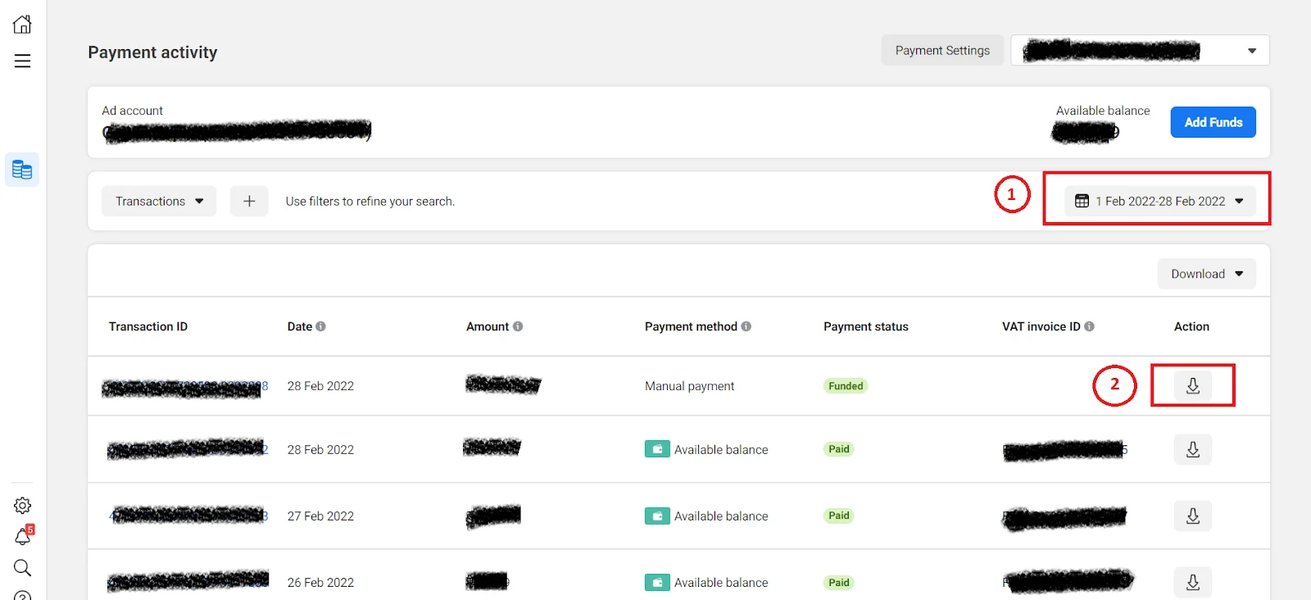
Meta Ad receipts and invoices can be downloaded from the Billing section of your account.
The Reverse Charge Mechanism
When a UK VAT-registered business buys services from a supplier based outside the UK (like Meta, which often invoices from its headquarters in Ireland), the reverse charge mechanism usually applies. This shifts the responsibility for accounting for VAT from the overseas supplier to the UK business customer.
- How it Works: If you provide your valid UK VAT number to Meta, they typically will not add UK VAT to your invoice. Instead, the invoice might state "VAT 0%" or reference specific EU VAT directives (like Article 196 of Council Directive 2006/112/EC) indicating that the reverse charge applies.
- Your Responsibility: You must then "self-assess" the VAT on your own UK VAT return. You declare the VAT due as output tax (as if you supplied the service yourself) in Box 1 of your return, and simultaneously reclaim the same amount as input tax (subject to normal rules) in Box 4.
- Net Effect: For businesses making fully taxable supplies, the output VAT declared and the input VAT reclaimed cancel each other out, resulting in no net VAT cost. However, the reporting is mandatory for compliance.
Invoice Clarity Issues
Sometimes, Meta's invoices might not clearly state "Reverse Charge Applicable" or detail the VAT treatment explicitly, even when it's being applied correctly behind the scenes because you provided your VAT number. This can lead to confusion. The absence of a VAT breakdown on your receipt could mean reverse charge is active (and correctly so, if you've added your VAT number), but the invoice format isn't explicit.
Scenario: No VAT Number Provided & No VAT on Receipt
This is the most problematic scenario. If you haven't provided your VAT number, Meta *should* be charging you 20% VAT. If this VAT isn't showing on the receipt, it creates uncertainty. It could be an error, or the VAT might be bundled into the total cost without itemization (which is poor practice for VAT invoicing). This makes it difficult for you to reclaim the VAT correctly.
Tax Liability Implications for Your UK Business
Your tax liability hinges significantly on whether you have provided your VAT number to Meta and how VAT is consequently handled.
Scenario 1: VAT Number Provided (Reverse Charge Applies)
- Meta Invoice: Should show no UK VAT charged, possibly referencing reverse charge.
- Your Action: You must account for the VAT via the reverse charge mechanism on your UK VAT return (declare in Box 1, reclaim in Box 4).
- Tax Liability: Generally cost-neutral if your business activities are fully taxable. Failure to account for reverse charge correctly is a compliance risk.
Scenario 2: VAT Number NOT Provided (Default VAT Charged)
- Meta Invoice: Meta likely charges 20% UK VAT. This should ideally be shown on a valid VAT invoice.
- Your Action: If VAT is charged and clearly shown on a valid VAT invoice from Meta, you can reclaim this as input tax on your VAT return (Box 4), subject to normal rules.
- Tax Liability: The VAT paid becomes an actual cost to your business if you cannot reclaim it (e.g., due to lack of a proper VAT invoice or if your business activities are VAT-exempt). The lack of breakdown on your current receipts makes reclaiming this potentially charged VAT problematic.
Summary Table: VAT Treatment Comparison
This table summarizes the key differences in VAT handling based on whether your UK VAT number is registered in your Meta account:
| Aspect | VAT Number Provided to Meta | VAT Number NOT Provided to Meta |
|---|---|---|
| VAT Charged by Meta? | No (typically) | Yes (UK VAT @ 20%) |
| VAT Handling Mechanism | Reverse Charge (Self-Assessed by UK Business) | Standard VAT (Charged by Meta) |
| Invoice Appearance | May show VAT 0%, reference EU directive, or lack explicit VAT breakdown. Should include your VAT number. | Should ideally show 20% VAT itemized. Lack of breakdown causes issues. |
| VAT Reclaimability (for UK Business) | Input VAT reclaimed via Box 4 of VAT return (balances Box 1 output tax). | Input VAT reclaimable via Box 4 if shown on a valid VAT invoice. Difficult/impossible without proper invoice. |
| Action Required by UK Business | Declare Output VAT (Box 1) and Input VAT (Box 4) on VAT return. | Ensure VAT number is added. If VAT was charged, reclaim Input VAT (Box 4) if possible. |
Visualizing VAT Factors & Process
Key Factors Influencing Meta Ads VAT Treatment
Several factors interact to determine how VAT is applied to your Meta ad spend. The radar chart below illustrates the relative importance of these factors based on typical scenarios for a UK VAT-registered business. A higher score indicates greater influence or importance.
As shown, providing your VAT number and the applicability of the reverse charge mechanism are highly influential factors. Invoice clarity, while important for record-keeping, has slightly less impact on the underlying VAT treatment itself compared to whether the correct mechanism (reverse charge vs. direct charge) is triggered.
Decision Flow Mindmap
This mindmap outlines the typical process and outcomes regarding VAT on Meta Ads for a UK VAT-registered business:
to Meta Account Settings?"] id1_yes["Yes"] id2["Meta likely invoices from Ireland (non-UK)"] id3["Reverse Charge Mechanism Applies"] id4["Meta does NOT charge UK VAT"] id5["Invoice may show VAT 0% or reference
Directive (e.g., Art. 196)"] id6["UK Business MUST self-assess VAT
on VAT Return (Box 1 Output, Box 4 Input)"] id7["Typically cost-neutral if fully taxable"] id1_no["No"] id8["Meta MUST charge UK VAT (currently 20%)"] id9["VAT should be itemized on invoice"] id10["Invoice clarity issue? Your receipt lacks breakdown."] id11["Potential Problem: VAT charged but not shown clearly"] id12["Difficult to reclaim Input VAT without proper invoice"] id13["VAT paid to Meta increases ad cost"] id14["UK Business can reclaim Input VAT (Box 4)
IF shown on valid VAT invoice"]
The mindmap clearly shows the two distinct paths based on whether the VAT number is provided, leading to either the reverse charge mechanism or direct VAT charging by Meta, and highlights the implications for invoicing and tax reporting.
Actionable Steps You Should Take
Given the lack of VAT breakdown on your receipts, it's crucial to take action to ensure compliance and clarify your VAT position.
1. Add Your VAT Number to Meta Immediately
This is the most critical step. By adding your valid UK VAT number to your Meta account settings, you signal your business status to Meta, which should trigger the application of the reverse charge mechanism (assuming Meta invoices from outside the UK, e.g., Ireland). This usually stops Meta from directly charging you UK VAT.
- Go to your Meta Ads Manager or Business Manager.
- Navigate to Billing & Payment Settings.
- Find the section for Business Info or Tax Information.
- Enter your UK VAT number accurately and save the changes.
Video Guide: Adding VAT ID to Facebook Ads Account
The process of adding your VAT ID is straightforward. This video demonstrates how to navigate the Meta Ads interface to update your tax information (note: interface may have changed slightly since 2022, but the principle remains the same):
Visual guide on updating VAT information in Meta Ads settings.
2. Review Past and Future Invoices Carefully
Once your VAT number is added, download new invoices as they become available. Check if they now explicitly mention reverse charge or show VAT as 0%. Also, re-examine past invoices. Look for:
- Your business name and address.
- Meta's VAT number (often an Irish one).
- Your VAT number (once added).
- A description of the services (Advertising).
- The date of supply.
- The net amount charged.
- Any mention of VAT rate (even if 0%) or references like "Subject to Reverse Charge - VAT to be accounted for by the recipient".
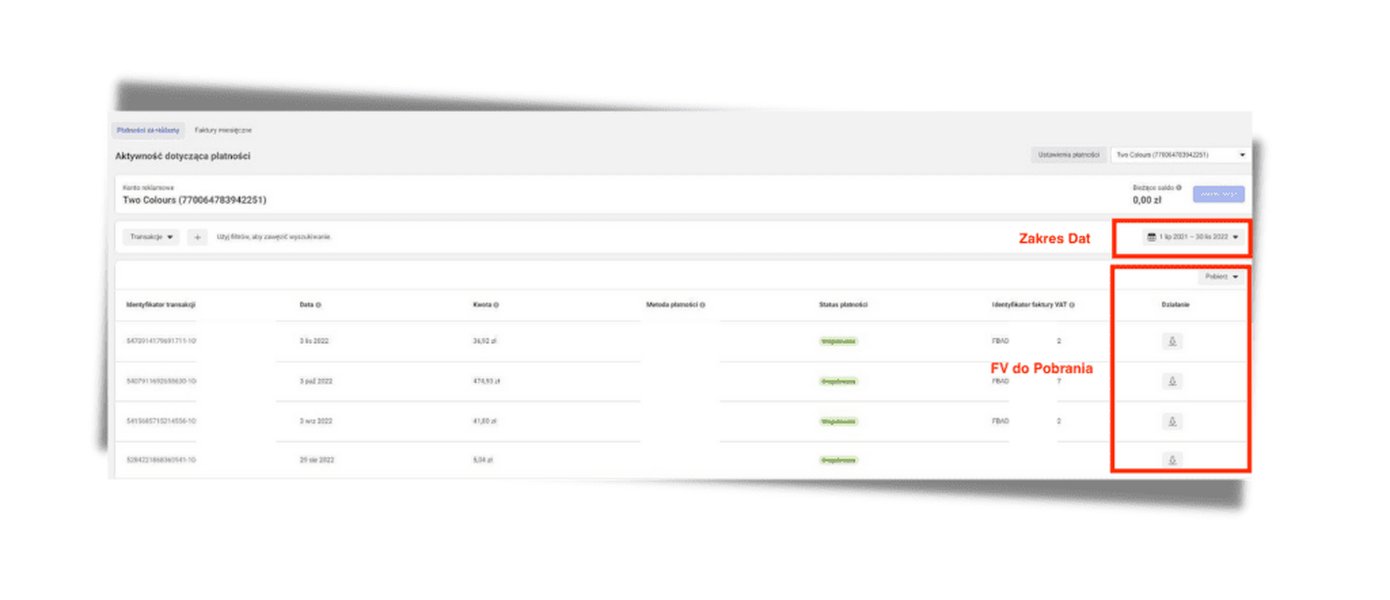
Example showing typical details found on a Meta Ads invoice.
3. Contact Meta Support
If invoices remain unclear after adding your VAT number, contact Meta Business Support directly. Ask them to confirm:
- Whether UK VAT has been charged on your past invoices.
- Whether the reverse charge mechanism is now correctly applied to your account.
- Request clarification or corrected invoices if necessary.
4. Consult Your Accountant or Tax Advisor
Given the potential complexities and compliance risks, consulting with a tax professional is highly recommended. They can:
- Review your specific situation and Meta invoices.
- Confirm the correct VAT treatment (direct charge vs. reverse charge).
- Advise on how to correctly account for the VAT on your VAT returns, including any necessary adjustments for past periods.
- Ensure you have the necessary documentation (valid VAT invoices) to support any input VAT reclaims.
Frequently Asked Questions (FAQ)
What exactly is the 'reverse charge' mechanism?
The reverse charge is a VAT procedure used mainly for cross-border B2B (Business-to-Business) services within the EU and for services imported into the UK from abroad. Instead of the overseas supplier charging VAT, the responsibility ('charge') for accounting for the VAT is reversed onto the business customer receiving the service in the UK. The UK customer declares the VAT as output tax on their VAT return and usually reclaims it simultaneously as input tax, making it cost-neutral for fully taxable businesses but ensuring VAT is reported within the UK system.
How do I add or verify my VAT number in Meta Ads Manager?
Log in to your Meta Ads Manager or Business Manager. Go to 'Billing' or 'Payment Settings'. Look for an area labelled 'Business Info', 'Account Settings', or 'Tax Information'. There should be a field to enter or edit your VAT registration number. Ensure you enter the full UK VAT number (including the 'GB' prefix if required by Meta's system) and save the changes. Meta may perform a validation check on the number.
What if Meta still charges VAT after I've added my VAT number?
This shouldn't happen if the reverse charge mechanism applies correctly (i.e., you're a UK VAT-registered business buying services from Meta Ireland). If VAT is still being charged:
- Double-check the VAT number entered is correct and validated in Meta's system.
- Confirm the invoicing entity (is it Meta Ireland or a UK entity?). If it's a UK entity supplying the service, UK VAT would be correct.
- Contact Meta support immediately to rectify the situation. They may need to adjust your account settings or issue credit notes/corrected invoices.
- Consult your tax advisor, as incorrect VAT charging needs proper handling.
Can I reclaim VAT Meta charged me before I added my VAT number?
Possibly, but it depends on having a valid VAT invoice from Meta that clearly shows the VAT amount charged, Meta's details, your details, and other required information. Since your current receipts lack a VAT breakdown, this might be difficult. You would need Meta to issue corrected, compliant VAT invoices for the past periods showing the VAT charged. Once you have valid VAT invoices, you can generally reclaim the input VAT on your next VAT return, subject to the normal time limits and rules for reclaiming input tax. Discuss this with your tax advisor.
Recommended Further Research
- Explore a detailed guide on how the UK reverse charge VAT mechanism works for digital services.
- Learn how to ensure your Meta invoices meet HMRC requirements for reclaiming input VAT.
- Discover common VAT errors UK businesses make when advertising on Facebook and how to avoid them.
- Understand how the location of the Meta entity invoicing you (e.g., Ireland vs. UK) impacts VAT treatment.
References
Last updated May 4, 2025