
Unlocking AI Synergy: A Deep Dive into Microsoft Copilot's Integration with Microsoft 365
Discover how Microsoft Copilot seamlessly blends into the Microsoft 365 ecosystem, transforming productivity and collaboration.
Key Integration Highlights
- Embedded AI Assistance: Microsoft Copilot is directly integrated into core Microsoft 365 applications like Word, Excel, PowerPoint, Outlook, and Teams, providing real-time, context-aware AI support within your daily workflow.
- Microsoft Graph Powered Context: Copilot leverages Microsoft Graph to securely access and understand your organizational data—emails, documents, chats, and meetings—enabling highly personalized and relevant AI-generated responses without training LLMs on your proprietary data.
- Enterprise-Grade Security & Extensibility: It inherits your existing Microsoft 365 security, compliance, and privacy policies, including Conditional Access and MFA, ensuring data protection. Furthermore, it supports extensibility through custom connectors and AI agents via Copilot Studio, allowing tailored solutions for specific business needs.
Microsoft Copilot is an advanced AI-powered productivity assistant that is fundamentally integrated into the Microsoft 365 ecosystem. Far from being a standalone tool, it acts as an intelligent companion, deeply embedded within the applications users rely on daily. This seamless integration is designed to revolutionize how individuals and organizations work by enhancing creativity, boosting productivity, and streamlining workflows through intelligent, real-time assistance.
The Foundational Architecture: How Copilot Connects
The core of Microsoft Copilot's integration with Microsoft 365 lies in a sophisticated architecture that combines Large Language Models (LLMs) with Microsoft Graph. This synergy allows Copilot to provide contextually rich and relevant assistance while adhering to strict security and privacy protocols.
The Role of Large Language Models (LLMs)
At its heart, Copilot is powered by cutting-edge LLMs hosted securely in the Microsoft Cloud. It's crucial to understand that these LLMs are not trained on an organization's specific, proprietary data. Instead, they are general-purpose models that are leveraged to generate AI-powered information. When a user provides a prompt, these LLMs process the request and, in conjunction with contextual data, formulate a response.
Microsoft Graph: The Contextual Bridge
A pivotal element of Copilot's functionality is its interaction with Microsoft Graph. This powerful API acts as a gateway, allowing Copilot to access an organization's unique context—emails, chats, documents, calendars, and contacts. When a user enters a prompt, Copilot uses Microsoft Graph to retrieve relevant data from the user's Microsoft 365 environment. This contextual information enables Copilot to deliver highly personalized and accurate responses, tailored to the user's specific work and data access permissions. For example, if you ask Copilot to summarize a recent meeting, it will access the meeting transcript, chat logs, and related documents through Microsoft Graph to provide a comprehensive summary.
This radar chart illustrates the perceived strength of Microsoft Copilot's integration aspects within Microsoft 365, from deeply embedded functionalities to robust security.
Seamless Integration Across Microsoft 365 Applications
Microsoft Copilot is designed to be an inherent part of the Microsoft 365 suite, working alongside users in their familiar daily applications. This deep embedding means users can access Copilot's AI capabilities directly within their workflow, eliminating the need to switch between different tools.
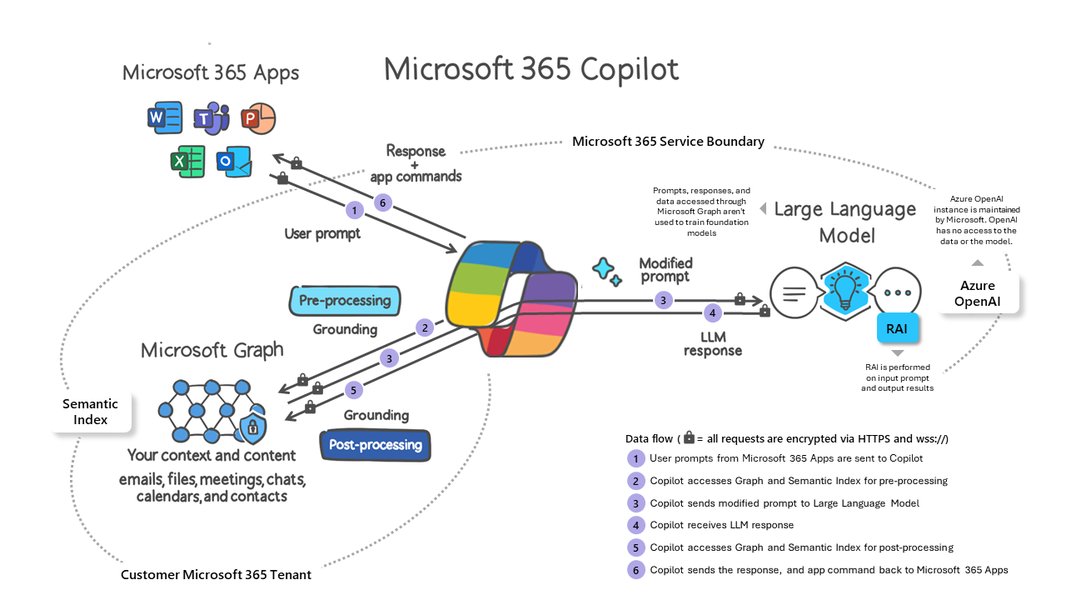
A visual representation of the Microsoft 365 Copilot data flow, showcasing its interaction with user prompts and organizational data.
App-Specific Functionalities and Use Cases
Copilot's integration is meticulously tailored to enhance the core functions of each Microsoft 365 application:
- Word: Transforms document creation by assisting with drafting, editing, summarizing, and refining content. Users can prompt Copilot to generate initial drafts, rephrase sentences, or create outlines based on existing documents or notes.
- Excel: Revolutionizes data analysis and exploration. Copilot can help users understand complex datasets, identify trends, generate formulas, and create compelling visualizations, turning raw data into actionable insights.
- PowerPoint: Speeds up presentation creation by generating slide drafts, suggesting designs, and incorporating content from other Microsoft 365 sources like Word documents or Teams meeting notes.
- Outlook: Streamlines email management significantly. Copilot can summarize lengthy email threads, draft replies from simple prompts, and convert notes into clear, concise messages, enhancing communication efficiency.
- Teams: Elevates collaboration by automating administrative tasks during calls, such as capturing key discussion points, assigning tasks, and summarizing entire meetings. Copilot Chat is also available, allowing real-time queries and insights within collaborative sessions.
- Loop: Supports dynamic and collaborative content creation by providing AI-driven insights and assistance within shared workspaces.
The Microsoft 365 Copilot App and Copilot Chat
Beyond individual application integration, Microsoft 365 Copilot also offers a centralized experience through the dedicated Microsoft 365 Copilot app and Copilot Chat. This serves as a starting point for AI at work, allowing users to ask general questions, create content, or draft documents across various contexts. Copilot Chat, powered by LLMs and grounded in both web and enterprise data, ensures enterprise-grade data protection while providing broad AI assistance.
Security, Compliance, and Data Governance
A cornerstone of Microsoft Copilot's integration is its unwavering commitment to security, compliance, and privacy. It's designed to inherit and uphold an organization's existing Microsoft 365 security policies, ensuring that sensitive data remains protected.
Inheriting Organizational Policies
Copilot automatically inherits the organization's existing security, compliance, and privacy policies set within Microsoft 365. This includes enforcing Conditional Access and multifactor authentication (MFA), meaning Copilot only accesses data that the user is explicitly authorized to view. This mechanism ensures that data governance and confidentiality are maintained across all interactions.
Data Protection and Privacy
Microsoft emphasizes that the LLMs used for Copilot are not trained on an organization's proprietary data. Instead, they leverage this data dynamically through Microsoft Graph for real-time contextual understanding. This architecture is critical for protecting privacy and ensuring that customer data is not used to train external models. Microsoft Purview data protections are also applied, providing comprehensive data security when Copilot accesses organizational or external data.
Extensibility and Customization: Tailoring Copilot to Your Needs
Microsoft 365 Copilot is built with extensibility in mind, allowing organizations to tailor its capabilities to their unique business processes and industry-specific requirements.
Copilot Connectors and Agents
Organizations can extend Copilot's knowledge base by using **Copilot Connectors** to ingest and index data from various sources, including proprietary or third-party systems. This enables Copilot to reason over a broader spectrum of information, delivering more contextually relevant responses. For highly specialized workflows, organizations can create custom AI agents using **Copilot Studio**. These agents can be designed to perform specific actions, such as updating databases, triggering workflows, or integrating with unique systems directly within the Microsoft 365 environment (e.g., in Teams, Outlook, or SharePoint).
This mindmap illustrates the comprehensive integration of Microsoft 365 Copilot, detailing its core mechanisms, functionalities, extensibility, and key aspects.
Youtube Video: Unlocking the Magic of Microsoft 365 Copilot
To further illustrate the practical applications and benefits of Microsoft 365 Copilot's integration, the following video provides a concise overview of its capabilities and how it can significantly enhance productivity:
This video, titled "The Magic of Microsoft 365 Copilot Revealed; Save An Hour ...", demonstrates how Copilot integrates into daily workflows to save time and enhance productivity, showcasing its practical use cases across various Microsoft 365 applications. It visually explains the benefits of having an AI assistant embedded directly within your work environment.
Licensing, Setup, and System Requirements
To fully leverage the integrated capabilities of Microsoft Copilot, organizations and individuals need to consider specific licensing and technical prerequisites.
Availability and Licensing Models
Microsoft Copilot is available as an add-on subscription for various Microsoft 365 plans. For business and enterprise customers, it typically requires an add-on to Microsoft 365 Business Standard, Business Premium, or Enterprise plans. Features like Copilot Chat are often included at no additional cost for these customers, inheriting enterprise-grade data security and compliance settings. For individual users, Copilot features within Microsoft 365 apps are included with Microsoft 365 Personal and Family subscriptions, with Copilot Pro offering priority access to the latest AI models and faster response times.
Deployment and Network Considerations
Administrators play a crucial role in the successful deployment of Copilot. This involves configuring security features, managing data access, and adopting best practices to prevent data oversharing. IT teams may also need to prepare organizational data by cleaning up and standardizing it to ensure Copilot can effectively utilize it. Furthermore, Copilot experiences often use the same network connections and endpoints as Microsoft 365 apps. Admins need to configure their network to allow worldwide Microsoft 365 URLs and IP address ranges to enable richer Copilot integrations, especially for web-based experiences.
Benefits and Transformative Impact
The comprehensive integration of Microsoft Copilot within Microsoft 365 offers numerous benefits, fundamentally transforming productivity and collaboration.
Enhanced Productivity and Efficiency
By automating routine and mundane tasks, Copilot frees up users to focus on higher-value work. Whether it's drafting a complex report, summarizing a lengthy email thread, or preparing a presentation, Copilot significantly reduces the time and effort required, leading to substantial productivity gains. This allows users to concentrate on strategic thinking and creative problem-solving.
Improved Collaboration and Communication
In collaborative environments, Copilot enhances communication by summarizing meetings, capturing action items, and drafting clear messages. This ensures that all team members are on the same page, reducing miscommunication and facilitating smoother project execution. The ability to quickly extract key information from shared documents and conversations also fosters more effective teamwork.
Empowering Users with AI Assistance
Copilot acts as an intelligent assistant, empowering users with AI capabilities directly within their familiar applications. This seamless access to AI tools allows users to explore data more deeply, generate creative content, and gain insights they might otherwise miss, enhancing their overall skill set and output quality.
The following table summarizes the key integration points and their associated benefits:
| Integration Point | Description | Primary Benefit |
|---|---|---|
| Embedded in M365 Apps | Copilot works directly within Word, Excel, PowerPoint, Outlook, Teams, etc. | Seamless, in-context AI assistance; eliminates tool switching. |
| Microsoft Graph Data Access | Utilizes organizational data (emails, documents, chats) for context. | Personalized, highly relevant AI responses; grounded in user's work. |
| LLM & Cloud Hosting | Powered by advanced Large Language Models securely hosted in Microsoft Cloud. | Intelligent content generation; scalable AI capabilities. |
| Security & Compliance Inheritance | Adheres to existing M365 security, privacy, and compliance policies. | Data protection; ensures secure and compliant AI operations. |
| Copilot Chat & App | Centralized AI chat interface for broad work queries. | Unified AI experience; comprehensive AI assistance across contexts. |
| Extensibility (Connectors & Agents) | Allows integration of proprietary data and custom AI workflows. | Tailored AI solutions; automation of industry-specific tasks. |
Frequently Asked Questions (FAQ)
How does Microsoft Copilot protect my organizational data?
Do I need a separate license for Microsoft Copilot?
Can Copilot be customized for specific business needs?
What is the difference between Microsoft Copilot and Copilot Chat?
How does Copilot ensure that I only see data I'm authorized to access?
Conclusion
Microsoft Copilot's deep and intelligent integration with Microsoft 365 marks a significant evolution in productivity. By embedding advanced AI capabilities directly into familiar applications, leveraging the rich context provided by Microsoft Graph, and upholding stringent security and compliance standards, Copilot transforms how individuals and organizations interact with their data and daily tasks. It empowers users to be more creative, analytical, and efficient, ultimately driving a more productive and collaborative work environment. As of today, May 29, 2025, this integration continues to evolve, promising even more sophisticated and seamless AI assistance in the future.
Recommended Further Exploration
- How does Microsoft Copilot's security architecture ensure data privacy?
- What are the capabilities for extending Microsoft Copilot with custom connectors and AI agents?
- Can you provide more specific examples of Microsoft Copilot's use cases in Excel and Teams?
- What are the detailed licensing requirements and availability of Microsoft 365 Copilot for different user types?