
全面實作Modbus TCP智慧電表資料擷取與管理系統
利用Python、Flask與SQL Server打造高效的智慧電表資料管理平台
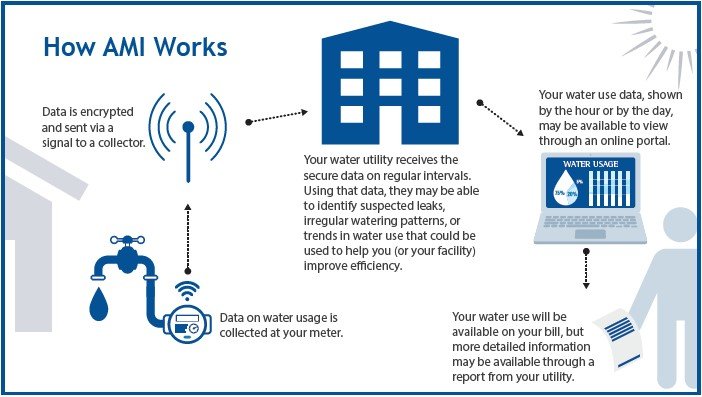
主要精要
- 整合Flask框架與Modbus TCP通訊,實現智慧電表的即時資料擷取與管理。
- 設計直觀且動態更新的前端介面,使用者可輕鬆查看與設定電表參數。
- 確保系統穩定性與可擴展性,透過多線程或排程任務實現資料輪巡與儲存。
系統架構概述
本系統旨在透過Python結合Flask框架,實現對多個Modbus TCP智慧電表的資料擷取,並將收集到的數據存儲至SQL Server資料庫。使用者可透過網頁介面進行相關設定,包括電表IP、輪巡週期及SQL Server連線參數等。
系統組成
- Flask後端:負責處理前端請求、管理設定、啟動輪巡任務並與資料庫互動。
- Modbus TCP客戶端:通過
pymodbus庫實現與智慧電表的通信,定期擷取資料。 - SQL Server資料庫:存儲擷取到的電表數據,便於後續查詢與分析。
- 前端介面:包含
basboard.html與setting.html,提供即時數據顯示與設定功能。
詳細實作步驟
1. 環境配置與依賴安裝
首先,確保已安裝Python環境,並使用pip安裝所需套件:
pip install flask pymodbus pyodbc flask-socketio apscheduler此外,需安裝ODBC Driver 17 for SQL Server,以確保pyodbc能正常與SQL Server通信。
2. 專案結構設計
遵循Flask的最佳實踐,建議專案目錄結構如下:
project/
├── app/
│   ├── __init__.py
│   ├── models.py
│   ├── routes/
│   │   ├── __init__.py
│   │   ├── dashboard.py
│   │   └── settings.py
│   ├── templates/
│   │   ├── basboard.html
│   │   └── setting.html
│   ├── static/
│   │   ├── css/
│   │   └── js/
│   └── utils/
│       ├── modbus_client.py
│       ├── database.py
│       └── scheduler.py
├── config.py
└── run.py
此結構將功能模組化,提升可維護性與可擴展性。
3. SQL Server資料庫設計
建立一個名為meter_data的資料表,用以存儲智慧電表數據:
CREATE TABLE meter_data (
    id INT PRIMARY KEY IDENTITY(1,1),
    ip VARCHAR(15) NOT NULL,
    address INT NOT NULL,
    name VARCHAR(50),
    value FLOAT NOT NULL,
    timestamp DATETIME DEFAULT GETDATE()
);
此資料表包含電表IP、資料地址、參數名稱、值及時間戳記。
4. Flask應用程式初始化
在app/__init__.py中初始化Flask應用程式,並設定相關擴展:
from flask import Flask
from flask_socketio import SocketIO
from .routes.dashboard import dashboard_bp
from .routes.settings import settings_bp

socketio = SocketIO()

def create_app():
    app = Flask(__name__)
    app.config['SECRET_KEY'] = 'your_secret_key'

    # 註冊藍圖
    app.register_blueprint(dashboard_bp)
    app.register_blueprint(settings_bp)

    # 初始化SocketIO
    socketio.init_app(app)

    return app
5. Modbus TCP客戶端實作
在app/utils/modbus_client.py中實作Modbus輪巡邏功能:
from pymodbus.client import ModbusTcpClient
from app.utils.database import Database
from apscheduler.schedulers.background import BackgroundScheduler
import time

class ModbusPoller:
    def __init__(self, db_config):
        self.db = Database(db_config)
        self.scheduler = BackgroundScheduler()
        self.devices = []
        self.polling_interval = 10  # 預設輪巡週期為10秒

    def load_config(self, config):
        self.devices = config.get('devices', [])
        self.polling_interval = config.get('polling_interval', 10)

    def start_polling(self):
        self.scheduler.add_job(self.poll_meters, 'interval', seconds=self.polling_interval)
        self.scheduler.start()

    def stop_polling(self):
        self.scheduler.shutdown(wait=False)

    def poll_meters(self):
        for device in self.devices:
            ip = device['ip']
            for param in device['parameters']:
                address = param['address']
                name = param['name']
                client = ModbusTcpClient(ip)
                try:
                    if client.connect():
                        result = client.read_holding_registers(address, 1)
                        if not result.isError():
                            value = result.registers[0]
                            self.db.save_data(ip, address, name, value)
                        client.close()
                except Exception as e:
                    print(f"Error polling {ip} at address {address}: {e}")
此模組負責根據設定定期輪巡智慧電表,並將擷取到的資料存入資料庫。
6. 資料庫操作模組
在app/utils/database.py中實作與SQL Server的連接與資料儲存:
import pyodbc

class Database:
    def __init__(self, config):
        self.host = config['host']
        self.database = config['database']
        self.user = config['user']
        self.password = config['password']
        self.connection_string = (
            f"DRIVER={{ODBC Driver 17 for SQL Server}};"
            f"SERVER={self.host};DATABASE={self.database};"
            f"UID={self.user};PWD={self.password}"
        )
        self.connect()

    def connect(self):
        self.conn = pyodbc.connect(self.connection_string)
        self.cursor = self.conn.cursor()

    def save_data(self, ip, address, name, value):
        query = """
            INSERT INTO meter_data (ip, address, name, value)
            VALUES (?, ?, ?, ?)
        """
        self.cursor.execute(query, (ip, address, name, value))
        self.conn.commit()

    def close(self):
        self.conn.close()
此模組封裝了資料庫的連接與資料儲存功能,確保資料的可靠性。
7. 排程與輪巡管理
在app/utils/scheduler.py中管理Modbus輪巡任務:
from app.utils.modbus_client import ModbusPoller

class SchedulerManager:
    def __init__(self, db_config, polling_config):
        self.poller = ModbusPoller(db_config)
        self.poller.load_config(polling_config)

    def start(self):
        self.poller.start_polling()

    def stop(self):
        self.poller.stop_polling()

    def update_config(self, new_polling_config):
        self.stop()
        self.poller.load_config(new_polling_config)
        self.start()
此模組負責啟動、停止及更新輪巡配置,確保系統能根據使用者設定動態調整。
8. Flask路由設計
在app/routes/dashboard.py與app/routes/settings.py中實作主要路由功能:
# app/routes/dashboard.py
from flask import Blueprint, render_template, jsonify
from flask_socketio import emit
from app.utils.database import Database

dashboard_bp = Blueprint('dashboard', __name__)

@dashboard_bp.route('/')
def dashboard():
    return render_template('basboard.html')

@dashboard_bp.route('/api/data')
def get_data():
    db = Database(current_app.config['DB_CONFIG'])
    data = db.fetchall("SELECT * FROM meter_data ORDER BY timestamp DESC")
    db.close()
    # 將資料轉換為JSON格式
    result = [
        {"ip": row.ip, "address": row.address, "name": row.name, "value": row.value, "timestamp": row.timestamp}
        for row in data
    ]
    return jsonify(result)
# app/routes/settings.py
from flask import Blueprint, render_template, request, jsonify, current_app
from app.utils.scheduler import SchedulerManager

settings_bp = Blueprint('settings', __name__)

@s⃦ettings_bp.route('/setting')
def settings():
    return render_template('setting.html')

@settings_bp.route('/api/settings', methods=['GET', 'POST'])
def manage_settings():
    if request.method == 'POST':
        settings = request.json
        # 更新配置
        current_app.config['DB_CONFIG'] = settings['db_config']
        current_app.config['POLLING_CONFIG'] = settings['polling_config']
        # 重啟輪巡
        scheduler = current_app.config['SCHEDULER']
        scheduler.update_config(settings['polling_config'])
        return jsonify({"status": "success"})
    else:
        # 返回現有設定
        return jsonify({
            "db_config": current_app.config['DB_CONFIG'],
            "polling_config": current_app.config['POLLING_CONFIG']
        })
上述路由負責渲染頁面、處理設定的獲取與更新,並確保輪巡任務根據最新設定運行。
9. 前端介面設計
設計兩個主要的HTML頁面:basboard.html與setting.html。
basboard.html
<!DOCTYPE html>
<html lang="zh-TW">
<head>
    <meta charset="UTF-8">
    <title>智慧電表儀表板</title>
    <link rel="stylesheet" href="/static/css/styles.css">
    <script src="https://code.jquery.com/jquery-3.6.0.min.js"></script>
    <script src="https://cdnjs.cloudflare.com/ajax/libs/socket.io/4.0.1/socket.io.min.js"></script>
</head>
<body>
    <h2>智慧電表即時數據</h2>
    <table id="data-table">
        <thead>
            <tr>
                <th>IP</th>
                <th>名稱</th>
                <th>地址</th>
                <th>數值</th>
                <th>更新時間</th>
            </tr>
        </thead>
        <tbody>
            <!-- 動態更新數據 -->
        </tbody>
    </table>

    <script>
        function fetchData() {
            $.ajax({
                url: '/api/data',
                method: 'GET',
                success: function(data) {
                    $('#data-table tbody').empty();
                    data.forEach(function(row) {
                        $('#data-table tbody').append(
                            '<tr><td>' + row.ip + '</td><td>' + row.name +
                            '</td><td>' + row.address + '</td><td>' +
                            row.value + '</td><td>' + row.timestamp + '</td></tr>'
                        );
                    });
                }
            });
        }

        $(document).ready(function() {
            fetchData();
            setInterval(fetchData, 5000); // 每5秒更新一次
        });
    </script>
</body>
</html>
setting.html
<!DOCTYPE html>
<html lang="zh-TW">
<head>
    <meta charset="UTF-8">
    <title>設定頁面</title>
    <link rel="stylesheet" href="/static/css/styles.css">
    <script src="https://code.jquery.com/jquery-3.6.0.min.js"></script>
</head>
<body>
    <h2>系統設定</h2>

    <button id="open-modal">設定SQL Server</button>

    <div id="modal" class="modal">
        <div class="modal-content">
            <span class="close">×</span>
            <h3>SQL Server設定</h3>
            <form id="db-form">
                <label for="host">主機:</label>
                <input type="text" id="host" name="host" required><br>
                <label for="database">資料庫:</label>
                <input type="text" id="database" name="database" required><br>
                <label for="user">使用者:</label>
                <input type="text" id="user" name="user" required><br>
                <label for="password">密碼:</label>
                <input type="password" id="password" name="password" required><br>
                <button type="submit">儲存</button>
            </form>
        </div>
    </div>

    <h3>電表設定</h3>
    <form id="settings-form">
        <div id="devices">
            <div class="device">
                <label>IP:</label>
                <input type="text" name="ip" required>
                <label>輪巡週期 (秒):</label>
                <input type="number" name="polling_interval" min="1" required>
                <button type="button" class="add-parameter">+</button>
                <div class="parameters">
                    <div class="parameter">
                        <label>名稱:</label>
                        <input type="text" name="name" required>
                        <label>地址:</label>
                        <input type="number" name="address" required>
                    </div>
                </div>
            </div>
        </div>
        <button type="button" id="add-device">+ 新增電表</button>
        <button type="submit">儲存設定</button>
    </form>

    <script>
        // Modal功能
        var modal = document.getElementById("modal");
        var btn = document.getElementById("open-modal");
        var span = document.getElementsByClassName("close")[0];

        btn.onclick = function() {
            modal.style.display = "block";
        }

        span.onclick = function() {
            modal.style.display = "none";
        }

        window.onclick = function(event) {
            if (event.target == modal) {
                modal.style.display = "none";
            }
        }

        // 增加電表
        $('#add-device').click(function() {
            var deviceHtml = `
                <div class="device">
                    <label>IP:</label>
                    <input type="text" name="ip" required>
                    <label>輪巡週期 (秒):</label>
                    <input type="number" name="polling_interval" min="1" required>
                    <button type="button" class="add-parameter">+</button>
                    <div class="parameters">
                        <div class="parameter">
                            <label>名稱:</label>
                            <input type="text" name="name" required>
                            <label>地址:</label>
                            <input type="number" name="address" required>
                        </div>
                    </div>
                </div>
            `;
            $('#devices').append(deviceHtml);
        });

        // 增加參數
        $(document).on('click', '.add-parameter', function() {
            var parameterHtml = `
                <div class="parameter">
                    <label>名稱:</label>
                    <input type="text" name="name" required>
                    <label>地址:</label>
                    <input type="number" name="address" required>
                </div>
            `;
            $(this).siblings('.parameters').append(parameterHtml);
        });

        // 儲存設定
        $('#db-form').submit(function(e) {
            e.preventDefault();
            var dbConfig = {
                host: $('#host').val(),
                database: $('#database').val(),
                user: $('#user').val(),
                password: $('#password').val()
            };
            $.ajax({
                url: '/api/settings',
                method: 'POST',
                contentType: 'application/json',
                data: JSON.stringify({ db_config: dbConfig, polling_config: getPollingConfig() }),
                success: function(response) {
                    alert('設定已儲存並輪巡已重新啟動');
                    modal.style.display = "none";
                }
            });
        });

        function getPollingConfig() {
            var devices = [];
            $('.device').each(function() {
                var ip = $(this).find('input[name="ip"]').val();
                var interval = parseInt($(this).find('input[name="polling_interval"]').val());
                var parameters = [];
                $(this).find('.parameter').each(function() {
                    var name = $(this).find('input[name="name"]').val();
                    var address = parseInt($(this).find('input[name="address"]').val());
                    parameters.push({ name: name, address: address });
                });
                devices.push({ ip: ip, polling_interval: interval, parameters: parameters });
            });
            return { devices: devices, polling_interval: 10 }; // 可根據需要調整
        }

        // 提交設定表單
        $('#settings-form').submit(function(e) {
            e.preventDefault();
            var settings = {
                db_config: {
                    host: $('#host').val(),
                    database: $('#database').val(),
                    user: $('#user').val(),
                    password: $('#password').val()
                },
                polling_config: getPollingConfig()
            };
            $.ajax({
                url: '/api/settings',
                method: 'POST',
                contentType: 'application/json',
                data: JSON.stringify(settings),
                success: function(response) {
                    alert('設定已儲存並輪巡已重新啟動');
                    location.reload();
                }
            });
        });
    </script>
</body>
</html>
在setting.html中,使用者可透過表單動態新增電表與其參數,並透過模態框設定SQL Server連線資訊。
10. Flask應用程式啟動與配置管理
在run.py中啟動Flask應用程式並載入初始配置:
from app import create_app, socketio
from app.utils.scheduler import SchedulerManager

app = create_app()

# 初始設定
app.config['DB_CONFIG'] = {
    'host': 'localhost',
    'database': 'meter_db',
    'user': 'sa',
    'password': 'your_password'
}

app.config['POLLING_CONFIG'] = {
    'devices': [
        {
            'ip': '192.168.1.100',
            'parameters': [
                {'name': '電壓', 'address': 1},
                {'name': '電流', 'address': 2}
            ]
        }
    ],
    'polling_interval': 10
}

# 初始化排程管理
scheduler = SchedulerManager(app.config['DB_CONFIG'], app.config['POLLING_CONFIG'])
app.config['SCHEDULER'] = scheduler
scheduler.start()

if __name__ == '__main__':
    socketio.run(app, host='0.0.0.0', port=5000, debug=True)
此步驟確保在應用啟動時即開始資料輪巡,並根據初始設定進行配置。
系統運行機制
當系統運行時,Flask後端會啟動Modbus TCP輪巡任務,定期向各智慧電表擷取資料,並將資料存入SQL Server。使用者可透過setting.html網頁動態調整設定,系統將根據新的參數重啟輪巡任務。
數據流動圖
| 階段 | 描述 |
|---|---|
| 1. 設定管理 | 使用者透過設定頁面輸入或修改SQL Server與電表參數。 |
| 2. 設定儲存 | 後端接收設定,更新資料庫與輪巡配置,並重新啟動輪巡任務。 |
| 3. 資料輪巡 | 系統定期向各智慧電表發送Modbus TCP請求,擷取資料。 |
| 4. 資料存儲 | 將擷取到的資料存入SQL Server資料庫。 |
| 5. 即時數據顯示 | 前端介面透過AJAX或WebSocket定期獲取最新資料,並更新展示。 |
最佳實踐與注意事項
- 安全性:確保SQL Server連線資訊的安全,避免硬編碼敏感資訊,可考慮使用環境變數或加密存儲。
- 錯誤處理:在Modbus通信過程中加入充分的錯誤處理,以應對設備連線失敗或資料擷取異常的情況。
- 資源管理:確保資料庫連線在使用完畢後正確關閉,避免資源洩漏。
- 可擴展性:設計模組化的程式結構,便於未來新增功能或支持更多設備類型。
- 性能優化:對輪巡週期與資料擷取頻率進行合理設置,平衡系統即時性與資源使用。
常見問題解答
-
如何處理多個電表同時輪巡的情況?可以使用多線程或非同步編程技術,如
asyncio,提升輪巡效率。 -
如何確保資料的完整性與一致性?在資料庫操作中加入事務管理,確保資料寫入的原子性。
-
如何擴展系統以支持更多電表?通過動態讀取設定,並優化輪巡機制,使系統能夠自動適應新增的設備。
結論
本系統結合了Python、Flask框架與SQL Server資料庫,提供了一個完整的Modbus TCP智慧電表資料擷取與管理解決方案。透過直觀的前端介面,使用者能夠輕鬆設定與查看電表數據,並確保系統運行的穩定性與可擴展性。未來,可根據實際需求進一步優化與擴展系統功能,以滿足更高的使用要求。
參考資源
總結
透過本文提供的詳細步驟與代碼範例,您可以建立一個強大且靈活的Modbus TCP智慧電表資料擷取系統。此系統不僅能夠實時監控電表數據,還具備良好的擴展性,能夠適應未來可能的需求變動。希望本指南能夠幫助您順利完成系統的開發與部署,若有進一步的問題,歡迎參考相關資源或進行技術討論。
Last updated January 24, 2025