
Unraveling the Mystery: Why is Freshwater Appearing in Your MODFLOW Brine Zones?
Diagnosing spontaneous freshwater intrusion in SWI2 simulations at the initial time step.
It's a perplexing situation: you've carefully set up your MODFLOW-NWT model with the SWI2 package to simulate distinct zones ranging from freshwater to concentrated brines, yet freshwater inexplicably appears in the brine-dominated center right at the simulation's start. This common issue typically points towards specific aspects of how initial conditions and density are handled within the SWI2 package.
Key Insights into the Issue
- Initial Freshwater-Equivalent Heads: The most frequent cause is specifying initial head values (STRT) incorrectly. SWI2 requires heads in saline zones to be input as *freshwater-equivalent* heads, not the actual measured or expected heads for that brine density.
- Initial Interface Positions: The defined starting positions (elevations) of the interfaces (ZETA surfaces) between your four water density zones might be inaccurate, effectively placing freshwater initially where brine should be.
- Boundary Condition Consistency: While the problem manifests at t=0, boundary conditions (like GHB or CHD) must also use freshwater-equivalent heads and be consistent with the initial density setup to avoid immediate, non-physical fluxes.
Decoding Initial Conditions in the SWI2 Package
The Seawater Intrusion (SWI2) package for MODFLOW handles variable-density flow by simulating the movement of sharp interfaces between zones of different densities. It incorporates density effects into the standard groundwater flow equation through the addition of pseudo-source terms. The accuracy of the simulation, especially at the very beginning, hinges critically on how you define the initial state of the system.
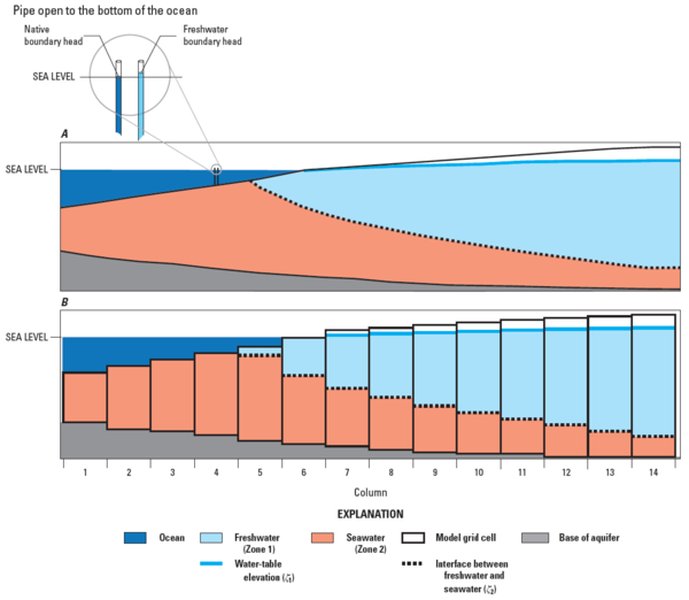
Conceptual diagram illustrating the SWI2 package approach.
The Critical Concept: Freshwater-Equivalent Heads
Why Standard Heads Cause Problems
A core requirement of SWI2 is that all specified head values, including initial heads (STRT parameter in the Basic Package) and time-variant boundary heads (like those in GHB or CHD packages), must be represented as freshwater-equivalent heads. This means the head value represents the water level that *would* exist if the water column had the density of freshwater (\(\rho_f\)), even if the cell actually contains denser brine.
If you input the actual expected head for a brine zone directly into the STRT array, MODFLOW interprets this lower head (relative to what a freshwater column of the same height would exert) as indicating a pressure gradient driving flow *into* the brine zone, potentially manifesting as the appearance of freshwater.
Calculating Freshwater Head
The conversion relies on the density ratio. For a point within a brine zone with density \(\rho_{brine}\) and an actual head \(h_{brine}\), the corresponding freshwater-equivalent head \(h_f\) needed for MODFLOW input is calculated relative to the same datum:
\[ h_f = h_{brine} \times \frac{\rho_{brine}}{\rho_f} \]Where \(\rho_f\) is the density of freshwater (typically 1000 kg/m³ or 1.0 g/cm³). For your zone 4 (concentrated brines), you must calculate this freshwater head for every cell initially containing brine and use these adjusted values in your STRT array.
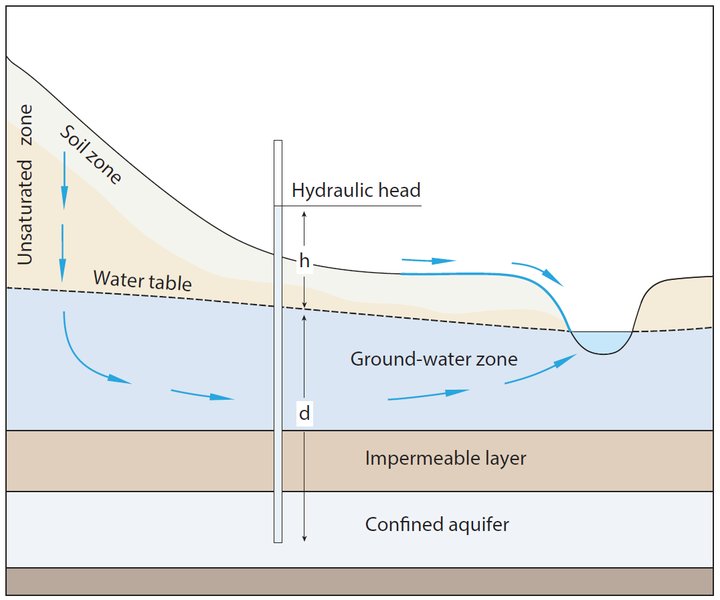
Illustration of hydraulic head concepts in groundwater. Accurate head specification is vital in SWI2.
Defining Initial Interface Elevations (ZETA)
SWI2 tracks the position of interfaces between density zones using surfaces defined by the ZETA parameters in the SWI2 input file. You have four zones, meaning you'll likely have three interfaces (ZETA surfaces) to define:
- Interface 1: Between Zone 1 (freshwater) and Zone 2
- Interface 2: Between Zone 2 and Zone 3
- Interface 3: Between Zone 3 and Zone 4 (brine)
You must provide the initial elevation of each of these ZETA surfaces across your model domain. If the initial elevation specified for the interface between freshwater (or lower density zones) and the brine zone (Zone 4) is set too high within the central area of your model, it means the model *starts* with freshwater occupying space above that specified elevation, even if you intended it to be fully brine-saturated. Carefully review the initial ZETA values for all surfaces, ensuring they accurately reflect the expected vertical distribution of brine in the model center at time zero.
Specifying Initial Zone Distribution (ISOURCE)
The ISOURCE array within the SWI2 input allows you to specify which water zone initially occupies each cell. This acts as an initial condition for the density distribution. Ensure that cells in the center of your model, intended to be Zone 4 (brine), are correctly assigned the value 4 (or the corresponding zone number) in the ISOURCE array for the relevant layers. An incorrect or default ISOURCE specification could lead the model to assume freshwater (Zone 1) presence.
Boundary Conditions and Their Influence
While your issue manifests immediately, boundary conditions defined in packages like the General-Head Boundary (GHB), Constant-Head Boundary (CHD), or River (RIV) package can interact with the initial state. These boundaries define hydraulic connections to external water bodies or conditions.
Consistency is Key
Similar to initial heads, the head values specified in these boundary packages must also be freshwater-equivalent heads. If a boundary represents connection to a saline water body (like an ocean or a saline lake connected to your brine zone), the specified head must be adjusted using the density ratio described earlier. Failure to do this can create an artificial pressure gradient at the boundary, driving freshwater into the model domain, even during the first time step's calculations.
Double-check all boundary condition inputs, especially those adjacent to or potentially influencing the central brine zone, to ensure they use correctly calculated freshwater-equivalent heads consistent with the density of the water they represent.
Numerical Stability and Model Setup Considerations
Beyond initial and boundary conditions, certain numerical aspects can contribute to unexpected behavior, especially with significant density contrasts like those between freshwater and concentrated brines.
Potential Numerical Artifacts
- Grid Resolution: Coarse spatial discretization (large grid cells) around the sharp interfaces between density zones can lead to numerical diffusion or instability, potentially smearing the interface or causing non-physical mixing. Refining the grid in areas of high density gradients can help.
- Time Step Size: While the issue appears at the first time step, large time steps can exacerbate numerical errors in transient simulations. Ensure your initial time step size is reasonably small.
- Solver Settings: The MODFLOW-NWT solver has parameters (like
HCLOSEfor head closure criterion) that control convergence tolerance. With high density contrasts, tighter tolerances might be needed for accurate and stable solutions. - SWI2 Options: The SWI2 package itself has options that can influence stability. For instance, using upstream weighting for the advection term (
OPTION=UPSTREAMin the SWI input) can sometimes help stabilize simulations with sharp density fronts, although it can also introduce numerical dispersion.
SWI2 Package Assumptions
Remember that SWI2 simplifies reality by assuming a sharp interface and neglecting variations in fluid viscosity. While powerful, modeling systems with multiple, distinct density zones, especially highly concentrated brines, can push the limits of these assumptions. If meticulous checking of initial/boundary conditions and numerical settings doesn't resolve the issue, it might indicate that the sharp-interface approach is struggling with the complexity of your specific four-zone system.
Relative Impact of Factors on Initial Simulation State
The radar chart below provides a conceptual illustration of the relative sensitivity of the initial simulation state (and potential for errors like spontaneous freshwater appearance) to various model setup factors in SWI2. Factors with higher scores are generally more critical to get right to avoid initial state problems.
As illustrated, accurately defining the initial freshwater-equivalent heads and interface positions is paramount for achieving a correct initial state in SWI2 simulations.
Visualizing the Troubleshooting Path
The mindmap below outlines a logical sequence for diagnosing the spontaneous freshwater issue in your SWI2 model.
in Brine Zone (SWI2)"] id1["Verify Initial Conditions"] id1a["Check STRT array"] id1a1["Are heads Freshwater-Equivalent?"] id1a2["Correct density ratio used?"] id1b["Check ZETA surfaces"] id1b1["Are initial interface elevations correct?"] id1b2["Correct number of surfaces defined?"] id1c["Check ISOURCE array"] id1c1["Correct zone number assigned?"] id2["Validate Boundary Conditions"] id2a["Check GHB/CHD/RIV etc."] id2a1["Are boundary heads Freshwater-Equivalent?"] id2a2["Consistent with adjacent zones?"] id3["Review Numerical Setup"] id3a["Grid Resolution"] id3a1["Sufficient refinement near interfaces?"] id3b["Time Stepping"] id3b1["Initial timestep small enough?"] id3c["Solver Settings (NWT)"] id3c1["Check HCLOSE/convergence"] id3d["SWI2 Options"] id3d1["Consider UPSTREAM weighting?"] id4["Consider Model Assumptions"] id4a["Sharp Interface Limitation"] id4b["Viscosity Neglected"] id4c["Alternative Codes? (e.g., SEAWAT)"]
Following this structured approach helps ensure all potential causes related to model setup are systematically investigated.
Systematic Troubleshooting Steps
Based on the potential causes, here is a step-by-step guide to diagnose and resolve the issue:
- Validate Initial Head (STRT) Conversion: Meticulously check the STRT values for all cells designated as Zone 2, 3, or 4. Ensure they are calculated freshwater-equivalent heads using the correct density for each zone relative to freshwater.
- Review Initial Interface (ZETA) Elevations: Examine the initial elevations specified for each ZETA surface. Plot these surfaces and compare them against your conceptual model of the initial brine distribution, especially in the model center.
- Confirm Initial Zone Specification (ISOURCE): Verify that the
ISOURCEarray correctly assigns zone number 4 to the cells intended to be brine initially. - Inspect Boundary Condition Heads: Check head values in all boundary packages (GHB, CHD, RIV, etc.). Convert any saline boundary heads to their freshwater equivalents.
- Refine Numerical Settings: Consider refining the grid mesh around the freshwater-brine interfaces. Experiment with smaller initial time steps and potentially tighter solver convergence criteria (
HCLOSEin NWT). Evaluate the effect of theUPSTREAMoption in SWI2. - Utilize Diagnostic Outputs: Activate detailed output options in SWI2 if available (e.g., observation points or detailed budget terms) to track interface movement and fluid balance specifically in the problematic central cells from the very first time step.
- Simplify for Testing: If the problem persists in the complex four-zone model, try creating a simplified test case (e.g., fewer layers, simpler geometry, only two density zones) to isolate whether the issue is fundamental to your setup or arises from the multi-zone complexity.
Understanding SWI2 Concepts: A Visual Example
The following video provides a basic tutorial on setting up a seawater intrusion model using MODFLOW and the SWI package (the predecessor to SWI2, but principles regarding head and interface setup are similar). Watching how initial conditions and boundaries are defined in a simpler case can offer valuable insights for configuring your more complex four-zone model.
Basic Example of Seawater Intrusion Modeling with MODFLOW-SWI.
Pay close attention to how freshwater heads are used and how the initial position of the interface is established, as these are directly relevant to the problem you are encountering.
Summary Table: Causes and Solutions
This table consolidates the common causes for spontaneous freshwater appearance in SWI2 brine zones and the recommended solutions:
| Potential Cause | Explanation | Solution / Action |
|---|---|---|
| Incorrect Initial Heads (STRT) | Actual brine heads used instead of freshwater-equivalent heads. | Recalculate STRT values for zones 2-4 using the density ratio formula: \( h_f = h_{brine} \times (\rho_{brine}/\rho_f) \). |
| Incorrect Initial Interface (ZETA) | Initial elevation of interfaces between zones set too high in the brine area. | Carefully review and adjust initial ZETA surface elevations to match the conceptual model of initial brine distribution. |
| Incorrect Initial Zone (ISOURCE) | Cells intended as brine are not assigned the correct zone number initially. | Verify the ISOURCE array accurately reflects the initial distribution of all four zones. |
| Inconsistent Boundary Heads | Heads in GHB/CHD/etc. representing saline conditions are not freshwater-equivalent. | Recalculate boundary heads connected to saline zones using the density ratio formula. |
| Numerical Instability | Coarse grid, large time steps, or loose solver tolerance with high density contrast. | Refine grid near interfaces, reduce initial time step size, tighten NWT solver tolerance (HCLOSE), consider SWI2 UPSTREAM option. |
| SWI2 Model Limitations | Sharp-interface assumption struggles with extreme density contrasts or highly complex multi-zone setups. | Ensure SWI2 is appropriate; if issues persist after careful setup, consider alternative variable-density codes (e.g., SEAWAT). |
Frequently Asked Questions (FAQ)
What exactly is "freshwater-equivalent head"?
It's a hydraulic head value adjusted to represent the pressure exerted by a column of saline water as if that column were composed entirely of freshwater. Because denser water exerts more pressure for the same height, the freshwater-equivalent head will be higher than the actual water level elevation in a saline water column (relative to the same datum). MODFLOW's flow equation is formulated based on freshwater density, so SWI2 requires all head inputs (initial and boundary) to be converted to this freshwater basis using the density ratio: \( h_f = h_{saline} \times (\rho_{saline}/\rho_f) \).
How do I determine the correct initial interface elevations (ZETA)?
The initial ZETA values should represent your best estimate of the interface positions at the start of the simulation (time = 0). This might come from:
- Field data (e.g., measured salinity profiles in wells).
- Results from a previous steady-state variable-density simulation (run until interfaces stabilize).
- Hydrogeological judgment based on the expected equilibrium position under initial conditions (e.g., applying Ghyben-Herzberg principles as a starting approximation, though SWI2 models dynamics beyond simple equilibrium).
It's crucial that these initial elevations are defined across the entire model grid for each interface.
Can SWI2 accurately handle very concentrated brines (Zone 4)?
SWI2 is designed for sharp-interface simulation and can handle multiple density zones. However, very large density contrasts increase the potential for numerical instability. Furthermore, SWI2 neglects viscosity variations, which can become significant with highly concentrated brines. While it *can* represent brine zones, ensuring numerical stability (through grid refinement, appropriate time stepping, solver settings) and careful initial/boundary condition setup becomes even more critical. If highly accurate simulation of brine transport (including dispersion/diffusion and viscosity effects) is needed, SWI2 might be too simplified.
Should I consider using SEAWAT instead of MODFLOW-NWT with SWI2?
SEAWAT is a coupled variable-density groundwater flow and solute transport code. Unlike SWI2's sharp-interface approach, SEAWAT explicitly simulates solute (salt) transport, allowing for gradual transition zones (dispersion/diffusion) and incorporating the effects of variable fluid density and viscosity on flow. If:
- The transition zone between freshwater and brine is expected to be wide (not sharp).
- Accurate simulation of salt concentration changes over time is crucial.
- Viscosity differences between zones are significant.
- You continue to experience instability or non-physical behavior with SWI2 despite careful setup.
Then SEAWAT might be a more appropriate, albeit computationally more demanding, modeling tool for your problem.
Recommended Further Exploration
- Learn more about calculating freshwater-equivalent heads for various brine densities in MODFLOW SWI2.
- Discover best practices for defining initial ZETA interface elevations in complex multi-layer SWI2 models.
- Explore a comparison between MODFLOW SWI2 and SEAWAT for simulating groundwater flow with concentrated brines.
- Find strategies for troubleshooting numerical instability issues in MODFLOW-NWT variable density simulations.
References
 s3.amazonaws.com
Last updated May 5, 2025