
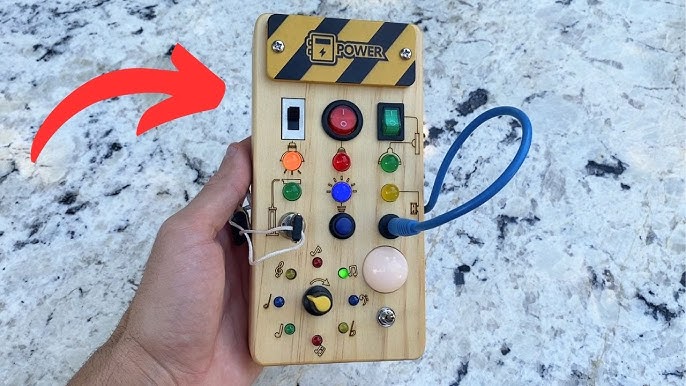
Montessori Switch Board Circuit Diagram Guide
Comprehensive instructions and wiring techniques for creating an interactive sensory board
Key Highlights
- Component Breakdown: Detailed list of essential elements such as switches, LEDs, resistors, and power sources.
- Step-by-Step Assembly: Clear wiring instructions and circuit layout ensuring safety and functionality.
- Flexibility in Design: Options for customization that cater both to beginner DIYers and advanced electronics enthusiasts.
Introduction
A Montessori switch board, sometimes referred to as a control board or busy board, serves as an interactive sensory toy designed for young children. It aims at developing fine motor skills, hand-eye coordination, and an understanding of cause and effect. In this guide, we will present a detailed circuit diagram and assembly instructions, integrating insights and best practices from multiple reliable sources.
Essential Components & Their Functions
A successful Montessori switch board requires a careful selection of components that not only perform their intended functions but also adhere to safety standards for use by children. Below is an in-depth breakdown of the required parts:
Component List
| Component | Description | Considerations |
|---|---|---|
| Power Source | Battery pack (commonly AA batteries or a 9V battery) or a low-voltage DC adapter. | Choose low voltage (e.g., 3V to 12V) to guarantee safety and minimize shock risk. |
| Switches | SPST (Single Pole Single Throw) toggle or push button switches. | Ensure easy activation and tactile feedback; can be arranged in parallel. |
| LEDs / Lights | Light Emitting Diodes (or small incandescent bulbs for variation); used to indicate circuit activation. | LEDs are preferred due to low power consumption, brightness, and durability. |
| Resistors | Resistors (commonly around 220 ohms, though this can vary). | Protects LEDs from excessive current by limiting current flow. |
| Wiring & Connectors | Insulated wires (22 AWG or 18 AWG) for connecting components. | Securely connected and insulated to prevent short circuits. |
| Base Board | Typically a wooden or plastic board used for mounting all components. | Drilled and prepared for mounting to ensure accessibility and durability. |
| Optional Components | Relays for additional functionality, buzzers for auditory feedback, cable ties, and insulation materials. | Enhances safety and introduces more sensory elements. |
Circuit Diagram Overview
The Montessori switch board circuit is comprised of several independent branches. Each branch incorporates a switch, its associated LED, and a resistor. All branches are connected to a common power supply controlled by a main on/off switch.
Circuit Diagram Layout
The following description outlines how to systematically set up your circuit:
1. Power Supply Integration
Connect the positive terminal of the battery pack to a main power switch. This is the master control for your entire board. The output from this main switch is then routed to each individual branch.
For a safe design, use a DC power source that is low in voltage (like 6V from 4 AA batteries or a regulated 9V supply). Low voltage operation is critical in designs targeted at young children.
2. Branch Circuit Configuration
Each branch is identified by its corresponding switch and LED, along with a resistor to limit current. The wiring is arranged in parallel, ensuring that activation of one branch does not affect the others.
For each branch, follow these connections:
- Initial Connection: Connect from the main power supply to one terminal of the switch.
- Switch to LED: Connect the other terminal of the switch to the anode (long leg) of the LED.
- LED to Resistor: Connect the LED's cathode (short leg) to one end of a resistor.
- Resistor to Ground: Connect the opposite end of the resistor to the negative terminal of the battery pack.
This arrangement ensures that when the switch activates, the circuit is completed, causing the LED to illuminate.
3. Optional Component – Relays and Auditory Feedback
To provide more advanced functionality, such as incorporating auditory feedback or dual circuit control, you may include relays in some branches:
- Connect a small relay in series with the switch.
- Route the normally open (NO) contact to the LED (or other sensory devices like buzzers).
- This additional feature can enhance the board’s interactivity by offering different sensory rewards.
4. Assembly on the Base Board
Once the wiring is complete, mount each component onto a prepared board. Secure the switches and LEDs using strong adhesive or screws as needed. The board should be neat and accessible, so children can activate each switch effortlessly.
Cover exposed wiring and connections with insulating materials, such as electrical tape, to ensure safety.
Detailed Step-by-Step Assembly Instructions
Step 1: Planning and Preparation
Begin by planning your board layout. Determine how many individual switch branches you would like to incorporate. Sketch a rough layout to position the switches, LEDs, and any optional components onto your board. Drill holes precisely where components will be mounted.
Step 2: Wiring the Power Circuit
Securely connect the power source to the main power switch. This switch will feed power into each branch under the condition that it is ‘on’. If using batteries, ensure the holder is well-insulated and mounted on the back of the board. Check polarities carefully to avoid wiring errors.
Step 3: Creating Individual Branches
For each branch on the board:
- Mount the Switch: Install the switch into its designated hole. Ensure it is easily accessible and securely fastened to the board.
- Wire the Connection: Connect a wire from the main power switch output to the first terminal of the branch’s switch.
- Attach the LED: Connect the opposite terminal of the switch to the anode (positive side) of the LED. A proper connection here is essential for correct illumination.
- Integrate the Resistor: Solder or securely fasten the resistor to the cathode (negative side) of the LED. The resistor should then be connected to the ground (negative terminal from the power source), hence completing the circuit.
Repeat the above assembly process for each additional branch you plan to include. Verify each branch’s continuity with a multimeter prior to final mounting.
Step 4: Testing and Troubleshooting
Once you have wired all branches, perform a systematic test of each circuit. Activate each switch individually while checking if the corresponding LED lights up. If an LED does not illuminate, double-check the wiring connections and resistor values. A short or misaligned wire can prevent the LED from receiving sufficient power.
Use a multimeter to inspect voltage differences between the positive and negative rails, ensuring that all connections are secure and that resistors are appropriately limiting current.
Step 5: Securing and Final Assembly
Once testing verifies that each branch functions properly, fix all wiring onto the board using cable clips and secure insulating tape to cover any exposed conductive paths. Finally, mount the power source, either by securely attaching the battery holder or incorporating a designated space for a DC adapter.
Label each switch and LED if desired, using colorful markers or adhesive labels. This not only enhances the board's educational value but also assists in identifying components during troubleshooting.
Visualizing the Circuit: A Diagrammatic Representation
Although a text-based description of the circuit has been provided, below is a simplified schematic diagram representation to help visualize the process:
  // Schematic diagram representation
  // --------------------------
  //   + (Power Source)
  //      │
  //   [Main Power Switch]
  //      │
  //    ┌─┴────────────┐
  //    │              │
  // [Switch1]      [Switch2] ... (Continues for each branch)
  //    │              │
  // [LED1]         [LED2]
  //    │              │
  // [Resistor]     [Resistor]
  //    │              │
  //     └─── Ground ( - )
  // --------------------------
  //
  // In each branch, flipping the switch connects the positive voltage to the LED,
  // allowing current to flow through the resistor back to ground,
  // resulting in illumination of the LED.
Note: This textual diagram is a simplified version to illustrate the connection logic. Further detailing may be required based on the exact number of branches and additional components such as relays or buzzers.
Customization and Add-Ons
The Montessori switch board design is inherently flexible. Depending on your project requirements or the developmental needs of the children, you can incorporate extra features:
Advanced Branches with Relays
For instance, incorporating relays in a branch adds an extra layer of interactivity or control. In such cases, the circuit branch might include:
- An SPST or SPDT relay placed after the switch.
- The normally open (NO) contact of the relay routing the current to the LED.
- An optional resistor in series with the relay coil, if needed.
This configuration can teach the concept of intermediate control and add a new dimension of sensory stimulation.
Auditory Feedback
Adding small buzzers or sound modules in parallel with the LED branches can also offer auditory feedback when switches are activated. For each branch with a sound element:
- Wire the buzzer in parallel with the LED circuit.
- Ensure that combining resistors or diodes may be necessary to protect each component.
This approach enhances cognitive learning by connecting visual and auditory cues.
Safety Considerations
Protective Measures
When building a Montessori switch board, safety is paramount. Always adhere to the following guidelines:
- Use only low-voltage power sources to minimize any risk of electric shock.
- Make sure all wiring is insulated and components are securely mounted to avoid loose connections.
- Utilize resistors to safeguard LEDs against overcurrent damage.
- If possible, incorporate a fuse or circuit breaker into the main power line to ensure that the circuit will not overload.
- Supervise usage when the board is in operation, particularly with young children.
Professional Consultation
In cases where you are not entirely confident in handling electrical components, consider consulting with a professional electrician or an electronics engineer. This not only ensures correct circuit formation but also enhances overall safety.
References
-
Montessori Toddler Wooden Switch Board - Amazon
-
Joyreal Toddler Busy Board - Amazon
-
Hikoshi Montessori Busy Board - Amazon
- Montessori Switch Board - Etsy
- Montessori Wooden Switch Board - Montessori Generation
Recommended Further Inquiries

Last updated March 21, 2025