
Python's Power: The Essential Built-in Functions You Need to Master
A comprehensive guide to Python's most frequently used functions, complete with detailed explanations, syntax, and practical examples.

Key Insights into Python's Core Functions
- Fundamental Utility: Functions like
print(),len(), andrange()are indispensable for everyday Python programming, covering basic operations from output to sequence generation. - Data Manipulation Powerhouses: Functions such as
map(),filter(),sorted(),min(), andmax()provide robust capabilities for transforming, filtering, and organizing data efficiently. - Type Conversion and Inspection: Functions like
int(),str(),float(),type(), andisinstance()are crucial for managing data types and inspecting object characteristics, enabling flexible and robust code.
Python's strength lies not just in its readability and extensive libraries, but also in its rich set of built-in functions. These functions are pre-defined tools that perform specific tasks, significantly reducing the amount of code developers need to write and enhancing productivity. While a definitive list of the "top 100 most used" can vary based on application domain—from web development to data science—a core set of functions consistently emerges as essential for any Python programmer. This guide delves into these vital functions, providing clear explanations, syntax details, and practical examples to solidify your understanding.
The Pillars of Python: Essential Built-in Functions
The following table presents a curated selection of Python's most frequently used built-in functions. These functions are fundamental to writing efficient, readable, and functional Python code, serving a wide array of programming needs from basic output to complex data transformations.
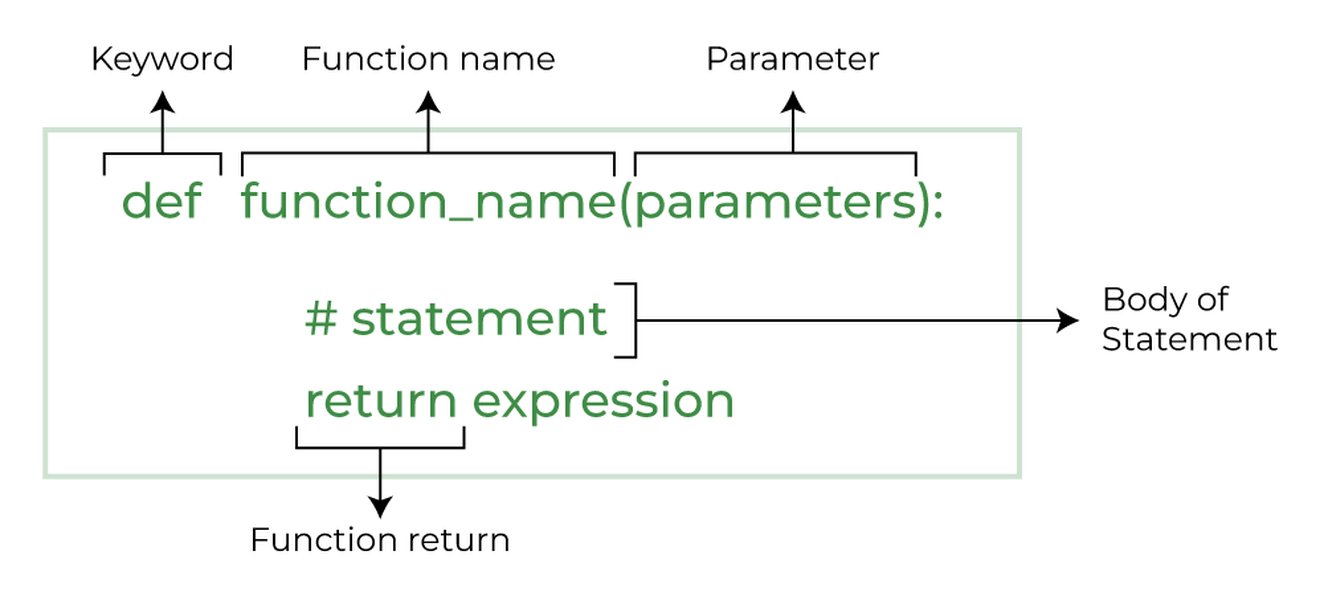
An illustration highlighting the concept of Python functions.
| Function | Purpose & Syntax | Example & Explanation |
|---|---|---|
print() |
Outputs objects to the console. Syntax: print(*objects, sep=' ', end='\n') |
print("Hello, World!") Prints: Hello, World! |
len() |
Returns the length (number of items) of an object. Syntax: len(s) |
len("Python") Returns: 6 |
range() |
Generates a sequence of integers. Syntax: range(start, stop, step) |
list(range(5)) Returns: [0, 1, 2, 3, 4] |
type() |
Returns the type of an object. Syntax: type(object) |
type(10) Returns: <class 'int'> |
int() |
Converts a value to an integer. Syntax: int(x, base=10) |
int("123") Returns: 123 |
str() |
Converts a value to its string representation. Syntax: str(object) |
str(45.6) Returns: "45.6" |
float() |
Converts a value to a floating-point number. Syntax: float(x) |
float("3.14") Returns: 3.14 |
abs() |
Returns the absolute value of a number. Syntax: abs(x) |
abs(-7.5) Returns: 7.5 |
sum() |
Sums items in an iterable. Syntax: sum(iterable, start=0) |
sum([1, 2, 3]) Returns: 6 |
min() |
Returns the smallest item in an iterable or among arguments. Syntax: min(iterable) or min(arg1, arg2, ...) |
min(4, 7, 1) Returns: 1 |
max() |
Returns the largest item in an iterable or among arguments. Syntax: max(iterable) or max(arg1, arg2, ...) |
max([10, 20, 30]) Returns: 30 |
sorted() |
Returns a new sorted list from the items of an iterable. Syntax: sorted(iterable, key=None, reverse=False) |
sorted([3, 1, 2]) Returns: [1, 2, 3] |
list() |
Creates a new list or converts an iterable into a list. Syntax: list(iterable) |
list("abc") Returns: ['a', 'b', 'c'] |
dict() |
Creates a dictionary. Syntax: dict(**kwargs) or dict(mapping) |
dict(a=1, b=2) Returns: {'a': 1, 'b': 2} |
set() |
Creates a set (unordered collection of unique elements). Syntax: set(iterable) |
set([1, 2, 2, 3]) Returns: {1, 2, 3} |
input() |
Reads input from the user. Syntax: input([prompt]) |
name = input("Enter your name: ") Prompts user for input. |
open() |
Opens a file and returns a file object. Syntax: open(file, mode='r', encoding=None) |
f = open("file.txt", "r") Opens 'file.txt' for reading. |
help() |
Invokes the built-in help system. Syntax: help(object) |
help(len) Displays documentation for len(). |
isinstance() |
Checks if an object is an instance of a class or a type. Syntax: isinstance(object, classinfo) |
isinstance(5, int) Returns: True |
enumerate() |
Adds a counter to an iterable and returns it as an enumerate object. Syntax: enumerate(iterable, start=0) |
list(enumerate(['a', 'b'])) Returns: [(0, 'a'), (1, 'b')] |
zip() |
Combines multiple iterables into a sequence of tuples. Syntax: zip(*iterables) |
list(zip([1, 2], ['a', 'b'])) Returns: [(1, 'a'), (2, 'b')] |
map() |
Applies a function to each item in an iterable. Syntax: map(function, iterable, ...) |
list(map(str, [1, 2, 3])) Returns: ['1', '2', '3'] |
filter() |
Filters items from an iterable based on a function. Syntax: filter(function, iterable) |
list(filter(lambda x: x > 1, [1, 2, 3])) Returns: [2, 3] |
callable() |
Checks if an object is callable (e.g., a function). Syntax: callable(object) |
callable(len) Returns: True |
chr() |
Converts an integer to its Unicode character. Syntax: chr(i) |
chr(65) Returns: 'A' |
ord() |
Converts a character to its Unicode integer value. Syntax: ord(c) |
ord('A') Returns: 65 |
format() |
Formats a value as a string. Syntax: format(value, format_spec) |
format(24, "b") Returns: '11000' (binary) |
round() |
Rounds a floating-point number. Syntax: round(number, ndigits=None) |
round(3.14159, 2) Returns: 3.14 |
any() |
Returns True if any element in the iterable is truthy. Syntax: any(iterable) |
any([False, True, False]) Returns: True |
all() |
Returns True if all elements in the iterable are truthy. Syntax: all(iterable) |
all([True, True, False]) Returns: False |
repr() |
Returns a string representation of an object. Syntax: repr(object) |
repr("hello") Returns: "'hello'" |
eval() |
Evaluates a string as a Python expression. Syntax: eval(expression, globals=None, locals=None) |
eval('1 + 2 * 3') Returns: 7 |
exec() |
Executes dynamically created Python code. Syntax: exec(object, globals=None, locals=None) |
exec("x = 10\nprint(x)") Prints: 10 |
globals() |
Returns a dictionary representing the current global symbol table. Syntax: globals() |
globals()['my_var'] = 5 Adds 'my_var' to global scope. |
locals() |
Returns a dictionary representing the current local symbol table. Syntax: locals() |
def foo(): y = 1; return locals() Returns {'y': 1} |
id() |
Returns the identity (memory address) of an object. Syntax: id(object) |
id("Python") Returns a unique integer ID. |
bin() |
Converts an integer to a binary string prefix "0b". Syntax: bin(x) |
bin(10) Returns: '0b1010' |
oct() |
Converts an integer to an octal string prefix "0o". Syntax: oct(x) |
oct(8) Returns: '0o10' |
hex() |
Converts an integer to a hexadecimal string prefix "0x". Syntax: hex(x) |
hex(15) Returns: '0xf' |
pow() |
Returns base to the power exponent. Syntax: pow(base, exp, mod=None) |
pow(2, 3) Returns: 8 |
getattr() |
Returns the value of a named attribute of an object. Syntax: getattr(object, name, default) |
my_list = [1,2]; getattr(my_list, 'append')(3) Adds 3 to my_list. |
setattr() |
Sets the value of a named attribute of an object. Syntax: setattr(object, name, value) |
class MyClass: pass; obj = MyClass(); setattr(obj, 'x', 10) Sets obj.x = 10. |
delattr() |
Deletes a named attribute from an object. Syntax: delattr(object, name) |
class MyClass: x = 10; obj = MyClass(); delattr(obj, 'x') Deletes obj.x. |
Understanding Python Functions: A Mindmap Overview
To further illustrate the interconnectedness and categories of Python's built-in functions, the following mindmap provides a visual breakdown. It categorizes functions by their primary utility, helping to grasp their purpose and application more intuitively.
Exploring Python Functions Through Video
For a more visual and auditory learning experience, consider watching this video on Python functions. It provides an excellent introduction to what functions are, why they are used, and how to define and call them, which is essential context for understanding built-in functions.
A comprehensive tutorial on functions in Python.
The video, titled "Functions in Python are easy," serves as a foundational resource. It breaks down the concept of functions, their arguments, and the crucial 'return' statement, which are all fundamental elements that apply to both user-defined and built-in functions. Understanding these core concepts from the video will make it easier to grasp the behavior and utility of Python's built-in functions discussed in this guide.
Frequently Asked Questions (FAQ)
What is a built-in function in Python?
Why are built-in functions important in Python?
How can I find documentation for a specific built-in function?
help()help(len)Are there other types of functions in Python besides built-in ones?
defConclusion
Mastering Python's built-in functions is a cornerstone of becoming a proficient developer. This guide has presented a comprehensive overview of the most frequently used functions, detailing their syntax, purpose, and practical examples. From simple output with print() to complex data manipulation with map() and filter(), these functions are the building blocks of efficient and elegant Python code. By understanding and effectively utilizing these tools, you can write cleaner, more concise, and more powerful programs, enhancing both your productivity and the quality of your code.
Recommended Further Exploration
- How to write custom functions in Python?
- Understanding Python standard library modules.
- Advanced Python data structures and their methods.
- Python functional programming techniques.