
Unlocking Creative Potential: Your Blueprint for a Multi-LLM Internal Powerhouse
Discover how to build a versatile AI tool that centralizes diverse language models, empowers your team with custom prompts, and streamlines content creation.
Key Insights for Your AI-Powered Creative Hub
- Unified LLM Access is Crucial: Integrating multiple Large Language Models (LLMs) through a centralized gateway or abstraction layer simplifies development, management, and allows for task-specific model selection.
- Empowerment Through Modularity: A modular system where team members can easily add, customize, and manage prompts for various creative tasks (like social media posts or video scripts) without coding is essential for adaptability and user adoption.
- Focus on User-Friendly Workflow: The tool's success hinges on an intuitive interface that allows creatives to effortlessly select tasks, trigger content generation, and manage diverse outputs, from text to multimedia.
You're envisioning a powerful internal tool designed to revolutionize how your creative team interacts with Large Language Models (LLMs). The goal is a flexible, user-friendly platform that not only integrates various LLM providers but also allows your team to define custom workflows for diverse content generation needs – from crafting Facebook replies and YouTube scripts to conceptualizing GDN campaigns or even generating picture-to-video content. This is a smart move to harness the burgeoning power of AI in a tailored way.
Building such a system requires careful consideration of several architectural and functional components. Let's explore what you need to think about to bring this vision to life.
Core Architectural Pillars for Your Creative AI Tool
To construct a robust and scalable tool, focusing on a few key architectural pillars is essential. These form the foundation of your system's capabilities and user experience.
Multi-LLM Integration & Management
The heart of your tool will be its ability to seamlessly connect with and manage multiple LLM providers (like OpenAI, Anthropic, Google, Cohere, etc.).
Unified Access Layer
Instead of directly coding against each LLM's unique API, a unified access layer or gateway is highly recommended. This abstraction simplifies communication by providing a consistent interface for your tool, regardless of the backend LLM. It means your core application logic doesn't need to change significantly if you switch LLM providers or add new ones.
Intelligent Model Routing & Defaults
Your system should allow for intelligent routing of requests. For example, you might find one LLM excels at concise social media copy, while another is better for long-form scriptwriting. The tool should enable setting default LLMs for specific tasks or content types. This could be managed through a configuration panel accessible to administrators.
Secure API Key Management
Managing API keys for various services securely is paramount. The system must include a secure vault or mechanism for storing and using these keys, protecting them from unauthorized access and ensuring compliance with each provider's terms.
Modular Prompt & Task System
The true power for your creative team comes from the ability to customize and extend the tool's capabilities through prompts.
Customizable Prompts & Templates
Users, especially non-technical ones, should be able to easily create, save, categorize, and share prompts. This includes the ability to create prompt templates with variables (e.g., {product_name}, {target_audience}) that can be filled in when generating content. A well-organized prompt library is key.
Action Mapping & Workflow Definition
Each prompt or template needs to be linked to a specific action or output format. When a user selects "New ideas for GDN campaigns," the tool should know which LLM (or sequence of LLMs/tools) to use, what parameters to apply, and how to format the output. This "action mapping" is what makes the tool modular, allowing users to define new "buttons" or functionalities.
User-Centric Interface & Experience (UI/UX)
A tool is only as good as its usability. For a creative team, a clean, intuitive, and inspiring interface is non-negotiable.
Intuitive Task Selection
The UI should make it simple for users to find and select the task they want to perform (e.g., "Generate Facebook reply," "Draft YouTube script outline"). This could be achieved through a dashboard with clearly labeled buttons, dropdown menus, or a searchable catalog of available generation tasks.
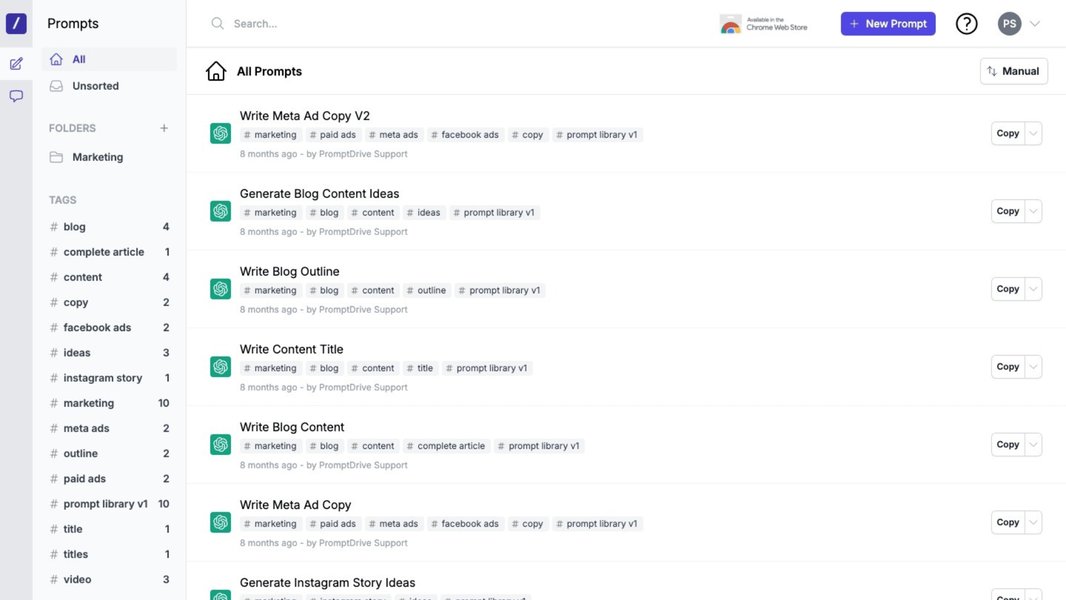
Conceptual interface for organizing and collaborating on AI prompts, similar to what your tool might feature.
Low-Code/No-Code Extensibility
A core requirement you mentioned is allowing any team member to add new prompts and functionalities. The UI should support this with a low-code or ideally no-code approach, perhaps through a simple form-based system for defining new prompts, associating them with LLMs, and creating the corresponding UI elements (like a new button).
Handling Diverse Creative Outputs
Creative tasks are varied, and so too should be the outputs your tool can handle.
Text, Image, Video, and Beyond
While text generation is a common starting point, your vision includes "Generate Picture to Video." This implies integrating with LLMs or AI services specializing in image generation, video creation, or other modalities. The architecture should be flexible enough to incorporate these different types of services and manage their unique outputs.
Governance, Cost Control, and Scalability
As usage grows, managing the operational aspects becomes critical.
Usage Tracking & Budgeting
Integrating multiple LLMs means dealing with different pricing models. The tool should ideally provide mechanisms for tracking usage per user, per task, or per LLM provider. This data is vital for cost management, budgeting, and optimizing LLM choices based on cost-effectiveness.
Performance & Reliability
The system needs to be reliable, handling API errors gracefully and providing reasonable response times. Techniques like asynchronous processing for long-running generation tasks, caching common requests, and implementing retry mechanisms can improve performance and user satisfaction.
Visualizing the Core Components: A Mindmap
To better understand how these different aspects interrelate, the following mindmap illustrates the key components and considerations for your internal multi-LLM creative tool. It highlights the central role of LLM integration, prompt management, user interface, and governance in creating a cohesive and powerful platform.
This mindmap serves as a high-level blueprint, outlining the interconnected systems required to build the versatile tool you're aiming for. Each node represents a significant area of focus during the planning and development phases.
Comparative Analysis of LLM Integration Strategies
Choosing how to integrate multiple LLMs is a critical early decision. Different strategies offer varying trade-offs in terms of ease of setup, flexibility, cost management, and scalability. The radar chart below provides an opinionated comparison of common approaches. The scores (from 1 to 10, where 10 is best) are illustrative, reflecting general tendencies rather than precise metrics, and should be adapted to your specific priorities.
This chart illustrates that tools like LiteLLM and OpenRouter can offer a good balance of ease of setup and model flexibility, while a more structured solution like the AWS Multi-Provider Gateway might excel in scalability and integrated cost management for enterprises already within the AWS ecosystem. Direct SDK integration offers maximum control but typically requires more development effort for each new LLM and for building common features like unified logging or cost tracking.
Existing Tools & Frameworks: Building on What's Available
You don't necessarily have to build everything from scratch. Several existing tools and frameworks can provide significant components or inspiration for your internal platform.
LLM Gateways & Aggregators
These tools specialize in providing a unified interface to multiple LLM providers.
AWS Multi-Provider Generative AI Gateway
This AWS Guidance offers a deployable architecture that acts as a centralized API gateway. It's designed for standardized access to various LLMs, incorporating features for usage tracking, cost control, and governance. This is particularly relevant if your organization heavily uses AWS services, as it can streamline multi-provider access and management.
LiteLLM
LiteLLM is an open-source library that provides a simple, unified interface to call over 100 LLM APIs (including OpenAI, Anthropic, Cohere, Google Gemini, Mistral, etc.). It can be used as a proxy to centralize access, manage API keys, log requests, track costs, and implement features like retries and fallbacks. This is a strong candidate for the backend of your multi-LLM integration layer.
OpenRouter
OpenRouter offers a single API to access a wide variety of LLMs, both open-source and proprietary. It allows users to find the best models for their needs and switch between them easily. It can also handle payment consolidation, making it simpler to manage costs across different providers.
Prompt Management Platforms
These platforms focus on helping teams create, organize, test, and deploy prompts.
PromptHub
PromptHub is a SaaS tool designed for teams to collaborate on prompt engineering. It allows for versioning, testing, and deployment of prompts. While it might not be the complete solution for your tool, its features for prompt organization, sharing, and modularity align well with your requirements for a user-extendable prompt system.
Development Frameworks & Libraries
These provide building blocks for developing AI applications.
AISuite
Developed by Andrew Ng's AI Fund, AISuite is an open-source Python library aimed at simplifying the integration and management of LLMs from various providers. It can be a useful developer toolkit for building the multi-provider orchestration layer in your application's backend.
LangChain
Though not explicitly detailed in all provided answers, LangChain is a widely recognized open-source framework for developing applications powered by language models. It provides modules for LLM integration, prompt templating, agent creation, and chaining calls to LLMs and other tools. It could be highly valuable for orchestrating complex workflows in your creative tool.
CrewAI
CrewAI is an AI orchestration framework that often integrates with tools like LiteLLM for multi-provider LLM access. It focuses on enabling AI agents to collaborate on complex tasks. Understanding its architecture can provide insights into designing systems that route tasks effectively among different models or specialized agents within your tool.
Considerations for Selection
When evaluating these, consider factors like your team's technical expertise, desired level of customization, budget, security requirements, and scalability needs. Often, a combination of tools (e.g., LiteLLM for backend integration, a custom UI, and principles from PromptHub for prompt management) will yield the best results.
Feature Comparison of Key Tool Categories
To help you navigate the landscape, the table below summarizes the primary functions, strengths, and considerations for different categories of tools relevant to building your internal creative AI platform.
| Tool/Approach Category | Primary Function | Key Strengths | Considerations for Your Use Case | Example Tools/Approaches |
|---|---|---|---|---|
| Multi-LLM Gateways/Proxies | Provide a unified API to access multiple LLM providers. | Simplified LLM integration, centralized key management, consistent request format, often includes logging/cost tracking. | Essential for your multi-provider requirement. Evaluate based on supported LLMs, ease of deployment, and feature set. | LiteLLM, AWS Multi-Provider Generative AI Gateway, OpenRouter |
| Prompt Management Platforms | Enable teams to create, organize, test, version, and deploy prompts. | Improved prompt quality, collaboration, reusability, and faster iteration on prompt design. | Crucial for your modular prompt system and empowering non-technical users to add functionalities. | PromptHub, Custom-built UI with database backend |
| AI Orchestration Frameworks | Help build complex applications by coordinating LLMs, tools, and data sources. | Facilitate complex workflows, agent-based systems, and integration of various components. | Useful if your tasks involve multi-step processes or require LLMs to interact with other tools/APIs. | LangChain, CrewAI, AISuite |
| Custom In-House Development (using SDKs/Libraries) | Building the entire system or significant parts from scratch using provider SDKs or general programming libraries. | Maximum control and customization, tailored precisely to your needs. | Higher development effort, requires expertise in API integration, security, and UI/UX design. Best combined with specialized libraries. | Python with Requests/SDKs (OpenAI, Anthropic, etc.), Frontend framework (React, Vue) |
Exploring Multi-LLM Workflow Interfaces
Visualizing how multiple LLMs can be orchestrated within a single interface can be inspiring. The video below introduces XeroFlow, a node-based, multi-LLM AI interface. While it may be more complex than your initial needs, it showcases the potential of streamlined workflows when working with diverse AI models. This can provide ideas for how your tool might evolve or how different components could interact.
Interfaces like the one shown in the video demonstrate how complex AI tasks can be broken down and managed, often using visual paradigms. For your tool, even a simpler version of such an approach for linking prompts to specific LLMs and actions could significantly enhance usability.
Frequently Asked Questions (FAQ)
How do I manage API costs with multiple LLMs?
Managing costs involves several strategies:
- Usage Tracking: Implement or use tools (like LiteLLM or AWS Gateway) that provide detailed logging of API calls per provider, user, or task.
- Model Selection: Choose cost-effective models for tasks that don't require the most powerful (and expensive) options. Allow configuration of preferred models per task.
- Rate Limiting & Quotas: Set internal rate limits or quotas for users or projects to prevent runaway spending.
- Caching: Cache responses for identical prompts if appropriate to reduce redundant API calls.
- Budget Alerts: Some LLM providers or gateway tools offer budget alert features.
What's the best way to allow non-technical users to add new prompts?
Empowering non-technical users requires a very user-friendly interface:
- Form-Based Input: Provide a simple form where users can type their prompt, give it a name (which might become the button label), select an LLM provider (or use a default), and categorize the prompt.
- Prompt Templates: Allow users to create prompts with placeholders (e.g., "[Product Name]") that can be filled in at generation time.
- Preview & Test: Ideally, allow users to test their new prompt directly within the interface before saving it.
- Approval Workflow (Optional): For larger teams, you might consider a simple approval step before a new user-created prompt/button goes live for everyone.
- Clear Documentation & Examples: Provide guidance on how to write effective prompts.
How can I ensure consistent output quality across different LLMs?
Ensuring consistent quality is challenging due to the inherent variability of LLMs. However, you can take steps:
- Detailed Prompt Engineering: Craft specific and well-structured prompts. Include instructions on tone, style, format, and length.
- Few-Shot Prompting: Provide examples of desired outputs within the prompt itself.
- Parameter Tuning: Experiment with parameters like temperature (randomness) and top_p for each LLM and task to find optimal settings.
- Model-Specific Prompts: Recognize that the same prompt might yield different results across LLMs. You may need to slightly adapt prompts for optimal performance with specific models.
- Post-Processing: Implement rules or light editing steps to clean up or standardize outputs if necessary.
- User Feedback Loop: Allow users to rate the quality of generated content, providing data for refining prompts and model choices.
What are the security implications of managing multiple LLM API keys?
Managing multiple API keys introduces several security considerations:
- Secure Storage: API keys must be stored securely, ideally encrypted at rest, using services like AWS Secrets Manager, Azure Key Vault, or HashiCorp Vault. Avoid hardcoding keys in source code.
- Access Control: Limit access to API keys strictly to the application components that need them. Use role-based access control (RBAC).
- Rotation: Regularly rotate API keys according to best practices and provider recommendations.
- Monitoring: Monitor API key usage for suspicious activity or unauthorized access attempts.
- Provider Security Features: Leverage security features offered by LLM providers, such as IP whitelisting or organization-level controls, if available.
- Gateway Benefits: Using a gateway (like LiteLLM or a custom proxy) can centralize key management, reducing the surface area where keys need to be configured directly.
Recommended Next Steps & Further Exploration
As you embark on this project, consider exploring these related areas for deeper insights:
- How can I design a robust and secure API key management system for an internal application accessing multiple third-party services?
- What are the best practices for designing a user interface that allows non-technical team members to easily create and manage custom AI prompts and workflows?
- What strategies and metrics can be used to evaluate and compare the performance and cost-effectiveness of different Large Language Models for specific creative tasks like copywriting or script generation?
- How can an organization effectively implement cost tracking, budget controls, and governance for the consumption of multiple AI services from various cloud providers?
References
The following resources provide further details on some of the tools and concepts discussed:

Last updated May 6, 2025