
Unlock Your Perfect Home Printing Setup: Finding the Best Multifunctional Printer in Belgium
Your guide to printers with duplex, color, ADF, and potential dual paper trays, with price comparisons for Bol.com, Amazon.be, and Coolblue.be.
Key Insights for Your Printer Quest
- Essential Features: Focus on models offering automatic recto verso (duplex) printing and color capability, as these are fundamental for versatile home use.
- Convenience Boosters: An Automatic Document Feeder (ADF) significantly enhances productivity for scanning/copying multiple pages, while two paper drawers offer flexibility, though the latter is less common in standard home printers.
- Belgian Retail Landscape: Compare current prices and availability on Bol.com, Amazon.com.be, and Coolblue.be to secure the best deal. Each retailer offers distinct advantages in terms of pricing, delivery, and service.
Understanding Your Printer Needs: Core Features Explained
Choosing the right multifunctional printer involves understanding key features that align with your home printing, scanning, and copying requirements. Here’s a breakdown of what to look for:
Multifunctional Capabilities
Often called All-in-One (AIO) printers, these devices combine printing, scanning, and copying functionalities in a single unit. Some models also include fax capabilities (4-in-1). This integration saves space and is generally more cost-effective than purchasing separate machines.
Recto Verso (Duplex) Printing
This feature allows the printer to automatically print on both sides of a sheet of paper. It's an excellent way to save paper, reduce document bulk, and contribute to a more eco-friendly printing habit. This is a highly sought-after feature for home and office use.
Automatic Document Feeder (ADF)
An ADF is a significant time-saver if you frequently scan or copy multi-page documents. Instead of placing each page manually on the scanner glass, you can load a stack of papers into the ADF, and the printer will process them automatically. While a "nice-to-have" for some, it's invaluable for users with higher volume scanning/copying needs.
Color Printing Capability
Essential for printing photos, presentations, school projects, or any document where color enhances readability or impact. Most modern home multifunctional printers are color-capable, typically using inkjet technology for vibrant output.
Two Paper Drawers
Having two paper drawers (or a main tray plus a bypass/secondary tray) offers flexibility. You can load one drawer with standard A4 paper and the other with photo paper, envelopes, or a different paper size. This feature is more common in office-oriented printers but can occasionally be found or approximated in higher-end home models (e.g., a main tray and a rear specialty media feed).
Top Recommended Multifunctional Printers for Home Use in Belgium
Based on your requirements for recto verso printing, color capability, and the desirable features of an ADF and potentially two paper drawers, here are some highly recommended models available in Belgium. These selections consider functionality, user reviews, and typical availability.
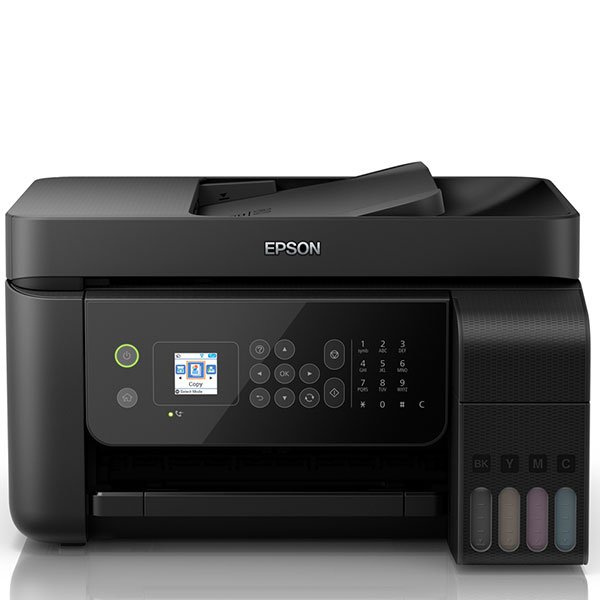
An Epson EcoTank L5190, illustrating a multifunction InkTank printer with an Automatic Document Feeder (ADF).
1. Epson EcoTank Series (e.g., ET-2850/ET-2851, ET-3850, ET-4850)
Epson's EcoTank range is renowned for its cartridge-free system, using refillable ink tanks that offer exceptionally low running costs. Many models in this series meet your core requirements.
- Recto Verso Printing: Yes, automatic duplex printing is standard on many models like the ET-2850 and higher.
- ADF: Available on mid-range to higher-end EcoTank models (e.g., ET-3850, ET-4850, specific ET-285x variants). The WorkForce Pro WF-3820DWF, while not an EcoTank, is a similar Epson option with a 35-sheet ADF.
- Color Capable: Yes, excellent color printing for documents and photos.
- Paper Drawers: Typically one main front-loading paper tray (e.g., 100-250 sheets). Some higher-end models like the EcoTank L14150 (A3 capable) offer a main tray plus a rear feed for specialty media, which can function like a second input source.
- Connectivity: Wi-Fi, Wi-Fi Direct, USB, mobile printing apps.
- Suitability: Ideal for homes with regular printing needs looking to minimize long-term ink costs. The inclusion of an ADF in certain models adds significant convenience.
2. HP Envy Inspire Series (e.g., 7924e)
The HP Envy Inspire series offers a good balance of features, style, and affordability, often including eligibility for HP Instant Ink subscription services.
- Recto Verso Printing: Yes, automatic duplex printing.
- ADF: Yes, models like the 7924e typically include an ADF.
- Color Capable: Yes, good quality color printing.
- Paper Drawers: Usually one main paper tray. Some models might have a separate photo paper tray.
- Connectivity: Wi-Fi (often dual-band), Bluetooth, USB, HP Smart App.
- Suitability: A strong contender for families and home offices needing a versatile all-in-one with modern connectivity and the convenience of an ADF without a premium price tag.

The Brother MFC-J775DW, an example of Brother's INKvestment Tank All-in-One printers, often equipped with an ADF.
3. Brother MFC INKvestment Tank Series (e.g., MFC-J995DW, MFC-J1010DW)
Brother's INKvestment Tank printers are designed for users who want longer periods between ink replacements, similar to Epson's EcoTank, but using a hybrid cartridge/tank system. They are often robust and feature-rich.
- Recto Verso Printing: Yes, automatic duplex printing is a common feature.
- ADF: Yes, most MFC (Multi-Function Center) models include an ADF.
- Color Capable: Yes, reliable color output for various documents.
- Paper Drawers: Typically one main paper tray. Some higher-end office models may offer dual trays, but home-focused ones usually stick to one.
- Connectivity: Wi-Fi, Ethernet (on some models), USB, mobile connect apps.
- Suitability: Excellent for home offices or users needing a durable printer with cost-effective ink and comprehensive features including a reliable ADF.
4. Canon PIXMA Series (e.g., TS5150, TS8350, some TS3xxx models with specific features)
Canon PIXMA printers are well-regarded for their photo printing quality and user-friendly interfaces. While not all models will have an ADF, some offer a good blend of home-centric features.
- Recto Verso Printing: Available on many mid-range PIXMA models like the TS5150 and TS8350.
- ADF: Less common on budget PIXMA models, but some higher-end TS series or the TR series (office-oriented) might include it.
- Color Capable: Yes, renowned for excellent photo and color document quality.
- Paper Drawers: Often a single main tray, though some models like the TS8350 series might have a front cassette and a rear feed, providing flexibility.
- Connectivity: Wi-Fi, Bluetooth (on select models), USB, Canon PRINT app.
- Suitability: Best for users who prioritize high-quality photo and color printing, with duplex being a key requirement. If ADF is critical, careful model selection is needed.
Visualizing Feature Importance for Selected Printers
To help you weigh your options, this radar chart provides an opinionated comparison of key features for a few representative printer models. The scores (ranging from 3 to 10, where higher is generally better or more present) reflect a synthesis of their typical capabilities. Remember that specific sub-models can vary.
This chart helps visualize how different printer types might excel in certain areas. For example, EcoTank models generally lead in low running costs, while others might offer a lower initial purchase price. The "ADF Performance" and "Paper Handling" scores reflect general capabilities, as these can vary significantly even within a series.
Navigating Your Printer Choices: A Feature Mindmap
This mindmap outlines the key considerations and features involved in selecting a multifunctional home printer that suits your needs in Belgium.
(or flexible input)"] id3["Printer Types & Brands"] id3a["Inkjet (Common for Home)"] id3aa["Epson (EcoTank, WorkForce)"] id3ab["HP (Envy, DeskJet, OfficeJet)"] id3ac["Canon (PIXMA)"] id3ad["Brother (MFC INKvestment)"] id3b["Laser (Less common for home color, consider if B&W heavy)"] id4["Purchase Considerations"] id4a["Budget (Initial Cost)"] id4b["Running Costs (Ink/Toner)"] id4c["Retailers in Belgium"] id4ca["Bol.com"] id4cb["Amazon.com.be"] id4cc["Coolblue.be"] id4d["User Reviews & Reliability"] id4e["Connectivity (Wi-Fi, USB, Mobile)"] id5["User Needs Profile"] id5a["Occasional Printing"] id5b["Regular Home Office Use"] id5c["Photo Printing Focus"] id5d["High Volume Scanning/Copying"]
Use this mindmap to trace your specific needs back to potential printer categories and features, helping you narrow down your search among the Belgian retailers.
Price Comparison & Where to Buy in Belgium (May 2025)
Below is an approximate price comparison for some of the discussed printer types or representative models. Please note that prices are dynamic and can vary based on promotions, stock levels, and specific sub-models. Always check the retailer websites for the most current information.
| Printer Model/Series (Representative) | Key Features Match | Approx. Price Bol.com (€) | Approx. Price Amazon.com.be (€) | Approx. Price Coolblue.be (€) | Notes & Availability |
|---|---|---|---|---|---|
| Epson EcoTank ET-2850 / ET-2851 | Duplex, Color, (ADF on some ET-285x variants or higher models like ET-3850/4850) | 230 - 300 | 220 - 290 | 250 - 320 | Popular for low ink costs. ADF availability varies by exact model. Generally good stock. |
| Epson WorkForce Pro WF-3820DWF | Duplex, Color, ADF (35-sheet) | 200 - 250 | 200 - 250 | 210 - 260 | Good all-rounder for home office features. Not an EcoTank. |
| HP Envy Inspire 7924e | Duplex, Color, ADF | 110 - 140 | 110 - 140 | 120 - 150 | Affordable, feature-rich for home use. HP Instant Ink eligible. Good availability. |
| HP DeskJet 2820e / 2710e | Duplex (check model), Color | 45 - 70 | 50 - 75 | 55 - 80 | Entry-level. Duplex/ADF less common or manual. Best for basic needs. Widely available. |
| Brother MFC-J1010DW (INKvestment) | Duplex, Color, ADF | 180 - 230 | 180 - 230 | 190 - 240 | Reliable, cost-effective ink. Good for home office. Stock can vary. |
| Canon PIXMA TS5150 / TS8350 | Duplex, Color (ADF rare on TS5150, TS8350 no ADF but dual feed) | 60 - 180 (TS5150 lower, TS8350 higher) | 65 - 190 | 70 - 200 | Excellent photo quality. TS8350 has front cassette + rear feed. Check ADF specifically if needed. |
Where to Buy Now:
- Bol.com: Offers a wide selection, often competitive pricing, and reliable delivery across Belgium.
- Amazon.com.be: Growing presence in Belgium, often has good deals, especially from various marketplace sellers. Fast Prime delivery available for eligible items.
- Coolblue.be: Known for excellent customer service, fast (often next-day) delivery, and helpful product information. They may also have physical stores for pickup or advice.
It's recommended to check all three platforms for the specific model you're interested in to compare the latest prices, delivery times, and any ongoing promotions.
Guidance from the Experts: Printer Insights
For a broader perspective on selecting a home printer, the following video offers general advice and reviews popular models available in 2025. While it may not focus specifically on the Belgian market, the feature discussions and model types are globally relevant.
This video, "Best Home Printers 2025 - (Which One Is The Best?)", discusses various home printer options, helping you understand current market trends and key features to look for.
Watching reviews like this can provide valuable context on print quality, ease of use, and long-term reliability, complementing the feature-based comparisons.
Factors to Consider Beyond Price
While price is a significant factor, other aspects contribute to the overall value and satisfaction with your home printer:
Cost of Ownership (Ink/Toner)
Consider the long-term cost of ink or toner. Ink tank printers (like Epson EcoTank or Brother INKvestment Tank) have a higher upfront cost but significantly lower per-page printing costs. Cartridge-based printers might be cheaper to buy initially, but replacement cartridges can add up, especially with frequent color printing. Some brands like HP offer ink subscription services (e.g., Instant Ink) which can be cost-effective for predictable usage patterns.
Print Quality and Speed
Assess your needs. If you print photos regularly, look for printers with high print resolution (DPI) and good color accuracy. If you primarily print text documents, speed (PPM - pages per minute) might be more important. Reviews often provide insights into real-world print quality and speed.
Connectivity Options
Most modern printers offer Wi-Fi connectivity, allowing printing from multiple devices (laptops, smartphones, tablets). Wi-Fi Direct enables printing without a network. USB ports are standard for direct PC connection, and some models offer Ethernet for wired network stability. Check for compatibility with mobile printing apps (e.g., Apple AirPrint, Mopria Print Service).
Footprint and Design
Consider the physical size of the printer and where it will be placed in your home. Compact designs are preferable for limited spaces. Aesthetics might also be a factor if the printer is in a visible location.
Ease of Use
Look for intuitive control panels (touchscreens are a plus), easy setup processes, and straightforward maintenance (like changing ink or clearing paper jams).
Frequently Asked Questions (FAQ)
How important is an Automatic Document Feeder (ADF) for a home printer?
An ADF is very useful if you frequently scan or copy documents with multiple pages. It automates the process, saving you considerable time and effort compared to manually placing each page on the scanner glass. If your scanning/copying needs are minimal or mostly single pages, an ADF might be less critical, but it's a highly convenient feature for many home office tasks or managing paperwork.
Are printers with two paper drawers common for home use?
Dedicated dual paper drawers are not very common in standard home printers, especially budget models. This feature is more prevalent in office-oriented printers or higher-end all-in-ones. However, some home printers offer a main paper tray plus a rear specialty media feed or a separate photo paper tray, which can provide similar flexibility for handling different paper types or sizes without constantly swapping paper in a single tray.
What are the main benefits of ink tank printers like Epson EcoTank or Brother INKvestment?
The primary benefit of ink tank printers is significantly lower long-term running costs. They use large, refillable ink reservoirs instead of disposable cartridges. While the initial printer purchase price might be higher, the cost per page for ink is drastically reduced, as replacement ink bottles are inexpensive and last for thousands of pages. This makes them very economical for users who print regularly.
How much can I expect to spend on a good multifunctional home printer in Belgium?
Prices vary widely based on features. Basic color multifunctional printers with duplex capability might start around €60-€100. Models with an ADF typically range from €100-€250. Ink tank printers with these features often start from €200-€250 and can go higher. Always compare current prices on Bol.com, Amazon.be, and Coolblue.be, as promotions can significantly affect the final cost.
What's the difference between duplex printing and duplex scanning?
Duplex printing means the printer can automatically print on both sides of a sheet of paper. Duplex scanning (often requiring a Duplexing Automatic Document Feeder or DADF) means the scanner can automatically scan both sides of a document fed through the ADF. Many printers offer duplex printing, but automatic duplex scanning is a more premium feature, typically found on more advanced or office-oriented models.
Recommended Further Exploration
To delve deeper into specific aspects of home printers, consider these related search queries:
- What are the best home printers specifically for high-quality photo printing in Belgium that also offer duplex functionality?
- How do the long-term running costs of Epson EcoTank printers compare to HP printers with an Instant Ink subscription in Belgium?
- Are there any multifunctional printers available in Belgium under €200 that feature both an ADF and automatic duplex scanning?
- What are user reviews saying about the reliability and performance of Brother INKvestment Tank printers for home office use in Belgium?
References
 amazon.com
amazon.com
amazon.com
 amazon.com
Last updated May 18, 2025