
Unlock the Full Potential of n8n: Your Definitive Guide to Its Comprehensive Documentation
Navigate n8n's rich documentation ecosystem to master workflow automation, AI integration, and much more.
n8n, a powerful fair-code licensed workflow automation tool, empowers users to connect diverse applications, automate intricate processes, and harness AI capabilities. To fully leverage its potential, a deep understanding of its extensive documentation is key. This guide provides a thorough exploration of the n8n platform documentation, designed to assist users of all skill levels, from novices to seasoned developers, in effectively utilizing n8n.
Key Documentation Highlights
Essential Insights into n8n's Learning Resources
- Comprehensive Coverage: The documentation spans from initial setup and basic workflow creation to advanced topics like custom node development, API utilization, and AI agent implementation.
- User-Centric Structure: Resources are organized intuitively, catering to different learning needs with quickstart guides, detailed tutorials, in-depth explanations of integrations, and specific use-case examples.
- Community-Driven & Open: Hosted on GitHub, the documentation benefits from community contributions, ensuring it remains current, relevant, and reflective of n8n's evolving capabilities.
The Central Hub: Navigating docs.n8n.io
Your Primary Source for All Things n8n
The official n8n documentation, primarily available at docs.n8n.io, serves as the definitive resource for anyone looking to understand and utilize the platform. This central repository is meticulously organized to guide users through every facet of n8n.
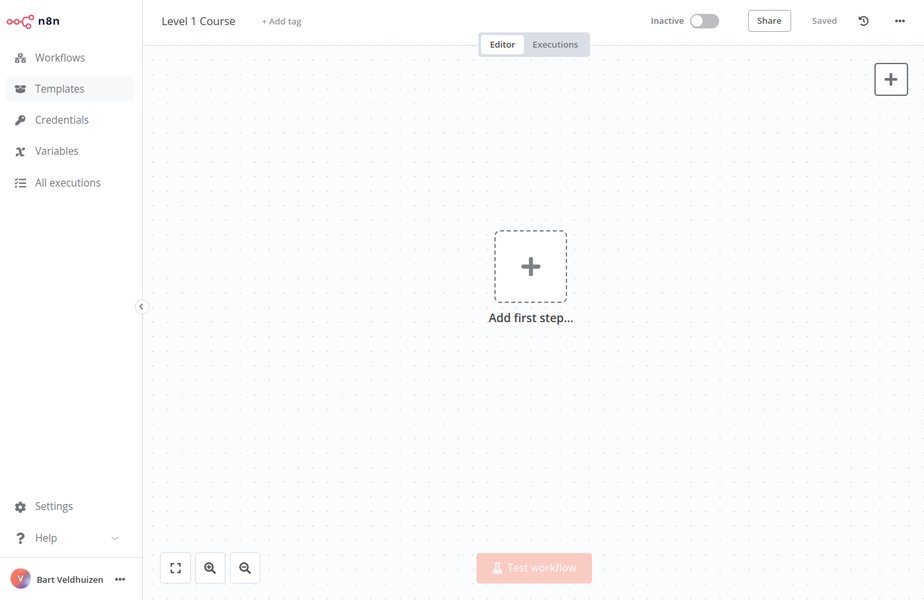
A glimpse into the n8n visual workflow editor, a core concept detailed in the documentation.
The site is structured to cover foundational knowledge, specific functionalities, and advanced development topics. Whether you're looking to perform a local install, self-host for enhanced control, or deploy in a cloud environment, docs.n8n.io provides the necessary guidance.
Key Sections within docs.n8n.io:
Getting Started & Learning Paths
For newcomers, n8n offers curated learning paths and quickstart guides. These resources are designed to help users grasp the basics of the n8n interface, understand core concepts like nodes and workflows, and build their first automation swiftly. Tutorials often include step-by-step instructions and practical examples.
Installation and Hosting
Comprehensive documentation is available for various installation methods, including Docker, npm, and self-hosting on different operating systems (Windows, macOS, Linux) and cloud platforms. These guides cover setup, configuration, updates, security best practices for credentials, and scaling your n8n instance.
For a quick local trial, n8n can be started using npx (Node.js required):
npx n8nAlternatively, using Docker:
docker volume create n8n_data
docker run -it --rm --name n8n -p 5678:5678 -v n8n_data:/home/node/.n8n docker.n8n.io/n8nio/n8n
After execution, the editor is typically accessible at http://localhost:5678.
Workflow Automation Mastery
The heart of n8n lies in its workflow automation capabilities. The documentation provides extensive details on:
- Nodes: The building blocks of n8n workflows. Documentation covers core nodes, app-specific nodes, and how to configure them. This includes understanding data flow between nodes.
- Triggers: Initiating workflows based on schedules (Cron), webhooks, chat events, API calls, or specific events from integrated services.
- Data Handling: Transforming, mapping, merging, and processing data within workflows using expressions, conditional logic, and loops.
- Sub-Workflows: Creating modular and reusable workflow components.
- Error Handling: Strategies for managing and troubleshooting errors within workflow executions.
Integrations: Connecting Your Digital Ecosystem
n8n boasts support for over 400 app integrations. The documentation provides dedicated sections for many popular services like Google Workspace (Sheets, Calendar, Drive), Slack, Discord, AWS, GitHub, Salesforce, HubSpot, and more. For each integration, you'll typically find:
- Setup instructions for the specific node.
- Guidance on managing credentials securely.
- Examples of common use cases.
Harnessing AI Capabilities
n8n seamlessly integrates AI into business process automation. The documentation includes resources on:
- Building AI-powered workflows, for instance, using OpenAI or other AI services.
- Leveraging AI agents, potentially with frameworks like LangChain, for complex decision-making and data analysis.
- Tutorials guide users through configuring API credentials for AI services and embedding AI logic into multi-step automations (e.g., for customer support, task assignment, or content generation).
- One notable example is a workflow template for auto-documenting n8n workflows using AI.
Developer-Focused Resources
For technical users and developers, n8n documentation offers:
- Public REST API: Detailed information on using n8n's API to programmatically manage workflows (create, update, trigger), credentials, and other platform aspects. This is crucial for integrating n8n into larger systems or CI/CD pipelines.
- Custom Node Development: Guides on creating new nodes using JavaScript or TypeScript, allowing users to extend n8n's functionality to connect with unsupported services or implement custom logic.
- Coding Options: Information on writing custom code snippets (JavaScript, Python) within workflows.
Advanced Platform Features
The documentation also delves into advanced features crucial for enterprise and sophisticated deployments:
- Security: Managing credentials securely, credential sharing, role-based access control (RBAC), Single Sign-On (SSO) with SAML/LDAP, and data security during transfer.
- Monitoring and Debugging: Tools and techniques for monitoring workflow executions, re-running steps, mocking data, and using inline code logs.
- Version Control: Managing changes to workflows, especially in team environments.
Visualizing Documentation Quality & n8n Concepts
Gauging Documentation Strengths
The n8n documentation strives for a balance across various aspects to cater to its diverse user base. The radar chart below offers an opinionated perspective on the perceived strengths of the n8n documentation ecosystem based on the analyzed information. This includes aspects like ease of understanding for beginners, depth for advanced users, thoroughness of integration guides, detail in API documentation, and clarity of AI-related feature explanations.
This chart highlights areas where the documentation excels, such as the quality of integration guides and self-hosting information, while also suggesting potential areas for further development like even deeper AI feature documentation.
Mapping Core n8n Concepts as Documented
The n8n documentation covers several interconnected concepts crucial for understanding and using the platform effectively. The mindmap below illustrates these core areas and their relationships, reflecting how they are presented within the documentation ecosystem.
This mindmap provides a visual overview of how different components of n8n, from basic workflow elements to advanced AI integrations and developer tools, are documented and interlinked within the platform's resources.
Learning Through Video: n8n Tutorials
Visual Guides to Mastering n8n
Beyond written documentation, video tutorials offer an excellent way to learn n8n. The following video provides a comprehensive beginner's guide, covering essential concepts and helping users get started with creating workflows. It's a great resource for visual learners looking to understand n8n's capabilities quickly.
This tutorial, "Master n8n in 2 Hours: Complete Beginner's Guide for 2025," aims to get users up to speed with n8n, showcasing how to build workflows and leverage readily available templates. Such visual aids complement the official documentation by demonstrating practical application of concepts.
Key Documentation Resources at a Glance
Summary of n8n Documentation Assets
The n8n documentation landscape is rich and varied, catering to different needs. The table below summarizes the primary types of documentation resources available for n8n users and their typical focus areas.
| Resource Type | Primary Focus | Target Audience | Key Content |
|---|---|---|---|
| Official Docs (docs.n8n.io) | Comprehensive platform guide | All users (Beginner to Advanced) | Installation, workflows, nodes, triggers, integrations, API, AI features |
| GitHub Repository (n8n-io/n8n-docs) | Source of truth for documentation, contribution | Developers, Contributors, Advanced Users | Documentation source files, issue tracking, contribution guidelines |
| n8n.io Website | Platform overview, features, use cases | Prospective Users, Decision Makers | High-level features, AI capabilities, enterprise solutions, pricing (if applicable) |
| API Documentation (docs.n8n.io/api/) | Programmatic interaction with n8n | Developers | Endpoints, authentication, request/response formats, API playground |
| Community Forums & Discord | Peer support, troubleshooting, best practices | All users | Q&A, shared workflows, tips & tricks, announcements |
| Tutorials & Blog Posts (Official & Community) | Practical examples, specific use cases | All users | Step-by-step guides, workflow templates, feature deep-dives |
| Learning Paths (docs.n8n.io/learning-path/) | Structured learning for new users | Beginners, Intermediate Users | Curated tutorials from basic setup to more complex workflows |
This table provides a quick reference to help users identify the most relevant documentation resource based on their current needs and experience level with n8n.
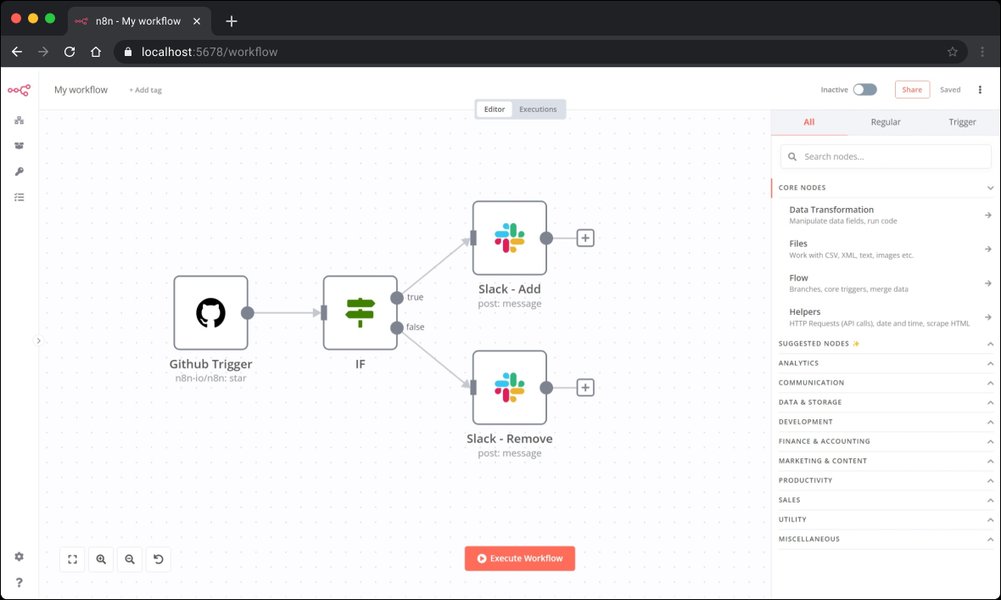
An example of the n8n workflow canvas, illustrating the node-based approach to automation.
Community and Contributions
The Power of Open Collaboration
n8n's documentation is not static; it's a living resource. Hosted on GitHub (n8n-io/n8n-docs), it reflects the open-source and fair-code spirit of the platform. This allows the community to contribute by suggesting improvements, reporting issues, or even submitting new content. This collaborative approach ensures the documentation remains accurate, up-to-date, and comprehensive, addressing the evolving needs of its users. The n8n community forums and Discord server are also valuable extensions of the documentation, providing platforms for peer-to-peer support, sharing solutions, and discussing best practices.
Frequently Asked Questions (FAQ)
Quick Answers to Common Documentation Queries
Where can I find the official n8n documentation?
The primary official n8n documentation is hosted at docs.n8n.io. This site is the central hub for all guides, tutorials, and reference materials.
Is there documentation for self-hosting n8n?
Yes, the documentation provides extensive guides on self-hosting n8n. You can find this information in the "Hosting" section of docs.n8n.io/hosting/, covering Docker, server setups, and other deployment methods.
How can I learn to build AI workflows with n8n?
The documentation includes tutorials and guides on integrating AI capabilities. For example, the "Tutorial: Build an AI workflow in n8n" found at docs.n8n.io/advanced-ai/intro-tutorial/ is a great starting point. There are also examples of using specific AI services and frameworks like LangChain.
Where can I find information on n8n's integrations and nodes?
Detailed information about n8n's numerous integrations and their corresponding nodes is available in the "Integrations" section of the official documentation: docs.n8n.io/integrations/. This section covers setup, credentials, and usage for each supported app.
Is there an API documentation for n8n?
Yes, n8n provides a public REST API for programmatic interaction. The API documentation, including details on endpoints, authentication, and usage examples, can be found at docs.n8n.io/api/.
Recommended Next Steps
Explore Further to Deepen Your n8n Knowledge
- How can I create my first n8n workflow integrating with Google Sheets?
- What are the best practices for managing credentials securely within n8n workflows?
- How can n8n's advanced features like RBAC and custom nodes be utilized in an enterprise setting?
- What is the process for developing and deploying a custom node in n8n?
References
Sources and Further Reading
- n8n Official Documentation - docs.n8n.io
- n8n Official Website - n8n.io
- n8n Documentation GitHub Repository - GitHub
- n8n Hosting Documentation - docs.n8n.io
- n8n Integrations Documentation - docs.n8n.io
- n8n Public REST API Documentation - docs.n8n.io
- n8n Learning Path - docs.n8n.io
- Unlock unlimited AI automation potential with n8n beginners guide - Geeky Gadgets
Unveiling n8n's Knowledge Universe: A Comprehensive Expedition Through Its Platform Documentation
Navigate the depths of n8n's extensive documentation to master workflow automation from setup to advanced AI integration.
n8n stands as a versatile fair-code licensed workflow automation tool, empowering users to visually connect applications, automate complex processes, and integrate artificial intelligence. To truly unlock its capabilities, understanding its rich documentation is paramount. This guide meticulously explores the n8n platform's documentation ecosystem, offering insights for users at every skill level, from those just starting their automation journey to experienced developers seeking to push the boundaries of what's possible.
Core Strengths of n8n's Documentation
Key Takeaways for Effective Learning
- Holistic Coverage: The documentation comprehensively addresses all aspects of n8n, from initial setup and basic workflow construction to sophisticated topics like custom node development, API interactions, and AI-driven automations.
- Structured for All Users: Resources are thoughtfully organized with clear learning paths, quickstart guides for beginners, in-depth tutorials for practical application, detailed explanations of over 400 integrations, and specific use-case scenarios.
- Dynamic and Community-Enriched: Primarily hosted on docs.n8n.io and mirrored on GitHub, the documentation is a living resource that benefits from community contributions, ensuring it stays current with n8n's rapid evolution.
The Epicenter of Knowledge: Exploring docs.n8n.io
Your Primary Portal to n8n Mastery
The official documentation website, docs.n8n.io, is the cornerstone of n8n's learning resources. It's designed to be a comprehensive guide for anyone looking to understand, implement, or extend n8n functionalities. The site is meticulously structured to cater to diverse user needs, offering pathways for beginners, detailed references for experienced users, and specific guides for developers.
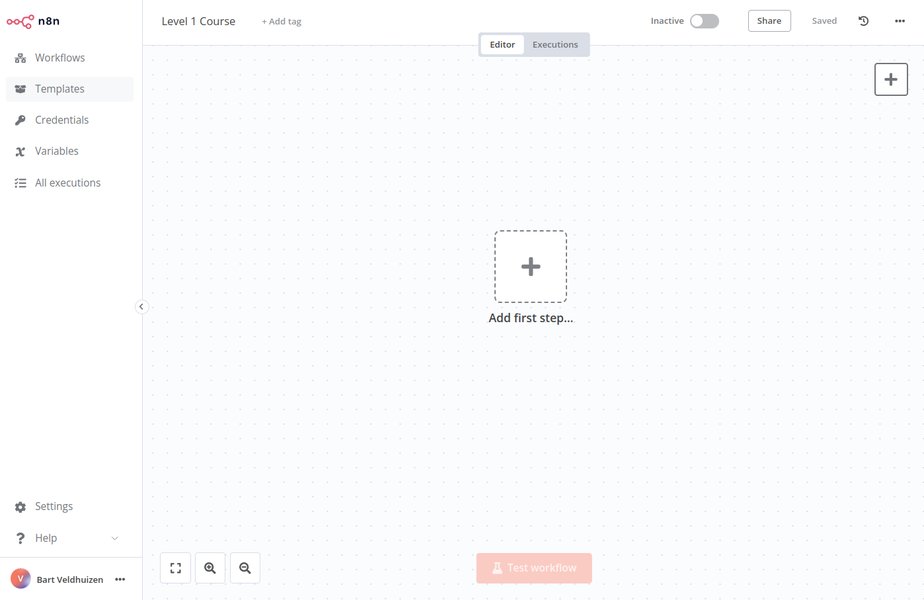
The n8n visual workflow editor, a central component detailed extensively in the documentation.
Navigating the Documentation Sections:
1. Getting Started & Learning Paths
For individuals new to n8n, the "Getting Started" guides and structured "Learning Paths" provide an accessible entry point. These resources cover fundamental concepts such as the n8n interface, understanding nodes (the building blocks of workflows), triggers, and basic workflow construction. Quickstart tutorials often include hands-on examples to help users build their first automations rapidly.
2. Installation and Hosting Options
This section offers comprehensive guidance on deploying n8n. It covers various methods:
- Local Installation: Using `npm` or `npx` for quick setup on personal computers (Windows, macOS, Linux). For instance, to quickly try n8n (Node.js must be installed):
npx n8n - Docker Deployment: A popular method for containerized environments.
After running, the n8n editor is typically accessible atdocker volume create n8n_data docker run -it --rm --name n8n -p 5678:5678 -v n8n_data:/home/node/.n8n docker.n8n.io/n8nio/n8nhttp://localhost:5678. - Self-Hosting: Detailed instructions for setting up n8n on private servers or cloud platforms, including configurations for security, updates, credential management, backups, scaling, and monitoring.
3. Mastering Workflow Automation
The core of n8n revolves around its powerful workflow automation capabilities. The documentation thoroughly explains:
- Workflow Creation: Using the visual drag-and-drop interface to connect nodes.
- Nodes: Detailed explanations of various node types (core nodes, app-specific nodes) and their configurations.
- Triggers: How to initiate workflows using webhooks, cron schedules, chat integrations (Slack, MS Teams), API events, and service-specific triggers.
- Data Handling: Techniques for data flow between nodes, data transformation, mapping, merging, and using expressions for dynamic processing.
- Advanced Flow Control: Implementing conditional logic, loops, and sub-workflows for complex scenarios.
- Error Handling: Strategies for managing and debugging errors within workflow executions.
4. Leveraging Extensive Integrations
n8n supports over 400 integrations with various applications and services. The "Integrations" section provides dedicated documentation for setting up and using these nodes. This includes popular services like Google Suite (Sheets, Calendar, Drive), AWS, GitHub, Slack, Discord, Salesforce, HubSpot, OpenAI, and many others. Each integration guide typically covers node setup, secure credential management, and common use cases. The n8n Form node, for instance, is detailed for creating user-facing forms with multiple steps and custom HTML.
5. Exploring AI Capabilities
n8n uniquely combines AI with business process automation. The documentation includes:
- Tutorials on building AI-powered workflows, for example, integrating with OpenAI or other AI services.
- Information on leveraging AI agents, potentially using frameworks like LangChain, for intelligent decision-making, text analysis, and data enrichment.
- Guides on configuring API credentials for AI services and embedding AI logic within multi-step automations (e.g., for automated customer support, smart task assignments, or natural language processing). A notable template allows for automatically documenting n8n workflows using AI.
6. Developer-Focused Resources
For technical users and developers, n8n provides:
- Public REST API Documentation: Detailed information on n8n's API for programmatic control over workflows (create, update, trigger), credentials, and other platform aspects. This is essential for integrating n8n into larger systems or CI/CD pipelines. The docs cover authentication, pagination, and using the built-in API playground for self-hosted instances.
- Custom Node Development: Guides on creating new nodes using JavaScript or TypeScript, enabling users to extend n8n's functionality to connect with proprietary systems or implement unique logic.
- Coding within Workflows: Documentation on using JavaScript or Python code directly within nodes for custom data manipulation or logic.
7. Advanced Platform Features
The documentation also addresses advanced topics crucial for robust and enterprise-grade deployments:
- Security: Secure credential handling, credential sharing, Role-Based Access Control (RBAC), Single Sign-On (SSO via SAML/LDAP), encrypted secret stores, and data security best practices.
- Monitoring & Debugging: Tools for real-time monitoring, re-running single workflow steps, replaying or mocking data, and utilizing inline code logs for efficient troubleshooting.
- Version Control: Best practices for managing changes to workflows, particularly in team environments.
Visualizing Documentation Quality and n8n's Structure
Assessing Documentation Strengths
The n8n documentation aims to be comprehensive and user-friendly. The radar chart below provides an analytical perspective on the perceived quality and coverage of different aspects of the n8n documentation ecosystem. This assessment considers factors like clarity for beginners, depth for advanced users, thoroughness of integration guides, detail in API references, and support for AI feature implementation.
This chart suggests strong areas like integration guides and self-hosting information, while also indicating the continuous effort to enhance documentation for newer or highly advanced features like AI capabilities.
Mapping the n8n Documentation Landscape
The n8n documentation covers a wide array of interconnected topics. The mindmap below visualizes the main pillars of n8n's functionality and how they are typically structured within its documentation, offering a bird's-eye view of the knowledge base.
This mindmap illustrates the breadth of topics covered, from initial setup and basic workflow design to complex integrations, AI automation, and developer-specific tools, all accessible through n8n's comprehensive documentation.
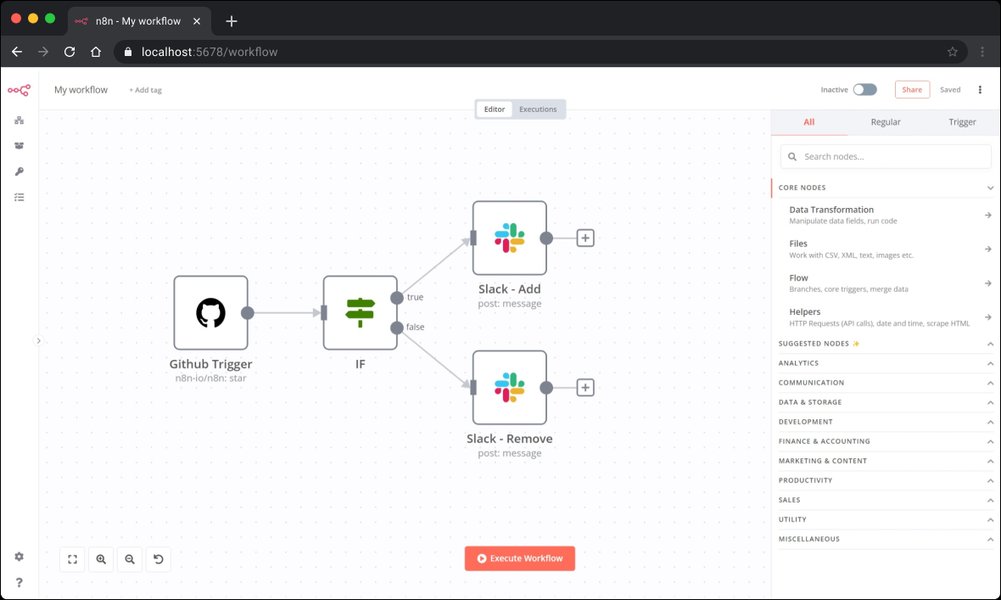
A typical n8n workflow canvas, showcasing the interconnected nodes that define an automation.
Video Learning: n8n Tutorials in Action
Visual Walkthroughs for n8n Mastery
For those who prefer visual learning, n8n's community and official channels offer numerous video tutorials. The video embedded below, "Master n8n in 2 Hours: Complete Beginner's Guide for 2025," provides a comprehensive introduction for new users. It covers fundamental concepts, demonstrates workflow creation, and shows how to utilize readily available templates, making it an excellent supplement to the written documentation.
Such video resources are invaluable for understanding the practical application of n8n's features and for getting a feel for the platform's user interface and workflow design process.
Key Documentation Resource Overview
A Quick Guide to n8n's Knowledge Assets
The n8n documentation ecosystem is diverse, offering various resources tailored to different needs. The following table summarizes the main types of documentation available, their primary focus, target audience, and typical content.
| Resource Type | Primary Focus | Target Audience | Key Content Areas |
|---|---|---|---|
| Official Documentation (docs.n8n.io) | Comprehensive platform guides and references | All Users (Beginner to Advanced Developer) | Installation, workflow building, nodes, triggers, data handling, integrations, AI, API, advanced features |
| n8n.io Website | Platform overview, features, solutions, pricing | Prospective Users, Business Decision Makers | Use cases, AI capabilities, enterprise offerings, community highlights |
| GitHub Repository (n8n-io/n8n-docs) | Source code for documentation, issue tracking, contributions | Developers, Technical Writers, Contributors | Documentation source files, contribution guidelines, version history |
| API Documentation (docs.n8n.io/api/) | Programmatic interaction with n8n platform | Developers | REST API endpoints, authentication, request/response schemas, usage examples, API playground |
| Learning Paths & Tutorials (docs.n8n.io/learning-path/) | Structured, step-by-step learning modules | Beginners, Intermediate Users | Guided tutorials from basic setup to specific automation tasks and feature exploration |
| Community Forums & Discord | Peer-to-peer support, troubleshooting, best practices, shared workflows | All Users | Q&A, user-contributed solutions, tips & tricks, announcements, feedback |
| Blog Posts & Video Tutorials (Official & Community) | Practical examples, specific use cases, feature deep-dives | All Users | Step-by-step guides, workflow templates, new feature showcases, expert insights |
This table serves as a quick reference, helping users navigate to the most appropriate documentation resource based on their specific query or learning objective.
The Role of Community and Contributions
Collective Intelligence Driving Documentation Excellence
n8n's documentation is a dynamic and evolving resource, significantly benefiting from its active community. Hosted on GitHub, the documentation (n8n-io/n8n-docs) embraces an open-source ethos, allowing users to suggest improvements, report inaccuracies, or even contribute new content. This collaborative model ensures that the documentation remains relevant, accurate, and comprehensive. Beyond GitHub, the n8n community forums and Discord server are vibrant hubs for knowledge sharing, peer support, and practical advice, effectively extending the formal documentation with real-world insights and solutions.
Frequently Asked Questions (FAQ)
Your Quick Guide to Common n8n Documentation Queries
Where is the main n8n documentation located?
The primary and most comprehensive n8n documentation is available at docs.n8n.io. This is the central repository for all official guides, tutorials, and reference materials.
Can I find information on self-hosting n8n?
Absolutely. The "Hosting" section of the official documentation, found at docs.n8n.io/hosting/, provides extensive guides on various self-hosting methods, including Docker, server installations, and cloud deployments.
How does the documentation cover n8n's AI capabilities?
The documentation includes specific tutorials and guides for integrating AI into workflows. For instance, the "Tutorial: Build an AI workflow in n8n" (often found under advanced AI sections like docs.n8n.io/advanced-ai/intro-tutorial/) is a valuable resource. It also covers using AI services and frameworks like LangChain.
Where can I learn about n8n's different integrations and nodes?
Detailed information on all supported integrations (over 400 apps) and their respective nodes, including setup and credential management, is available in the "Integrations" section of the documentation: docs.n8n.io/integrations/.
Does n8n have documentation for its Public REST API?
Yes, n8n offers a Public REST API for programmatic interaction. Comprehensive API documentation, covering endpoints, authentication, request/response details, and usage examples, can be found at docs.n8n.io/api/.
Recommended Further Exploration
Deepen Your Understanding of n8n
- How can I set up my first n8n workflow to automate social media posts?
- What are the recommended best practices for securely managing credentials and sensitive data within n8n?
- How can I implement advanced error handling and alerting mechanisms in my n8n workflows?
- What is the detailed process for developing, testing, and deploying a custom n8n node for a new API?
References
Key Sources and Additional Reading
Last updated May 7, 2025