
Unveiling the Mystery: Why Is Your NetApp AutoSupport ENVIRONMENT Section Blank?
Discover the precise location within an AutoSupport message that reveals the cause of an empty ENVIRONMENT section.
Key Insights at a Glance
- The HEADERS section is paramount: When the ENVIRONMENT section of a NetApp AutoSupport message is empty, the primary reason is typically found within the HEADERS section.
- MANIFEST.XML provides context: While HEADERS explains *why* a section might be empty, MANIFEST.XML details what data was intended for collection and its status, offering corroborating information.
- Understand AutoSupport structure: Knowing the purpose of different AutoSupport sections (HEADERS, MANIFEST.XML, AUTOSUPPORT-BUDGET.XML, AUTOSUPPORT-HISTORY.XML) is crucial for effective troubleshooting.
Decoding NetApp AutoSupport Messages
The Backbone of Proactive Support
NetApp AutoSupport is a vital proactive monitoring and diagnostic feature integrated into ONTAP systems. It automatically collects system data, logs, and configuration details, sending them to NetApp support (and optionally to internal destinations). These messages enable rapid troubleshooting, preventative maintenance, and overall system health management. Understanding the structure of these messages is key when diagnosing issues, such as an unexpectedly empty section.
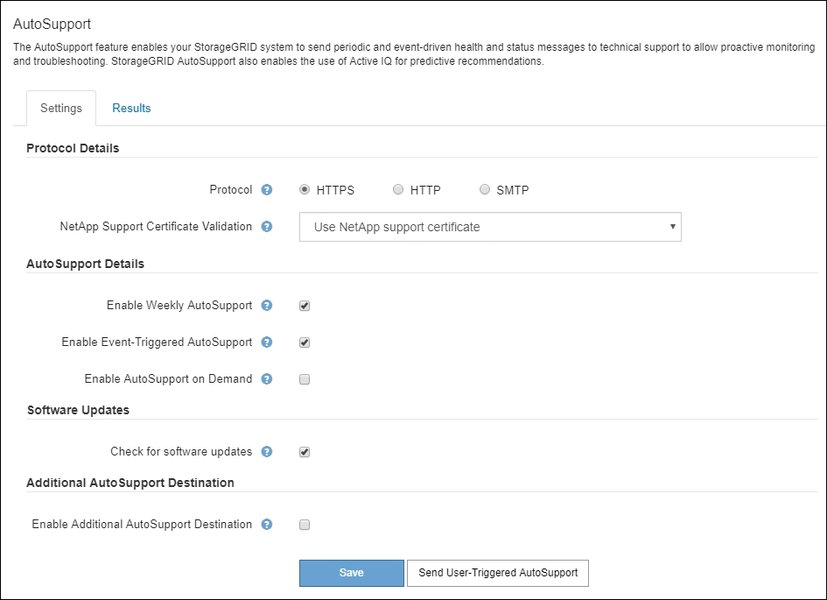
A typical interface showing AutoSupport configuration settings.
Anatomy of an AutoSupport Message
An AutoSupport message is not a monolithic block of data but rather a collection of various files and sections, each serving a specific purpose. When troubleshooting, knowing where to look is half the battle.
The ENVIRONMENT Section: A System Snapshot
The ENVIRONMENT section within a MANAGEMENT LOG AutoSupport message is designed to provide crucial details about the storage system's operational state and configuration at the time of generation. This can include hardware specifics, firmware versions, network configurations, and other contextual data that paints a picture of the system's surroundings. An empty ENVIRONMENT section can hinder diagnostic efforts as it omits this valuable snapshot.
The Crucial HEADERS Section
The HEADERS section acts as a meta-data repository for the AutoSupport message itself. It contains critical information about the generation and composition of the AutoSupport bundle. This includes timestamps, system identifiers, and, most importantly for this query, indications or explanations if certain data sections are missing, suppressed, or incomplete. If the ENVIRONMENT section is empty, the HEADERS section is the first place to consult for reasons. It might indicate:
- Data collection failures or errors.
- Intentional omission due to privacy settings (e.g., masking of sensitive data).
- Configuration settings that prevent collection of certain environmental data.
- Impacts of AutoSupport budget limitations.
The MANIFEST.XML File: The Content Ledger
The MANIFEST.XML file within an AutoSupport bundle serves as an inventory or table of contents. It lists all the components and data sections that were intended to be collected and included in that specific AutoSupport message. Furthermore, it provides the status of each item – whether it was collected successfully, skipped, or encountered an error during collection. While it can confirm that the ENVIRONMENT section was indeed not populated, the direct *reason* for the omission is more likely detailed or flagged in the HEADERS.
AUTOSUPPORT-BUDGET.XML: Managing Resources
The AUTOSUPPORT-BUDGET.XML file pertains to the resource constraints placed on AutoSupport generation, such as limits on the total size of the message or the time allowed for data collection. If these budgets are exceeded, ONTAP might truncate the AutoSupport message or omit certain less critical sections to stay within limits. While an empty ENVIRONMENT section *could* be an indirect consequence of budget limitations, the HEADERS section would typically reflect this impact by noting the truncation or omission.
AUTOSUPPORT-HISTORY.XML: A Record of Transmissions
The AUTOSUPPORT-HISTORY.XML file maintains a log of past AutoSupport messages sent from the system. It includes details like timestamps, sequence numbers, and delivery statuses (e.g., successful, failed). While useful for tracking the overall reliability of AutoSupport transmissions, it does not contain information about the content (or lack thereof) within a *specific* AutoSupport message, such as why the ENVIRONMENT section might be empty.
Pinpointing the Cause: Why is the ENVIRONMENT Section Empty?
When you encounter an empty ENVIRONMENT section in a NetApp MANAGEMENT LOG AutoSupport message, your primary diagnostic focus should be the HEADERS section.
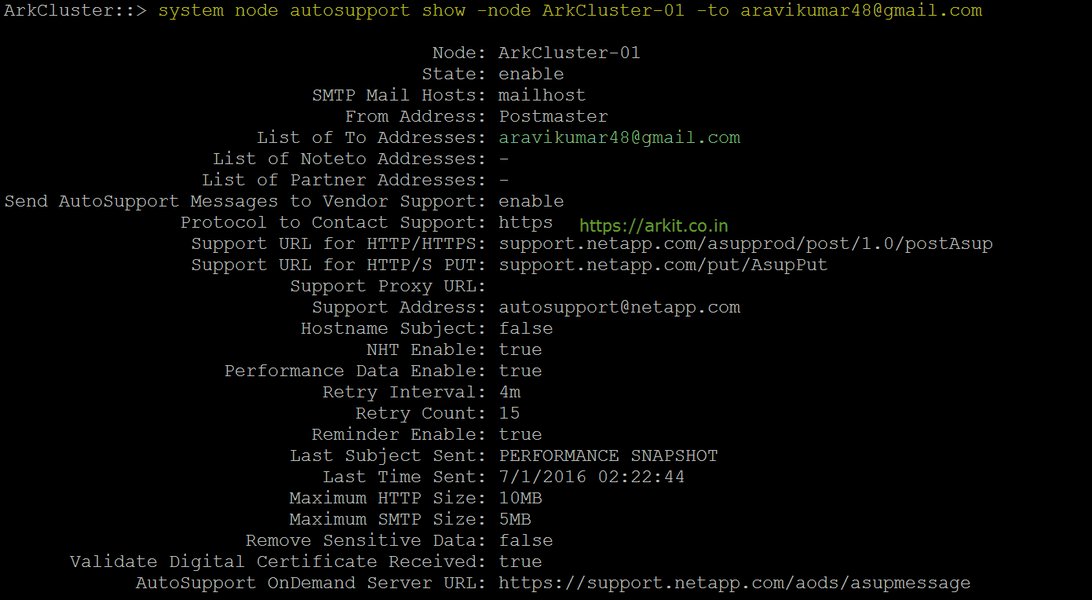
Interface showing a check of AutoSupport manual configuration status.
The Primary Culprit: The HEADERS Section
Multiple sources confirm that the HEADERS section is designed to contain metadata about the AutoSupport message itself, including reasons for missing or suppressed data. If the ENVIRONMENT section is empty, the HEADERS section will likely contain flags, messages, or codes indicating why this information was not included. This could range from data collection errors during the AutoSupport generation process to specific configuration settings that explicitly exclude environmental details, perhaps for security or privacy reasons (e.g., if settings to hide private data are enabled).
For example, the HEADERS might contain an entry like "Collection aborted for ENVIRONMENT_DATA_MODULE" or a flag indicating that certain private data fields, which would normally populate parts of the ENVIRONMENT section, have been masked or omitted based on system policy.
How HEADERS Provides Clues
The HEADERS section doesn't just state that a section is missing; it often provides diagnostic clues. These can include:
- Error Messages: Specific error codes or messages related to the collection module for environment data.
- Status Flags: Flags indicating data suppression due to policies (e.g.,
private-data-masking: true). - Process Information: Notes about the AutoSupport generation process, such as early termination due to budget limits, which might lead to incomplete sections.
Corroborating Evidence: The Role of MANIFEST.XML
While HEADERS provides the "why," the MANIFEST.XML file offers the "what." It lists all the intended contents of the AutoSupport message and their collection status. If you check MANIFEST.XML, you might find an entry for the ENVIRONMENT section with a status like "skipped," "failed_to_collect," or "omitted_due_to_policy." This complements the information in HEADERS by confirming the omission from a content perspective. However, for the direct explanatory reason, HEADERS remains the primary source.
Therefore, the correct answer to the user's query is B. HEADERS.
Comparative Analysis of AutoSupport Sections for Diagnosing Empty ENVIRONMENT
To better understand the roles of different AutoSupport components in diagnosing an empty ENVIRONMENT section, the following radar chart visualizes their relative utility across several diagnostic criteria. The scores (out of 10) are based on their directness and effectiveness in providing the *reason* for the empty section.
As the chart illustrates, the HEADERS section scores highest in directly explaining the reason for omissions and reflecting policy or collection issues. MANIFEST.XML is strong in confirming absence and identifying collection failures. AUTOSUPPORT-BUDGET.XML primarily indicates budget impacts, while AUTOSUPPORT-HISTORY.XML is useful for historical transmission data but not for diagnosing content within a specific message.
Visualizing the Diagnostic Path
The following mindmap illustrates the thought process and diagnostic steps an administrator might take when encountering an empty ENVIRONMENT section in an AutoSupport message. It emphasizes the central role of the HEADERS section.
Status Flags (e.g., privacy masking)
Collection Issues Notes"] id1_A3["Possible Findings:
- Data collection failure
- Intentional suppression (policy)
- Budget limitations causing truncation"] id1_B["Secondary Check: MANIFEST.XML"] id1_B1["Lists Intended Content & Collection Status"] id1_B2["Confirms if ENVIRONMENT section was:
- Skipped
- Failed to Collect"] id1_B3["Corroborates HEADERS findings"] id1_C["Supporting Information (Less Direct for 'Why Empty')"] id1_C1["AUTOSUPPORT-BUDGET.XML"] id1_C1a["Indicates if resource limits were hit"] id1_C2["AUTOSUPPORT-HISTORY.XML"] id1_C2a["Shows transmission history, not content reasons"] id2["Determine Root Cause"] id2_A["Technical Issue (e.g., module failure)"] id2_B["Configuration Setting (e.g., 'no-private-data')"] id2_C["System Constraint (e.g., budget exceeded)"] id3["Take Corrective Action (if applicable)"] id3_A["Address collection errors"] id3_B["Review/modify AutoSupport configuration"] id3_C["Adjust AutoSupport budgets if necessary"]
This mindmap shows that upon discovering an empty ENVIRONMENT section, the immediate step is to analyze the HEADERS. MANIFEST.XML serves as a confirmation tool. Other sections like AUTOSUPPORT-BUDGET.XML and AUTOSUPPORT-HISTORY.XML provide broader context but are not the primary sources for explaining the empty section.
In-Depth Look at AutoSupport Sections for Troubleshooting
The table below provides a detailed comparison of the relevant AutoSupport sections, their general content, and their specific significance when the ENVIRONMENT section is found empty.
| Section / File | General Content | Relevance to Empty ENVIRONMENT Section |
|---|---|---|
| HEADERS | Metadata about the AutoSupport message itself, including timestamps, message IDs, system identifiers, and critically, information about data collection, suppression, or errors. | Primary source for the reason. Contains explanations, error codes, or flags indicating why the ENVIRONMENT section is empty (e.g., collection failure, privacy masking, configuration limits). |
| ENVIRONMENT | System's operational environment details: hardware configurations, network settings, software versions, and other contextual data. | The section in question. If empty, critical diagnostic information is missing. |
| MANIFEST.XML | An inventory of all data components intended for collection in the AutoSupport message and their collection status (e.g., collected, skipped, error). | Confirms that the ENVIRONMENT section was intended for collection and its actual collection status (e.g., "not collected" or "error"). Supports findings from HEADERS but doesn't usually provide the primary reason. |
| AUTOSUPPORT-BUDGET.XML | Information about resource limitations (e.g., size, time) imposed on the AutoSupport generation process. | Indirectly relevant. If budgets are exceeded, sections might be omitted. HEADERS would typically reflect this consequence. |
| AUTOSUPPORT-HISTORY.XML | A log of previously sent AutoSupport messages, including their sequence numbers, timestamps, and delivery status. | Not directly relevant for diagnosing content within a *specific* message. Useful for tracking overall AutoSupport transmission health. |
Frequently Asked Questions (FAQ)
Q1: So, which option is definitively correct for finding the reason for an empty ENVIRONMENT section?
The most direct and accurate answer is B. HEADERS. The HEADERS section of the AutoSupport message contains metadata specifically designed to explain anomalies in the message content, including why sections like ENVIRONMENT might be empty or suppressed.
Q2: How does MANIFEST.XML differ from HEADERS in this context?
MANIFEST.XML acts like a packing list; it tells you what was supposed to be in the AutoSupport bundle and whether it was successfully included. For example, it might show "ENVIRONMENT_SECTION: Status - NOT_COLLECTED." However, the HEADERS section is more like an accompanying note from the sender explaining why something might be missing or different – for instance, "ENVIRONMENT_SECTION: Omitted due to private data policy."
Q3: Could AUTOSUPPORT-BUDGET.XML ever be the primary reason?
AUTOSUPPORT-BUDGET.XML details the resource limits (like size or time) for AutoSupport generation. If these limits are exceeded, some data collection might be curtailed. While this *could* lead to an empty ENVIRONMENT section, the HEADERS section would typically be the place where the *impact* of this budget constraint (i.e., the resulting omission or truncation) is documented or flagged.
Q4: What if the HEADERS section itself is missing or very minimal?
If the HEADERS section is missing or unusually sparse, it could indicate a more fundamental problem with the AutoSupport generation or transmission process itself. In such cases, deeper troubleshooting of the AutoSupport subsystem on the ONTAP system would be necessary, potentially involving checking system logs beyond the AutoSupport message itself or verifying network connectivity and AutoSupport configuration.
Recommended Further Exploration
- How can I manually trigger and retrieve a NetApp AutoSupport message for analysis?
- What are common configuration settings in NetApp ONTAP that affect AutoSupport content?
- Explain the process of AutoSupport delivery mechanisms like SMTP and HTTPS in NetApp.
- Where can I find documentation on interpreting NetApp AutoSupport error codes found in the HEADERS section?
References
Last updated May 12, 2025