
Unveiling the Truth: Which Commands Pinpoint WAFL Inconsistency in Your NetApp Aggregates?
Discover the precise ONTAP commands essential for diagnosing critical filesystem health in your NetApp storage.
When managing NetApp ONTAP systems, ensuring the health and integrity of your data is paramount. Aggregates, the fundamental building blocks of storage, rely on the Write Anywhere File Layout (WAFL) filesystem. If WAFL encounters issues it cannot automatically resolve, an aggregate can be marked "WAFL inconsistent," signaling potential filesystem corruption. Identifying this state promptly is crucial. This guide delves into the specific commands that confirm this critical status.
Key Insights: Confirming WAFL Inconsistency
Essential Takeaways for NetApp Administrators
- Critical Status: A "WAFL inconsistent" state indicates a significant filesystem problem within a NetApp aggregate that requires immediate attention.
- Primary Commands: The two definitive commands to confirm if an aggregate is WAFL inconsistent are
wafiron show <aggregate>andstorage aggregate show. - Diagnostic vs. Confirmation: While other tools like
WAFL_checkare used for diagnosing and repairing, the focus here is on commands that *confirm* the inconsistent status.
Understanding WAFL Inconsistency
What Does "WAFL Inconsistent" Mean?
WAFL (Write Anywhere File Layout) is the robust filesystem at the heart of NetApp ONTAP. It's designed for high performance and data integrity. However, under certain circumstances, such as severe hardware failures (e.g., multiple disk issues beyond RAID protection), unexpected system shutdowns, software anomalies, or aborted critical operations, the internal consistency of the WAFL structure on an aggregate can be compromised.
When ONTAP detects such non-recoverable discrepancies in the filesystem's metadata, blocks, or inodes, it flags the affected aggregate as "WAFL inconsistent." This status essentially means the aggregate is considered corrupted and may be offline or in a restricted state to prevent further data damage. Data access might be limited or impossible until the inconsistency is resolved, typically involving processes guided by NetApp support like running WAFL_check and potentially wafliron.
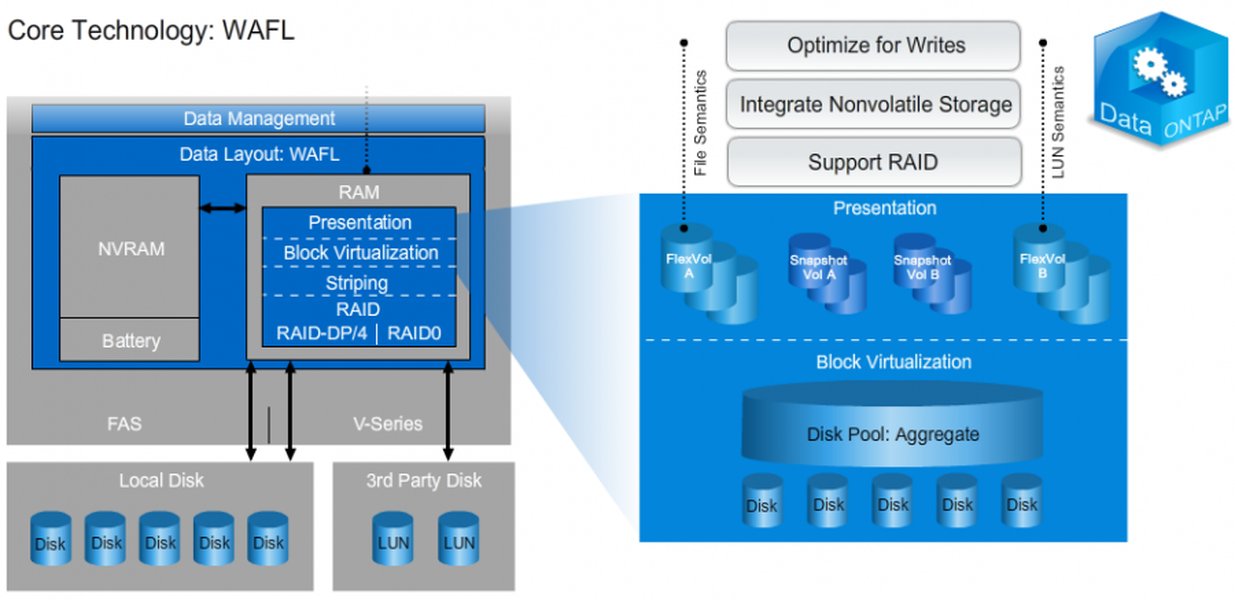
Visualizing the WAFL (Write Anywhere File Layout) layer within the NetApp storage stack.
The Definitive Commands for Confirmation
Based on NetApp documentation and expert consensus, two primary commands stand out for confirming a WAFL inconsistent state on an aggregate. These are options A and C from your query.
A. wafiron show <aggregate>
Purpose and Usage
The wafiron utility is primarily associated with the process of "ironing" or repairing WAFL inconsistencies. However, the wafiron show <aggregate_name> command plays a crucial role in displaying the status of this process, or more generally, the consistency state as perceived by the wafliron subsystem for a specific aggregate. If an aggregate is marked as WAFL inconsistent, this command will typically reflect that status.
How it Confirms Inconsistency
When executed, wafiron show <aggregate> queries the state of the specified aggregate concerning WAFL consistency checks and repair operations. Its output can directly indicate if the aggregate is WAFL inconsistent, often detailing the phase of checking or if a check is required. This command is often used in advanced privilege levels (diag mode) and provides a targeted view of a single aggregate's WAFL health from the perspective of the repair utility.
For example, output might explicitly state "Aggregate is WAFL inconsistent" or provide codes/messages that translate to this condition. It’s a direct way to verify the status if you suspect a particular aggregate.
C. storage aggregate show
Purpose and Usage
The storage aggregate show command is a standard and widely used ONTAP command for displaying comprehensive information about all aggregates in the cluster or a specific aggregate. This includes their online/offline status, RAID status, available space, and, crucially, their health status, which encompasses WAFL consistency.
How it Confirms Inconsistency
One of the possible values for the "RAID Status" or a similar health indicator field in the output of storage aggregate show is "wafl inconsistent." If an aggregate has this status, the command will clearly display it. Administrators can use this command to get an overview of all aggregates or filter for specific states.
For instance, running storage aggregate show -aggregate <aggregate_name> -instance would provide detailed fields for the specified aggregate, one of which would reveal the WAFL inconsistent state. You can also use parameters like -raid-status wafl_inconsistent to list only those aggregates currently in this problematic state.
This command is generally accessible at standard admin privilege levels and is a go-to for routine health checks and status verification.
Comparing the Key Commands
A Closer Look at Their Strengths
Both wafiron show <aggregate> and storage aggregate show are effective in confirming a WAFL inconsistent state, but they offer slightly different perspectives and levels of detail. The following chart provides a comparative overview based on several operational aspects. The scores are on a scale where higher means 'more' or 'better' for that characteristic, with a minimum axis value of 3 for clarity.
As the chart illustrates, wafiron show <aggregate> is highly specific for inconsistency confirmation related to the wafliron process. In contrast, storage aggregate show provides broader aggregate information while still reliably indicating the 'wafl inconsistent' status, often with easier initial access.
Why Other Options Are Less Direct
Analyzing Options B and D
The query also presented two other options involving sysconfig:
- B.
node run "node <node> sysconfig "r - D.
node run "node <node> sysconfig "a
These commands are generally used for displaying detailed system configuration and hardware information at a node level. While the output of sysconfig -r (often used for RAID configuration details) might contain lines that allude to the state of aggregates, it's not its primary purpose to serve as a direct or user-friendly confirmation of WAFL filesystem-level inconsistency in the same way the dedicated storage commands do.
The sysconfig commands tend to produce verbose, low-level output that can be challenging to parse specifically for a "WAFL inconsistent" status without significant expertise. They are more akin to diagnostic tools for hardware and basic storage layout rather than specific filesystem health status commands like storage aggregate show or wafiron show.
Therefore, for the specific task of *confirming* whether an aggregate is WAFL inconsistent, options A and C are the more appropriate and direct choices.
Visualizing WAFL Inconsistency Context
A Mindmap Overview
To better understand where WAFL inconsistency fits into the NetApp ecosystem and how it's identified, the following mindmap provides a conceptual overview. It highlights the nature of WAFL inconsistency, the primary commands for its confirmation, and the typical next steps an administrator might consider.
on an aggregate, WAFL layer affected"] id1_2["Impact: Potential data unavailability or loss,
aggregate may be offline/restricted"] id1_3["Common Causes: Severe hardware issues (disks, controller),
abrupt power loss, software bugs,
aborted critical operations"] id2["Confirming the 'WAFL Inconsistent' Status"] id2_1["Primary Commands (User Query A & C)"] id2_1_1["
wafiron show <aggregate>Checks status from wafliron subsystem's perspective"] id2_1_2["
storage aggregate showDisplays 'wafl inconsistent' in RAID/health status"] id2_2["Why These Commands are Key"] id2_2_1["Designed to report aggregate health directly"] id2_2_2["Output clearly indicates the 'wafl inconsistent' state"] id3["Other Mentioned Commands (User Query B & D)"] id3_1["
node run \"node <node> sysconfig \"r\""]
id3_2["node run \"node <node> sysconfig \"a\""]
id3_2_1["General system/hardware configuration output"]
id3_2_2["Not primary tools for confirming WAFL-specific filesystem inconsistency"]
id4["If Inconsistency is Confirmed"]
id4_1["Immediate Action: Contact NetApp Technical Support"]
id4_2["Diagnostic Tools (Under Guidance):WAFL_check to analyze inconsistencies"]
id4_3["Repair Tools (Under Guidance):wafliron to apply fixes"]
This mindmap shows that identifying a WAFL inconsistent state using commands like wafiron show <aggregate> and storage aggregate show is a critical first step before proceeding to more involved diagnostic and repair procedures, which should always be undertaken with caution and ideally under the guidance of NetApp support.
Command Summary for WAFL Inconsistency
Quick Reference Table
The following table summarizes the key characteristics of the two primary commands used to confirm if a NetApp aggregate is WAFL inconsistent:
| Command | Primary Purpose | How it Confirms WAFL Inconsistency | Typical Privilege Level |
|---|---|---|---|
wafiron show <aggregate> |
Shows the status of the wafliron process (WAFL check/repair utility) for a specific aggregate. | Directly reports if the aggregate is considered WAFL inconsistent by the wafliron subsystem; may show "WAFL inconsistent" or related status messages. | Advanced (diag mode often required) |
storage aggregate show |
Displays detailed information and status for one or all aggregates in the ONTAP cluster. | Lists "wafl inconsistent" as one of the possible values in the 'RAID Status' or overall health status field for an affected aggregate. | Admin (standard access) |
This table underscores that both commands serve the purpose, with wafiron show <aggregate> being more specialized towards the WAFL repair context and storage aggregate show being a broader, more general-purpose aggregate status command.
Deeper Dive: WAFL Consistency Points
Understanding Data Integrity Mechanisms
To appreciate why WAFL inconsistency is a significant issue, it's helpful to understand how WAFL normally maintains data integrity. The following video provides an overview of WAFL Consistency Points (CPs), which are fundamental to how NetApp ONTAP systems ensure data is written durably and consistently to disk. While not directly about inconsistency, it explains the mechanisms that, when failing or encountering severe issues, can lead to such a state.
This video explains the concept of Consistency Points in NetApp's WAFL filesystem, crucial for understanding data integrity.
Consistency Points are periodic events where all data changes held in memory (NVRAM and system memory cache) are flushed to disk, creating a consistent on-disk image of the filesystem. This process involves creating new blocks (due to WAFL's "write anywhere" nature) and updating metadata. If a catastrophic event occurs that disrupts these processes or corrupts existing on-disk structures beyond what normal recovery mechanisms can handle, a WAFL inconsistent state can arise.
Frequently Asked Questions (FAQ)
What exactly is WAFL inconsistency?
WAFL inconsistency means that the internal structure of the Write Anywhere File Layout (WAFL) filesystem on a NetApp aggregate has encountered errors or corruption that ONTAP cannot automatically fix. This can involve problems with metadata, inodes, or data blocks, essentially indicating that the filesystem's integrity is compromised.
What are common causes of WAFL inconsistency?
Common causes include:
- Severe hardware failures, such as multiple simultaneous disk failures in a RAID group or controller issues.
- Unexpected power outages or improper system shutdowns that interrupt critical write operations.
- Software bugs within ONTAP or related firmware.
- Aborted critical operations, like an aggregate resize or relocation, if not handled cleanly.
- Data corruption due to underlying undetected media errors.
What are the risks associated with a WAFL inconsistent aggregate?
The primary risks are data loss or data unavailability. An inconsistent aggregate might be automatically taken offline or put into a restricted mode to prevent further corruption. Access to volumes and LUNs residing on that aggregate may be impossible. In some cases, data recovery might be complex or incomplete.
Should I attempt to fix a WAFL inconsistent aggregate myself?
It is strongly recommended to contact NetApp Technical Support before attempting to run any repair utilities like WAFL_check or wafliron. These are powerful tools that can alter the filesystem structure. Incorrect usage can potentially lead to further data loss. NetApp Support can guide you through the appropriate diagnostic and recovery steps safely.
Recommended Further Exploration
Deepen Your Understanding
- What are the detailed steps to take when an aggregate shows WAFL inconsistent status in NetApp ONTAP?
- Explain the differences between WAFL_check and wafliron in NetApp ONTAP.
- How does NetApp NVRAM contribute to WAFL consistency and data protection?
- What are best practices for preventing WAFL inconsistency on NetApp storage systems?
References
Sources and Further Reading
 senthil-it-infrastructure.blogspot.com
 ervikrant06.wordpress.com
senthil-it-infrastructure.blogspot.com
ervikrant06.wordpress.com
senthil-it-infrastructure.blogspot.com
Last updated May 12, 2025