
Next-Generation Paint: Revolutionizing Digital Art and Design
Empowering Creativity with Advanced AI and Seamless Collaboration
Key Takeaways
- AI-Driven Creativity: Integrates cutting-edge AI tools to enhance and simplify the creative process.
- Comprehensive Editing Suite: Offers both raster and vector capabilities with non-destructive workflows.
- Seamless Collaboration and Cross-Platform Access: Enables real-time collaboration and cloud synchronization across devices.
Introduction
In the rapidly evolving landscape of digital art and design, the demand for sophisticated yet user-friendly tools has never been higher. Building on the foundational simplicity of Microsoft Paint, the envisioned software, tentatively named Next-Gen Paint, aims to integrate state-of-the-art technologies to cater to both novice artists and seasoned professionals. This comprehensive toolset leverages artificial intelligence, machine learning, and advanced user interface design to redefine digital creativity.
Core Features
AI-Powered Drawing Assistance
Next-Gen Paint incorporates sophisticated AI algorithms that offer real-time suggestions and enhancements to user drawings. These AI-driven tools analyze the artist's style and provide intelligent modifications, such as:
- Real-time sketch predictions and completions
- Style transformation based on famous art movements
- Automatic correction of drawing imperfections
- Smart layer management and object recognition
Advanced Image Editing Capabilities
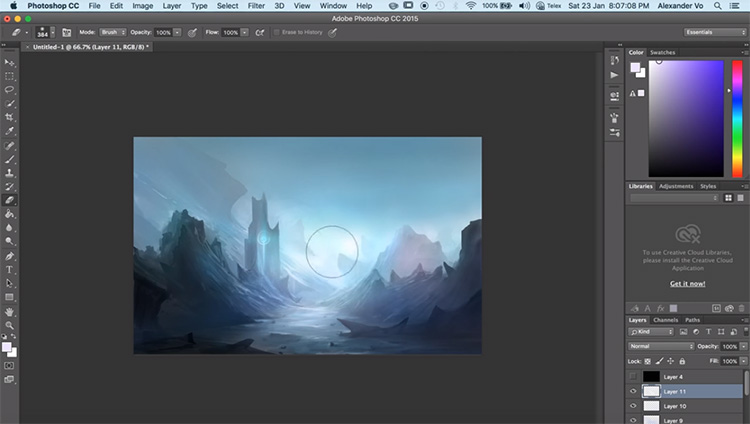
The software boasts a comprehensive set of image editing tools akin to professional-grade applications. Key features include:
- Layers and Blending Modes: Multiple layers with advanced blending options for complex compositions.
- Advanced Brushes: A diverse library of brushes with customizable parameters such as pressure sensitivity and flow dynamics.
- Filters and Effects: Integrated filters like glow, motion blur, and drop shadows, all customizable through an intuitive interface.
- Non-Destructive Editing: Adjustment layers that allow modifications without altering the original image data.
User-Friendly Interface
Despite its advanced features, Next-Gen Paint maintains an intuitive and accessible user interface. Inspired by platforms like Canva Pro, the interface ensures that users of all skill levels can navigate and utilize the software effectively. Features include:
- Customizable workspace layouts tailored to different user preferences
- Modular design supporting plugins and add-ons for extended functionality
- Integrated tutorials and guided workflows to assist new users
Real-Time Collaboration
Next-Gen Paint facilitates real-time collaboration, allowing multiple users to work on the same canvas simultaneously. This feature is supported by cloud integration, ensuring seamless access and continuity across different devices and platforms.
Cross-Platform Compatibility
The software is developed to be compatible across various platforms, including Windows, macOS, Linux, and mobile/tablet devices. Cloud-based saving and synchronization ensure that users can access their projects from any device without any loss of functionality or performance.
Multi-Modal Input Support
Next-Gen Paint supports a wide range of input methods to accommodate diverse user preferences and hardware configurations:
- Stylus and touch input for tablet and touchscreen devices
- Mouse and keyboard inputs with customizable shortcuts
- Voice and text commands powered by natural language processing for intuitive editing instructions
- Gesture-based drawing and editing for enhanced interactivity
Advanced AI Generation Capabilities
Leveraging the latest advancements in AI, Next-Gen Paint offers robust generation tools that empower users to create and manipulate images with unprecedented ease and precision:
| AI Feature | Description |
|---|---|
| Text-to-Image Generation | Generate images based on textual descriptions, allowing for creative exploration and rapid prototyping. |
| Image-to-Image Transformation | Transform existing images into different styles or formats using AI-driven algorithms. |
| Automated Background Removal | Effortlessly remove or replace backgrounds with intelligent detection and masking. |
| Smart Color Palette Generation | Automatically generate and match color palettes based on the image content or user preferences. |
Performance and Accessibility
High-Performance Rendering
Next-Gen Paint utilizes GPU acceleration to ensure ultra-fast rendering times, enabling smooth and responsive interactions even with complex projects. The software is optimized to run efficiently on both low-end and high-end hardware, making it accessible to a broad user base.
Lightweight and Customizable Interface
The interface is designed to be lightweight yet highly customizable. Users can tailor their workspace to suit their workflow, adjusting toolbars, panels, and shortcuts as needed. This flexibility ensures that the software can adapt to various use cases, from quick sketches to detailed graphic design.
Accessibility Features
Committed to inclusivity, Next-Gen Paint includes a range of accessibility features to support users with different abilities:
- Voice command integration for hands-free operation
- High-contrast modes and scalable UI elements for better visibility
- Support for screen readers and other assistive technologies
Integration and Extensions
Integration with AI Tools
Next-Gen Paint seamlessly integrates with various AI tools to enhance its capabilities. This includes color palette generators, style transfer applications, and image enhancement services, providing users with a comprehensive suite of design tools within a single platform.
Extensions and Plugins
The software supports a modular architecture, allowing users to extend its functionality through third-party plugins and scripts. This community-driven approach ensures continuous innovation and the availability of specialized tools tailored to specific needs.
Cross-Software Compatibility
Designed for interoperability, Next-Gen Paint integrates with other popular design and editing software, enabling smooth workflows and the transfer of assets between different platforms without loss of quality or functionality.
Technical Specifications
Programming Languages and Frameworks
The core functionality of Next-Gen Paint is developed using a combination of C++, Python, and JavaScript. C++ ensures high-performance processing, Python facilitates AI and machine learning integrations, and JavaScript enables web-based and plugin functionalities. Key libraries and frameworks include:
- OpenCV: For advanced image processing and AI functionalities
- Qt: For the graphical user interface
- TensorFlow: For machine learning algorithms
Platform Support
Next-Gen Paint is developed to run smoothly on multiple operating systems, including:
- Windows
- macOS
- Linux
- iOS and Android for mobile and tablet devices
Cloud Integration
Cloud-based synchronization allows users to save and access their projects from any device. Integration with popular cloud services ensures data security and provides seamless sharing and collaboration capabilities.
Development Roadmap
Phase 1: Core Development
Establish the foundational framework and develop core features, including the basic drawing engine and user interface.
Milestones:
- Develop raster and vector drawing capabilities
- Create a customizable and intuitive user interface
- Implement basic toolsets such as pencils, brushes, and shapes
Phase 2: AI Integration
Incorporate AI-powered tools and machine learning algorithms to enhance user experience and functionality.
Milestones:
- Integrate AI-assisted drawing and editing features
- Develop content-aware fill and object recognition tools
- Implement style transfer and automated enhancements
Phase 3: Collaboration and Cross-Platform Support
Enable real-time collaboration and ensure compatibility across different platforms.
Milestones:
- Implement real-time multi-user collaboration features
- Optimize software performance for various operating systems
- Ensure seamless cloud synchronization and data management
Phase 4: Extensions and Community Building
Foster a community-driven ecosystem through support for extensions and plugins.
Milestones:
-
Develop a plugin framework for third-party extensions
-
Launch community forums and support channels
-
Encourage user-generated content and tool contributions
Phase 5: Testing, Refinement, and Launch
Conduct thorough testing, gather user feedback, and refine the software for official release.
Milestones:
- Perform extensive beta testing across different platforms
- Incorporate user feedback into final product adjustments
- Launch the software with comprehensive support and documentation
Conclusion
Next-Gen Paint is poised to transform the digital art and design landscape by merging the simplicity of traditional tools with the power of modern technology. By integrating advanced AI functionalities, offering a comprehensive suite of editing tools, and ensuring seamless collaboration across platforms, this software caters to a diverse range of users. Its commitment to accessibility, performance, and community-driven development ensures that it will remain at the forefront of digital creativity for years to come.
References
Best 5 Free Alternatives to Microsoft Paint
Microsoft Paint Alternatives
Best Microsoft Paint Alternative Software
MS Paint Alternatives
Alternative to Microsoft Paint
Best AI Art Generators
Artificial Intelligence Design Blog
AI Graphic Design Software Reviews
AI Tools for Easy Drawing 2025
AI Art Generators
Best AI Art Generators by CyberLink
Last updated February 13, 2025