
Mastering Next.js 15: Essential Best Practices for Modern Web Development
A Comprehensive Guide to Building Scalable and Performant Applications
Next.js 15 is the latest iteration of the popular React framework, bringing significant enhancements and new features designed to improve developer experience and application performance. As web applications grow in complexity, adhering to best practices becomes paramount for ensuring scalability, maintainability, and optimal user experience. This guide delves into key best practices for developing with Next.js 15, covering aspects from project structure and performance optimization to data fetching and API routes.
Key Highlights of Next.js 15 Best Practices
- Prioritize App Router and Server Components: Leverage the latest routing and rendering paradigms in Next.js 15 for enhanced performance and simplified data fetching.
- Optimize Performance Relentlessly: Utilize built-in features like the Image component, Font optimization, and strategic caching to ensure fast load times and a smooth user experience.
- Structure Your Project for Scalability: Adopt a logical and organized folder structure that facilitates collaboration and simplifies maintenance as your application grows.
Understanding Next.js 15 and Its Core Features
Next.js is a powerful React framework that provides a robust foundation for building full-stack web applications. It extends React's capabilities with features like server-side rendering (SSR), static site generation (SSG), API routes, and file-system based routing. Next.js 15 builds upon this foundation with several key updates:
- React 19 Support: Next.js 15 fully supports the latest features and improvements introduced in React 19, including the new React Compiler and advancements in Concurrent Features.
- Caching Improvements: Enhanced caching mechanisms provide developers with more granular control over caching behavior, leading to better performance for both SSR and SSG.
- Turbopack Stability: Turbopack, the Rust-based successor to Webpack, reaches a stable release in development, offering significantly faster build times and Fast Refresh.
- New APIs: Introduction of new APIs simplifies common development tasks and provides greater flexibility.
- ESLint 9 Support: Support for ESLint 9 ensures developers can leverage the latest linting features and best practices for code quality.
These features underscore the importance of understanding and implementing best practices to fully harness the power of Next.js 15.
Structuring Your Next.js 15 Project
A well-organized project structure is fundamental to building maintainable and scalable applications. With the introduction of the App Router, the recommended structure in Next.js 15 has evolved. Here are some best practices for structuring your Next.js 15 project:
App Router vs. Pages Router
Next.js 15 primarily focuses on the App Router, which offers a more flexible and powerful way to handle routing, data fetching, and rendering. While the Pages Router is still supported, migrating to the App Router is recommended for new projects and beneficial for existing ones to leverage the latest features and performance improvements.
Recommended Folder Structure
A common and effective approach for structuring your Next.js 15 project with the App Router involves organizing files and folders based on features or routes. Key directories typically include:
app/: Contains all your route segments and components for the App Router.public/: For static assets like images, fonts, and favicons.components/: Reusable UI components.lib/orutils/: Helper functions, utility classes, and non-component logic.styles/: Global styles or CSS modules.
Within the app/ directory, organize your routes using nested folders. Colocate route-specific components, data fetching logic, and tests within their respective route segments for better organization and maintainability.
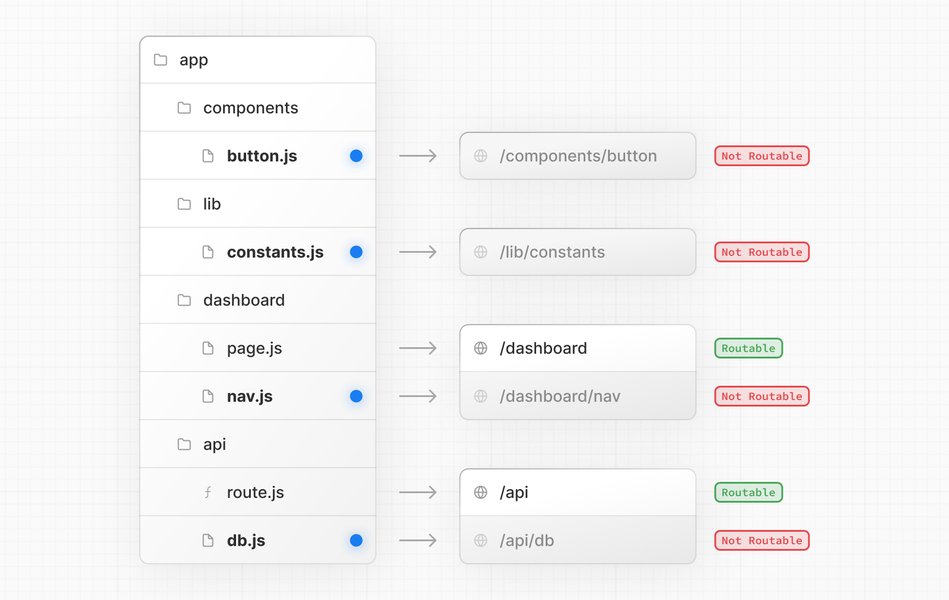
Example of a Next.js project structure emphasizing colocation within the app directory.
Component Organization
For components, consider organizing them based on their usage or domain. You can have a flat structure for simple components or group them into subfolders for larger applications (e.g., components/ui/, components/forms/). Prioritize creating small, focused, and reusable components.
Leveraging TypeScript
Using TypeScript in your Next.js 15 project is a strong best practice. It provides static type checking, which helps catch errors early in the development process, improves code readability, and enhances the developer experience with features like autocompletion and refactoring.
Optimizing Performance in Next.js 15
Performance is a critical aspect of modern web applications, and Next.js 15 provides several built-in features and opportunities for optimization. Implementing the following best practices can significantly improve your application's speed and responsiveness:
Image Optimization
The built-in next/image component is essential for optimizing images. It automatically handles image resizing, format optimization, and lazy loading, ensuring that images are delivered efficiently to users regardless of their device or network conditions. Next.js 15 also simplifies image optimization by automatically including the necessary sharp dependency.
Font Optimization
Optimize your application's web fonts using the built-in next/font loaders. This helps eliminate layout shifts and improves text rendering performance.
Script Optimization
For third-party scripts, use the next/script component to optimize their loading strategy. This prevents render-blocking scripts from negatively impacting your page load times.
Data Fetching Strategies and Caching
Next.js 15 offers flexible data fetching options within the App Router, primarily through Server Components and Route Handlers. Best practices include:
- Server Components for Data Fetching: Fetch data directly in Server Components to avoid client-side waterfalls and improve initial page load performance.
- Strategic Caching: Utilize Next.js 15's improved caching mechanisms. Data fetched in Server Components is cached by default, but you can control caching behavior with options like
revalidatefor time-based revalidation. - Client-Side Data Fetching with SWR or React Query: For data that changes frequently or requires client-side interaction, consider using libraries like SWR or React Query in Client Components.
Code Splitting and Lazy Loading
Next.js automatically handles code splitting for routes, but you can further optimize by dynamically importing components or libraries that are not immediately needed. This reduces the initial JavaScript bundle size and improves perceived performance.
Optimizing Server-Side Rendering (SSR)
While Server Components are the primary method for server rendering in the App Router, understanding SSR principles remains valuable. For pages requiring dynamic data fetched on each request, SSR with Next.js 15 can be optimized by ensuring efficient data fetching and minimizing the work done on the server before sending the HTML to the client.
Working with APIs and Server Actions
Next.js 15 provides robust capabilities for building APIs and handling server-side logic directly within your application.
API Routes (App Router)
In the App Router, API routes are defined within the app/api/ directory using Route Handlers. Best practices for building APIs include:
- Organize API Routes by Concern: Group related API endpoints within logical subfolders in the
app/api/directory. - Handle Different HTTP Methods: Implement handlers for relevant HTTP methods (GET, POST, PUT, DELETE) within a single Route Handler file.
- Input Validation and Error Handling: Implement robust input validation and provide clear error responses.
- Authentication and Authorization: Secure your API routes by implementing appropriate authentication and authorization mechanisms.
Server Actions
Server Actions in Next.js 15 allow you to define server-side functions that can be called directly from Client Components or Server Components. Best practices for using Server Actions:
-
Separate Logic from Presentation: Keep server-side logic within Server Actions and avoid embedding complex server code directly in your components.
-
Centralize API Calls: Use Server Actions to centralize data mutations and other server-side operations.
-
Organize Actions by Feature: Group related Server Actions within files or folders based on the features they support.
-
Handle Errors Gracefully: Implement error handling within your Server Actions and provide feedback to the user interface.
Server Actions promote a cleaner separation of concerns and can simplify data mutations and form handling.
Additional Best Practices for Next.js 15
ESLint and Prettier Configuration
Configure ESLint and Prettier to enforce code style consistency and catch potential issues early. Next.js 15 supports ESLint 9 and provides a recommended configuration.
npm install --save-dev eslint-config-next eslint-plugin-react eslint-plugin-react-hooks prettier
Run npm run lint to initialize ESLint in your project and follow the prompts to set up the configuration. You can also add scripts to your package.json for easily running linting and formatting.
Writing Clean and Maintainable Code
Beyond structure, focus on writing clean, readable, and maintainable code. This includes using meaningful variable names, writing clear comments where necessary, and breaking down complex logic into smaller, manageable functions or components.
Testing Your Application
Implement a testing strategy that includes unit tests for components and utility functions, integration tests for interactions between different parts of your application, and end-to-end tests for critical user flows.
Leveraging Metadata for SEO
Properly utilize Next.js 15's metadata features to improve your application's search engine optimization (SEO). Configure titles, descriptions, and other meta tags for each page to provide search engines with relevant information about your content.
Considering Production Deployment
When preparing your Next.js 15 application for production, consider deployment platforms like Vercel (built by the creators of Next.js) which offer seamless integration and optimizations. Ensure you have configured environment variables and other production-specific settings correctly.
FAQs About Next.js 15 Best Practices
Is Next.js 15 production-ready?
Next.js 15 has reached a stable release and includes support for React 19 RC. While extensive testing has been done, the decision to use it in production depends on your specific project's requirements and tolerance for potential early adoption considerations. Many core breaking changes are well-tested, and codemods are provided to assist with upgrades.
How do I migrate from the Pages Router to the App Router in Next.js 15?
Migrating to the App Router involves restructuring your application within the app/ directory and adapting your data fetching and rendering strategies to align with Server Components and Route Handlers. Next.js provides an upgrade guide and codemods to assist with this process.
What are the benefits of using Server Components in Next.js 15?
Server Components offer several benefits, including improved performance by rendering on the server and sending only the necessary HTML and CSS to the client, simplified data fetching by allowing direct database access or API calls within components, and reduced client-side JavaScript bundle size.
How can I optimize data fetching in Next.js 15?
Optimizing data fetching in Next.js 15 involves leveraging Server Components for initial data loads, utilizing the built-in caching mechanisms, and employing client-side data fetching libraries like SWR or React Query for dynamic or frequently changing data.
What are Server Actions and when should I use them?
Server Actions are server-side functions in Next.js 15 that can be invoked directly from the client. They are ideal for handling form submissions, data mutations, and other server-side logic that needs to be triggered by user interactions on the client.
Relevant YouTube Video
This video provides a breakdown of the top new features in Next.js 15, highlighting key updates that inform best practices for development with this version.
Understanding the new features introduced in Next.js 15, as discussed in this video, is crucial for adopting the most effective development strategies and leveraging the framework's full potential. The video touches on areas like performance enhancements and new APIs, directly relating to the best practices outlined in this guide.
Comparison of Next.js 15 Rendering Strategies
Next.js 15 provides various rendering strategies, each with its own strengths and use cases. Understanding when to use each is key to optimizing performance and user experience.
| Strategy | Description | Best Use Cases | Pros | Cons |
|---|---|---|---|---|
| Server Components | Rendered on the server, sent as HTML and CSS to the client. Can directly access backend resources. | Pages with dynamic, personalized content, initial page loads. | Improved performance, simplified data fetching, reduced client-side JavaScript. | Cannot use client-side hooks or browser APIs directly. |
| Client Components | Rendered on the client's browser. Can use state, effects, and browser APIs. | Interactive UI elements, features requiring client-side state management or browser access. | Full access to browser APIs and React hooks. | Can lead to larger client-side bundles, potential for client-side waterfalls if data fetching is not optimized. |
| Server-Side Rendering (SSR) | Pages are rendered on the server for each request. | Pages with frequently updating data that needs to be fresh on every load, SEO-critical pages. | Good for SEO and initial load performance for dynamic content. | Can increase server load compared to SSG. |
| Static Site Generation (SSG) | Pages are pre-rendered at build time. | Pages with static or rarely changing content (blogs, documentation, marketing pages). | Excellent performance, CDN caching, reduced server load. | Content is not fresh without revalidation. |
By strategically combining these rendering strategies within your Next.js 15 application, you can achieve optimal performance and deliver a great user experience.
Conclusion
Developing with Next.js 15 offers a powerful and efficient way to build modern web applications. By adopting the best practices outlined in this guide – focusing on project structure with the App Router, relentlessly optimizing performance, intelligently handling data fetching and APIs with Server Actions, and maintaining code quality – developers can build scalable, maintainable, and high-performing applications that leverage the full potential of this exciting framework.
References
Last updated May 4, 2025