
Unlocking Notion's Potential: How to Import Any Template Into Your Workspace
Follow these simple steps to get that perfect template from any article into your Notion account in just minutes
Key Takeaways
- Most templates require using the "Duplicate" button in the top-right corner of a template page to copy it to your workspace
- Templates can be found in multiple places including Notion's official gallery, community marketplaces, and article links
- Once imported, templates are fully customizable to fit your specific workflow needs and preferences
Understanding How to Import Notion Templates
Importing a template into Notion is a straightforward process that can significantly enhance your productivity. Whether the template was mentioned in an article, found in Notion's gallery, or shared by a content creator, the process follows a similar pattern. Here's how to bring that template into your workspace:
Following Template Links
If the article you're reading has provided a direct link to the Notion template, simply click on that link. This will open the template in your browser, where you'll see a preview of its design and functionality. From there, you can import it using the duplication method described below.
The Duplication Method
The most common way to import templates into Notion is through duplication:
- Open the template page (either through a link or after finding it in Notion's gallery)
- Look for the "Duplicate" button in the top-right corner of the page
- Click this button to create a copy in your workspace
- Select which workspace you want to add it to (if you have multiple)
- Wait for the duplication to complete (usually takes just a few seconds)
- The template will now appear in your sidebar, ready for customization
Alternative Method When No Duplicate Button Exists
If you don't see a "Duplicate" button on the template page, try this workaround:
- Create a link to the template on one of your existing Notion pages
- Click on this link to open the template
- Click the three dots (...) next to the page title
- Select "Duplicate" from the dropdown menu
- The template will be added to your workspace
Where to Find Notion Templates
Notion Template Gallery
Notion provides an official template gallery with hundreds of pre-designed templates for various purposes:
- Open Notion and click on "Templates" in the left sidebar
- Browse through categories or use the search function
- Click on a template to preview it
- Use the "Duplicate" button to add it to your workspace
Community Resources
Beyond the official gallery, there are numerous places to find templates:
- Notion Marketplace: Community-created templates, both free and paid
- Content Creator Websites: Many Notion experts create and share templates
- Reddit (r/Notion): Community members frequently share templates
- YouTube: Tutorial videos often include template links in descriptions
Finding Templates Mentioned in Articles
If you're looking for a specific template mentioned in an article, check for:
- Direct links within the article text
- Link buttons or call-to-action sections
- Resource sections at the bottom of the article
- Author's profile/bio section with template links
Step-by-Step Visual Guide to Importing Templates
Video Tutorial
This video provides a clear visual demonstration of how to import any Notion template, whether it's free or paid. It walks through the entire process step-by-step, making it easy to follow along:
The video above demonstrates exactly how to find the "Duplicate" button and use it to import templates into your workspace, addressing common issues users might encounter during the process.
Visual Reference: Importing Templates
Key Template Import Elements
These images show what to look for when importing templates into Notion:
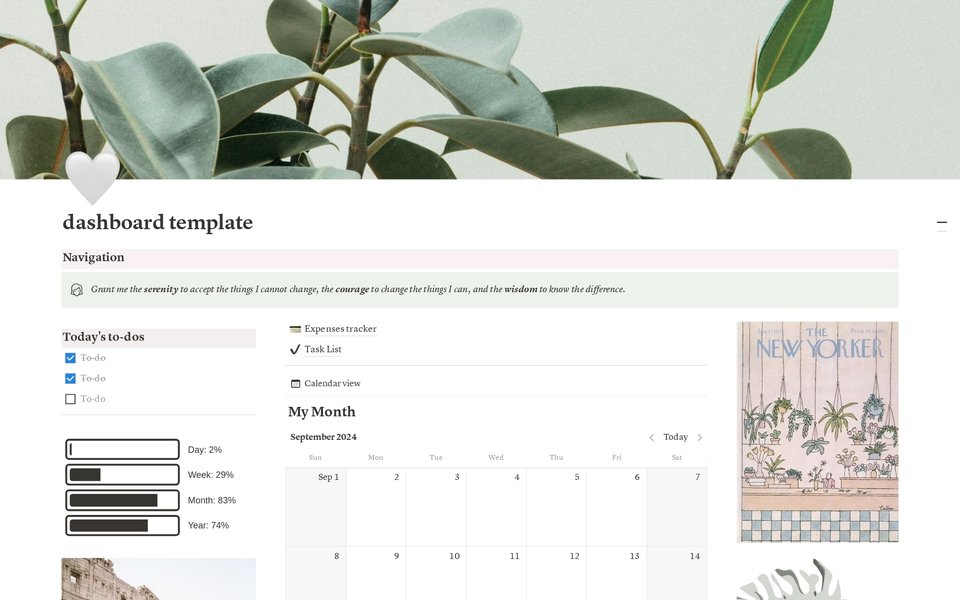
Example of a Personal Dashboard template in Notion's marketplace. Look for the "Duplicate" button in the top-right corner of this preview to add it to your workspace.
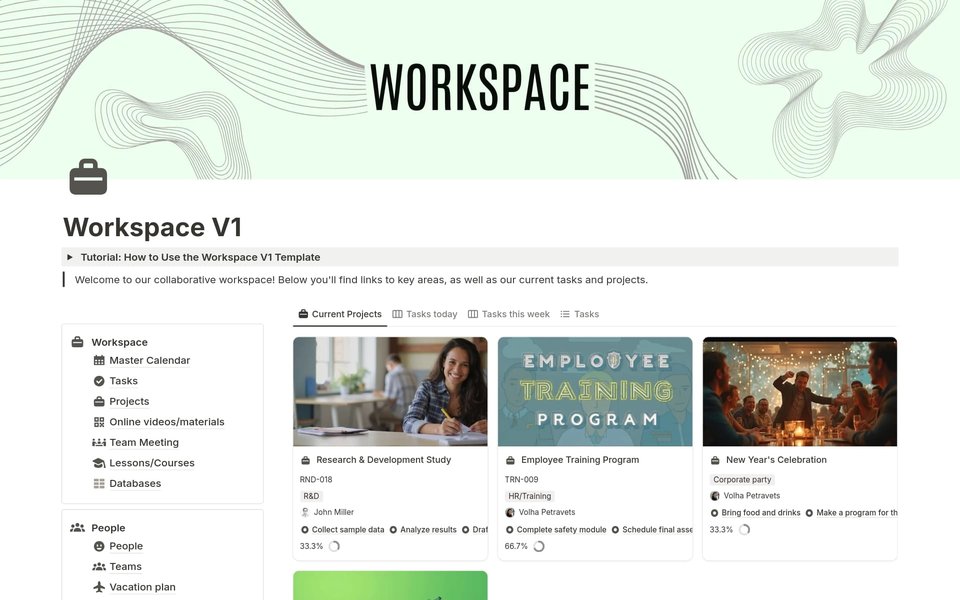
Example of a Workspace template that you might find linked in an article. The duplication process works the same for all templates regardless of their source.
Common Template Types and Their Use Cases
| Template Type | Common Features | Best For | Typical Customizations |
|---|---|---|---|
| Personal Dashboard | Goal trackers, habit trackers, daily planning | Personal organization and productivity | Adding custom categories, adjusting time frames |
| Project Management | Kanban boards, Gantt charts, task databases | Team coordination and project tracking | Modifying task properties, adding team members |
| Content Creation | Article outlines, publishing schedules, idea banks | Writers, bloggers, content marketers | Customizing content categories, adding SEO fields |
| Research Organization | Citation databases, note-taking systems, literature reviews | Students, researchers, academics | Adding custom metadata fields, linking to references |
| Business Operations | CRM systems, invoice tracking, employee databases | Small businesses and entrepreneurs | Customizing client fields, adding financial calculations |
Understanding Template Structure
Frequently Asked Questions
References
- How to Import Templates into Notion: A Step-by-Step Guide - Notionry
- How to Import Notion Template from Link - The Bricks
-
How to Add or Import a Notion Template to Notion from a Notion.Site - NotionApp
- Importing templates - Reddit r/Notion
- How to Import Notion Template (2025) - Super.so
- 99 FREE Notion Templates for Everything - Notion Everything
- Notion Template Gallery - Official Notion
Recommended Searches
Last updated April 3, 2025