
Unlocking Peak Performance: Your Optimal Storage Strategy for H200 GPU-Powered KubeVirt VMs
Navigating Ceph, Local Volumes, and Performance Trade-offs for Your 3-Node OpenShift Cluster.
You're navigating a common yet critical challenge: designing the optimal storage architecture for a high-performance computing environment. Your 3-node cluster, each boasting 4x NVIDIA H200 GPUs and 8x 15.4TB SSDs, is primed for demanding KubeVirt VM workloads on OpenShift. Let's delve into the best storage solutions, evaluate your proposal, and clarify the implications of different approaches.
Essential Insights: Key Takeaways
- Local Volumes Alone Are Risky: Relying solely on local SSDs for VMs in a multi-node KubeVirt setup introduces significant risks regarding high availability, data safety, scalability, and operational complexity.
- Unified Ceph is Recommended: For your configuration, dedicating all 24 SSDs (8 per node) to a unified Ceph cluster, managed by Rook, offers the most robust, scalable, and resilient storage solution for both your VMs and the HA Galera database.
- Replication Factor 3 is Crucial: In a 3-node Ceph cluster, a replication factor of 3 is essential to ensure data durability and high availability, allowing the cluster to tolerate at least one node failure without data loss.
Understanding Your High-Performance Setup
Your hardware configuration – 3 nodes, each with 4 potent NVIDIA H200 GPUs and a substantial 122TB of local SSD storage – is designed for intensive workloads. The choice to use KubeVirt for VMs on OpenShift, without traditional pods, focuses the infrastructure on virtual machine performance and management. The absence of external storage makes the design of your internal storage system paramount.
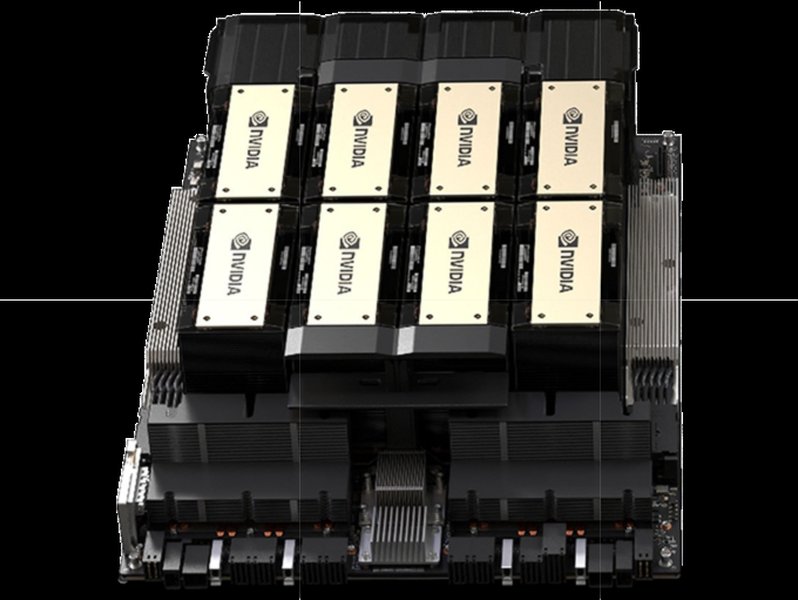
An NVIDIA H200 GPU, central to your high-performance computing nodes.
The Perils of Relying Solely on Local Volumes
Opting to use *only* local volumes across your nodes for KubeVirt VMs would introduce numerous significant drawbacks. While local NVMe SSDs offer excellent raw performance for isolated tasks, they are ill-suited as the sole storage mechanism for a distributed, resilient virtualization platform. Here are over 15 cons:
Availability & Data Redundancy Issues
- No High Availability for Storage: If a node fails, any VMs using its local storage become inaccessible. There's no automatic failover for storage.
- No Data Redundancy: Data on a local volume exists only on that node. A disk or node failure leads to data loss for VMs on that storage.
- Single Point of Failure: Each node’s storage is isolated, making it a single point of failure for the VMs it hosts.
- No Data Healing or Self-Repair: Unlike distributed systems like Ceph, there's no automatic mechanism to repair data corruption or recover from disk failures by using redundant copies.
VM Management & Mobility
- Difficult or Impossible VM Live Migration: KubeVirt's live migration, crucial for maintenance and load balancing, requires shared storage. Local volumes prevent or severely complicate this.
- Complex VM Placement: Decisions on where to place VMs become critical and manual, trying to balance load and capacity on isolated storage.
Scalability & Resource Utilization
- Limited Scalability: Scaling storage capacity is tied to adding more storage to individual nodes or adding new nodes, without a unified pool.
- Inefficient Resource Utilization: Storage capacity can become fragmented. One node might be full while others have ample free space, with no easy way to rebalance.
- Storage Silos: Each node's storage becomes an isolated silo, hindering data sharing and efficient resource pooling.
Performance & Contention
- I/O Contention on Local SSDs: Multiple VMs and potentially GPU-intensive processes on a single node can compete heavily for the I/O bandwidth of local SSDs, leading to performance bottlenecks.
- GPU and Storage I/O Bottlenecks: The powerful H200 GPUs can drive significant I/O. If local storage cannot keep up, overall application performance for GPU-accelerated VMs will suffer.
- Inconsistent Performance: VM storage performance can vary significantly from node to node depending on local load and specific SSD health.
Backup, Data Integrity & Security
- Complex Backup and Restore Procedures: Backups would need to be managed on a per-node, per-VM basis, lacking centralized snapshot or cloning capabilities and increasing the risk of inconsistent backups.
- Increased Risk of Data Loss: Accidental deletion or corruption on a local disk is often irreversible without robust, distributed versioning or snapshots.
- No Unified Security Policies: Managing data security, encryption, and access controls consistently across disparate local volumes is more complex than with a centralized storage system.
Operational & Management Overhead
- Fragmented Storage Management: Administrators must manage storage on each node independently, increasing operational overhead and complexity.
- Lack of Centralized Monitoring: Gaining a unified view of storage health, capacity, and performance across the cluster is difficult.
- Limited Advanced Storage Features: Features common in distributed storage systems like thin provisioning, automated tiering, and quality of service (QoS) are typically unavailable or hard to implement consistently.
- Poor Integration with Kubernetes Storage APIs: Local volumes don't fully leverage PersistentVolume (PV) and PersistentVolumeClaim (PVC) abstractions for dynamic provisioning and lifecycle management as effectively as integrated solutions like Ceph with Rook.
Evaluating Your Proposed Hybrid Storage Solution
Your proposal involves a hybrid approach:
- 2 SSDs per node (6 total) dedicated to a Ceph cluster for VM storage.
- The remaining 6 SSDs per node (18 total) used as local volumes, specifically for an HA database (Galera), aiming to prevent write amplification.
Critique of the Hybrid Model
While dedicating SSDs to Ceph is a good practice, and the intent to manage write amplification for the database is understandable, this hybrid model has notable drawbacks:
- Insufficient Ceph Cluster Size: Using only 6 SSDs across 3 nodes for your primary Ceph cluster (hosting all VMs) is quite small. This limited number of OSDs (Object Storage Daemons) can lead to:
- Reduced performance and throughput due to fewer parallel I/O paths.
- Less resilience; the loss of even one or two OSDs in such a small pool has a greater impact.
- Potential hotspots and uneven data distribution.
- Limited capacity for growth and snapshots. Ceph typically benefits from more OSDs for better distribution and recovery performance.
- Local Volumes for HA Database: While Galera provides application-level replication, relying on local volumes for its data storage reintroduces many of GAlera's aforementioned cons for that critical data. If a node hosting Galera data on local storage fails catastrophically, data recovery can be complex and potentially lead to data loss if Galera's replication state is compromised or if multiple nodes are affected. The goal of preventing write amplification is valid, but a robust, well-tuned Ceph cluster can also host databases, offering superior data protection at the storage layer.
- Complexity of Managing Two Storage Tiers: This approach necessitates managing and monitoring two distinct storage systems (a small Ceph cluster and a collection of local volumes), increasing operational complexity.
- VMs on Local Volumes (if any part of the 18 disks were for VMs): Any VMs placed on these 18 local disks would suffer from all the limitations previously discussed (no HA, no live migration, etc.). Your proposal specifies VMs on Ceph, which is good, but it's crucial to ensure *all* VMs benefit from shared, resilient storage.
Essentially, this hybrid model attempts to gain some benefits of Ceph but significantly constrains its potential and still exposes critical components (like the database) to the risks of local storage.
The Recommended Path: Unified Ceph Storage with Rook
A significantly more robust, scalable, and manageable solution for your OpenShift/KubeVirt environment is to leverage all 8 SSDs per node (24 SSDs total) for a single, large Ceph cluster. This cluster would be managed by Rook, a CNCF-graduated project that automates Ceph deployment, management, and integration within Kubernetes.

Conceptual overview of Ceph's distributed storage architecture, ideal for unified storage.
Benefits of a Unified Ceph Approach:
- True High Availability: Data, including VM disks and database files, is replicated across multiple nodes and disks, ensuring VMs and services remain operational even if a node or several disks fail (depending on configuration).
- Seamless VM Live Migration: With all VM storage on a shared Ceph pool, KubeVirt can perform live migrations efficiently between nodes for maintenance or load balancing.
- Enhanced Data Redundancy and Durability: Ceph's replication and erasure coding mechanisms provide strong protection against data loss.
- Scalability: You can scale storage capacity and performance by adding more OSDs (disks) or entire nodes to the Ceph cluster. The storage pool grows cohesively.
- Centralized Management: Rook simplifies Ceph operations within OpenShift, providing a unified platform for managing all your persistent storage.
- Dynamic Provisioning: Leverage Kubernetes PVCs to dynamically provision storage for VMs and your Galera database from the Ceph cluster.
- Advanced Storage Features: Benefit from Ceph features like snapshots for quick backups/rollbacks, cloning for rapid VM deployment, and potential for quality of service controls.
- Optimized Resource Use: All SSDs contribute to a single, large pool, maximizing the utilization of your available storage hardware.
- Suitable for HA Databases: Storing your Galera database on Ceph (with appropriate tuning) adds storage-level HA and data protection, complementing Galera's application-level replication. While write amplification is a factor with replication, the data safety gains are often paramount.
Ceph Configuration: Replication Factor
If you use all 24 SSDs for Ceph across your 3 nodes, a replication factor of 3 is highly recommended for both your KubeVirt VMs and your HA Galera database.
- Why Replication Factor 3? In a 3-node cluster, a replication factor of 3 means every piece of data is written to three different OSDs, ideally placed on different nodes. This configuration allows your storage system to tolerate the failure of:
- Any single disk.
- Any single node.
- For VMs: This provides robust protection for your virtual machine disks.
- For HA Database (Galera): While Galera itself replicates data across its instances, storing its underlying data files on Ceph with replication factor 3 adds a critical layer of storage-level durability. This protects against scenarios where Galera's replication might be compromised due to rapid successive failures or complex failure modes. The write amplification from Ceph's replication is a trade-off for this enhanced data safety.
Performance Deep Dive: Ceph vs. Local Volumes
Moving from direct local SSD access to a distributed Ceph cluster involves performance trade-offs. It's crucial to understand these for your H200 GPU workloads.
Understanding the Overheads
Ceph introduces overheads not present with local storage:
- Network Latency & Bandwidth: All data operations (reads, writes, replication traffic) traverse the network. A high-speed, low-latency network (e.g., 25GbE or higher) is critical for Ceph performance.
- Replication: Writing data multiple times (e.g., 3x for replication factor 3) consumes additional disk I/O and network bandwidth. This is often referred to as write amplification at the storage layer.
- CPU Usage: Ceph OSDs and Monitors consume CPU resources for data placement, replication, recovery, and metadata operations.
- Distributed Consensus: Operations often require coordination between multiple nodes, adding latency.
Potential Performance Degradation (Estimates)
Compared to the raw performance of an isolated local NVMe SSD, a Ceph cluster might exhibit the following (these are general estimates and can vary widely based on workload, network, tuning, and Ceph version):
- IOPS (Input/Output Operations Per Second): For single-client, small random I/O workloads, you might see a reduction. Some sources suggest this could be in the range of 20-50% lower IOPS compared to direct local SSD access. However, Ceph can often deliver very high aggregate IOPS across many clients/VMs.
- Read/Write Speed (Throughput):
- Write Speed: Due to replication, effective write throughput for a single stream might be roughly 1/3 of the aggregate write capacity of the disks involved in the replica set (for replication factor 3), plus network overhead. Some benchmarks indicate a potential 40-60% reduction in single-stream sequential write speed compared to local.
- Read Speed: Read performance is often less impacted than write performance, as Ceph can read from any available replica, potentially parallelizing reads. Degradation might be in the 20-50% range for single streams, but aggregate read throughput can be very high, summing the capabilities of many OSDs. The H200 GPUs' need for high read bandwidth (e.g., 4 GBps per GPU mentioned in some contexts) can be met by a well-sized and tuned all-SSD Ceph cluster, especially when data is distributed across many fast OSDs.
The Broader Performance Picture
While raw single-VM latency might be higher with Ceph, the benefits often outweigh this in a virtualized, HA environment:
- Aggregate Performance: A Ceph cluster with 24 SSDs can provide massive aggregate throughput and IOPS to many VMs simultaneously, potentially exceeding what isolated local disks could offer in a consolidated fashion.
- Consistency and Predictability: Performance can be more consistent across the cluster once tuned.
- Resilience Benefits: The performance cost buys you high availability, data durability, and easier management, which are critical for production VM workloads.
For your HA Galera database, the write amplification inherent in Ceph's replication (e.g., factor 3) means each database write results in three writes at the storage layer. This is a known trade-off for durability. Careful Ceph tuning (e.g., journal configuration, appropriate pool types) can help optimize performance for database workloads.
Comparative analysis of storage architectures based on key operational and performance metrics. Higher scores are generally better, except for Management Complexity where lower is better.
Visualizing Storage Architecture Choices
The decision process for your storage architecture involves several interconnected factors. A mindmap can help visualize these relationships and guide your strategy:
This mindmap illustrates the primary decision pathways, highlighting why a unified Ceph approach is generally favored for environments like yours, balancing performance with critical enterprise features.
Storage Architecture Comparison
To further clarify the differences, here's a table comparing the three main storage strategies discussed:
| Feature | Local Volumes Only | User's Hybrid Proposal | Recommended: Unified Ceph (All SSDs) |
|---|---|---|---|
| High Availability | Very Low (Node is Single Point of Failure) | Partial (VMs on small Ceph better; DB on local is risky) | High (Data replicated across nodes) |
| VM Live Migration | Effectively Impossible | VMs on Ceph: Yes; Others (if any): No | Yes (Enabled by shared storage) |
| Data Redundancy | None (Single copy of data) | VMs on Ceph: Yes (if configured); DB: Application-level only | High (e.g., 3 copies with replication factor 3) |
| Scalability | Poor (Node-bound, manual expansion) | Ceph part: Yes, but small base; Local part: Poor | Good (Add nodes/disks to unified pool) |
| Management Effort | High (Per-node, fragmented, manual) | Moderate (Managing two distinct storage systems) | Lower (Unified, orchestrated by Rook) |
| Raw Single-VM Performance (IOPS/Latency) | Potentially Highest (direct SSD access) | VMs on Ceph: Lower; Local: Higher | Moderate (Network/replication overhead) |
| Aggregate Cluster Throughput | Limited by individual node capabilities | Mixed; small Ceph limits aggregate | Potentially Very High (Distributed across all SSDs) |
| Suitability for HA Database (Galera) | Risky (Storage is SPOF despite Galera's replication) | Risky (Local storage vulnerabilities remain) | Good (Storage-level HA complements application HA) |
| Write Amplification for Database | Dependent on local SSD controller/filesystem | DB on Local: Aim to control at device level | Ceph: Replication-driven (e.g., 3x); Tunable |
| Overall Robustness & Resilience | Low | Moderate (Better than local-only, but has gaps) | High |
Insights on Production-Grade Ceph Clusters
Implementing and managing a Ceph cluster, especially in a production environment with OpenShift and KubeVirt, requires attention to best practices. The following video offers valuable insights into running a production-grade Rook/Ceph cluster, covering aspects relevant to your setup, such as stability, performance, and operational considerations.
"Best Practices of Production-Grade Rook/Ceph Cluster" - a helpful resource for understanding Ceph in production.
Key takeaways often include the importance of a reliable network, sufficient resources for Ceph MONs and OSDs, proper pool configuration, and regular monitoring.
Frequently Asked Questions (FAQ)
Why not use local volumes for the Galera database to avoid Ceph's write amplification?
While local volumes might seem to offer more direct control over write amplification at the device level, they expose your HA database to significant risks. If the node hosting a Galera instance with data on local storage fails, data recovery can be complex and may lead to data loss, even with Galera's own replication. Ceph, with a replication factor of 3, provides an essential layer of storage-level fault tolerance. The write amplification from Ceph's replication is a trade-off for much higher data durability and availability, which is typically preferred for critical databases. Moreover, Ceph can be tuned to optimize performance for database workloads.
Is a replication factor of 2 enough for a 3-node Ceph cluster?
While technically functional, a replication factor of 2 in a 3-node cluster is generally not recommended for production workloads. It means you only have two copies of your data. If one node (or the OSDs on it holding one copy) fails, you are down to a single copy of that data. If another failure occurs on a different node holding the remaining copy before the first failure is fully recovered and data re-replicated, you will experience data loss. A replication factor of 3 provides N-2 redundancy in a 3-node cluster (can tolerate one node failure) and is the standard practice for ensuring data safety and availability.
How critical is the network for Ceph performance?
The network is extremely critical for Ceph performance. Ceph is a distributed storage system, meaning all client I/O, data replication traffic between OSDs, and cluster rebalancing/recovery traffic flows over the network. A slow, high-latency, or congested network will severely bottleneck Ceph performance, regardless of how fast your SSDs are. For production Ceph clusters, dedicated high-bandwidth (e.g., 10GbE, 25GbE, or faster) and low-latency networks are strongly recommended for both the public (client-facing) and cluster (internal OSD replication) traffic.
Can Ceph match the raw speed of local NVMe SSDs for a single VM?
For a single VM performing I/O operations, especially latency-sensitive random I/O, Ceph will generally not match the raw speed or ultra-low latency of a direct-attached local NVMe SSD. This is due to the inherent overheads of network communication, data replication, and distributed consensus. However, Ceph excels in providing high aggregate throughput and IOPS to many VMs simultaneously and offers crucial benefits like high availability, data durability, and scalability that local SSDs alone cannot provide in a clustered environment.
What are Ceph Monitors (MONs) and Object Storage Daemons (OSDs)?
Ceph Monitors (MONs) maintain the master copy of the cluster map, which includes information about the cluster topology, data placement (CRUSH map), and the state of OSDs and other Ceph daemons. They are essential for the overall health and coordination of the Ceph cluster. An odd number of MONs (typically 3 or 5) is required for quorum and high availability.
Object Storage Daemons (OSDs) are the workhorses of the Ceph cluster. Each OSD is typically associated with a single physical storage device (like one of your SSDs). OSDs store the actual data objects, handle data replication, recovery, rebalancing, and provide I/O services to clients. The number and performance of OSDs directly impact the capacity and performance of the Ceph cluster.
Recommended Further Exploration
- How can I fine-tune Ceph performance specifically for KubeVirt virtual machines running on an OpenShift platform?
- What are the networking best practices to ensure optimal performance and stability for a 3-node Ceph cluster managed by Rook?
- What are effective strategies for backing up and restoring KubeVirt VMs when their storage is on Ceph, particularly using Ceph snapshots within an OpenShift environment?
- When should I choose Ceph Block Device (RBD) versus CephFS for storing KubeVirt VM disks, considering different application requirements?
References

Last updated May 11, 2025