
Optimization Tips for Ray Tracing with DLSS
Unlocking superior performance while maintaining stunning visuals
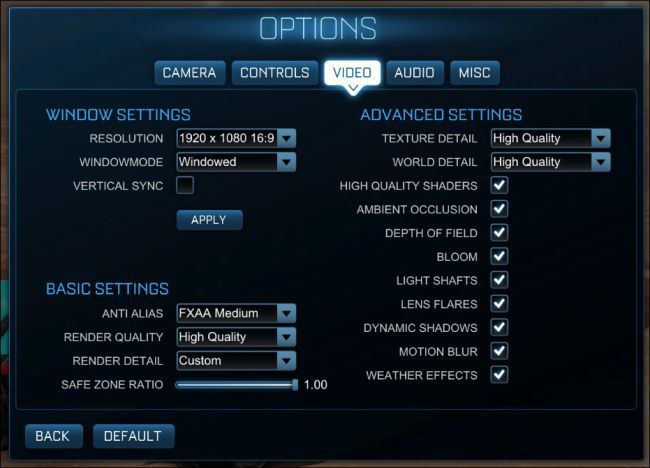
Key Highlights
- DLSS Modes and Resolution Scaling: Experiment with various DLSS modes and upscale techniques to balance performance and visual fidelity.
- Driver and Hardware Updates: Keep GPU drivers and hardware firmware updated to leverage the latest optimizations for ray tracing and DLSS.
- Fine-Tuning Ray Tracing Settings: Adjust ray tracing parameters and selectively disable less critical effects to minimize performance overhead.
Understanding the Basics
Ray tracing is a powerful rendering technique that simulates the interaction of light with virtual objects to produce high-fidelity visuals. However, its computational cost is high, which can lead to lower frame rates in graphically intensive scenarios. Deep Learning Super Sampling (DLSS) is a technology developed by NVIDIA that utilizes AI to upscale lower-resolution images into a higher-resolution frame while preserving details. When these two technologies are combined, gamers can achieve beautifully detailed environments with realistic lighting, reflections, and shadows, all while maintaining smoother gameplay.
Overview of DLSS
DLSS works by rendering the game at a lower resolution and then using neural networks to scale the image up to the desired display resolution. This approach significantly reduces the burden on hardware while aiming to retain image quality. Different DLSS modes – such as Quality, Balanced, Performance, and Ultra Performance – allow users to prioritize visual quality or performance based on their hardware configuration. Recent advancements in DLSS include features like Ray Reconstruction, which improve the quality of ray-traced effects by intelligently replacing traditional denoising methods with AI-generated enhancements.
Understanding Ray Tracing
Ray tracing simulates real light behavior by extending rays from the camera (or “eye”) and simulating the interaction of these rays with objects in the scene. This method produces highly realistic lighting, reflections, refractions, and shadows, but each traced ray demands considerable computational resources. Consequently, optimizing ray tracing settings is vital to balance performance (frame rate) and visual excellence.
Optimization Strategies for DLSS with Ray Tracing
DLSS-Specific Techniques
Choosing the Right Mode
Depending on your system’s capabilities and gaming requirements, start by selecting a DLSS mode that best suits your needs. Here are the available options:
- Quality Mode: Optimizes for best image quality, suitable for systems where performance is not a limiting factor.
- Balanced Mode: Offers a compromise between visual fidelity and performance; a good starting point when incorporating ray tracing effects.
- Performance Mode: Reduces rendering resolution more aggressively, making it ideal for high-fidelity ray tracing scenarios where higher frame rates take precedence.
- Ultra Performance Mode: Suitable for lower-end systems, enabling real-time ray tracing without severely compromising frame rates.
Resolution Scaling and Frame Generation
Employ resolution scaling using DLSS to render at a lower resolution while maintaining the appearance of a higher resolution output. Platforms that support DLSS Frame Generation can insert additional frames between rendered ones, further enhancing the smoothness of gameplay. This approach is particularly useful for leveraging the full potential of RTX 40 series hardware.
Optimizing Ray Tracing Parameters
Adjusting Ray Tracing Settings
Fine-tuning the various ray tracing settings is a key element in achieving optimal results:
- Shadows and Reflections: Experiment with lowering the quality or intensity of ray-traced shadows and reflections. Many games allow you to adjust these parameters individually. Reducing the complexity of reflections and shadow details in areas where extreme fidelity is less noticeable can yield significant performance improvements.
- Ambient Occlusion: Adjust the settings for ambient occlusion, which helps simulate soft shadows in corners and crevices. In some cases, reducing the ray count or turning off secondary ray bounces can help reduce load on your GPU.
- Selective Feature Disabling: Some games enable you to disable specific ray tracing effects that are less central to the visual experience. This might include secondary lighting effects or minor reflection details that do not significantly affect the overall aesthetics but impact performance.
Scene-Specific Optimizations
Beyond general settings, some optimization strategies can depend on the scene composition:
- Backwards Ray Tracing: Implementing backwards ray tracing techniques, where rays are traced from the viewer’s perspective, can reduce unnecessary computations by focusing only on what is visible.
- Hierarchy and Bounding Volumes: Utilizing hierarchical bounding volumes minimizes intersection tests by organizing objects into simpler, larger volumes (or groups). This significantly reduces computation in complex scenes.
- Dynamic Object Selection: Prioritizing objects based on their visibility and relevance to the viewer can ensure that only what is essential is computed with full ray-traced detail.
Hardware and Software Considerations
Keeping Drivers and Software Updated
One of the simplest yet most effective methods of optimization is to ensure your GPU’s drivers are up to date. Manufacturers frequently release driver updates that improve performance, fix bugs, and offer specific enhancements for new ray tracing and DLSS implementations. Software tools such as NVIDIA GeForce Experience or AMD Radeon Software can perform these updates with minimal hassle.
Utilizing Game-Specific Settings
Many modern games incorporate built-in tools and profiles designed to optimize settings based on your system's hardware. These profiles adjust both ray tracing and DLSS parameters to strike a balance customized for your environment. Make sure to use recommended settings provided by the game as a baseline and tweak from there as needed.
Practical Implementation: A Comparative Overview
Summary Table of Optimization Techniques
| Category | Techniques | Benefits |
|---|---|---|
| DLSS Modes |
|
|
| Resolution Scaling |
|
|
| Ray Tracing Settings |
|
|
| Scene-Based Optimizations |
|
|
| Hardware/Driver Updates |
|
|
Integrating Advanced Techniques
DLSS Enhancements
The DLSS integration is continually evolving. With the introduction of DLSS 3.5 and later versions, additional features such as Ray Reconstruction have emerged. This method leverages AI to augment the ray-traced images, effectively reducing the reliance on hand-tuned denoisers. This means that even when you adjust ray tracing settings to lower details in shadows or reflections, the quality can be improved via AI-enhanced reconstruction processes. These improvements translate to less visible artifacts and more coherent details in fast-paced scenes.
Hardware-Specific Optimizations
With the release of the latest RTX 40 series graphics cards, ray tracing and DLSS are more deeply integrated into the hardware. This specialized processing allows real-time ray tracing to be executed more efficiently while taking full advantage of DLSS upscaling. For gamers with these top-tier systems, it is crucial to:
- Utilize DLSS Frame Generation when available. This technology inserts intermediate frames to smooth out animations and gameplay, resulting in a more responsive experience.
- Experiment with input resolutions. For instance, using a slightly lower base resolution like 1440p instead of 4K, then upscaling via DLSS, can lead to better consistency in performance without drastically sacrificing stunning visual detail.
Optimizing Scene Complexity
The complexity of a scene directly influences the performance of ray tracing. In scenes densely packed with objects, it is beneficial to leverage data structure optimizations, such as hierarchical bounding volume arrangements, to minimize the number of calculations per frame.
Furthermore, tailoring dynamic object selections—where only critical objects that significantly contribute to the visual experience are computed with full-detail ray tracing—can further enhance overall performance.
Practical Considerations and Tips
Troubleshooting and Fine-Tuning
Effective optimization is often an iterative process. Begin with the settings recommended by your game or GPU manufacturer and then refine them based on your experience. For instance, if you notice that shadow details do not significantly affect gameplay at a distance, consider reducing their quality or frequency. Use third-party tools like MSI Afterburner or Razer Cortex to monitor GPU temperatures, frame rates, and other performance metrics in real-time. This data allows you to make informed adjustments that balance visual quality with acceptable performance levels.
Utilizing Game-Specific Configuration Menus
Many modern titles now offer in-game benchmarking and configuration tools. These tools automatically adjust settings for ray tracing and DLSS in response to your hardware. While these recommendations provide a robust baseline, use them as a starting point before delving deeper into manual adjustments. Personal gaming preferences and specific scene requirements might call for further tweaks. Tuning individual settings can give you a custom-tailored experience that maximizes both graphical fidelity and framerate.
Additional Resources and References
For in-depth details and the latest developments, consider visiting the following resources which provide technical insights, community discussions, and official updates on both DLSS and ray tracing optimization:
References
- How to Optimize Ray Tracing Performance - Tech Centurion
- Optimize Gaming PC for Ray Tracing - Early Finder
- NVIDIA DLSS 3.5 Ray Reconstruction - NVIDIA
- NVIDIA DLSS - NVIDIA Developer
- Cyberpunk 2077 Optimized Settings 2025 - PC Optimized Settings
Recommended Further Explorations
Last updated March 17, 2025