
Optimizing DeepSeek R1 70B on Systems with Limited VRAM
Strategic approaches for high-performance model management under VRAM constraints
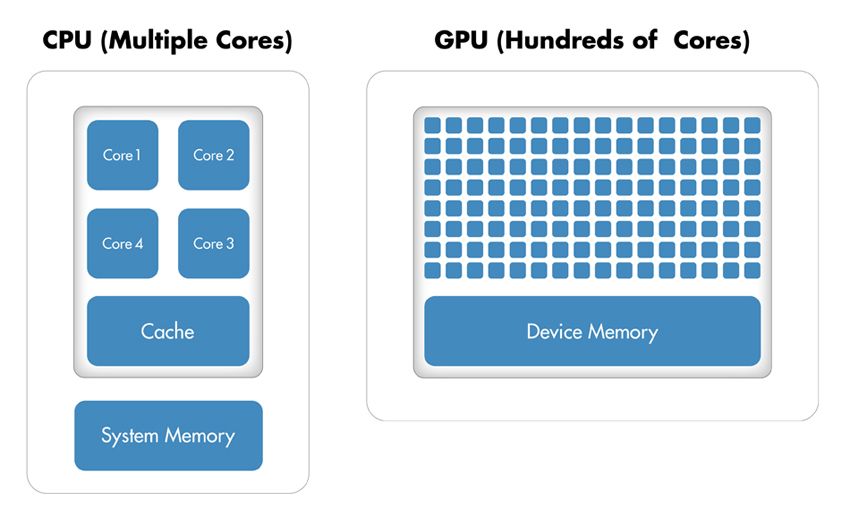
Key Highlights
- Distillation and Quantization: Use distilled model variants and quantization techniques to substantially reduce model size and VRAM needs.
- Dynamic Memory Management: Implement offloading, mixed precision, and optimal batch size strategies to effectively manage limited GPU memory.
- Multi-GPU and Hardware Strategies: Leverage multi-GPU setups and adjust hardware configurations, including adopting enterprise-grade GPUs when available.
Understanding the Challenge
The DeepSeek R1 70B model, with its significant parameter count, is designed for high-level reasoning tasks. However, the high computational demands and substantial VRAM requirements can create bottlenecks, particularly on systems with limited GPU memory. Optimizing such a model involves a multifaceted approach that includes both algorithmic and hardware-based strategies to balance performance with resource limitations.
Optimization Strategies Overview
There are several key strategies to optimize DeepSeek R1 70B for limited VRAM environments. The primary areas of focus are model reduction techniques, dynamic memory management, hardware configuration adjustments, and performance tuning during inference. The following sections provide an in-depth discussion of each approach.
1. Model Size Reduction Techniques
A. Model Distillation
Model distillation involves training a smaller network, derived from the full-size DeepSeek R1 70B, which retains the core reasoning and performance capabilities. Typically, distilled models such as variants based on Llama or Qwen architectures are used. These versions reduce the number of parameters, making them much more amenable to environments with VRAM restrictions. For example, distilled models may require as little as 3.5 GB VRAM for small variants while still performing effectively.
B. Quantization
Quantization is a technique that reduces the precision of the model's weights, thereby lowering the memory footprint. Approaches such as converting weights to 4-bit or 8-bit precision can bring down VRAM requirements significantly. While 4-bit quantization generally results in the most dramatic memory savings, there might be a trade-off in terms of some performance reduction. When applied correctly, quantization will deliver a balance between computational efficiency and model accuracy.
2. Dynamic Memory Management
A. Memory Offloading
Memory offloading is a technique where less active parts of the model are transferred from GPU memory to the system RAM. Techniques such as dynamic or selective layer offloading allow critical portions of the model to remain on the GPU while shifting others to the CPU. This approach minimizes the VRAM burden and keeps overall performance within acceptable limits, albeit with some potential latency increases.
B. Mixed Precision Inference
Mixed precision training and inference make use of multiple numerical formats (e.g., a combination of 16-bit and 32-bit floating-point data types) to reduce memory consumption without significantly sacrificing performance. For example, adopting 4-bit or 8-bit representations where possible helps in managing VRAM efficiently. The use of mixed precision is particularly effective when paired with quantization, striking a fine balance between speed and model fidelity.
C. Optimal Batch Size and Context Length
Adjusting batch sizes or reducing the context length during inference can further lower memory requirements. Smaller batch sizes mean fewer inputs processed simultaneously, hence lower VRAM peak usage. While this might slow down overall throughput, it is a necessary trade-off in resource-constrained environments.
3. Hardware and Configuration Adjustments
A. Multi-GPU Configurations
Deploying a multi-GPU setup is one of the most effective approaches to handle the high requirements of DeepSeek R1 70B. Splitting the model’s workload across two or more GPUs can distribute the VRAM load and yield a more efficient inference process. For example, if a single GPU has 24 GB VRAM, a dual setup can virtually combine these resources, making it feasible to run even larger models.
B. Adjusting GPU Memory Allocation
For users with high-end GPUs like the NVIDIA RTX 4090 or enterprise-level cards, it is essential to optimize GPU configurations such as CUDA kernels, streams, and memory allocation settings. Ensuring that the system uses mixed precision and quantization correctly, while minimizing overhead from other running processes, can lead to further VRAM savings.
C. Utilizing Cloud GPU Services
In cases where local hardware is insufficient, renting or using cloud-based GPU instances can be a cost-effective way to access higher VRAM thresholds. This approach allows developers to adjust runtime configurations based on peak loads without permanent hardware upgrades.
4. Application-Level Optimizations
A. Pipeline Processing
By processing inputs in a pipeline rather than in a single monolithic pass, you can effectively reduce the instantaneous VRAM load. This involves batching the data into smaller segments and sequentially processing them. Though this might introduce some latency, it significantly reduces the memory footprint during inference.
B. Adjusting Inference Parameters
Altering the inference parameters such as temperature, top-k sampling, or beam width can affect memory usage. These settings determine the complexity of the processing load, and careful tuning can help maintain a balance between performance and resource use.
5. Performance Optimization Tools and Techniques
A. Utilizing Specialized Frameworks
Specialized frameworks or libraries designed for efficient memory management and acceleration can be extremely beneficial. Tools that support layer offloading, quantization, and mixed precision, such as those integrated into deep learning libraries, provide a robust foundation for running large-scale models under constrained resources.
B. Continuous Monitoring and Tuning
Implementing robust monitoring tools to continuously track memory usage and performance metrics is vital. Optimizing VRAM utilization is an iterative process; practical adjustments based on feedback from diagnostic tools ensure that the model operates within the desired performance and efficiency margins.
Practical Implementation: An Example Configuration
Below is an example of how one might configure the DeepSeek R1 70B with optimizations for a system with limited VRAM. This configuration includes distilled model use, quantization settings, GPU layer adjustments, and offloading strategies.
| Optimization Strategy | Description | VRAM Impact |
|---|---|---|
| Model Distillation | Utilize smaller distilled versions of the model to reduce parameter count. | Substantial decrease in VRAM usage (3.5 - 16GB depending on variant) |
| Quantization (4-bit/8-bit) | Reduce precision of model weights to lower memory footprint. | VRAM reduction; trade-off with minor performance impact |
| Layer Offloading | Selective shifting of less critical layers to CPU memory. | Improves VRAM availability while managing latency |
| Mixed Precision | Handle computations with lower precision formats combined with full precision. | Optimizes memory usage with minimal performance loss |
| Multi-GPU Setup | Distribute the model workload across multiple GPUs. | Enhanced effective VRAM by aggregating GPU resources |
The configuration might be implemented through command-line scripts or integrated into a deployment pipeline. Carefully adjusting parameters like context length, batch size, and GPU layer allocation can further tune performance.
Best Practices and Final Considerations
When optimizing DeepSeek R1 70B for systems with limited VRAM, it’s essential to consider the following best practices:
Minimize Overhead
Closing background processes and using dedicated environments for model deployment can reduce additional memory consumption. By isolating the optimization process, the operational efficiency of DeepSeek R1 70B will be maximized.
Iterative Testing
Every system configuration behaves differently. Therefore, iterative testing using monitoring tools is imperative. Experiment with different quantization levels, batch sizes, and offloading strategies to determine the optimal configuration for your particular hardware.
Balancing Performance and Resources
Striking a balance between model accuracy and VRAM consumption is key. In environments where performance cannot be heavily compromised, employing a combination of distilled models, quantization, and offloading strategies ensures that the DeepSeek R1 70B can function effectively even with limited resources.
Conclusion
Optimizing the DeepSeek R1 70B model on systems with limited VRAM is a multifaceted challenge that requires a combination of several strategies. By employing model distillation and quantization, users can reduce the overall memory footprint of the model without sacrificing its key capabilities. Dynamic memory management through mixed precision and offloading, along with adjustments to inference parameters like batch size and context length, further assists in balancing workload efficiently.
Additionally, configuring multi-GPU setups or leveraging cloud-based GPU services can also mitigate VRAM limitations. Employing iterative testing and performance monitoring tools to fine-tune settings ensures that the optimization not only reduces VRAM usage but also maintains the desired level of performance. This integrated approach allows users to deploy DeepSeek R1 70B within resource-constrained environments while still reaping the benefits of its advanced reasoning capabilities.
References
- GPU Requirements for DeepSeek-R1 - APXML
- We Tested DeepSeek - Quickchat
- DeepSeek R1 Architecture and Requirements - DEV.to
- Running Reasoning LLMs Locally - O'Brien Labs
Recommended Further Exploration
Last updated February 28, 2025