
Struggling with Complex n8n JSON? Discover a More Efficient Path to Flawless Automations!
Unlock greater efficiency and reduce errors in your n8n workflow development by leveraging advanced AI-assisted coding environments.
Building intricate n8n automations often involves wrestling with complex JSON configurations. If you're finding that your current approach using ChatGPT Pro is leading to frequent errors and inefficiencies, especially as your builds grow in complexity, it's wise to explore alternatives. This guide delves into whether transitioning to a more integrated development environment like Visual Studio Code (VS Code) combined with AI tools such as Gemini Code Assist, potentially through an interface like Cursor, could be the key to streamlining your n8n workflow creation.
Key Insights for Enhanced n8n Development
- Integrated AI Assistants: Tools like Gemini Code Assist within VS Code offer superior JSON generation, validation, and context-awareness compared to standalone chat interfaces, potentially reducing errors in complex n8n workflows.
- Development Environment Benefits: VS Code provides a robust ecosystem with features like linting, debugging, version control integration, and schema validation, crucial for managing intricate n8n JSON structures.
- Best Practices Are Paramount: Regardless of the tools used, adhering to n8n best practices—such as modular design, thorough documentation, version control, and comprehensive testing—is fundamental for efficient and reliable automations.
Evaluating Your Current Approach: ChatGPT Pro for n8n JSON
Using ChatGPT Pro for generating n8n workflow JSON has its advantages, particularly in its intuitive natural language interface. However, for complex automations, its limitations can become significant.
Pros of Using ChatGPT Pro
- Ease of Use: ChatGPT's conversational nature allows for quick generation of ideas and initial JSON snippets. It's accessible even if you're less familiar with the intricacies of JSON.
- Rapid Ideation: Useful for brainstorming workflow logic or getting suggestions for specific n8n nodes or configurations.
Cons and Challenges with ChatGPT Pro
- Error Proneness: As you've experienced, ChatGPT can produce errors, inconsistencies, or suboptimal JSON, especially for deeply nested structures or complex n8n node configurations. AI-generated code often requires manual review and correction, and can sometimes overlook n8n-specific nuances.
- Lack of Integrated Validation: The chat interface doesn't offer real-time JSON validation, linting, or schema checking, increasing the likelihood of deploying faulty workflows.
- Manual Processes: Copy-pasting JSON and synchronizing property names between ChatGPT and your n8n instance can be tedious and error-prone.
- Limited Context: While powerful, ChatGPT might not always grasp the full context of a large, evolving n8n workflow, leading to suggestions that don't fit or that introduce bugs.
- Inefficiency for Iterative Development: The back-and-forth between generating, testing, and correcting JSON in a separate interface can significantly slow down development for complex projects.
The Alternative: VS Code with AI Coding Assistants like Gemini
Transitioning to a dedicated code editor like Visual Studio Code, enhanced with AI coding assistants such as Gemini Code Assist (which can be accessed directly or via tools like Cursor, an AI-first editor), presents a more robust environment for building complex n8n automations.
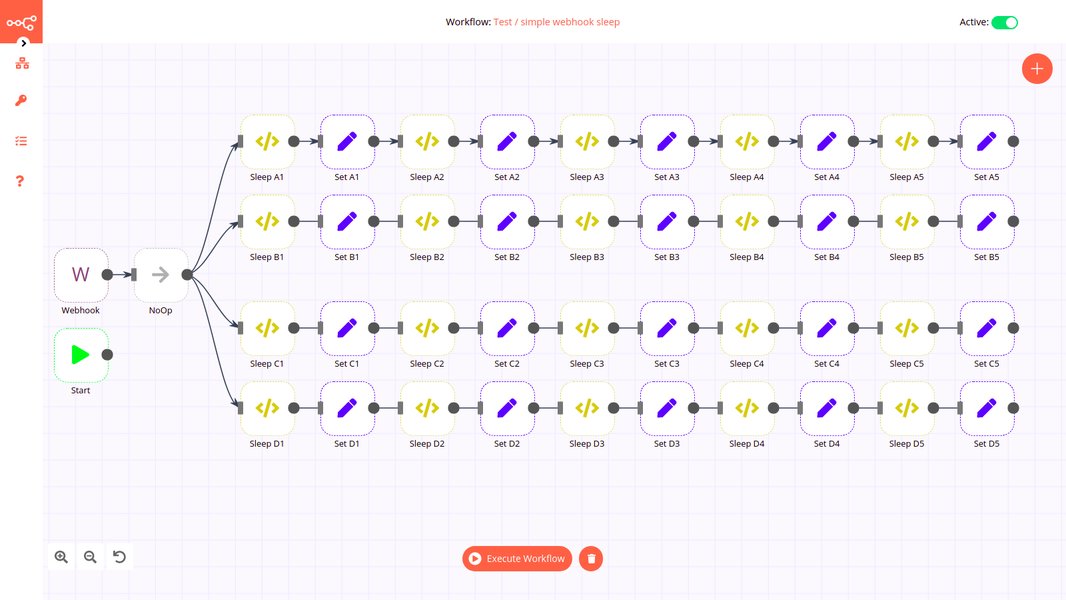
A visual representation of an n8n workflow, highlighting the node-based structure often defined by complex JSON.
Understanding Gemini Code Assist and Cursor
Gemini Code Assist is an AI-powered coding assistant designed to integrate directly into IDEs like VS Code. It offers features like intelligent code completion, code generation from natural language prompts, debugging assistance, and context-aware suggestions. It's tailored for developers and aims to improve productivity and code quality.
Cursor is an AI-first code editor that often leverages VS Code's foundation and can integrate with various AI models, including Gemini. It's designed to facilitate a more seamless AI-assisted coding experience directly within the editor.
Advantages for n8n JSON Development
Enhanced JSON Generation and Validation
AI assistants within VS Code, like Gemini, are generally better at generating and validating structured data formats like JSON. They can leverage schema information (if available) and provide real-time feedback, auto-completing objects, suggesting corrections, and helping ensure your n8n node configurations are correctly formatted. This can significantly reduce the syntax and structural errors common with standalone chat-based generation.
Superior Development Environment
VS Code offers a rich ecosystem for developers:
- Linting and Formatting: Extensions can automatically check your JSON for errors (linting) and format it consistently, improving readability and maintainability.
- Schema Validation: You can use JSON schemas for n8n nodes to get real-time validation within VS Code, catching errors before you even run the workflow.
- Version Control Integration: Seamless integration with Git allows you to track changes to your workflow JSON files, revert to previous versions, and collaborate more effectively. This is a crucial best practice for complex projects.
- Debugging Tools: While n8n has its own debugging, VS Code's environment can assist in analyzing and fixing issues within the JSON itself or related helper scripts.
Improved Iteration and Debugging
Having your AI assistant directly within your code editor means you can generate, modify, and test JSON structures more rapidly. Immediate feedback and the ability to quickly iterate on AI suggestions within the same environment streamline the debugging process, reducing the context-switching inherent in using a separate chat tool.
Contextual Awareness
AI assistants integrated into IDEs often have better access to the broader context of your project, including other files and existing code patterns. This can lead to more relevant and accurate suggestions for your n8n JSON.
Potential Considerations
- Learning Curve: If you're not already familiar with VS Code or AI coding assistants, there might be an initial learning period to become proficient with the environment and its features.
- AI is Still an Assistant: While more integrated and potentially more accurate, AI-generated code (including JSON) should always be reviewed and tested. These tools assist, they don't replace human oversight.
Comparative Analysis: ChatGPT Pro vs. VS Code + AI Assistant
To help you decide, here's a comparative look at how these two approaches stack up across key factors relevant to building complex n8n JSON.
This radar chart visually compares ChatGPT Pro and VS Code with Gemini Code Assist across several factors critical for n8n JSON development. Higher scores (further from the center) indicate better performance in that category. As shown, VS Code with an integrated AI assistant generally offers more advantages for complex, error-sensitive tasks.
Recommendation: A Hybrid Approach Might Be Optimal
For building complex n8n automations, especially those involving intricate JSON structures, migrating your core development and JSON generation to VS Code with an AI assistant like Gemini Code Assist (potentially via Cursor) is likely to be significantly more efficient and result in fewer errors than relying solely on ChatGPT Pro.
However, this doesn't mean ChatGPT Pro has no role. A hybrid approach can be very effective:
- ChatGPT Pro for Ideation: Use its natural language strengths for brainstorming initial workflow logic, exploring different n8n nodes, or getting high-level architectural ideas.
- VS Code + AI Assistant for Implementation: Switch to VS Code for the detailed work of writing, refining, validating, and debugging the n8n workflow JSON. The integrated tools and features will provide a much more controlled and accurate environment.
This combination allows you to leverage the creative flexibility of a chatbot with the precision and power of a dedicated coding environment.
Essential n8n Best Practices for Efficiency and Reliability
Regardless of the tools you choose, adhering to n8n best practices is crucial for managing complexity and ensuring your automations are robust and maintainable. These practices will help you even if you stick with ChatGPT, but they become even more powerful when combined with a proper development environment.
(Small, Reusable Workflows)"] id4b["Thorough Documentation
(Nodes, Logic, Credentials)"] id4c["Version Control (e.g., Git)
(Track JSON Changes)"] id4d["Comprehensive Error Handling
(Try-Catch, Fallbacks)"] id4e["Security Measures
(Credential Management, Least Privilege)"] id4f["Incremental Testing"]
This mindmap outlines the key aspects of choosing and optimizing your n8n development process, from evaluating current and proposed methods to emphasizing the importance of best practices.
Keep Workflows Small and Modular
Break down large, complex automations into smaller, interconnected workflows. This makes them easier to understand, debug, and maintain. It also allows for reusability of common components.
Document Everything
Thoroughly document your workflows, including the purpose of each node, the logic flow, any complex expressions used, and credential management. This is invaluable for future you and for anyone else who might work on the automations.
Use Version Control
Store your n8n workflow JSON files in a version control system like Git. This allows you to track changes, revert to previous versions if something breaks, and collaborate with others more effectively. This is particularly important when AI tools are modifying your JSON.
Handle Exceptions Properly
Implement robust error handling within your workflows. Use n8n's error handling nodes (like "Error Trigger" or conditional logic with "Try/Catch" patterns) to manage unexpected issues gracefully and prevent entire workflows from failing silently.
Focus on Security
Manage credentials securely using n8n's built-in credential management system. Avoid hardcoding sensitive information directly into your JSON. Run n8n with the least privilege necessary.
Test Incrementally and Thoroughly
Test your workflows at each stage of development. Don't wait until the entire automation is built to start testing. Use sample data and test edge cases to ensure reliability.
Tabular Comparison: Development Approaches
The following table summarizes the key differences between using ChatGPT Pro and a VS Code setup with an integrated AI assistant like Gemini for n8n JSON development.
| Feature / Aspect | ChatGPT Pro | VS Code + Gemini Code Assist (or similar) |
|---|---|---|
| Primary Use Case | Natural language ideation, quick snippets, simple JSON | Complex JSON generation, code editing, integrated development |
| JSON Accuracy for Complex n8n | Lower; prone to structural errors and inconsistencies | Higher; better context, schema awareness, real-time validation aid |
| Development Environment Integration | Minimal; external chat interface | Deep; integrated within the code editor (linting, formatting, Git) |
| Real-time Validation & Debugging Aid | None directly in the interface | Strong; via extensions and AI assistant capabilities |
| Learning Curve (for this specific task) | Low for chat, but high for error correction | Moderate for VS Code/AI setup, potentially lower overall due to fewer errors |
| Efficiency for Complex Builds | Low; frequent errors and manual iteration | High; streamlined workflow, better error prevention |
| Version Control | Not inherently supported; manual process | Natively supported via Git integration |
| Context Management for Large Workflows | Limited by chat history and input | Better; can analyze project files and code context |
This table provides a direct comparison to help you weigh the pros and cons of each approach based on specific development needs for your n8n automations.
Further Learning: n8n Tips and Tricks
To enhance your n8n development skills, regardless of the tools you use, exploring various tips and tricks can be highly beneficial. The following video provides a wealth of practical advice for mastering n8n.
This video, "n8n Tutorial: 37 Tips and Tricks (n8n Masterclass)," covers a broad range of topics that can help you build more efficient, reliable, and sophisticated automations. Learning these techniques can complement your choice of development tools by improving your fundamental understanding of n8n's capabilities and best practices.
Frequently Asked Questions (FAQ)
What is n8n?
n8n is a free and source-available workflow automation tool. It allows you to connect various applications and services using a visual, node-based interface to automate tasks. Workflows in n8n are defined by JSON structures, which represent the nodes, their configurations, and connections.
What is Gemini Code Assist?
Gemini Code Assist is an AI-powered coding assistant developed by Google. It integrates into Integrated Development Environments (IDEs) like Visual Studio Code to provide features such as code generation, intelligent code completion, debugging help, and a chat interface for coding queries. It aims to streamline the development process and improve developer productivity.
Why is JSON structure crucial for n8n workflows?
The entire definition of an n8n workflow—including all its nodes, their specific settings, connections between nodes, and credentials used—is stored as a JSON object. Accurate and well-structured JSON is therefore essential for the workflow to function correctly. Errors or malformations in the JSON can lead to workflow failures, incorrect behavior, or an inability to even load the workflow in n8n.
Can I use other AI coding assistants besides Gemini in VS Code?
Yes, Visual Studio Code supports a variety of AI coding assistant extensions. GitHub Copilot is another popular option that offers similar functionalities like code completion and generation. The best choice may depend on your specific preferences, project requirements, and any existing subscriptions or ecosystem integrations you have.
Are there free alternatives for AI-assisted coding for n8n?
Many AI coding assistants, including versions or tiers of Gemini and GitHub Copilot, may offer free trials or limited free access, especially for individual developers or open-source projects. VS Code itself is free. n8n also has a source-available version you can self-host. It's worth checking the current offerings of these tools, as plans and features can change.
Recommended Further Exploration
To deepen your understanding and find more solutions, consider exploring these related queries:
- How can I effectively debug complex n8n JSON workflows?
- What are the best version control strategies for n8n automation projects?
- Can I integrate n8n with CI/CD pipelines for automated testing and deployment?
- Explore advanced n8n security practices for enterprise-level automations.
References
Last updated May 9, 2025