
Optimizing Client Service Forms: Enhancing Clarity and Efficiency
Transforming your service documentation for improved client experience and internal workflows.
Key Highlights for Service Form Optimization
- Clarity is Paramount: Ensure your service form precisely captures the "what," "when," and "how" of the service provided, minimizing ambiguity for both client and provider.
- Structured Integration: Design the form to seamlessly integrate details of completed services, linking them directly to client needs identified during the intake process.
- User-Friendly Design: Prioritize a clean, intuitive layout that simplifies data entry for staff and provides clear, digestible information for clients.
The query "start working on adding the service we provided to the client to the form" indicates a critical need to enhance existing client forms by incorporating a detailed record of services rendered. This goes beyond mere data collection; it's about creating a comprehensive, transparent, and efficient system for documenting client interactions and the value delivered. By thoughtfully integrating service details, businesses can improve communication, streamline follow-ups, and build stronger client relationships. This involves understanding the various types of forms used in client interactions, what information is typically captured, and how to best structure these forms for optimal utility.
Understanding the Ecosystem of Client Forms
Differentiating intake, request, and service documentation forms.
Before diving into how to add "services provided" to a form, it's essential to distinguish between different types of client-facing forms and their primary purposes. While they all aim to gather information, their focus varies:
- Client Intake Forms: These are typically the first direct interaction with a new client. They focus on gathering initial personal information, background, needs, and goals. Their primary objective is to help the service provider understand the client's requirements to deliver effective support and services. Questions often cover contact details, service interests, and any specific background relevant to the service.
- Service Request Forms: These forms are used by potential or existing clients to detail their specific needs and requested services upfront. They streamline communication, help track work requests, and ensure efficient issue resolution. These forms often include fields for the type of service, urgency, and a detailed description of the problem or need.
- Service Documentation/Completion Forms (the focus here): These are the forms that record the services actually performed for a client. They document what was done, when it was done, by whom, and often include outcomes, follow-up actions, and any issues encountered. This form serves as a crucial record for both the client and the service provider, enhancing transparency and accountability.
The user's query specifically addresses the need to enrich the "service documentation" aspect, transforming a potentially generic form into a detailed record of the services provided to the client.
Designing a Comprehensive Service Documentation Section
Key elements for detailing services rendered.
To effectively add the services provided to a client, the form should be structured to capture specific, actionable details. This section transforms a simple record into a valuable analytical tool.
Essential Information to Include
- Date and Time of Service: Crucial for chronological tracking and billing.
- Service(s) Performed: A clear, concise description of the tasks completed. This could be a dropdown from a predefined list of services or an open-text field for custom services.
- Duration of Service: How long the service took, important for time-based billing or resource allocation.
- Personnel Involved: Who performed the service (e.g., name, role).
- Key Outcomes/Results: What was achieved as a result of the service.
- Materials/Resources Used: Any products, tools, or resources consumed during the service.
- Client Feedback/Sign-off: A section for the client to confirm satisfaction or provide comments.
- Next Steps/Follow-up: Any recommendations or scheduled future actions.
- Internal Notes: A private section for internal team members to add specific details not for client view.
Consider the level of detail required for your specific services. For instance, an accounting firm might list "payroll management" or "tax preparation," while a beauty salon might detail "haircut and color" with specifics on products used. The goal is to be precise without making the form overly cumbersome.
Strategic Integration of Service Details
Connecting provided services to client history and needs.
Simply listing services is a good start, but true optimization comes from integrating this information into a larger client management framework. This allows for a holistic view of each client's journey.
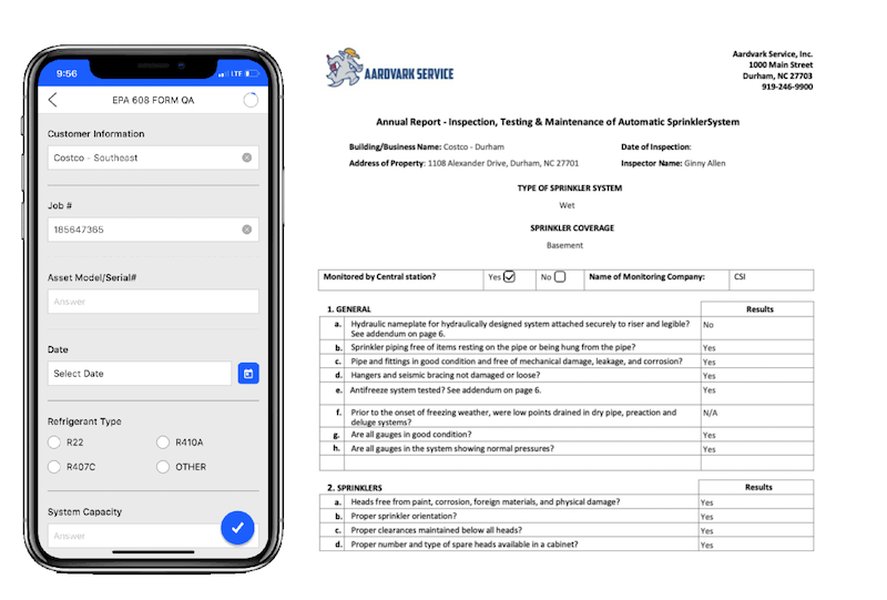
Example of a digital service form, demonstrating how service details can be integrated.
Linking to Client Intake Information
A well-designed system will allow easy cross-referencing between the initial client intake form and the subsequent service documentation. This helps to:
- Verify that the services provided align with the client's initial requests and goals.
- Identify any discrepancies or evolving needs.
- Provide context for future interactions and service planning.
For example, if an intake form for an architecture firm asks about "design and construction requirements," the service documentation form should detail how those requirements were met in a specific project phase.
Automating and Streamlining the Process
Leveraging digital tools is key to an efficient service documentation process. Many online form builders offer features that can significantly enhance this:
- Pre-filled Fields: Auto-populate client information from their intake form into new service forms.
- Conditional Logic: Show or hide fields based on previous selections (e.g., if "Repair Service" is selected, show fields for "Parts Used").
- Integrations: Connect your forms with CRM systems, scheduling tools (like Google Calendar), or project management software to automate workflows. This can include sending automated welcome messages or follow-up reminders.
- Digital Signatures: Allow clients to sign off on completed services electronically, ensuring consent and agreement.
The goal is to minimize manual data entry and ensure data consistency across all client records.
Choosing the Right Platform for Your Service Forms
Tools and considerations for form creation and management.
Various platforms can help you create and manage service forms, ranging from simple document editors to advanced online form builders.
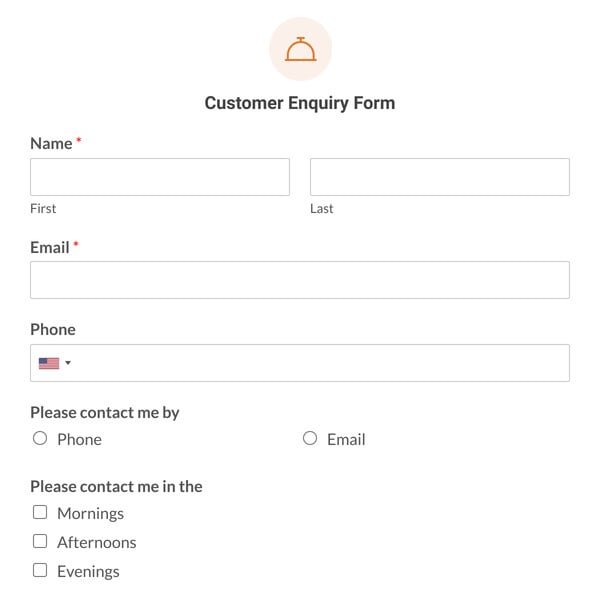
A visual representation of diverse online form templates available from various platforms.
Here’s a comparison of common methods:
| Method/Tool | Pros | Cons | Best For |
|---|---|---|---|
| PDF/Word Templates (Adobe Acrobat, Microsoft Word) | Familiar, easy to share via email, printable. | Manual data entry, difficult to integrate with other systems, no automation. | Small businesses with low volume, simple data collection needs. |
| Google Forms | Free, easy to use, integrates with Google Sheets for data tracking, customizable. | Limited design flexibility, less robust integrations than dedicated platforms. | Startups, small businesses, quick surveys, basic data collection. |
| Dedicated Online Form Builders (Jotform, MightyForms, Canva, Smartsheet Forms) | Drag-and-drop interface, extensive field options (calendars, file uploads), advanced integrations (CRM, payment), branding customization, conditional logic. | May have subscription costs, can be overwhelming for very simple needs. | Businesses scaling operations, needing robust features, automation, and professional appearance. |
| Practice Management Systems (SimplePractice, Zanda Health) | Built-in client management, HIPAA compliance, seamless data migration, appointment coordination, integrated billing. | Industry-specific, potentially higher cost, less general flexibility. | Healthcare, legal, or other service-based practices with specific compliance and workflow needs. |
For most businesses looking to effectively document services provided, dedicated online form builders offer the best balance of features, ease of use, and integration capabilities. These platforms allow for creating custom forms with specific fields for service details and can often connect to other business tools to streamline workflows.
Leveraging Forms for Enhanced Client Relationships
Beyond data collection: building trust and efficiency.
The act of documenting services provided is not just an administrative task; it's an opportunity to reinforce client relationships and improve operational efficiency.
This radar chart illustrates the perceived performance across key attributes for a typical "Current Form (Before Update)" compared to an "Optimized Service Documentation Form." The optimized form demonstrates significant improvements in clarity, integration, user experience for both clients and staff, and automation potential, reflecting its comprehensive design for detailing services provided.
By clearly documenting what was delivered, you provide clients with a tangible record of the value they received. This transparency can prevent misunderstandings, justify billing, and serve as a reference for future needs. For the business, detailed service records aid in performance tracking, identifying popular services, areas for improvement, and even training new staff. It allows for a data-driven approach to service delivery, enhancing efficiency and profitability.
Further Optimizing Workflow with Service Forms
Beyond the form: holistic process improvements.
Incorporating service details into forms is a crucial step, but its full potential is realized when it's part of an integrated workflow. This means considering how the form fits into your overall client journey, from initial inquiry to ongoing support.
Training and Adoption
Even the best-designed form won't be effective if staff aren't trained on its proper use. Clear guidelines on how to fill out the "services provided" section, including what level of detail is expected, are essential. Encourage consistent language and terminology to ensure data uniformity.
Regular Review and Iteration
Client needs and business services evolve. Regularly review your service documentation forms to ensure they remain relevant and efficient. Gather feedback from both clients and staff. Are there questions that are consistently left blank? Are there common "other comments" that could be turned into structured fields? This iterative process ensures continuous improvement.
For businesses seeking deeper dives into client information management and automation, especially in professional services, exploring dedicated intake and client management systems can be highly beneficial. Many platforms offer robust features for documenting not just the services provided, but also client consent, communication logs, and billing details, all in one centralized location.
Frequently Asked Questions (FAQ)
What is the primary purpose of adding "services provided" to a client form?
How does a service documentation form differ from a client intake form?
What are the benefits of digitizing service documentation forms?
What specific information should be included in the "services provided" section?
Can existing forms be updated to include service details, or is a new form necessary?
Conclusion
Effectively adding "the service we provided to the client" to your forms transforms them from simple data collection tools into powerful instruments for transparency, accountability, and improved client relationships. By focusing on clear, structured details, leveraging digital tools for automation and integration, and continuously refining your forms based on feedback, you can create a seamless and professional experience for both your clients and your team. This strategic approach ensures that every service provided is not just delivered, but also meticulously documented, fostering trust and operational excellence.
Recommended Further Exploration
- Explore best practices for a comprehensive client onboarding workflow.
- Discover how to integrate client forms with CRM systems for holistic client management.
- Learn about automating client communication through advanced online form features.
- Understand methods for measuring client satisfaction using structured feedback forms.
References
 squarespace.com
 assets.publishing.service.gov.uk
Last updated May 21, 2025