
Unlocking Public Access: Master OutSystems Anonymous Screens Securely
Navigate the essentials of anonymous screen setup in OutSystems, balancing accessibility with robust security protocols.
In OutSystems, designating a screen with the "Anonymous" role grants access to all users, including those not logged in. This feature is vital for public-facing elements like landing pages, login portals, and registration forms. However, leveraging this accessibility without compromising security requires a careful, informed approach. This guide delves into the best practices for configuring anonymous screens in OutSystems, ensuring your application remains both open where necessary and secure where critical.
Key Highlights for Anonymous Screen Configuration
- Understand the Scope: The "Anonymous" role is the most permissive, making the screen accessible to anyone. This means any data or functionality on such a screen is public by default.
- Prioritize Security: While anonymous access is convenient for public content, it inherently carries security risks. Strict adherence to security best practices is non-negotiable to prevent data breaches and unauthorized actions.
- Use Sparingly and Strategically: Reserve anonymous access for screens genuinely intended for the public. For all other screens, implement granular access control using specific user roles.
Understanding the "Anonymous" Role in OutSystems
OutSystems provides a built-in system role named Anonymous. When this role is assigned to a screen, it signifies that any user, irrespective of their authentication status, can access that screen. This includes users who have not logged in or do not have an account in your application. Essentially, it makes the screen public.
It's important to note that if a screen is marked as Anonymous, all other defined roles are implicitly associated with it. This means users belonging to any specific role can also access anonymous screens. This role is foundational for creating publicly accessible entry points into your application.
Step-by-Step: Making a Screen Anonymous
Configuring a screen for anonymous access in OutSystems Service Studio is straightforward:
- Select the Screen: In your OutSystems module, navigate to and select the screen you wish to make public.
- Access Screen Properties: With the screen selected, open the properties pane (typically on the right side of Service Studio).
- Assign the Anonymous Role: Locate the "Roles" or "Access" property. Check the box corresponding to the "Anonymous" role.
- Publish and Test: Publish your module to apply the changes. Thoroughly test the screen by accessing its URL in a browser (preferably in an incognito window or after logging out) to ensure it loads without requiring authentication.
While the technical setup is simple, the implications require careful consideration, leading us to essential best practices.
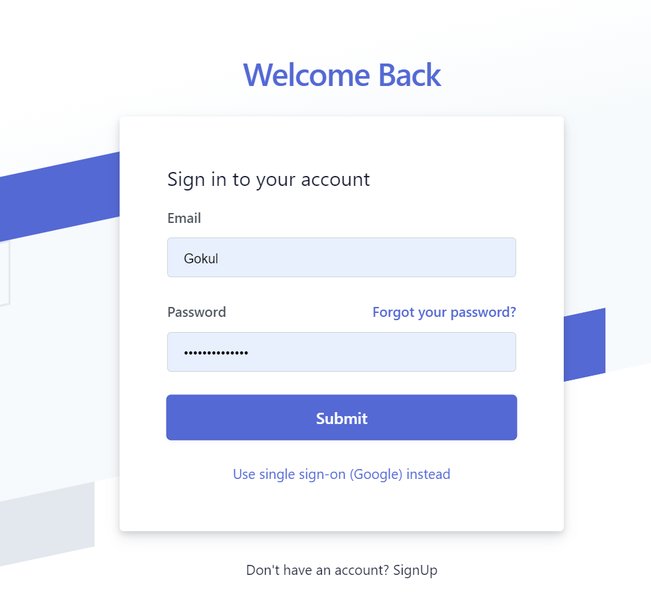
Login screens are a common and appropriate use case for anonymous access in OutSystems.
Core Best Practices for Anonymous Screens
Implementing anonymous screens requires a security-first mindset. The following best practices will help you mitigate risks while providing necessary public access.
1. Limit Data Exposure and Functionality
Minimize Sensitive Information
Anonymous screens should never display sensitive or confidential information. Any data fetched or displayed must be strictly public. If an anonymous screen requires data, ensure that aggregates and server actions retrieve only the absolute minimum necessary fields. Avoid exposing system entity data directly.
Secure Server Actions and REST APIs
If a screen accessible to anonymous users invokes server actions or exposes REST APIs, these server-side elements also become publicly accessible. Design these actions and APIs with extreme caution, ensuring they only perform operations and return data appropriate for unauthenticated users. Implement robust validation for any parameters they accept.
2. Implement Robust Server-Side Validation
Validate All Inputs
Never trust client-side input, especially on anonymous screens. All data submitted through forms or URL parameters on anonymous screens must be rigorously validated on the server-side. This helps prevent common web vulnerabilities such as SQL injection, Cross-Site Scripting (XSS), and parameter tampering.
URL Parameter Security
Be particularly cautious with URL parameters used by anonymous screens. Attackers can easily manipulate these. Avoid passing sensitive information or identifiers in URLs that could be exploited to access unintended data. For instance, if generating a PDF report anonymously based on an ID, ensure the ID cannot be easily guessed or iterated to access other reports. Consider using temporary, non-guessable tokens for such operations if anonymous access is unavoidable.
3. Strategic Use of Anonymous Access
Avoid Overuse of the Anonymous Role
The Anonymous role is a powerful tool, but its overuse can create significant security holes. Reserve it for screens that genuinely need to be public, such as login pages, registration forms, public information pages, or the initial landing page of your application. For any screen containing restricted data or functionality, use custom roles and proper authentication mechanisms.
Utilize Custom Roles for Granular Control
For screens that are not fully public but might not require a full login for certain interactions, consider if a more restricted custom role or a "Registered" (but not fully privileged) role might be more appropriate than full anonymous access. Custom roles offer finer-grained control over who can access what.
4. Diligence with Development and Test Screens
Secure or Remove Test Screens
A common and dangerous oversight is leaving test or debug screens with the Anonymous role enabled in higher environments (Quality Assurance, Production). These screens might expose internal application workings, test data (which could be sensitive), or functionalities not intended for public eyes. Always secure test screens with specific roles or, ideally, remove or disable them before deploying to production.
5. Entry Point Considerations
Designating Entry Pages
Typically, the main entry page of your application (e.g., the home page or login page) will need to be anonymous to allow users to reach your application without prior authentication. Ensure these entry points are carefully designed to guide users appropriately, whether to log in, register, or access public information.
6. Monitoring and Auditing
Regularly Review Architecture Dashboards
OutSystems Architecture Dashboard can help identify screens that have Anonymous or Registered roles, flagging them for review. Regularly check these warnings and assess if anonymous access is appropriately configured for each flagged screen.
Conduct Security Audits
Periodically conduct security audits and penetration tests on your application, paying special attention to anonymous screens as potential attack vectors.
When is Anonymous Access Appropriate?
Despite the risks, anonymous access is essential for certain application components:
- Login Screens: Users need to access the login page without being logged in.
- Registration Pages: New users require access to sign up.
- Password Reset Pages: Users who have forgotten their password need to initiate the reset process.
- Public Landing Pages: Marketing or informational pages designed for a general audience.
- Publicly Available Information: Help pages, FAQs, contact information, or any content that is intended for public consumption without restriction.
- Initial Steps in User Flows: Some processes might begin anonymously before requiring login for subsequent steps.
Comparative Analysis: Anonymous vs. Authenticated Screens
The radar chart below offers a visual comparison between anonymous screens and screens requiring authentication across several key aspects. This can help in deciding the appropriate access level for different parts of your application. Authenticated screens generally offer higher security and data protection at the cost of universal accessibility, while anonymous screens prioritize open access, which necessitates stronger diligence in other security areas.
This chart illustrates that anonymous screens excel in providing easy public access and a straightforward user experience for unauthenticated users. However, they carry a higher inherent security risk and are unsuitable for sensitive data. Authenticated screens, conversely, offer strong data protection and are ideal for sensitive information, though they require users to log in, impacting universal accessibility.
Decision Mindmap: Configuring Anonymous Access
The mindmap below outlines the key considerations and decision points when configuring anonymous access for a screen in OutSystems. It helps visualize the thought process, from initial need to security checks and final implementation.
This mindmap serves as a quick reference to ensure all critical aspects are considered before and during the process of making a screen anonymous.
Summary of Best Practices for Anonymous Screens
The following table summarizes the key best practices discussed, providing a quick checklist for secure implementation of anonymous screens in your OutSystems applications.
| Best Practice | Rationale | Key Actions |
|---|---|---|
| Limit Scope of Anonymous Access | Minimizes attack surface and potential for unauthorized data exposure. | Only set truly public screens (login, registration, public info) as anonymous. Use custom roles for other screens. |
| Avoid Displaying Sensitive Data | Prevents accidental or malicious exposure of confidential information. | Ensure no personal, financial, or proprietary data is accessible on anonymous screens. Fetch only necessary, non-sensitive fields in aggregates. |
| Implement Strong Server-Side Validation | Protects against injection attacks, parameter tampering, and other web vulnerabilities. | Validate all inputs from forms and URL parameters on the server. Do not rely on client-side validation alone. |
| Secure Server Actions and APIs | Prevents misuse of backend logic and data access points that become public via anonymous screens. | Carefully design and restrict any server actions or APIs called from anonymous screens. Validate parameters rigorously. |
| Protect URL Parameters | Avoids data leakage or unauthorized actions through manipulation of URL query strings. | Do not pass sensitive data in URL parameters. Consider tokens for operations like report generation if anonymous access is essential. |
| Manage Test Screens Securely | Prevents exposure of internal development artifacts or sensitive test data. | Remove anonymous access from test screens before deployment or ensure they are disabled/deleted in production. |
| Regular Monitoring and Auditing | Ensures ongoing compliance with security policies and helps detect potential misconfigurations. | Use OutSystems Architecture Dashboard to review anonymous screen configurations. Conduct regular security reviews. |
Understanding User Roles and Access Control
Grasping how OutSystems handles user roles is fundamental to implementing secure anonymous access. The "Anonymous" role is just one part of a broader access control system. For a deeper dive into creating and managing user roles, which is crucial for securing parts of your application that are not anonymous, the following video provides a helpful overview:
This video, "How to create and assign end user roles for controlling screen ...", explains how developers can establish roles and how end-users can subsequently be managed within these roles. While it focuses on authenticated access, understanding this system provides context for why careful consideration of the Anonymous role is so important – it's the exception to the typically role-based access model.
Frequently Asked Questions (FAQ)
What happens if I set a screen to Anonymous but it contains sensitive data?
If a screen set to Anonymous contains or fetches sensitive data, that data becomes publicly accessible to anyone who can find the screen's URL. This is a significant security risk and can lead to data breaches. Always ensure anonymous screens only handle non-sensitive, public information.
Are server actions called from an anonymous screen also public?
Yes. If a server action is used by a screen that has the Anonymous role, that server action effectively becomes public. It can be called by unauthenticated users. Therefore, any such server action must be designed with strict security, validate all inputs, and perform only operations suitable for public access.
Can I use the Anonymous role for generating PDF reports?
While technically possible, making screens that generate PDFs anonymous is generally discouraged due to security risks, especially if the report content is sensitive or based on parameters (like an ID) that could be manipulated. If unavoidable, implement strong security measures such as non-guessable tokens, strict parameter validation, and ensure the report doesn't expose sensitive data. Often, a better approach involves authentication before generating sensitive reports.
How does the "Registered" role differ from "Anonymous"?
The "Anonymous" role allows access to anyone, regardless of login status. The "Registered" role, another built-in OutSystems role, grants access to any user who is authenticated (logged in), regardless of any other specific roles they might have. It's a step above Anonymous but less specific than custom roles. Avoid relying solely on Anonymous or Registered for screens with sensitive information; custom roles provide better security granularity.
Recommended Further Exploration
To deepen your understanding of access control and security in OutSystems, consider exploring these related topics:
- How can I implement custom user roles in OutSystems for enhanced security?
- What are common security vulnerabilities in OutSystems applications and how can I prevent them?
- What are the best practices for securing OutSystems REST APIs that might be exposed to the public?
- How can I effectively use the OutSystems Architecture Dashboard to identify and mitigate security risks?
References
Last updated May 9, 2025