
Why is Your BetaFPV Pavo Pico Drone Bouncing Like a Pogo Stick?
Unraveling the common causes behind that frustrating vertical oscillation and how to stabilize your flight.
Experiencing your BetaFPV Pavo Pico drone bouncing up and down during flight can be alarming and disrupt your FPV experience. This behavior, often described as wobbling, shaking, or vertical oscillation, typically points towards underlying issues with vibrations, configuration settings, or hardware components. Let's dive into the likely causes and how you can systematically troubleshoot them.
Key Insights: Why Your Pavo Pico Might Be Bouncing
- Vibration Overload: Excessive vibrations, often stemming from motors, propellers, or improper mounting of components like the DJI O3 unit, are a primary suspect.
- PID Tuning & Configuration Chaos: Incorrect flight controller settings, especially PID loop values (Proportional and Integral gains), or improper orientation/calibration can cause instability and oscillations.
- Hardware Hiccups: Damaged propellers, loose screws, frame issues, or even power delivery problems can directly impact flight stability and lead to bouncing.
Diagnosing the Bounce: Common Culprits Explored
Several factors can contribute to your Pavo Pico's unstable vertical movement. Understanding these potential causes is the first step towards a smoother flight.
Mechanical Vibrations: The Invisible Shakes
Micro drones like the Pavo Pico are highly susceptible to vibrations. Even minor imbalances can translate into noticeable flight instability, including bouncing or shaking.
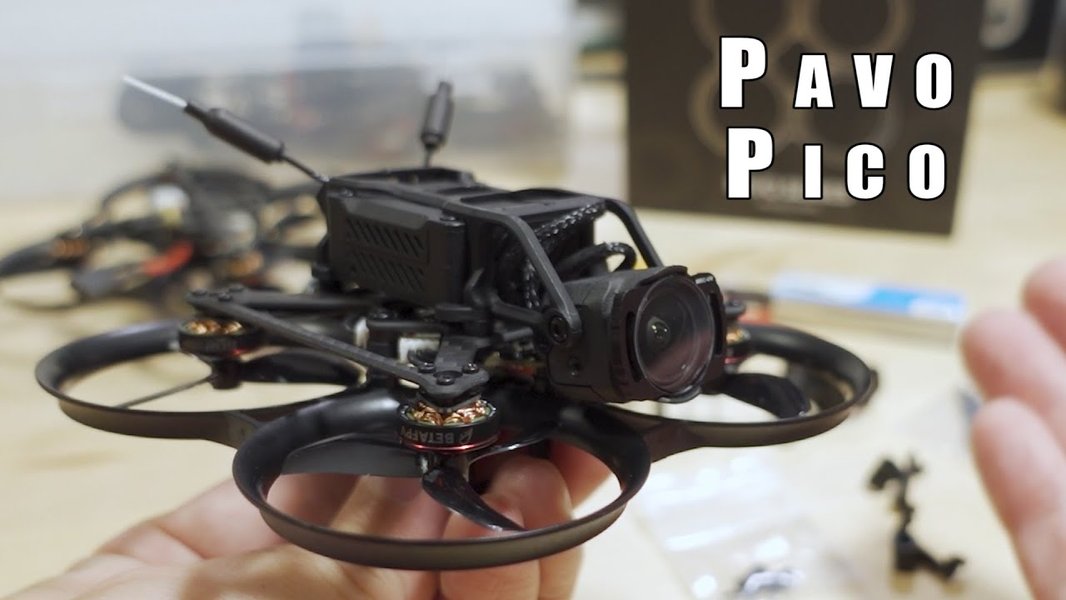
The compact design of the Pavo Pico requires careful attention to vibration sources.
Propeller Problems
Damaged, bent, unbalanced, or incorrectly installed propellers are a very common source of vibrations. Even tiny nicks can throw things off. Ensure propellers are:
- Free from any damage (chips, bends, cracks).
- Properly balanced (though often less critical on micros unless severe).
- Seated correctly on the motor shaft.
- Installed in the correct orientation (leading edge facing the direction of rotation, correct pitch direction - often marked "R" or "L"). Incorrect installation can cause awkward thrust and bouncing.
Motor Mounts and Frame Integrity
Loose motor screws or a damaged/bent frame can introduce significant vibrations. The Pavo Pico frame has been noted by some users as potentially fragile. Check:
- All motor mounting screws are secure.
- The frame for any cracks, bends, or damage, especially after a crash.
- Ensure the flight controller (FC) is securely mounted, but not overly tightened if using soft mounts.
DJI O3 Unit Mounting
If your Pavo Pico is equipped with the DJI O3 Air Unit, its mounting is critical. BetaFPV designed a specific damping system (carbon plate with rubber dampers) to isolate it. However, issues can still arise:
- Over-tightened Screws: Some users report that screwing the O3 unit down too tightly can negate the damping effect, transferring vibrations. Try slightly loosening the mounting screws.
- Damper Condition: Ensure the rubber dampers are intact and correctly installed.
Flight Controller Configuration & Tuning Errors
The flight controller's software setup dictates how the drone stabilizes itself. Errors here are a frequent cause of oscillations, wobbles, and bouncing.
PID Loop Tuning
PID (Proportional-Integral-Derivative) controllers are the core of flight stabilization. Incorrect tuning can lead to oscillations:
- High P Gain: Can cause rapid, high-frequency oscillations or shaking as the controller overcorrects errors too aggressively.
- Low I Gain: May lead to slower drifts or bounces as the controller doesn't correct for sustained errors effectively enough.
- High D Gain: Can amplify motor noise and cause high-frequency vibrations or motor heat, sometimes manifesting as shakes.
Tuning involves adjusting these values, often iteratively. For bouncing/wobbling, common advice includes slightly decreasing P gain while potentially increasing I gain. Trying different Betaflight PID profiles is also a good starting point.
Board Orientation & Sensor Calibration
The flight controller needs to know its exact orientation within the drone:
- Orientation: In Betaflight's Setup tab, verify the 3D model matches the physical drone's movements. If not, adjust the "Board and Sensor Alignment" settings (Yaw degrees primarily: 0, 90, 180, 270) until it aligns. An incorrect orientation tells the FC it's tilted when it isn't, leading to immediate instability or flip-overs, but can sometimes manifest as bouncing if subtly wrong.
- Calibration: Ensure the Accelerometer is calibrated on a perfectly level surface via the Setup tab in Betaflight. An uncalibrated accelerometer can cause drifting or unstable flight, potentially contributing to bouncing.
Motor Configuration & Output
Issues related to motor commands can cause instability:
- Motor Direction/Order: Ensure motor directions and order match the Betaflight configuration (check the Motors tab - REMOVE PROPS FIRST!). Incorrect settings will cause flips or severe instability on takeoff.
- Inconsistent RPM: Problems like motor twitching or inconsistent RPM values when armed (as seen in Betaflight's Motors tab) indicate potential motor or ESC (Electronic Speed Controller) issues that could cause bouncing.
- Motor Stalling/Overcurrent: Answer C mentioned potential motor stalling or pulse overcurrent, especially during demanding maneuvers or descents, which could lead to erratic behavior like bouncing.
Firmware & Filters
Rarely, firmware bugs or filter settings can cause issues. Ensure you are running a stable Betaflight version recommended for the Pavo Pico. Default filter settings are usually a good starting point unless significant vibrations necessitate tuning.
Power System Problems
Consistent and clean power is vital for stable flight.
- Battery Health: A worn-out or damaged battery might not deliver sufficient current under load, causing voltage sag. This can lead to motors momentarily losing power, resulting in bounces or dips in flight. Ensure batteries are fully charged and in good condition.
- Connections: Check battery leads, XT30/BT2.0 connectors, and motor/ESC connections for any looseness or damage.
Visualizing the Potential Causes
Understanding how these factors relate can help pinpoint the problem. This mindmap illustrates the interconnected nature of potential issues leading to the bouncing behavior.
Relative Impact of Potential Causes
While any issue can cause instability, some are more frequent or have a greater impact on causing bouncing or wobbling behavior in FPV drones like the Pavo Pico. This chart provides an estimated relative likelihood and impact score for common causes, based on community reports and general FPV troubleshooting knowledge (Scale: 4=Lower, 10=Higher).
As the chart suggests, PID tuning, propeller issues, and vibrations (including O3 mounting) are often high-impact factors when diagnosing bouncing or wobbling.
Troubleshooting Steps: Your Path to Stability
Follow these steps systematically. Always remove propellers before connecting the battery for configuration checks or motor tests!
1. Physical Inspection
- Propellers: Check every prop for bends, chips, or cracks. Replace any suspect props. Ensure they are installed correctly (correct rotation direction, seated fully).
- Frame & Screws: Inspect the frame for damage. Tighten all motor screws and frame screws. Check FC and O3 mounting screws (ensure O3 screws aren't excessively tight).
- Motors: Gently spin each motor by hand. Feel for roughness or binding bearings. Check for excessive play in the motor bells.
- Connections: Verify the battery connector and motor plugs/solder joints are secure.
2. Betaflight Configuration Checks
- Connect to Betaflight: Plug your Pavo Pico into your computer via USB.
- Calibrate Accelerometer: On the Setup tab, place the drone on a perfectly level surface and click "Calibrate Accelerometer".
- Verify Orientation: Still on the Setup tab, tilt the physical drone. Does the 3D model move exactly the same way? If not, adjust "Board and Sensor Alignment" (Yaw Degrees) until it does.
- Check Motor Settings (PROPS OFF!): Go to the Motors tab. Enable the motor test slider (understand the risks!). Check if the motor order and spin direction match the diagram shown. Spin up motors individually at low throttle to check for smoothness and consistency. Note any motors that sound rough or spin erratically.
- Review PID & Rates: Go to the PID Tuning tab. Note your current settings. Try switching to a different PID profile if available. If the issue persists, consider minor adjustments (e.g., slightly lower P, slightly higher I) based on common tuning advice for oscillations, but proceed cautiously if you're new to PID tuning. Resetting to Betaflight defaults for your target can sometimes help.
- Receiver Check: Go to the Receiver tab. Ensure your stick movements correspond correctly and smoothly to the channel bars. Check that the correct RC Link Preset is selected if applicable (e.g., for ELRS).
3. Power System Check
- Battery Test: Use a known good, fully charged battery. Check battery voltage with a multimeter or battery checker if unsure. Avoid using puffy or damaged batteries.
4. Test Flights & Observation
- Controlled Environment: Test fly cautiously in an open area, initially just hovering.
- Observe Behavior: Does the bouncing happen immediately on takeoff, during steady hover, or during maneuvers (like descents)? This can provide clues.
- Listen Carefully: Pay attention to motor sounds. Unusual whining, grinding, or inconsistent sounds can indicate problems.
- Check Motor Temp: After a short flight (30-60 seconds), carefully touch the motors. Are they excessively hot? This could indicate tuning issues (like high D gain) or binding.
Troubleshooting Summary Table
Here's a quick reference table summarizing the potential causes and checks:
| Potential Cause Category | Common Symptoms | Key Checks / Fixes |
|---|---|---|
| Propeller Issues | Vibrations, Jello in video, Bouncing, Shaking, Inefficient flight | Inspect for damage, check balance, ensure correct installation (direction & seating) |
| Mechanical Vibrations | General shaking, Bouncing, Jello, Loose feel in flight | Tighten motor/frame screws, check frame integrity, inspect FC/O3 mounting (dampers, screw tightness) |
| PID Tuning | Oscillations (fast/slow), Wobbles, Bouncing, Hot motors | Adjust P, I, D gains in Betaflight (cautiously), try different profiles, check filters |
| FC Configuration | Flip on takeoff, Drifting, Erratic flight, Bouncing | Verify board orientation (3D model), calibrate accelerometer, check motor order/direction |
| Motor/ESC Issues | Inconsistent sounds, Twitching, Loss of power, Bouncing, Hot motors | Motor test in Betaflight (PROPS OFF), inspect connections, check for physical damage/binding |
| Power System | Loss of power, Dips/Bounces, Short flight times | Use known good battery, check voltage, inspect connectors |
Visual Guide: Common FPV Drone Issues
Sometimes seeing common troubleshooting steps can help. While not specific only to the Pavo Pico or bouncing, this video covers frequent issues that cause FPV drones to behave erratically, particularly during takeoff, which often share root causes with mid-flight instability like bouncing.
This video explores common reasons FPV drones might "freak out," including configuration and hardware issues relevant to bouncing problems.
Frequently Asked Questions (FAQ)
What is PID tuning and why is it important?
PID stands for Proportional-Integral-Derivative. It's a control loop mechanism used by the flight controller to keep the drone stable. It constantly measures the drone's orientation (using the gyro sensor) and compares it to the desired orientation (based on your stick inputs or holding position). The P, I, and D values determine how aggressively the controller reacts to errors (difference between actual and desired orientation), corrects for accumulated errors over time, and dampens reactions to prevent overshoot. If these values are not tuned correctly for your specific drone's weight, motors, props, and frame, it can lead to oscillations (like bouncing or shaking) or sluggish performance.
How can I check if my motors are causing the problem?
First, physically inspect them for damage or dirt. Spin them by hand to feel for roughness or binding bearings. With propellers removed, connect to Betaflight, go to the Motors tab, enable the test mode, and slowly spin up each motor individually using the sliders. Listen for inconsistent sounds (grinding, whining) and watch if the RPM seems erratic compared to others at the same throttle level. After a short flight, check if any motor is significantly hotter than the others, which can indicate inefficiency, binding, or tuning issues (like excessive D gain).
Could the DJI O3 unit itself cause bouncing?
The O3 unit itself doesn't directly cause bouncing in terms of its electronics, but its mounting and the vibrations it experiences or transmits are critical. If it's mounted too rigidly (e.g., screws too tight, dampers missing/ineffective), vibrations from the motors/frame can pass through it to the flight controller's gyroscope, causing instability. Conversely, if the O3 unit vibrates excessively itself, it can cause "jello" in the video feed. While jello is different from the drone physically bouncing, severe vibrations affecting the gyro are a common cause of bouncing/shaking flight behavior.
Is bouncing a known issue specifically with the Pavo Pico?
Based on user reports in forums and discussions (like those referenced in the initial information), issues described as "shaking," "wobbling," or oscillations that could manifest as bouncing have been reported by some Pavo Pico users. Common themes in these discussions involve vibrations (especially related to the O3 mount), PID tuning, and ensuring correct configuration. While not necessarily universal, it appears to be a behavior that some users encounter and troubleshoot, often linked to the sensitivity of small drones to vibrations and configuration nuances.
References
- Pavo Pico DJI O3 shaking on roll axis | IntoFPV Forum
- How to Fix FPV Drone Flips Over Taking Off Issues - Oscar Liang
- Tune out Minor Oscillations / Wobbles | IntoFPV Forum
- Pavo Pico Brushless Whoop Quadcopter – BETAFPV
- r/fpv on Reddit: Pavo pico wobble or shake issue - Reddit
- Issues with Pavo Pico Motor Testing and Mixer Orientation in ... - Reddit
Recommended Reading
Last updated April 26, 2025