
Unlocking Data Insights: Contrasting Principal Component Transformation and Color Space Transformation
Explore how these two powerful transformation techniques reshape data for analysis and visual representation.
Principal Component Transformation, commonly associated with Principal Component Analysis (PCA), and Color Space Transformation are both fundamental techniques used across various fields, from data science to digital imaging. While both involve altering the way data is represented, they serve distinct purposes and operate on different principles. Understanding their unique mechanisms and applications is crucial for effectively processing and interpreting complex datasets and visual information.
Core Insights at a Glance
Key Differences and Applications
- Goal Distinction: Principal Component Transformation (PCA) primarily aims to reduce the dimensionality of complex datasets by identifying underlying patterns of variance, while Color Space Transformation focuses on converting color information between different models to ensure accurate representation or facilitate specific image manipulations.
- Methodology: PCA employs a statistical, linear algebraic approach (eigenvalue decomposition of the covariance matrix) to find new, uncorrelated axes (principal components) that capture maximum data variance. Color Space Transformation uses predefined mathematical formulas to map color values from one standard (e.g., RGB) to another (e.g., HSV, LCH, Rec.709).
- Application Domain: PCA is a general-purpose tool widely used in machine learning, data visualization, noise reduction, and feature extraction across various numerical datasets. Color Space Transformation is specifically applied in digital imaging, video processing, computer graphics, and printing to manage color fidelity and enable specific visual effects or analyses.
Deep Dive into Principal Component Transformation (PCA)
Simplifying Complexity Through Variance
Principal Component Analysis (PCA) is a cornerstone technique in statistical analysis and machine learning, designed primarily for dimensionality reduction. Its core function is the principal component transformation: a process that converts a dataset with potentially numerous, correlated variables into a smaller set of new, uncorrelated variables known as principal components. This transformation doesn't discard data arbitrarily; instead, it strategically reorganizes it to highlight the most significant patterns.
The Mechanics of Transformation
The transformation works by identifying new axes in the data space along which the variance is maximized. Imagine plotting your data points in a multi-dimensional space defined by the original variables. PCA essentially rotates this space so that the new axes (principal components) align with the directions of greatest spread (variance) in the data.
- Centering Data: The process usually begins by standardizing the data, typically by subtracting the mean from each variable, centering the dataset around the origin.
- Covariance Matrix: It then calculates the covariance matrix, which describes the relationships and variances between the original variables.
- Eigenvalue Decomposition: The crucial step involves finding the eigenvectors and eigenvalues of this covariance matrix.
- Eigenvectors: These represent the directions of the new axes (principal components). They are orthogonal (perpendicular) to each other, ensuring the new variables are uncorrelated.
- Eigenvalues: These indicate the magnitude of variance along each corresponding eigenvector (principal component).
- Projection: The original data is then projected onto the selected eigenvectors (typically those with the highest eigenvalues, representing the most variance). This results in the transformed data, expressed in terms of the principal components.
By selecting only the first few principal components (those explaining the most variance), PCA achieves dimensionality reduction while retaining the bulk of the information present in the original dataset. This can be visualized as projecting the data onto a lower-dimensional subspace.
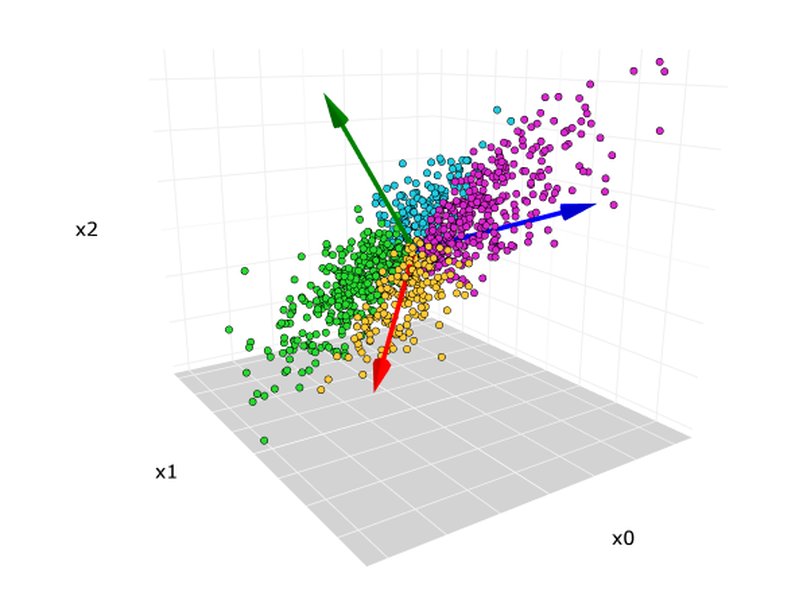
A visual representation of PCA projecting data points onto the first principal component (PC1), which captures the direction of maximum variance.
Purpose and Applications
PCA serves several key purposes:
- Dimensionality Reduction: Simplifying complex, high-dimensional datasets for easier analysis, visualization, and model training (combating the "curse of dimensionality").
- Noise Reduction: Principal components associated with lower variance often correspond to noise, which can be filtered out by retaining only the higher-variance components.
- Feature Extraction: Creating new, informative features (the principal components) from the original variables, which can improve the performance of machine learning algorithms.
- Data Visualization: Reducing data to 2 or 3 principal components allows for plotting and visual exploration of high-dimensional data structures.
- Multicollinearity Mitigation: Since principal components are uncorrelated, using them instead of original correlated variables can resolve multicollinearity issues in regression models.
It finds applications in diverse fields such as facial recognition (eigenfaces), genetics, financial analysis, image compression, and signal processing. For instance, in image processing, PCA can transform RGB color data into principal components to separate key features or convert multi-channel images into a single informative channel.
Exploring Color Space Transformation
Representing and Manipulating Color
Color Space Transformation is a fundamental process in digital imaging, computer graphics, and video production. It involves converting the representation of color information from one mathematical model (a color space) to another. A color space defines how colors are numerically encoded, typically using three or four components.
Understanding Color Spaces
Different color spaces exist because they are optimized for different purposes:
- RGB (Red, Green, Blue): An additive model commonly used for digital displays (monitors, cameras). Colors are created by combining different intensities of red, green, and blue light.
- HSL/HSV (Hue, Saturation, Lightness/Value): Designed to be more intuitive and align better with human perception of color. Hue represents the pure color, saturation its intensity, and lightness/value its brightness. Often used in image editing for color adjustments.
- CMYK (Cyan, Magenta, Yellow, Key/Black): A subtractive model used primarily in printing. Colors are created by subtracting brightness from white using inks.
- LCH/Lab (Luminosity, Chroma, Hue / Lightness, a*, b*): Perceptually uniform spaces where numerical changes correspond more closely to perceived visual differences. Lab separates lightness (L) from color components (a*: green-red axis, b*: blue-yellow axis). LCH is a polar representation of Lab.
- YCbCr/YUV: Often used in video compression and broadcast. Separates luminance (Y - brightness) from chrominance (Cb/Cr or U/V - color information). This is efficient because human vision is more sensitive to brightness than color detail.
- Logarithmic Spaces (e.g., Log-C, S-Log): Used by digital cinema cameras to capture a wider dynamic range. Requires transformation to standard display spaces (like Rec.709) for viewing.
- Rec.709 / Rec.2020: Standard color spaces for HDTV and UHDTV respectively, defining specific primaries, white point, and transfer functions.
The Transformation Process
Color space transformation involves applying specific mathematical formulas to convert the numerical values from the source space to the target space. These transformations can be linear or non-linear. For example, converting from RGB to HSV involves calculations based on the maximum and minimum RGB values to determine hue, saturation, and value. Converting between different RGB spaces (like sRGB to Adobe RGB) involves matrix transformations to account for different primary colors and white points. Managing transfer functions (gamma correction, which relates numerical values to light intensity) and gamut (the range of reproducible colors) is critical during transformation to avoid clipping or distorting colors.
Purpose and Applications
The primary reasons for transforming color spaces include:
- Device Compatibility: Ensuring accurate color reproduction across different devices (cameras, scanners, monitors, printers) that may operate in different native color spaces.
- Workflow Management: Professional workflows often involve capturing in one space (e.g., camera Log), editing in another (e.g., a wide-gamut space like ACES), and delivering in a standard output space (e.g., Rec.709 for web/HDTV). Tools like DaVinci Resolve use Color Space Transform (CST) nodes for this.
- Image Analysis & Manipulation: Certain tasks are easier in specific color spaces. For example, skin detection or object segmentation might be more effective in HSV or YCbCr where illumination effects can be partially separated from color. Adjusting saturation is direct in HSL/HSV but complex in RGB.
- Compression: Spaces like YCbCr are used in JPEG and MPEG compression to efficiently reduce file size by dedicating less data to the chrominance channels.
Comparing the Transformations: A Visual Synthesis
Key Attributes Side-by-Side
While both PCA and Color Space Transformation alter data representation, their characteristics differ significantly. The following mindmap highlights these distinctions across key attributes like goals, methods, data types, outputs, and typical applications.
Interconnections and Synergies
When Two Techniques Meet
Although distinct, Principal Component Transformation and Color Space Transformation are not mutually exclusive and can sometimes be used synergistically, particularly in image processing and computer vision.
Combining Approaches
One common integration involves applying PCA after a color space transformation. For example:
- Enhanced Feature Extraction: An image might first be converted from RGB to a more perceptually relevant space like HSV or Lab. PCA can then be applied to the channels of this new space (e.g., H, S, V components) to extract the most significant combined features or to reduce dimensionality further for tasks like image classification or segmentation. Studies have shown that applying PCA to certain color spaces (like YUV) can yield better results in tasks like face authentication compared to applying PCA directly to grayscale or RGB images.
- Color-to-Grayscale Conversion: PCA can be used as a method to convert a color image (represented in RGB or another space) into a single grayscale channel by projecting the color vectors onto the first principal component, which captures the maximum variance across the color channels. This often produces a more informative grayscale image than simple averaging or luminance extraction.
- Multi-spectral Image Analysis: In analyzing images with more than three channels (e.g., satellite imagery), color space concepts might be extended, and PCA becomes crucial for reducing the high dimensionality while retaining spectral information.
In essence, color space transformation prepares the color data by representing it in a potentially more meaningful way for a specific task, while PCA can then operate on this representation to simplify it based on statistical variance.
Comparative Strengths
The radar chart below provides a visual comparison of the two techniques across several key dimensions, based on their typical use cases and inherent properties. PCA excels in statistical reduction and handling high dimensions, while Color Space Transformation is paramount for color accuracy and perceptual manipulation.
This chart highlights PCA's strength in reducing dimensions and its broad applicability to general data based on statistical principles, whereas Color Space Transformation is highly specialized for color/image domains, prioritizing color fidelity and perceptual relevance with generally lower computational cost for standard transforms.
Key Differences Summarized
A Tabular Comparison
The following table provides a concise summary comparing Principal Component Transformation (PCA) and Color Space Transformation across essential aspects.
| Feature | Principal Component Transformation (PCA) | Color Space Transformation |
|---|---|---|
| Primary Goal | Dimensionality reduction, variance maximization, feature extraction. | Accurate color representation, device compatibility, enabling specific image edits/analysis. |
| Method | Statistical (Eigenvalue decomposition of covariance matrix), linear orthogonal transformation. | Mathematical formulas mapping values between predefined color models (can be linear or non-linear). |
| Input Data | High-dimensional numerical data (can include image channels). | Color pixel values (e.g., RGB, CMYK). |
| Output Data | Lower-dimensional data represented by uncorrelated principal components. | Color pixel values in a different color model (usually same dimension). |
| Basis of Transformation | Data-driven; components depend on the dataset's variance structure. | Standard-based; formulas are fixed for given source/target spaces. |
| Dimensionality Change | Typically reduces dimensions significantly. | Usually maintains the same number of dimensions (e.g., 3 channels to 3 channels). |
| Uncorrelated Output | Yes, principal components are orthogonal and uncorrelated. | Not necessarily; output channels may still be correlated (e.g., R, G, B). |
| Domain | General data analysis, machine learning, signal processing, image analysis. | Digital imaging, video processing, computer graphics, printing, color science. |
Understanding PCA Visually
A Step-by-Step Explanation
Principal Component Analysis can seem abstract. This video provides a clear, step-by-step visual explanation of how PCA works to identify the primary patterns within data, making the concept more accessible.
The video effectively demonstrates how PCA identifies principal components by finding the directions of maximum variance, simplifying data while retaining essential information, which is foundational to the principal component transformation process.
Frequently Asked Questions (FAQ)
Clarifying Common Queries
What is the absolute main difference between PCA and Color Space Transformation?
When should I use PCA versus Color Space Transformation in image processing?
Can PCA be applied directly to RGB values?
Is Color Space Transformation a type of dimensionality reduction like PCA?
Recommended Further Exploration
Dive Deeper into Related Concepts
- How is PCA mathematically derived using eigenvectors and eigenvalues?
- What are the practical steps for implementing Color Space Transform in video editing software?
- Compare different color spaces like RGB, HSV, Lab, and YCbCr for image segmentation tasks.
- Explore advanced dimensionality reduction techniques beyond PCA like t-SNE and UMAP.
References
Sources Used in This Analysis
Last updated May 2, 2025