
Understanding Histograms in Photography
A Detailed Exploration of Tonal Analysis and Exposure Techniques
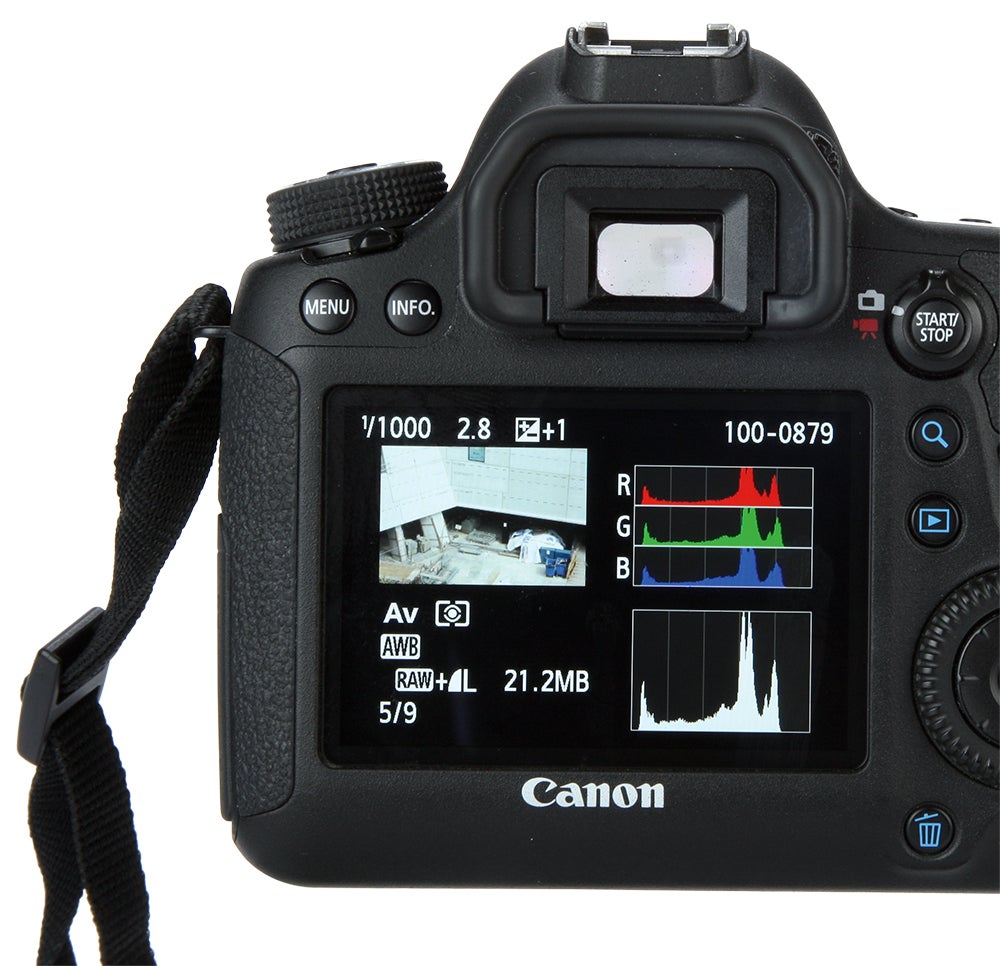
Key Highlights
- Essential Exposure Tool: Histograms provide a concise visual summary of an image's brightness distribution, aiding in exposure evaluation.
- Tonal Distribution Analysis: They reveal detailed information about shadows, midtones, and highlights, helping avoid clipping.
- Dual Utility: Histograms are indispensable during shooting and post-processing for achieving optimal contrast and dynamic range.
Introduction
In photography, the histogram is one of the most valuable analytical tools. It offers a graphical representation of the tonal distribution of an image. Through a detailed mapping of brightness levels, a histogram allows photographers to assess exposure, identify areas of potential detail loss, and adjust the tonal range before or during post-processing. This comprehensive guide delves into the concept of histograms, how they are constructed, what they represent, their importance in both shooting and editing, and practical tips for their effective use.
What is a Histogram?
A histogram in photography is essentially a graph that displays how the pixels in an image are distributed across various brightness levels. These levels range from pure black on one end to pure white on the other. By providing a visual summary of exposure, histograms help photographers determine whether an image is correctly exposed, underexposed, or overexposed. The horizontal axis of the histogram represents the brightness values—from black (0% brightness) on the left side to white (100% brightness) on the right—while the vertical axis indicates the number of pixels at each brightness level. When you view a histogram, the tallest peaks indicate the brightness values that most pixels of the image share.
The Structure of a Histogram
Horizontal and Vertical Axes
The histogram's structure is straightforward yet rich with information:
Horizontal Axis (X-axis)
The horizontal axis of the histogram represents the full range of brightness levels. The leftmost part corresponds to the darkest pixels (near or at pure black), while the rightmost side corresponds to the brightest pixels (near or at pure white). In between these extremes lie the midtones, which capture the grayscale spectrum.
Vertical Axis (Y-axis)
The vertical axis denotes the frequency or number of pixels that fall at each brightness value. A higher vertical value means that more pixels in the image have that particular brightness. Essentially, the taller the bar at any given point on the horizontal axis, the more prevalent that brightness level is within the image.
Types of Histograms
Histograms can be broadly categorized into two essential types:
Luminance Histogram
The luminance histogram is the most common type, which displays the overall brightness distribution without differentiating colors. It provides a summary of the tonal range and is extremely useful for evaluating whether an image is correctly exposed.
Color Histograms
In modern digital cameras and editing software, color histograms are also available. These are broken down into channels—typically red, green, and blue—to facilitate a more nuanced assessment of color balance and exposure. Each color channel histogram follows a similar pattern to the luminance histogram, but separately tracks the distribution of the individual color intensities.
Interpreting the Histogram
Reading a histogram is an art that evolves with experience and understanding. When examining a histogram, photographers look for certain telltale patterns:
Balanced Histograms
A well-balanced histogram typically features a distribution of pixels spreading across the available tonal range, without excessive concentrations at either extreme. A balanced histogram indicates that the image is likely neither underexposed nor overexposed, and suggests that details are preserved throughout the range from shadows to highlights.
Clipping in Shadows and Highlights
Clipping occurs when pixels in the darkest or brightest areas of the image are rendered as pure black or pure white, resulting in loss of detail. On a histogram, this appears as spikes at the extreme left (shadows) or extreme right (highlights). Recognizing clipping is crucial, as it alerts the photographer to parts of the image where tonal values have been lost.
Exposure Evaluation
By analyzing the histogram, photographers can determine if they are capturing the intended amount of detail. Overexposure, where too many pixels are clustered towards the right, and underexposure, with pixels predominantly on the left, are easily identified. Adjusting camera settings based on live histogram feedback can enhance exposure accuracy significantly.
Practical Applications in Photography
During the Shoot
Many modern cameras offer the option to view histograms in real time. This immediate feedback allows photographers to adjust their settings—such as aperture, shutter speed, and ISO—to achieve a more evenly distributed histogram, ensuring that details in the shadows and highlights are not irrevocably lost. Photographers often use the histogram as a safety net, ensuring that they are capturing as much tonal information as possible in varying lighting conditions.
Post-Processing
During the editing process, histograms become a vital resource. Photo editing software leverages histograms to allow users to fine-tune exposure, contrast, brightness, and overall tonal balance. Tools like levels and curves are adjusted while observing the histogram, ensuring that editing moves are data-driven rather than based on guesswork. This allows for targeted corrections that restore detail and optimize the final image output.
Using Histograms to Adjust Exposure
The histogram serves as a real-time diagnostic tool for exposure settings in photography. One can use it to avoid the pitfalls of underexposure and overexposure. Here are some practical steps:
| Exposure Issue | Histogram Indicator | Recommended Adjustment |
|---|---|---|
| Underexposure | Peak clustering toward the left side | Increase exposure or open the aperture |
| Overexposure | Peak clustering toward the right side | Decrease exposure or use a smaller aperture |
| Clipping | Spikes at either extreme edge | Adjust exposure settings or use a higher dynamic range |
By following these guidelines, photographers can dynamically adjust their shooting parameters to stay within an optimal exposure range.
Enhancing Image Quality with Histograms
Avoiding Clipping
Clipping represents a loss of detail in either the shadows or highlights of your image. Once detail is clipped, it's irrecoverable, which can significantly degrade the quality of your photograph. Histograms help detect these areas by showing spikes at the far left or right ends of the graph. When you see such spikes, it serves as a reminder to adjust your exposure settings immediately, either in-camera or during editing, to preserve the rich details in both bright and dark areas.
Balancing Contrast and Dynamic Range
A well-balanced histogram not only indicates proper exposure but also reflects a healthy contrast between dark and light areas. For images with a wide dynamic range, the histogram might appear broader, indicating that the image captures a significant spread of tonal values. Photographers can use this to their advantage; by balancing the histogram, they can ensure that the image maintains an engaging contrast without overdoing the extremes. In post-processing, adjustments to contrast and brightness guided by the histogram can drastically enhance the visual appeal.
Real-Time Exposure Correction
The incorporation of digital histograms in modern cameras has revolutionized real-time exposure correction. Photographers can instantly identify exposure issues and make the necessary adjustments on the fly, dramatically decreasing the likelihood of capturing unusable images. This dynamic feedback loop ultimately strengthens a photographer's ability to produce well-exposed images, regardless of lighting conditions.
Histograms and Color Management
While the luminance histogram is often the primary tool, color histograms offer additional insights. These histograms separate information by color channels—red, green, and blue—providing a detailed view of the image’s color balance. By examining these, photographers can assess if a photograph has a color cast or imbalance that might require correction.
Analyzing Color Channels
In a color histogram, the individual channels may display varying distributions depending on the scene’s lighting and the camera's white balance settings. A balanced color histogram ideally shows even distributions across channels, reflecting realistic color reproduction. Significant discrepancies among them can indicate issues with unintended tints or improper settings. Adjusting the white balance either during capture or in post-processing can often remedy these anomalies.
Application in Creative Photography
Beyond technical adjustments, histograms encourage creative exploration. Artists who wish to experiment with contrast, mood, or unconventional color grading can rely on color histograms to visualize and manipulate specific tonal regions. By adjusting the individual histograms for each color, photographers can artistically render images with a unique aesthetic appeal, which complements both traditional and experimental photography styles.
Advanced Techniques in Histogram Usage
Multiple Exposure Compounding
In techniques such as high dynamic range (HDR) photography or professional composite work, multiple exposures are often combined to create a single image that preserves details in both the highlights and shadows. Histograms serve as a guide during the capture of these bracketed shots, ensuring each exposure level contributes appropriately to the final merged image. By carefully monitoring histograms, photographers can confirm that no segment of the tonal spectrum is over- or under-represented, hence achieving a balanced final output.
Histogram Manipulation in Post-Processing
Modern editing software provides tools that allow photographers to consciously manipulate histograms. Features such as the levels adjustment or curves tool come with real-time histogram feedback. These allow for precise control over the darkness, midtone, and brightness output of the contrast curve. A subtle shift can lead to dramatic improvements in image quality, helping to recover lost detail or emphasizing the desired mood of the photograph.
Common Misconceptions About Histograms
The Screen vs. Real Image Exposure
One common myth is assuming that the histogram displayed on a camera’s LCD screen mirrors the final image perfectly. In reality, the histogram is a technical representation based on sensor data and may not always reflect the visual impression of the image on a monitor. The human eye may perceive scenes differently, particularly in high-contrast environments. Thus, while histograms are a crucial guide, they should be used in conjunction with visual assessment.
Histogram Perfection and Artistic Intent
Although a balanced histogram is often associated with a technically correct exposure, many artistic images intentionally deviate from this ideal for creative effect. For instance, a photographer might deliberately underexpose an image to invoke mystery or mood, resulting in a histogram skewed toward the darker end. The key is to understand what the histogram communicates and then decide if that data supports the photographer’s creative vision.
The Evolution of Histograms in Digital Photography
The integration of histograms in digital cameras marked a significant evolution in the field of photography. Early film photography required experience and intuition to determine proper exposure, while digital photography now offers instant feedback, drastically reducing guesswork. Over time, the histogram has evolved from a basic visual aid to a sophisticated exposure tool that integrates seamlessly with both shooting mechanics and post-production software.
In-Camera Histogram Development
Digital cameras now embed histograms that update in real time as settings are adjusted. This evolution has empowered photographers with immediate corrective options. Manufacturers have continually refined histogram displays, adding customizable color channel views and dynamic scale adjustments to accommodate the wide range of modern digital sensors.
Software Innovations
Photo editing software has also embraced the power of the histogram. Advanced applications allow for granular manipulation of the histogram, enabling photographers to make targeted adjustments that ensure every detail is captured correctly. Software tools now use the histogram as the baseline for many automated correction algorithms, making the process of post-processing more precise and efficient.
Case Studies and Practical Examples
High Contrast Scenes
Consider a scene with a brilliant sunset against a dark foreground. The histogram for such an image might display dual peaks, one in the deep shadows and another in the bright highlights, with a noticeable dip in the midtone region. By analyzing this histogram, a photographer can decide whether to balance the scene to recover details from the dark areas or preserve the dramatic contrast by maintaining the natural extremes. Techniques such as gradient filters or exposure blending can be employed to enhance the final image, guided by the histogram's visual input.
Portrait Photography
In portrait photography, maintaining subtle skin tones and avoiding harsh shadows is critical. Histograms assist photographers in ensuring that important details and textures in a subject’s face are preserved. A balanced luminance histogram can signal that the subject’s skin tones are captured accurately, devoid of overexposure that might wash out features or underexposure that might lose critical detail.
Landscape Photography
Landscape photography often involves scenes with wide dynamic ranges—for example, a bright sky contrasted with darker mountain ranges. Histograms help in capturing as much detail as possible in both extremes by guiding the photographer in setting the correct exposure. Techniques like bracketing exposures or using high dynamic range (HDR) methodologies can be validated through careful histogram analysis.
Best Practices for Using Histograms
Regular Monitoring
To make the most of histograms, regular monitoring during both the capture and post-processing phases is advised. Familiarize yourself with the histogram on your specific camera model, and practice interpreting its data. This habitual use will eventually develop into an intuitive understanding that can guide your exposure decisions in real time.
Histogram-Based Adjustments
When editing your photographs, use histogram data to calibrate adjustments with precision. Whether you're employing basic tools like brightness and contrast adjustments or advanced level and curve corrections, refer back to the histogram to ensure that the adjustments maintain a balanced tonal range, thereby preventing unwanted clipping or flattening of contrast.
Utilizing Camera Settings
In many cameras, you can customize the display settings of the histogram. Adjust its scale and color channel indicators to better suit the lighting conditions and the specific requirements of your shot. Some cameras even allow for a split-second review of histograms right after the shot is taken, facilitating immediate corrections if needed.
The Future of Histogram Technology
As digital photography continues to evolve, so too does the technology behind histogram analysis. Innovations in sensor design and computational imaging are paving the way for even more sophisticated methods of real-time tonal analysis. Future cameras may offer enhanced histogram interfaces that are not only more user-friendly but also capable of integrating artificial intelligence to suggest exposure corrections automatically. This evolution will empower photographers to capture images with optimal exposure even in the most challenging lighting scenarios.
Integration with AI and Machine Learning
One emerging trend is the integration of AI-based exposure analysis. By learning from thousands of images, these systems can predict the optimal histogram configuration for a range of scenarios and provide actionable recommendations on camera settings. This technological advancement is expected to streamline both shooting and editing workflows, ensuring that photographers of all skill levels can produce images with impeccable exposure.
Conclusion and Final Thoughts
In conclusion, the histogram is an indispensable tool for photographers. Whether you are in the field capturing a fleeting moment or meticulously editing the details in post-production, understanding and utilizing the histogram will greatly enhance your ability to produce well-exposed and visually stunning images. From its basic construction—illustrating the distribution of light and dark pixels—to its advanced applications in exposure correction and creative color grading, the histogram serves as a point of convergence between technical precision and artistic intent. As technology advances, its integration with AI and improved sensor designs will only make it more useful, ensuring that both amateur and professional photographers can benefit from its diagnostic power. Embracing the histogram means not only mastering exposure but also unlocking the full potential of your photographic vision.
References
- Histogram in Photography - PetaPixel
- How to Read and Use a Camera Histogram - Wix
- Understanding the Histogram - Shotkit
- Understanding Histograms - Photography Life
- The Histogram Explained - DIY Photography
- How to Read Histograms - Digital Photography School
-
How to Read a Histogram - Adobe
- Reading Your Camera's Histogram - The Creative Photographer
Recommended Further Queries
Last updated February 20, 2025