
Illustrating Dynamic Change in Population
Explore various visual tools and techniques to represent how populations evolve over time
Essential Insights
- Variety of Graphical Methods: Use line graphs, bar charts, and population pyramids to depict trends, comparisons, and demographic structures.
- Interactive Visualizations: Incorporate interactive dashboards, animations, and simulations to engage users and explore data variably.
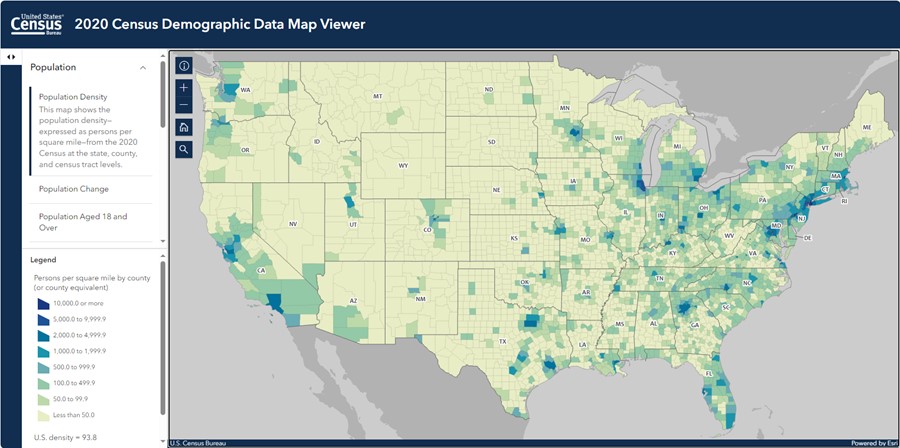
- Geospatial and Temporal Representation: Utilize maps and case studies to show geographic distributions and the influence of migration or external factors.
Overview of Visualization Techniques
Illustrating dynamic change in population involves capturing trends and shifts over time through a variety of methods. The key objective is to transform raw data into understandable visual narratives. Detailed below are several techniques complemented by specific examples and recommendations.
Graphical Approaches
The use of graphs is foundational to illustrate changes in population dynamics effectively. These methods include:
Line Graphs and Area Charts
Line graphs plot population size against time, making it easier to observe growth trends, fluctuations, and patterns over selected periods. Similarly, area charts can highlight the magnitude of change, emphasizing cumulative developments or contrasts between different periods.
Bar Charts and Grouped Bar Charts
Bar charts are particularly valuable for comparing data between different demographic groups or regions at specific moments. Grouped bar charts facilitate the side-by-side comparison of various population segments, enhancing clarity when interpreting complex datasets.
Population Pyramids
Population pyramids, or back-to-back charts, visually represent the distribution of a population by age and sex. They are especially effective in demonstrating how demographic structures evolve over time, highlighting trends such as an aging population or variations in fertility rates.
Interactive and Dynamic Visualizations
Modern data visualization is not limited to static images. Interactive tools and animations significantly enhance user engagement and understanding.
Interactive Dashboards & Simulations
Interactive dashboards using software like Tableau, Power BI, or Google Data Studio enable users to manipulate variables such as age, sex, and geographical data. Through filters, sliders, and hover-over text, viewers can explore how birth rates, death rates, and migration affect population change. In addition, some simulations allow for real-time adjustments of parameters, giving a more dynamic insight into future projections based on current trends.
Animations and Videos
Animations, including time-lapse videos, can amplify the narrative by showing gradual changes in population size or density over time. These tools often incorporate transitions between different demographic states, making the dynamic nature of population changes easier to comprehend at a glance.
Geospatial Mapping Techniques
Mapping is an essential component for visualizing the geographical aspects of population change. These methods enable viewers to see the spatial distribution and patterns influenced by environmental or socioeconomic factors.
Choropleth and Cartogram Maps
Choropleth maps color-code regions based on population density or other metrics, providing an intuitive understanding of where populations are concentrated. Cartograms distort the size of geographical boundaries to reflect population proportions more accurately.
Migration Pattern Maps
Using geospatial analysis, maps can also illustrate migration flows and shifts in settlement patterns. This method is particularly useful for exploring urbanization trends, rural depopulation, or regional shifts driven by economic and environmental factors.
Case Studies and Data Modeling
Combining visual tools with real-world case studies enhances the contextual understanding of population dynamics. These approaches streamline the visualization and interpretation of complex data by focusing on concrete examples.
Case Study Approach
Employing case studies simplifies complex population data by grounding it in real events and circumstances. Examples might include evaluating population changes in a specific country over decades, or analyzing the impact of a major migration wave. By comparing birth rates, death rates, and migration in a tangible scenario, the visualization becomes much more relatable.
Mathematical and Statistical Modeling
For those using advanced techniques, incorporating population growth models is beneficial. These models may include exponential and logistic growth curves, which can be mathematically represented as:
\( \text{\( P(t) = P_0 e^{rt} \)} \) for exponential growth, and \( \text{\( P(t) = \frac{K}{1+Ae^{-rt}} \)} \) for logistic growth. Here \( P_0 \) is the initial population, \( r \) is the growth rate, \( t \) is time, \( K \) is the carrying capacity, and \( A \) is a constant.
Such models, when paired with graphical representations, provide both a visual and quantitative exploration of population trends.
Comprehensive Summary Table
| Method | Description | Tools/Examples |
|---|---|---|
| Line Graphs & Area Charts | Plot historical population data over time to indicate trends, growth spurts, or declines. | Matplotlib, D3.js |
| Bar Charts | Compare different demographic groups or population sizes at specific time points. | Excel, Tableau |
| Population Pyramids | Visualize age and sex distribution, highlighting demographic changes over time. | D3.js, Power BI |
| Interactive Dashboards | Allow dynamic exploration of population data via filters and interactive elements. | Tableau, Power BI, Google Data Studio |
| Geospatial Maps | Visualize population density, migration patterns, and spatial distribution. | GIS software, choropleth, cartogram mapping |
| Animations & Videos | Animate changes over time to provide a dynamic visual narrative. | Adobe After Effects, Python animation libraries |
| Mathematical Models | Incorporate growth curves to analyze quantitative changes in population. | Python, MATLAB |
References
- Population Trends - Visualizing Demographic Changes with Line Graphs - FasterCapital
- Statistics Canada - Demographic Indicators - StatsCan
- Visualizing Demographic Data - Stephanie Evergreen
- U.S. Census Visualizations - Census.gov
- How Population Dynamics Shapes Development – BMZ
Recommended Related Topics
Last updated March 19, 2025