
Unlocking Powerful Motion Capture Locally: Can Your Intel Arc B580 Handle It?
Discover the top mocap systems that balance performance and compatibility for your B580-powered setup.
Highlights
- Intel Arc B580 Capability: Understand how the B580's 12GB VRAM, Xe2 architecture, and AI accelerators make it a viable option for running modern mocap software locally.
- Balancing Power & Practicality: Learn why the "most powerful" systems aren't always the "best" choice for a mid-range GPU, focusing on solutions optimized for local processing without requiring absolute top-tier hardware.
- Top Contenders Identified: Explore leading inertial suit systems (like Rokoko) and AI-driven markerless solutions (like RADiCAL or Autodesk) as strong candidates offering a blend of power, accessibility, and compatibility with the Arc B580.
Understanding the Intel Arc B580 for Motion Capture
Is Intel's Mid-Range GPU Up to the Task?
The Intel Arc B580 graphics card represents a significant step for Intel into the discrete GPU market. Positioned as a mid-range offering, it aims to provide strong performance for 1080p and 1440p gaming and content creation tasks. But how does it fare specifically for demanding motion capture workflows run locally?
Key Specifications and Features:
- Architecture: Built on the Xe2 "Battlemage" architecture.
- VRAM: Equipped with a generous 12GB of GDDR6 memory on a 192-bit bus, providing 456 GB/s bandwidth. This is crucial for handling large mocap data sets and complex 3D scenes.
- Compute Units: Features 20 Xe2 Cores and 20 Ray Tracing Units for graphics rendering.
- AI Acceleration: Includes 160 XMX (Xe Matrix Extensions) matrix accelerators, specifically designed to boost AI-related tasks. This is particularly relevant for modern AI-driven markerless mocap solutions.
- Performance: Reviews often place its performance near or occasionally exceeding competitors like the NVIDIA GeForce RTX 4060 and AMD Radeon RX 7600 XT, especially in scenarios leveraging its VRAM advantage or specific API optimizations (DirectX 12 Ultimate, Vulkan).
- Content Creation: While gaming performance is solid, content creation benchmarks show capable performance, sometimes trailing NVIDIA in certain optimized workloads, but offering potential in AI tasks potentially accelerated via Intel's toolkits like OpenVINO.
Overall, the Arc B580 presents a compelling hardware profile for running mocap software locally. Its substantial VRAM, respectable compute power, and dedicated AI hardware suggest it can handle real-time processing, rendering, and AI inference required by various mocap systems, making it a suitable foundation for a powerful local setup, provided the software is well-optimized or the demands don't exceed its mid-range capabilities.
Defining "Powerful" Local Motion Capture
What Does it Mean in Practice?
When seeking a "powerful" motion capture system, users typically look for a combination of factors:
- Accuracy & Fidelity: The system should capture subtle movements precisely with minimal noise or jitter.
- Real-Time Performance: The ability to see the captured motion applied to a character live, with low latency, is crucial for many workflows (animation preview, virtual production, VTubing).
- Robustness: Consistent tracking across various movements and environments, potentially handling multiple subjects.
- Feature Set: Advanced capabilities like finger tracking, facial capture integration, complex prop tracking, and sophisticated software tools for calibration, editing, and export.
- Local Processing: The capture data is processed directly on your machine (leveraging the CPU and GPU, like the Arc B580) rather than requiring data upload to the cloud for processing. This ensures data privacy, faster turnaround for real-time applications, and independence from internet connectivity.
However, the most powerful systems, especially high-end optical marker-based setups, often demand significant computational resources (high-end CPUs, professional GPUs, ample RAM) and dedicated studio space. Therefore, finding the "best powerful" system for a specific GPU like the Arc B580 involves finding the optimal balance between capability and the hardware's practical limits for smooth local operation.
Top Contenders for Local Mocap on Intel Arc B580
Balancing Performance with B580 Compatibility
Based on current mocap technology and the capabilities of the Intel Arc B580, several types of systems emerge as strong candidates for powerful local operation:
Inertial Suit Systems (The Balanced Powerhouses)
These systems use suits equipped with Inertial Measurement Units (IMUs) to track body movement. They offer a great blend of accuracy, ease of setup (no cameras needed typically), and real-time performance, often running efficiently on mid-range hardware.
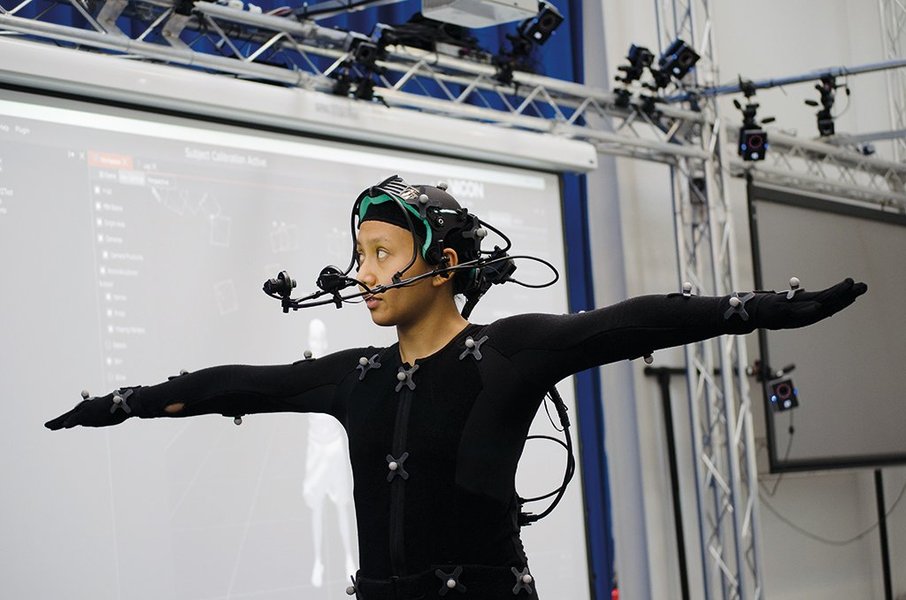
Inertial suits capture motion via sensors placed across the body.
- Rokoko SmartSuit Pro II + Rokoko Studio: Frequently recommended as an excellent balance of performance, features (including finger and optional face capture integration), and affordability for indie creators and studios. Rokoko Studio software is designed for real-time local processing and should run well on an Arc B580, handling visualization and data streaming effectively.
- Xsens MVN Link/Awinda: Considered a step up in accuracy and robustness, often used in professional VFX and animation. While more demanding than Rokoko, optimized setups might run acceptably on a B580, especially for offline processing or less complex real-time scenes. It requires careful consideration of the overall system resources.
AI-Powered Markerless Systems (Modern & Accessible)
Leveraging computer vision and AI, these systems analyze video feeds (from webcams, smartphones, or dedicated cameras) to extract 3D motion data without requiring markers or suits. Their performance heavily relies on GPU acceleration for AI inference.

AI markerless systems translate video footage into 3D animation data.
- RADiCAL: Known for its AI-driven approach using standard 2D camera input. It offers local processing options that can leverage GPU acceleration, making the Arc B580's XMX units potentially beneficial. It provides accessibility with free tiers and scalable options.
- Autodesk Markerless Motion Capture: Integrates AI mocap capabilities within Autodesk's ecosystem (Maya, 3ds Max). It's designed to utilize GPU acceleration and could benefit from the B580's features, offering a powerful solution for animation pipelines.
- Rokoko Vision: An AI camera-based solution from Rokoko, offering single or multi-camera setups with local processing capabilities designed to be efficient on consumer-grade GPUs like the B580.
- Remocapp: Another AI-driven real-time option aiming for markerless capture, potentially suitable depending on its specific GPU optimization for Intel hardware.
High-Precision Optical Systems (The Studio Standard - With Caveats)
These are often considered the "most powerful" in terms of raw accuracy and handling complex multi-person captures. They use multiple specialized cameras to track reflective markers placed on the performer.

Optical systems offer high precision but demand significant resources and space.
- OptiTrack: An industry leader known for precision in games, VR, and animation. Requires multiple cameras and powerful processing via software like Motive.
- Vicon: Another top-tier provider of optical systems, widely used in film and research.
- MotionAnalysis Cortex: Marketed as extremely powerful software capable of handling high marker counts and complex scenarios.
Important Caveat for Arc B580 Users: While undeniably powerful, these optical systems have very high hardware requirements for real-time local processing. They typically necessitate high-end workstation CPUs and professional-grade GPUs (often high-end NVIDIA Quadro/RTX). Running them smoothly *locally* in real-time on a mid-range GPU like the Arc B580 might lead to performance bottlenecks, reduced fidelity, or limitations in capture complexity. While the B580 could handle offline processing or less demanding real-time scenarios, it's unlikely to unlock the *full potential* of these systems for complex, high-fidelity local real-time work compared to inertial or AI solutions more optimized for its performance tier.
Comparative Analysis of Mocap Approaches
Visualizing Strengths and Weaknesses for the Arc B580
To better understand how these different types of mocap systems compare, especially considering the capabilities of the Intel Arc B580, the following chart provides an estimated comparison across key factors. Note that "Hardware Demand" and "Cost" are scored such that lower numbers are better, while other factors are better with higher numbers. "Local Processing Suitability" estimates how well the system type generally aligns with the B580's mid-range power for smooth local operation.
This visualization suggests that while Optical systems excel in accuracy and real-time performance, their high hardware demands and cost make them less suitable for maximizing local performance on a B580. Inertial suits (like Rokoko) and AI Markerless systems appear to offer a more practical balance, providing good performance and features with more manageable hardware requirements well-suited to the Arc B580's capabilities.
System Requirements & Optimization Tips
Building a Balanced Mocap Rig Around the Arc B580
While the Intel Arc B580 is a capable GPU, a powerful mocap system relies on a well-rounded PC. Consider these recommendations:
- CPU: Pair the B580 with a strong, modern multi-core CPU (e.g., Intel Core i7/i9 or AMD Ryzen 7/9 series). Mocap software often involves significant CPU computation alongside GPU tasks.
- RAM: A minimum of 32GB of system RAM is highly recommended for handling large mocap datasets, complex 3D scenes, and running multiple applications smoothly.
- Storage: A fast NVMe SSD is crucial for quick loading of software and assets, and essential for recording high-bandwidth mocap data without dropping frames.
- Drivers: Ensure you have the latest Intel Arc drivers installed, as Intel frequently releases updates that improve performance and compatibility in games and content creation applications.
- Software Trials: Whenever possible, utilize free trials offered by mocap software providers (like RADiCAL, Rokoko) to test performance directly on your B580 system before committing.
Visualizing the Local Mocap Workflow
From Capture to Final Animation
Understanding the flow of data in a local motion capture pipeline helps clarify how different components interact. The mindmap below illustrates a typical workflow where capture, processing, and integration happen on your local machine, powered by components like the Intel Arc B580.
(Powered by PC w/ Arc B580)"] id1["Capture Methods"] id1a["Inertial Suit
(e.g., Rokoko, Xsens)"] id1b["AI Markerless
(e.g., RADiCAL, Autodesk, Rokoko Vision)"] id1c["Optical Markers
(e.g., OptiTrack, Vicon)
(High Hardware Demand)"] id2["Processing Software
(Runs Locally on B580)"] id2a["Rokoko Studio"] id2b["RADiCAL Platform"] id2c["Autodesk Software (Maya/3ds Max)"] id2d["OptiTrack Motive / Cortex
(May Stress B580)"] id2e["Requires Capable GPU (e.g., Arc B580)
+ CPU + RAM"] id3["Data Integration & Editing"] id3a["3D Software
(Blender, Maya, 3ds Max)"] id3b["Game Engines
(Unreal Engine, Unity)"] id3c["VFX Tools
(Adobe After Effects)"] id4["Final Output"] id4a["Character Animation"] id4b["Game Assets"] id4c["Virtual Production"] id4d["Biomechanics Analysis"] id4e["VTubing Avatars"]
This map highlights how the Arc B580 fits into the processing stage, handling the computations needed by the mocap software before the data moves into 3D applications for refinement and use.
Feature Comparison Table
Key Mocap Systems at a Glance for B580 Users
This table summarizes key features, pros, cons, and suitability for the main types of powerful mocap systems discussed, specifically considering local operation on an Intel Arc B580.
| System Type | Examples | Key Features | Pros | Cons | Suitability for Local B580 Use |
|---|---|---|---|---|---|
| Inertial Suit | Rokoko SmartSuit Pro II, Xsens MVN | IMU sensors, real-time streaming, often includes finger/face integration options, wireless. | Good accuracy, relatively easy setup, no camera requirement, good real-time performance, balanced cost (Rokoko). | Potential magnetic interference (less in Xsens), suit can be restrictive, accuracy slightly lower than optical. | Excellent (Rokoko) / Good (Xsens): Generally well-suited. Software is often optimized for mid-range GPUs. Offers a powerful, practical local solution. |
| AI Markerless | RADiCAL, Autodesk Markerless, Rokoko Vision | Uses standard cameras, AI processing, no suits/markers needed, often accessible pricing tiers. | Very convenient setup, no special gear needed (uses cameras), cost-effective entry point, good for quick captures. | Accuracy can vary depending on AI model/lighting/camera, potential for occlusion issues, may require more cleanup, performance depends heavily on GPU AI capabilities. | Good to Excellent: Very suitable. Leverages the B580's XMX AI accelerators. Performance depends on software optimization, but generally less demanding than high-end optical. |
| Optical Marker-Based | OptiTrack, Vicon, MotionAnalysis Cortex | Multiple specialized cameras, reflective markers, dedicated software, highest precision. | Gold standard for accuracy and multi-person tracking, very low latency, robust tracking. | Very expensive, requires dedicated/controlled space, complex setup/calibration, *very* high hardware demands for local real-time processing. | Limited / Not Recommended (for high-fidelity real-time): While powerful, likely to bottleneck on the B580 for smooth, complex local real-time processing. Better suited for high-end workstations. Offline processing might be feasible. |
Frequently Asked Questions (FAQ)
Clarifying Common Doubts
+ Can the Intel Arc B580 really run high-end optical systems like OptiTrack locally?
+ Which is better for the B580: an inertial suit or an AI markerless system?
+ Do I need special cameras for AI markerless mocap with the Arc B580?
+ Will the Arc B580's 12GB VRAM be enough for mocap?
References
- Best Motion Capture Software of 2025 | RADiCAL - radicalmotion.com
-
Markerless AI Motion Capture Software | Autodesk - autodesk.com
- OptiTrack - Motion Capture Systems - optitrack.com
- Cortex - Our Most Powerful Motion Capture Software Yet - motionanalysis.com
- 5 Best Motion Capture Software in 2025 | Remocapp blog - remocapp.com
- Intel Arc B580 review: A worthy budget 1440p GPU - pcworld.com
- Intel Arc B580 Content Creation Review - pugetsystems.com
- Intel Arc B580 Review - IGN - ign.com
Recommended Further Exploration
Last updated April 18, 2025