
Can You Use Your Own Audio Sample to Find Similar Tracks on PremiumBeat?
Unlocking PremiumBeat's search capabilities and exploring alternatives for precise audio matching.
Finding the perfect audio track or sound effect often involves knowing exactly what you're looking for, sometimes even having a reference sample. A common question is whether platforms like PremiumBeat.com allow you to upload your own audio file to find acoustically similar content within their extensive library. Let's explore PremiumBeat's functionalities in this regard.
Key Insights
- No Direct Audio Upload for Similarity Search: PremiumBeat.com currently does not offer a feature allowing users to upload their own audio samples to find similar tracks based on sound analysis.
- Leverage Existing Search Tools: Users can effectively find similar audio by utilizing PremiumBeat's robust search filters (genre, mood, BPM, instruments), descriptive keywords, and browsing curated categories like "Samples / Effects".
- Understanding the "Find Similar" Feature: PremiumBeat includes a "Find Similar" option, but it recommends tracks based on the characteristics of a selected track *already within* the PremiumBeat library, not an externally uploaded sample.
Understanding PremiumBeat's Search Functionality
PremiumBeat is a well-regarded platform specializing in providing high-quality, royalty-free music and sound effects for various creative projects. Its core strength lies in its curated library and licensing model. While it offers sophisticated tools to navigate this library, the ability to upload an audio sample for a direct similarity search is not one of them.
The platform is designed for users to browse, search, and license content from its existing collection, which is sourced from professional artists who submit their work. Artist submissions involve uploading tracks for potential inclusion in the library, a process distinct from user-driven audio similarity searches.
Navigating PremiumBeat's Discovery Tools Manually
Although you cannot upload your sample, PremiumBeat provides several effective methods to manually locate audio that matches the characteristics you're looking for:
Leveraging Search Filters
PremiumBeat's search engine is equipped with advanced filters. You can narrow down your search significantly by applying criteria such as:
- Genres: Select from broad categories (Rock, Cinematic, Pop) or more specific ones.
- Mood: Filter by the emotional tone (e.g., uplifting, suspenseful, peaceful).
- BPM (Beats Per Minute): Specify the tempo range.
- Duration: Set the desired length for the track.
- Instruments: Choose tracks featuring specific instruments (e.g., piano, strings, synth).
- Samples / Effects Category: Directly browse specific types of sound elements like drum hits, foley, or atmospheric textures.
- Advanced Filters: Use options like "PRO-free" to find music cleared for specific uses.
Using Keywords Effectively
Think about descriptive words that capture the essence of your audio sample. Searching with terms like "punchy electronic drum loop," "ambient synth pad," "short vocal chop," or "cinematic riser sound effect" can yield relevant results within the library.
The "Find Similar" Feature Explained
PremiumBeat does offer a "Find Similar" function. However, it's crucial to understand how it works. Once you locate a track within the PremiumBeat library that you like or find somewhat similar to your target sound, you can use the "Find Similar" option associated with that track. The platform will then suggest other tracks from its collection that share similar metadata tags, such as genre, mood, instrumentation, or tempo. This is an internal recommendation engine, not one based on analyzing an external audio file.
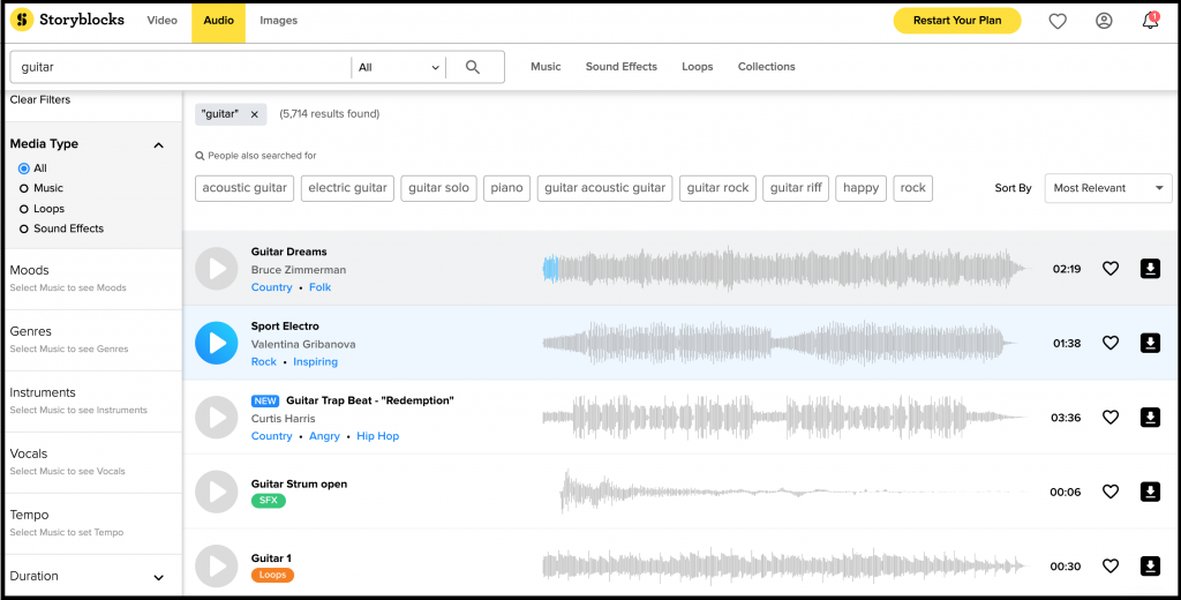
PremiumBeat offers various filters to help users find music, as seen in typical library interfaces.
Browsing Curated Collections
Explore PremiumBeat's organized collections and categories. If you're looking for specific types of sounds, navigating directly to sections like "Samples / Effects" or sub-genres can be an efficient way to discover suitable audio elements manually.
Visualizing Search Methods
This mindmap illustrates the available search methods on PremiumBeat compared to direct audio upload search, highlighting alternative platforms.
(Genre, Mood, BPM, etc.)"] id1c["Browse Categories
(e.g., Samples / Effects)"] id1d["'Find Similar' Feature
(Based on *existing* PB tracks)"] id2["Direct Audio Upload Search"] id2a["Feature Not Available on PremiumBeat"] id2b["Available on Alternative Platforms"] id2b1["Example: Airbit 'Search by Sound'"] id2b2["Uses audio analysis for matching"]
Comparing Search Capabilities
The following table compares the search features available on PremiumBeat with those found on platforms specializing in audio similarity search:
| Feature | PremiumBeat Availability | Example Alternative (e.g., Airbit) |
|---|---|---|
| Keyword Search | Yes | Yes |
| Metadata Filters (Genre, Mood, BPM) | Yes (Extensive) | Yes (Varies by platform) |
| "Find Similar" (Based on internal tracks) | Yes | Often Yes |
| Audio Sample Upload for Similarity Search | No | Yes (Specialized feature) |
| Search by Pasting Song Link (e.g., YouTube) | No | Yes (On platforms like Airbit) |
Platform Comparison Radar
This radar chart offers an opinionated comparison of PremiumBeat against potential alternatives across several dimensions relevant to finding music and sounds. Note that 'Audio Similarity Search' refers specifically to the ability to upload or link audio for matching.
PremiumBeat excels in curation quality and licensing simplicity, offering robust manual search tools. Platforms like Airbit cater specifically to audio similarity search, particularly for beats, while larger generic libraries might offer more quantity but less curation and potentially lack advanced search features.
Alternative Solutions for Audio Similarity Search
If uploading an audio sample to find similar sounds is your primary goal, you will need to explore other platforms specifically designed for this capability. One such example mentioned is Airbit, which offers a "Search by Sound" feature. This tool allows users to paste a link (e.g., from YouTube, Spotify) or potentially upload an audio file to find acoustically similar beats within their marketplace. Other specialized audio analysis tools or platforms might also offer similar functionalities.
Finding Music on PremiumBeat: Video Guide
While not demonstrating audio upload search, this video from PremiumBeat provides tips on how to effectively use their platform to find the right music tracks using their available tools, which aligns with the manual methods discussed.
Official PremiumBeat video guiding users on finding music tracks using their discovery tools.
Frequently Asked Questions (FAQ)
Does PremiumBeat have an audio recognition or 'Shazam-like' feature?
No, PremiumBeat does not currently offer a feature where you can upload an audio sample or use audio recognition (like Shazam) to identify or find similar tracks within its library. Their search relies on metadata like keywords, genres, moods, and other filters.
How does the "Find Similar" feature work on PremiumBeat?
The "Find Similar" feature on PremiumBeat works by analyzing the characteristics (metadata tags like genre, mood, instrumentation, tempo) of a track you've already selected *within* the PremiumBeat library. It then suggests other tracks from their collection that share these characteristics. It does not analyze external audio samples.
Can I upload music I own to PremiumBeat?
You can only upload music to PremiumBeat if you are an artist submitting your original compositions for consideration to be included in their licensed library. This requires owning 100% of the copyright. Users cannot upload audio files for personal storage, sharing, or searching purposes.
What are the best ways to find specific sounds or samples on PremiumBeat without uploading?
The most effective ways include: using very specific keywords describing the sound (e.g., "metallic impact sound effect," "soft ambient drone"), utilizing the extensive filters (especially BPM, mood, and instruments), browsing the dedicated "Samples / Effects" category, and using the "Find Similar" feature once you find a track that's close to what you need.
Are there other websites that let me search by uploading an audio sample?
Yes, some platforms specialize in or include audio similarity search features. Airbit's "Search by Sound" is one example, primarily for finding similar beats. Other niche audio analysis tools or specific music libraries might also offer this capability, though it's not a standard feature across all stock music sites.
Recommended
- How can I effectively utilize PremiumBeat's advanced search filters to find the exact audio I need?
- What are some top alternative platforms to PremiumBeat for sourcing royalty-free music and sound effects?
- How does the 'Search by Sound' feature on platforms like Airbit differ from traditional keyword-based music searches?
- What strategies can help me discover unique and specific sound effects on large stock audio websites?
References
Last updated May 5, 2025