
Enhancing Developer Productivity and DevSecOps on Google Cloud
Integrated Tools and Best Practices to Boost Efficiency and Code Quality
Key Highlights
- AI Code Assistants: Tools like Gemini Code Assist, GitHub Copilot, and Tabnine streamline coding by offering language support, intelligent code suggestions, and robust integrations with popular IDEs.
- DevSecOps Integration: Leverage Google Cloud’s native services and GitLab's security and CI/CD capabilities to ensure secure development pipelines and compliance automation.
- Optimized Developer Workstations: Using Google Developer Workstations to create consistent, streamlined environments that reduce context switching and maintain high coding standards.
Comprehensive Overview
In an environment that combines GitLab for source code management with Google Developer Workstations, optimizing development productivity and enhancing code quality requires a multifaceted strategy. This involves integrating AI code assistants, robust DevSecOps practices, and leveraging the full suite of Google Cloud Platform (GCP) services. Deployments to services such as App Engine, Google Kubernetes Engine (GKE), Cloud Run, Firebase, and BigQuery necessitate a tightly integrated development pipeline that emphasizes automation, security, and scalability.
Adopting AI Code Assistants
Key AI-Powered Tools
The first critical step is leveraging AI code assistants, which are rapidly transforming the waycode is written, reviewed, and maintained. Tools such as Gemini Code Assist and GitHub Copilot are engineered to provide contextual code suggestions, automate boilerplate code generation, and detect potential issues in real-time. In your integrated environment:
- Gemini Code Assist: Designed for the Google Cloud ecosystem, it integrates natively with Google Developer Workstations and supports a variety of programming languages. Its interaction with Google Cloud services ensures that your developers get context-aware suggestions directly linked to your deployment environment.
- GitHub Copilot: Although originally developed with GitHub in mind, its adoption through workflow integrations allows seamless use alongside GitLab, offering expanded language support and intelligent code completion features. Integration within VSCode and JetBrains contributes to a more efficient coding process.
- Tabnine and Codeium: These alternatives stand out for their privacy-first approaches, ensuring confidentiality, especially when handling sensitive codebases required by secure environments. They provide enhanced debugging, chat-based assistance, and even unit-test suggestions which are beneficial in a DevSecOps context.
These tools work by analyzing large codebases and providing context-driven assistance, thus reducing manual errors and speeding up the development process. Furthermore, when these assistants are configured inside Google Developer Workstations, the development environments become more productive and intuitive.
Integrating with IDEs and CI/CD Pipelines
The strength of AI code assistants increases manifold when they are directly integrated into popular IDEs, such as Visual Studio Code and JetBrains. This allows real-time suggestions and collaboration among developers. When integrated into GitLab CI/CD pipelines, these assistants can play a proactive role by:
- Automating code reviews and initiating suggestions for improvement.
- Generating unit tests that enhance code reliability.
- Providing refactoring recommendations to optimize performance.
Additionally, by integrating these tools within the pipelines, code security is heightened through early detection of vulnerabilities, and the continuous integration process is thereby intertwined with automated security checks.
Strengthening DevSecOps Practices
The next significant aspect is the enhancement of DevSecOps protocols across your Google Cloud environment. With microservices architectures and containerized deployments, incorporating security at every phase of development becomes essential. DevSecOps is an entire framework that amalgamates development, security, and operations to foster a secure, agile, and resilient production pipeline.
Core DevSecOps Tools and Strategies
Security Integration Through Google Cloud Services
Google Cloud provides several native services that integrate tightly with GitLab and other tools, thereby automating and enforcing security throughout the development lifecycle:
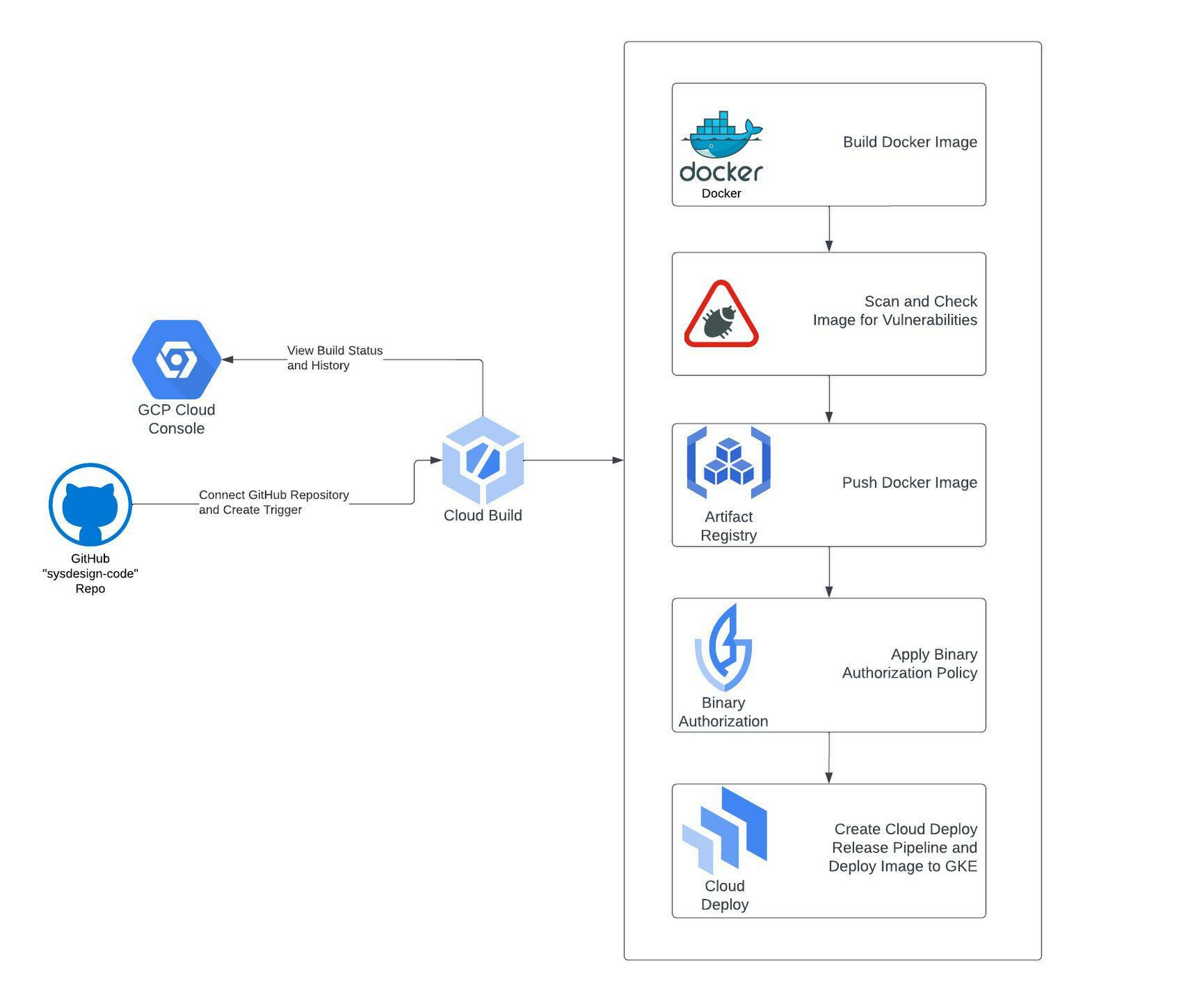
- Cloud Build and Cloud Deploy: These services support continuous integration and deployment pipelines, enabling automated builds that include security testing and verification processes.
- Artifact Registry and Binary Authorization: Ensure secure storage, distribution of container images, and enforce policies during runtime, mitigating risks from unauthorized code changes.
- Secret Manager: Safeguard API keys, credentials, and other sensitive information with robust access controls.
- Cloud Load Balancing, Cloud Armor, and Cloud CDN: Provide advanced security features such as anti-DDoS protection and global load balancing, contributing to a fortified operational environment.
Incorporating these services ensures that every stage, from code commit to deployment, undergoes rigorous security checks. This robust set of integrated tools facilitates the best practice of "security as code," where policies are version-controlled, automated, and consistently applied.
Integrating Static and Dynamic Analysis Tools
In addition to Google Cloud’s native security services, integrating third-party static, dynamic, and composition analysis tools plays a crucial role. These tools typically include:
- Static Application Security Testing (SAST): Analyzes code at rest to detect vulnerabilities without executing the program.
- Software Composition Analysis (SCA): Monitors dependencies to ensure that third-party packages are secure and compliant with licensing requirements.
- Dynamic Application Security Testing (DAST): Evaluates running applications to identify vulnerabilities in a real-time environment.
When these analysis tools are integrated directly into GitLab’s CI/CD pipelines, they provide continuous monitoring and real-time alerts if any deviations or vulnerabilities are detected. This continuous scanning becomes pivotal in ensuring that security is maintained throughout the development cycle.
Optimizing Developer Workstations
Google Developer Workstations are a significant asset in boosting productivity, as they offer consistent, cloud-based environments that mirror production configurations. These workstations are pre-configured with the necessary tools and dependencies, thus:
- Reducing the overhead of environment setup and maintenance.
- Ensuring a unified development experience regardless of a developer’s physical location.
- Facilitating quick onboarding and consistent application performance across teams.
Benefits of a Consistent Development Environment
Reducing Context Switching
One of the common challenges in modern development environments is the overhead caused by context switching—moving between different system setups, configurations, or development environments can disrupt focus and efficiency. With Google Developer Workstations:
- Developers operate on a standardized platform that aligns with cloud deployment settings.
- The integrated tools (IDEs with AI code assistants) work natively on these workstations, offering immediate code suggestions and on-the-fly debugging.
- Greater integration with GitLab ensures that any code commitments, merges, and reviews are handled within a secure, uniform environment.
This uniformity is especially beneficial when scaling development teams, as a predictable and familiar setup accelerates learning curves and ensures that coding standards and security protocols are uniformly executed.
Training and Onboarding
Equipping your team with training on the specific tools and practices is an integral part of the process. Brief, targeted training sessions on how to leverage AI code assistants, configure secure authentication, and manage automated CI/CD pipelines can dramatically enhance productivity. Frequent workshops help ensure that developers familiarize themselves with:
- The integrated capabilities of Google Developer Workstations.
- Best practices for secure coding and deployment.
- How to best utilize AI assistants for debugging, code suggestions, and refactoring.
Implementation Roadmap
To successfully integrate these technologies into your workflow, a well-defined roadmap is crucial. This process involves multiple phases that align carefully with your existing GitLab and Google Cloud infrastructure.
Phase 1: Integration Setup
GitLab and Google Cloud Integration
Begin by strengthening the linkage between GitLab and your Google Cloud account. This involves configuring Identity and Access Management (IAM) roles along with implementing Workload Identity Federation (WLIF). By streamlining authentication and eliminating the use of service account keys, you reduce potential security vulnerabilities while also simplifying development workflows.
Deploying AI Code Assistants
Next, integrate AI coding assistants into the active development pipeline. Whether you opt for Gemini Code Assist, GitHub Copilot, or other AI tools, their setup should be embedded into both local developer environments and GitLab's CI/CD workflows. This ensures that developers can access their coding suggestions within their usual coding environment without disruption.
Phase 2: Enhancing Security and CI/CD
CI/CD Pipeline Optimization
Leverage GitLab’s built-in CI/CD capabilities in tandem with Google Cloud’s tools like Cloud Build and Cloud Deploy to establish a secure and compliant pipeline. Embed automated tools for static, dynamic, and composition analysis at key stages within your pipeline. This approach not only maintains high code quality but ensures that code security is continuously verified through automated tests and compliance scanning.
Adopting DevSecOps Practices
Integrate configuration management tools that support security-as-code practices. Use artifact registries, binary authorization, and secret management as standard components in your workflow. This ensures that every piece of code and container deployed to production adheres to strict security guidelines, thereby mitigating potential vulnerabilities.
Phase 3: Continuous Monitoring and Feedback
Monitoring Performance
Utilize Google Cloud's monitoring tools to track deployments, application performance, and overall system health. Tools like Cloud Logging provide developers with valuable insights and immediate feedback on any performance or security issues. Integrating these insights into your feedback loop facilitates rapid improvements in both productivity and security practices.
Iterative Refinements
Establish regular review sessions where developers and DevSecOps teams assess the performance, integration, and effectiveness of the tools. Feedback gathered from these sessions should be used to iteratively refine workflows, upgrade AI assistance configurations, and update security protocols, ensuring that productivity goals (such as a 10x boost) are clearly documented and progressively achieved.
Tools and Features Comparison
Below is a table summarizing primary tools, their integrations, and features that are essential for success in your combined GitLab and Google Cloud environment:
| Tool/Service | Key Features | Integration Benefits |
|---|---|---|
| Gemini Code Assist | Intelligent code suggestion, supports 20+ languages, Integrated with Google Cloud | Streamlines coding in Google Developer Workstations; seamless integration within CI/CD pipelines |
| GitHub Copilot | Context-aware code suggestions, multi-language support, integrated in IDEs | Enhances code quality and accelerates development even when used with GitLab |
| Tabnine / Codeium | Privacy-focused coding, debugging assistance, unit test generation | Improves real-time assistance and maintains code confidentiality |
| Cloud Build & Deploy | Automated CI/CD pipeline, security testing integration | Ensures standardized deployments with embedded security checks |
| Artifact Registry & Binary Authorization | Secure package management, container security | Mitigates risk in production environments by enforcing security guidelines |
| Secret Manager | Credential storage and management | Enhances security by centralizing sensitive data control |
Practical Recommendations
To concurrently achieve a 10x productivity boost and tighten DevSecOps measures, it is critical to synchronize automation, security, and real-time assistance. Follow these practical recommendations:
- Implement single sign-on (SSO) and WLIF to reduce management overhead and fortify security.
- Integrate AI code assistants within both local development environments and the GitLab CI/CD platform to promote consistent coding practices.
- Leverage built-in Google Cloud services to automate deployment pipelines while ensuring continuous security validations.
- Regularly schedule training sessions to update your team on the latest features of workstations and AI tools, ensuring proficient usage and minimizing error rates.
- Adopt iterative review and feedback loops, where performance metrics and security audit reports guide improvements to workflows and tool configurations.
By merging these strategic tools and methodologies, your development teams can not only expedite the coding process but also maintain a high level of security and operational excellence—a key requirement when deploying multiple services on the Google Cloud Platform.
References
- Gemini Code Assist - Google Cloud
- DevSecOps with Google Cloud Built-in Services - Google Cloud Blog
- GitLab Allies with Google to Improve Developer Productivity - DevOps
- Best AI Coding Tools - Jellyfish
- Tabnine - AI Code Assistant
- Amazon CodeWhisperer - AWS
- Snyk - Security Tool
- DevOps Solutions on Google Cloud - Google Cloud
- GitHub Copilot - GitHub
- Firebase - Google Cloud
Recommended Searches
Last updated March 3, 2025